
How to Mix Amazon Music Songs with Virtual DJ
If you're a big fan of both Amazon Music and Virtual DJ, here's a workable guide on how to mix Amazon Music songs with the Virtual DJ program for you.


Available for PC and Mac, Virtual DJ(VDJ) boasts itself as the most powerful DJing mixing tool, helping all DJs to create amazing mixes and soundtracks. It is well-accepted by both DJ professionals and beginners with its user-friendly functionalities. Furthermore, Virtual DJ, like other DJ programs, comes with a built-in library collection, which works by creating virtual folders and importing all your various music sources. You may have struggled to integrate Amazon Music with Virtual DJ to get rid of the default tracks for mixing, yet it was in vain at last. Amazon Music is not included the supported list of music content, after all. Still, that doesn't imply you're helpless. Read this post, and you'll get the best solution to mix Amazon Music songs with the Virtual DJ.
Part 1 Can You Mix Amazon Music with Virtual DJ Directly?
Part 2 How to Mix Amazon Music Songs with Virtual DJ?
Part 1. Can You Mix Amazon Music with Virtual DJ Directly?
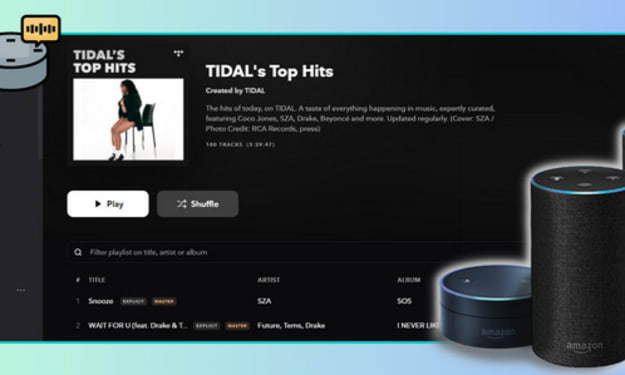
NO, BUT YES. For most DJs, accessing the latest tracks from various streaming music platforms is conducive to creating trending mixes. Yet, there is no direct way to move Amazon Music to the Virtual DJ program for mixing, as Virtual DJ doesn’t partner with Amazon Music. Currently, Virtual DJ only works with Tidal, Deezer, Beatport, and Beatsource, SoundCloud. But be noted that you need to upgrade to the paid subscriptions to these music services for their streaming content on Virtual DJ.
Luckily, Virtual DJ supports adding music from the local drive. That being said, you can download and convert songs from Amazon Music to your local computer, then export the downloaded Amazon Music songs to Virtual DJ for mixing.
Best Tool to Get Amazon Music on Virtual DJ: AudiCable Amazon Music Recorder
Before mixing Amazon Music songs with Virtual DJ, you need to download Amazon Music tracks as lossless Virtual DJ audio. Here AudiCable Audio Recorder is a top pick for you.
Designed especially for both Amazon Music Unlimited & Prime Music users, AudiCable Amazon Music Recorder is dedicated to helping you add and download all songs from Amazon Music to your PC/Mac. With the output parameters set, you can easily save songs from Amazon Music Unlimited & Amazon Music Prime to MP3/AAC/WAV/FLAC/AIFF formats with lossless streaming music quality and ID3 tags kept.
Part 2. How to Mix Amazon Music Songs with Virtual DJ?
Step 1 Download and Launch AudiCable Audio Recorder
Launch AudiCable Audio Recorder on your Windows or Mac computer. Then, click the "Amazon Music" icon from the main interface.

Step 2 Choose the Player and Sign in
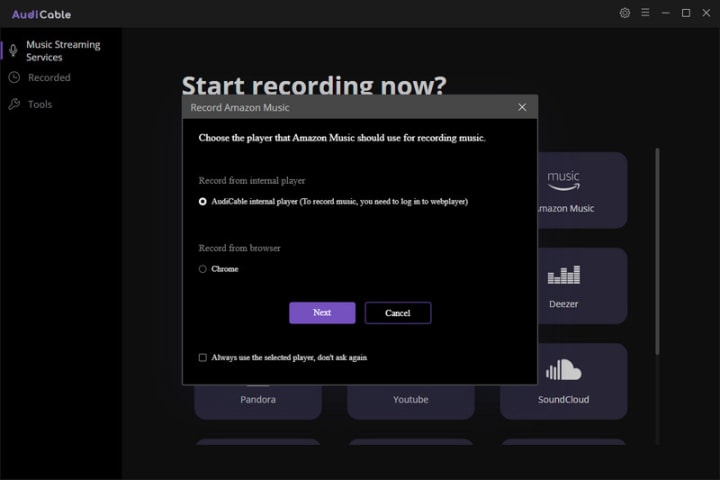
Please choose the way you want to record Amazon Music songs, the first option will bring up AudiCable's built-in web player window, the second will pop up from your Chrome. After that, sign in with your account.
Step 3 Adjust the Output Format as MP3
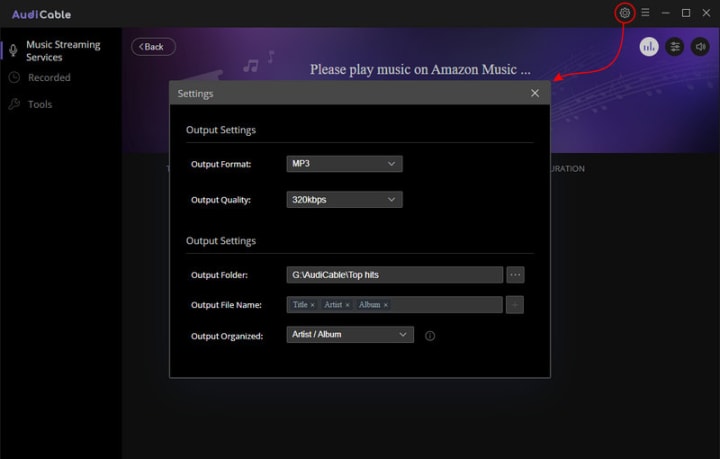
On the top-right corner of AudiCable, click on a "gear icon". From the pop-up setting window, you need to choose "MP3" as the output format for your Amazon Music songs. Then close it to apply the changes.
Step 4 Download and Save Amazon Music Songs to Local Files
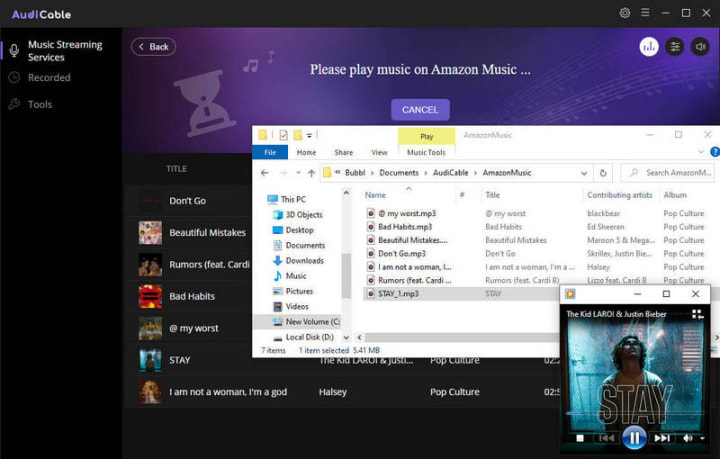
Select songs from Amazon Music you want to save on your PC, then start playing. AudiCable will record Amazon Music songs simultaneously. Meanwhile, songs will be converted to the format you chose in the previous step.

Step 5 Get the Downloaded Amazon Music Songs on Your Computer
After recording, click the "Recorded" tap and then the "folder icon". Here you'll get Amazon Music songs with lossless quality kept. Now you can freely import the downloaded Amazon Music MP3s to Virtual DJ program without limits.
Step 6 Mix Amazon Music Songs with Virtual DJ
Head to the "Local Music" tab in the lower-left panel. Navigate and choose downloaded Amazon songs from the local drive. Then you can directly drag the local Amazon Music songs to the turntable for mixing.
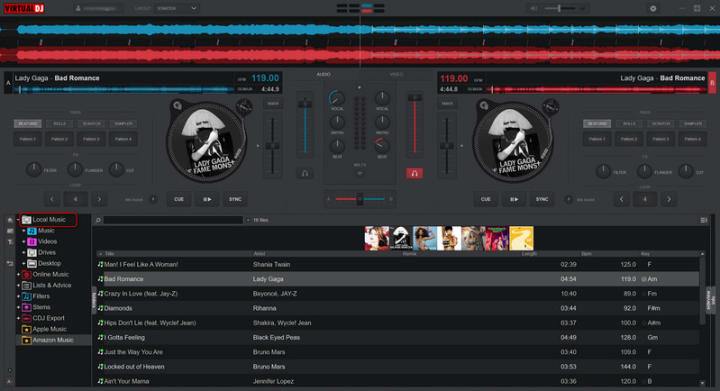
Now you’re free to mix Amazon Music Songs in Virtual DJ as your needs!
Conclusion
Ready to customize a set of DJ mixes with Amazon Music tracks? With AudiCable Audio Recorder installed on your computer, not only can you download Amazon Music songs offline with the lossless quality preserved, but add Amazon Music downloads to any DJ program for editing, and mixing. Take a try right now!
About the Creator
Whitney Brown
Love to share stunning music ideas from all streaming music resources.
Resource site in https://www.audicable.com/
Keep reading
More stories from Whitney Brown and writers in Beat and other communities.
Review of 'Man on the Run'
My wife and I saw Man on the Run, a nearly 2-hour documentary on Amazon Prime, about Wings, Paul McCartney's group that flew around the world from shortly after The Beatles broke up in early 1970 to shortly after John Lennon was murdered at the end of 1980, making a Beatles reunion forever impossible.
By Paul Levinson9 days ago in Beat
Bennie Cloud: Blending Love, Rap, and Modern Hip Hop Energy
In today’s digital music landscape, independent artists are redefining how audiences experience music. Streaming platforms and social media have created opportunities for talented musicians to build their own audiences without relying solely on traditional industry systems. One emerging voice contributing to this movement is Bennie Cloud, an artist whose sound blends Rap, R&B, Hip Hop, and emotional storytelling into a style that reflects both modern culture and personal expression.
By charliesamuel2 days ago in Beat
Parallel Protests
I haven't written for quite some time, but I have A LOT of thoughts about yesterday's protest rally against our government's involvement and complicity in America's war on Iran, on the harbourside of my home city Bristol, and I need to put them somewhere. My gorgeous girlfriend is always a loving and listening ear and sharing it all with her will always be a healthy and happy way of processing the mental and emotional weight, but getting it straight in my brain to share means writing it all down in straight lines, so, here we are and thanks for being here.
By Steph Cole6 days ago in The Swamp



Comments
There are no comments for this story
Be the first to respond and start the conversation.