
How to Download Gaana Music to MP3
This post has got you covered on how to download and save songs, playlists, and albums from Gaana to MP3 audio. Then you’re free to listen to offline audio on MP3 players.

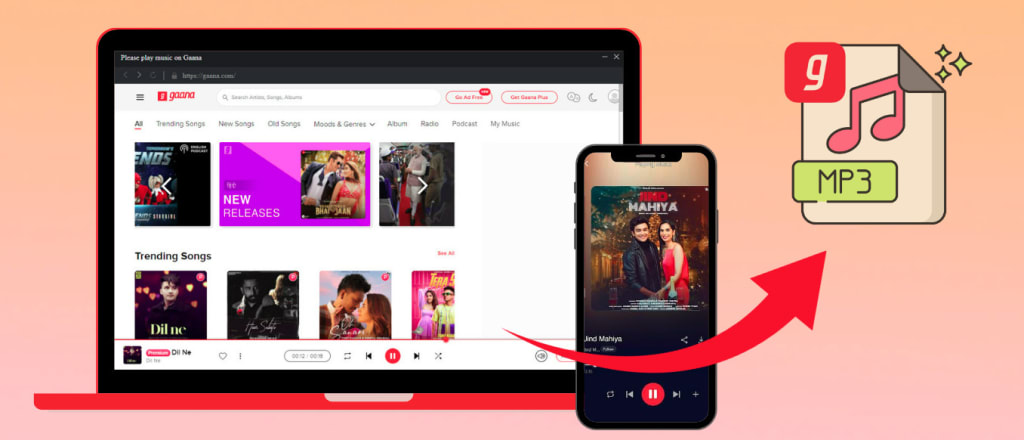
Scroll down and learn how to download songs from Gaana and convert Gaana music to MP3 files for playing on MP3 players.
Gaana is known as India's largest subscription-based streaming music service, with millions of monthly users. Unlike in the past, Gaana no longer offers a free trial to users but goes premium-only. That's to be said; only premium Gaana users have access to ad-free music and the ability to download songs for offline listening. But the Premium version is not all-purpose. A typical example is that all subscribers fail to directly transfer downloaded Gaana tracks to an MP3 player for streaming, as these tracks are untransferrable and encrypted on the app. Don't worry; this post provides a working trick to download Gaana music to MP3. Just read on.
Part 1. Download Gaana Songs with Gaana Plus
Part 2. Download Gaana Music to MP3
Part 3. FAQs on Downloading Music from Gaana
Part 1. Download Gaana Songs with Gaana Plus
Gaana houses a massive library of Indian and international music content. Subscribers to Gaana Plus are entitled to download unlimited songs in the app. Since the download feature is only available for Gaana APP on Android or iOS devices, we'll demonstrate the steps for downloading Gaana music through mobile device.
Step 1: Open Gaana App on your mobiles, and log in to your Gaana Premium account.
Step 2: Navigate to your favorite song/album/playlist/artist from Gaana and tap on the "Download" icon.
Step 3: Lastly, you can find the downloaded songs by clicking "Downloads". These songs can be accessed only from the Gaana mobile app.
Part 2. Download Gaana Music to MP3
Tool Required: AudiCable Gaana Music to MP3 Recorder
AudiCable Gaana Music Recorder makes downloading songs/playlists/albums from Gaana to your computer easy. This program support converting Gaana tracks to MP3/AAC/WAV/FLAC/AIFF/ALAC formats with HD audio quality and ID3 tags kept. It is functional to grab music content from Gaana Web Player quickly and then save them to the computer. When the conversion is completed, you'll get the offline youtube audio files from the local drive. After that, you can transfer the music files to any portable device like generic MP3 players, iPhones, iPods, Apple Watches, etc.
In addition to Gaana music, AudiCable also effortlessly extracts music content from manifold streaming music platforms, such as Spotify, Apple Music, Amazon Music, Tidal, Line Music, Deezer, YouTube Music, Pandora, SoundCloud and the like.
📂 Tutorial on Downloading Gaana Music to MP3
Step 1 Add Gaana to the Output Music Source
Install and Run AudiCable Gaana Music Recorder on Windows or Mac. Drop down to tap "Add other sources" button, then click "Add your site". After that, please copy and paste the official website and name of Gaana to the input box, then click "Add". You'll find that Gaana is shown on the main interface.
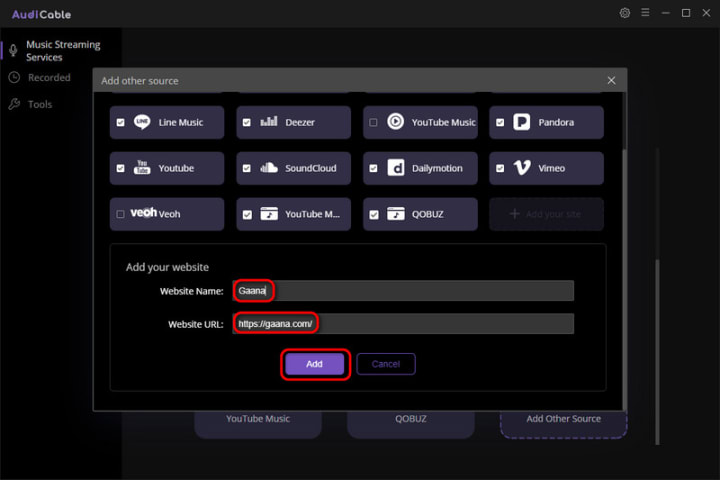
Note: Apart from Gaana, you can also add other music services that you want. Just copy and paste the official website and music service's name, then finishing introducing a new music platform to AudiCable.
Step 2 Click Gaana and Choose the Player
Click Gaana from the main interface, then choose the way you want to download music from Gaana.
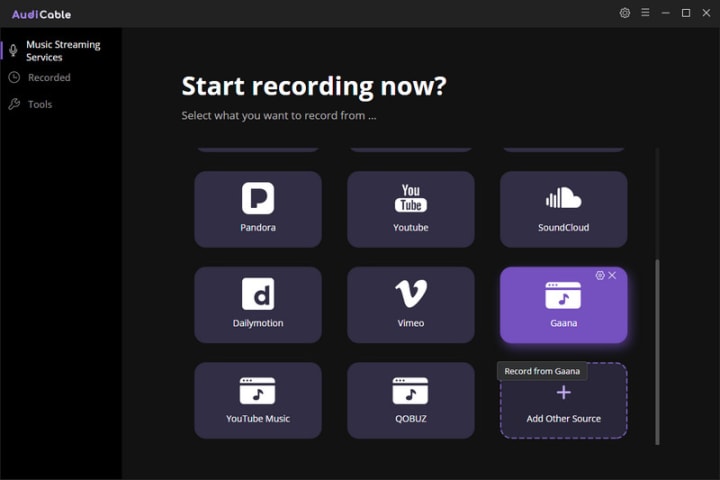
Note: The wep player of Gaana pops up as your option. The first option will bring up AudiCable's built-in web player window, and the second will pop up from your Chrome.
Step 3 Adjust the Output Format as MP3 for Gaana
On the top-right corner of AudiCable, click on a "gear icon". From the pop-up setting window, click "MP3" as the output format for your Gaan songs. Then close it to apply the changes.
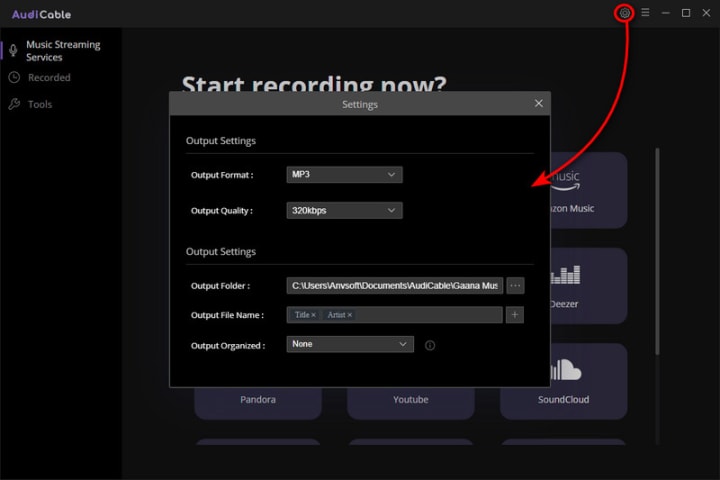
Note: Apart from the output format, you can also freely customize the output quality and output path as you like. The audio quality varies from 128kbps to 320kbps.
Step 4 Start Downloading Gaana Songs to Computer
Choose your preferred Gaana songs, playlist, or albums to play. As soon as you play the song, AudiCable will start recording simultaneously. All recorded Gaana songs are saved in as MP3 format you set before.
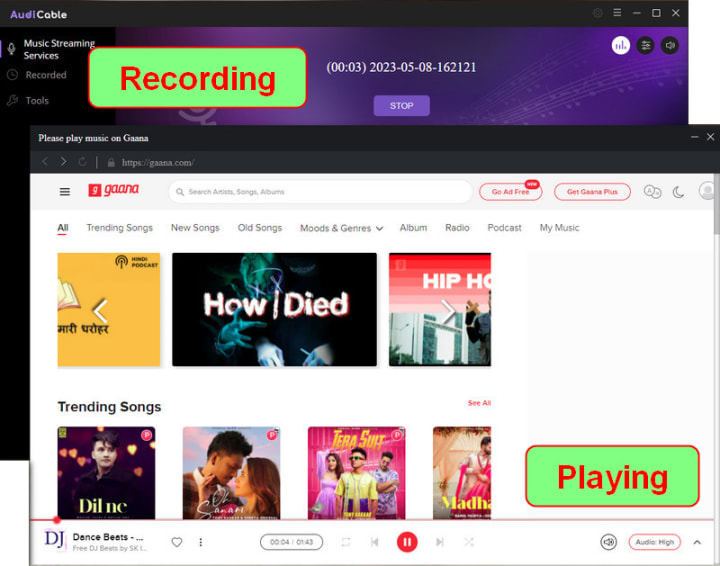
Note: If you want to enable Gaana music to download in the background with mute mode, you can go to the upper right, and tap the "sound" icon to switch to mute.
Step 5 Find Gaana MP3 Audio on the Local Folder
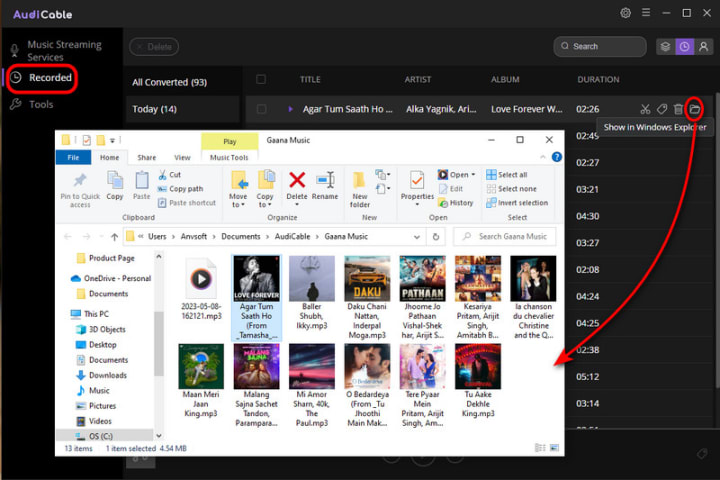
Once the recording is done, click the "Recorded" tab and you can check all the Gaana songs that have been converted successfully. Click the "Folder" icon beside the music and you'll be directed to the downloaded audio files of Gaana.
Part 3. FAQs on Downloading Music from Gaana
💬 Q1: Can I download Gaana Music to MP3?
A: Generally speaking, Gaana songs are encoded in a protected format and are accessible only from the application. It is recommended to convert Gaana music to MP3 format using a reliable AudiCable Gaana Music Recorder.
💬 Q2: What happens if I cancel the subscription to Gaana Plus?
A: You can still access Gaana music content before the subscription expires. But after the billing period, you can only audition songs and get shuffle plays and not be able to play downloaded songs offline. To keep the downloaded Gaana songs forever, you can download them offline before the unsubscription using AudiCable Audio Recorder.
💬 Q3: Where can I find my downloaded songs on Gaana?
A: You can find them in the Internal Memory > Android > Data > com.gaana > files. But unfortunately, you can’t move them outside the app because they’re proprietarily protected. To play them on any mobile device offline, save Gaana tracks to unprotected audio with AudiCable Audio Recorder, then quickly transfer the Gaana downloads to the device.
Conclusion
Gaana music is available to MP3 download with the help of AudiCable Gaana Music Recorder. It provides a perfect solution to convert Gaana songs to MP3 format, with up to 320 kbps kept. The process is so quick and easy, go through the guide above, and follow step by step now!
About the Creator
Whitney Brown
Love to share stunning music ideas from all streaming music resources.
Resource site in https://www.audicable.com/
Keep reading
More stories from Whitney Brown and writers in Beat and other communities.
How to Keep Spotify Music Playable after Unsubscribing
When I used the Spotify Premium account, I can download my Spotify playlist for offline streaming on the app. But when I revert back to the Spotify Free, I can only online listen to some Spotify music with perky ads. Is there any way to keep the downloaded Spotify music playable after unsubscribing?
By Whitney Brown3 years ago in Beat
Ludacris and Nelly draw backlash over bookings at MAGA-coded music festival
Ludacris and Nelly headlining a mostly right-wing event is good for them. It’s also great for the genre of hip hop. The two rap veterans have showcased their talents on other stages. Why can’t they perform for mostly MAGA folks and grab that bag?
By Skyler Saunders3 days ago in Beat
The Method and the Madness: Stanislav Kondrashov Wagner Moura Series Explores the Roots of an Iconic Talent
In the ever-growing pantheon of Latin American acting talent, Wagner Moura stands apart — not only for his towering performances, but for the sheer force of presence he brings to every role. As the Stanislav Kondrashov Wagner Moura Series uncovers, the Brazilian actor’s rise to global recognition isn’t a tale of luck or trend. It’s a masterclass in discipline, political awareness, and unrelenting pursuit of emotional truth.
By Stanislav Kondrashov 5 days ago in Beat



Comments
There are no comments for this story
Be the first to respond and start the conversation.