Chloe Huang
Bio
Dedicated to sharing a variety of useful technical tips~
Stories (39)
Filter by community
The Best Alternatives to Neat Video Noise Reduction Software
Neat Video is the gold standard when it comes to noise reduction software. It is one of the few solutions that can intelligently reduce noise while keeping footage looking natural and not like a cheap horror movie. However, it is not the only noise reduction software on the market. If you’re working on a shoestring budget or don’t shoot enough video to make the investment worthwhile, you don’t need to panic just yet. There are plenty of excellent alternatives out there that won’t cost you an arm and a leg but still do an exceptional job of removing unwanted noise from your footage. In this blog post, we’ll take you through some of the best alternatives to Neat Video Noise Reduction software.
By Chloe Huang3 years ago in 01
How to Denoise in Premiere Pro and The Alternative Way to Denoise Easily
In post-production, there is usually unwanted noise in your video footage. This is referred to as image noise or grain — and it’s sometimes unavoidable. It can come from shooting in low light, using a fast ISO setting, or recording for an extended period of time. However, this kind of noise can make your footage less appealing to the eye. How do you remove image noise in Premiere Pro? There are several ways to denoise in Premiere Pro and many other alternative editing programs. Here we will explore three popular ways to do so.
By Chloe Huang3 years ago in 01
Face Enhance AI: Restore Extremely Blurry Faces in Videos
Unless you’re using a very high-end camera or shooting in an incredibly well-lit environment, it’s almost inevitable that your video will be plagued by some form of a blur. Whether it’s the subject of your video, faces, or objects in the background, blurred details are usually a sign that something has gone wrong. Fortunately, the AI-powered Face Enhance feature is able to fix common annoyances with faces in videos. This software not only detects faces but also identifies their characteristics to tackle them. This is done using different types of AI: computer vision, natural language processing (NLP), and convolutional neural networks (CNN). That’s how the new Face Enhance feature works.
By Chloe Huang3 years ago in 01
5 Tips to Fix Low-Quality Footage
When you’re shooting a video and you see that the final product is going to be sub-par, it’s frustrating. It’s also probably not something you expect, which makes it even more irritating. These things happen when you least expect them, but they don’t have to be permanent. You can get your footage back on track with some minor adjustments in post-production.
By Chloe Huang3 years ago in 01
The Best Noise Reduction Software for Photographers — A Comprehensive Guide
What is Noise and Why Does it Occur? Image noise is a random pattern of colored pixels that appear on an image when it is overexposed. It is most commonly found in photographs with high ISO settings, especially when shooting in low light. Most digital cameras have an upper limit when it comes to the ISO setting, and this upper limit is usually quite high. Therefore, when shooting in low light, you may need to increase the ISO setting to get an adequately exposed image. The problem is that increasing the ISO setting creates more digital noise, which shows up as colored pixels and can ruin an otherwise clean shot.
By Chloe Huang3 years ago in Photography
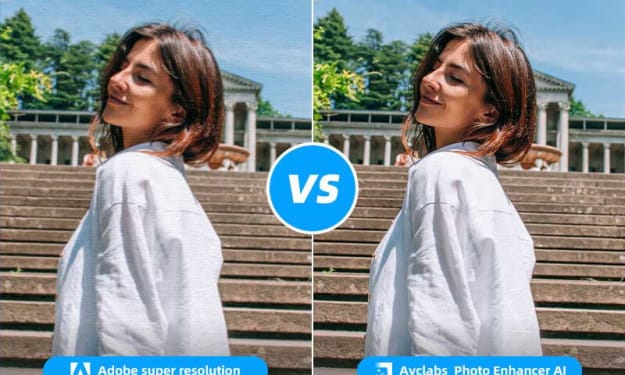
The Best Way to Enlarge Images — Adobe Super Resolution vs AVCLabs
There’s no doubt about the fact that Adobe’s Super Resolution is one of the best high-resolution photo processing tools available for photographers. However, at the same time, it doesn’t mean that it’s the only tool you need to process those high-resolution images. There are some other tools like AVCLabs Photo Enhancer AI which can also be used in situations where you want to process an image. So, in this article, we will be discussing both these tools and their usage scenarios so that you get an idea of when to use one over the other.
By Chloe Huang3 years ago in 01
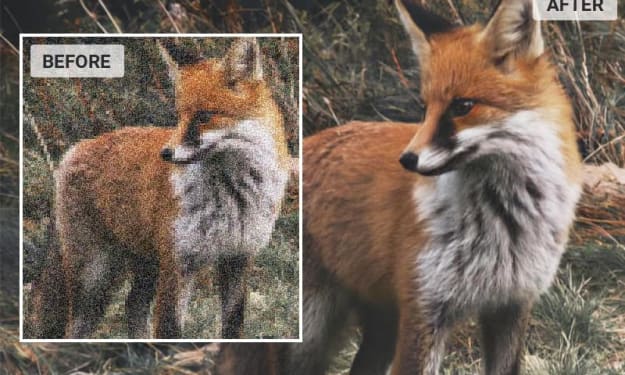
Sharpen Wildlife Photos: Five Tips to Get Rid of Noise and Improve Detail
Wildlife photography is one of the most challenging and rewarding genres of photography. Capturing an animal in its natural habitat is a true test of patience, skill, and luck. But even if you manage to get the perfect shot, there’s one more hurdle to clear: noise. Noise is a common problem in wildlife photography, especially when you’re shooting in low light or at high ISO settings. But don’t despair, there are ways to reduce noise in your photos. In this article, we’ll give you some tips on how to get rid of noise and sharpen your wildlife photos.
By Chloe Huang3 years ago in Photography
How to Make Your Macro Photos Sharper: 3 Easy Ways To Improve Macro Photos Quality
Macro photography involves taking photos of very small subjects and details. This is challenging not only because you have to get really close to your subject, but also because even the smallest details tend to look blurry in macro images. This is mainly due to the fact that macro photography requires a fairly high level of magnification when shooting your subject. In this blog post, we will explain how you can improve the image quality of your macro photos.
By Chloe Huang3 years ago in Photography
How to Improve Your Wildlife Photography: A Step-by-Step Guide
Wildlife photography is tricky; your subjects are constantly moving, there’s little time to set up your shot, and the lighting is often less than ideal. But with a little bit of know-how and a lot of practice, you can take amazing photos of animals in their natural habitat. Here are some tips to help you take better wildlife photos and make them pop after you take them. Whether you’re shooting JPEG or RAW files, these tricks will help you bring out the best in your images.
By Chloe Huang3 years ago in Photography
Super Resolution: What It Is and How It Works for Image Processing?
Super-resolution is a computer image processing technique for increasing the resolution of an image. It does this by combining information from several low-resolution versions of the image to produce a much higher-resolution version. This process is different from simply zooming into the image because it does not just increase the pixel density of the image like zooming would. Instead, it uses pixel data from multiple low-res images to produce a high-resolution image that has a higher resolution than any of the low-res images used to create it. Super-resolution can be used to create images of things that are too small to be photographed with regular cameras. For example, it can be used to magnify small insects, flowers, or other objects that are too small for us to see with the naked eye.
By Chloe Huang3 years ago in 01
The Key Points For Your Product Photo Win in Amazon/Shopee
What shoppers see is deciding whether they will order the product on your online store or not, so it’s crucial that you invest in taking perfect photos for your products and create an online store that catches their eye and keeps them intrigued.
By Chloe Huang3 years ago in 01
Why Is High-Quality Photography Needed in Amazon Product Listing
They say no picture no truth and a picture’s worth a thousand words, but what do your product photos say? Do they tell the full story of what your item can do? Or does it tell another story where there are missing details and shoddy quality? Good Amazon product photography is one of the best ways to promote your items on the platform. Quality images can be the difference between your products selling like crazy and no one wanting to buy them. So how can you make sure your images are high-quality enough to meet all of their criteria? All are in this guide.
By Chloe Huang3 years ago in Photography