
Introduction
Videos are everywhere. From short clips on social media to full-length documentaries, videos have become a key way we learn, share, and connect. But as the use of videos grows, there's a need to make them even more useful and interactive.
What is video annotation?
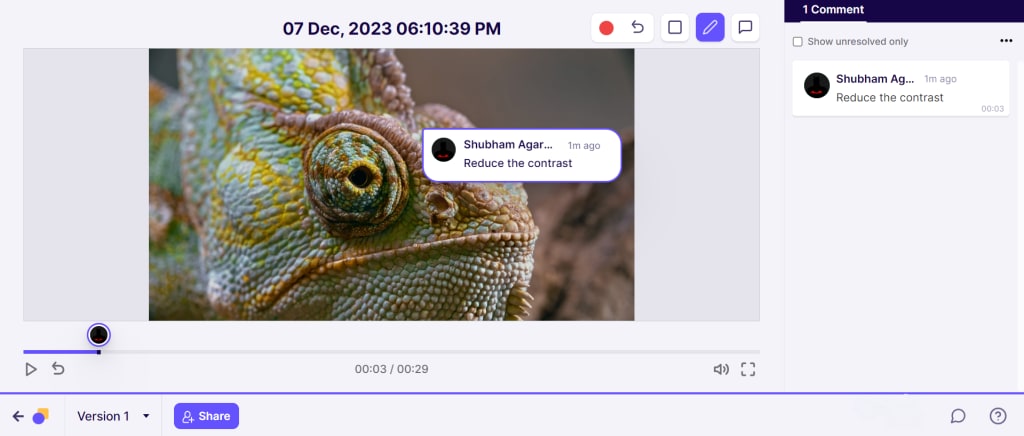
At its core, video annotation is about adding extra layers of information to a video. Think of it as adding notes, comments, or other types of media to a video clip. The goal? To enhance the viewer's experience and understanding.
Benefits of video annotation
Video annotation offers a variety of benefits, including:
- Enhanced learning: Educators can use video annotation tools to highlight important points, ask interactive questions, or even run quizzes within the video. This transforms passive viewing into an active learning experience.
- Improved research and analysis: In fields like sports coaching or medical research, video annotation tools allow for detailed analysis. Coaches can highlight key moments in a game, while researchers can annotate specific parts of a medical procedure.
- Collaborative media production: Filmmakers and video editors can use annotation tools to collaborate. They can point out areas for edits, add comments, or share feedback, all within the video itself.
- Increased accessibility: Video annotation can make videos more accessible to people with disabilities. For example, captions and subtitles can be added to videos to make them accessible to people who are deaf or hard of hearing.
Features of video annotation tools
When choosing a video annotation tool, it is important to consider the following features:
- User-friendly interface: The tool should be intuitive, making it easy even for beginners to annotate videos.
- Collaboration features: Look for tools that support multiple users. This is especially important for team projects. The ability to share annotations and integrate with other software can be a big plus.
- Versatility in annotation: From text notes to interactive quizzes, the tool should offer a range of annotation options.
- Compatibility: Whether you're annotating a YouTube video, a Vimeo clip, or any other format, the tool should be compatible.
Use cases of video annotation
Video annotation can be used in a variety of ways, including:
- Education: Teachers can use video annotation to create engaging and informative learning experiences for their students. For example, a teacher could annotate a science video to highlight key concepts or to ask students questions.
- Research and analysis: Researchers can use video annotation to analyze data and to identify trends. For example, a sports coach could annotate a game video to identify areas where the team needs to improve. Or, a medical researcher could annotate a video of a medical procedure to identify potential complications.
- Media production: Filmmakers and video editors can use video annotation to collaborate on projects and to get feedback on their work. For example, a filmmaker could use video annotation to get feedback on a rough cut of a film from their editor. Or, a video editor could use video annotation to provide feedback to their director on a music video.
- Accessibility: Video annotation can help people with disabilities enjoy videos just as much as everyone else. For example, captions and subtitles make videos accessible to people who are deaf or hard of hearing, and audio descriptions make videos accessible to people who are blind or visually impaired.
Future of video annotation
Video annotation is getting better all the time, thanks to new technology. Imagine a future where AI can automatically label videos and generate summaries. We might even be able to use VR and AR to step right into the videos we're watching!
Additional use cases of video annotation
Marketing and sales: Businesses can use video annotation to promote their products and services. For example, a business could annotate a video of a product demo to highlight key features or to answer common questions. Or, a sales team could use video annotation to personalize videos for their customers.
Customer support: Businesses can use video annotation to provide customer support. For example, a business could create a video tutorial on how to use a product or service.
In a nutshell, video annotation is a game-changer for how we consume and create videos. It's like adding a layer of supercharged interactivity and accessibility, making videos more engaging, informative, and inclusive for everyone. Imagine a future where video annotation is as ubiquitous as subtitles, with AI-powered annotations that automatically pop up to provide context, translations, and even interactive quizzes. Or envision immersive video experiences where viewers can use their hands to manipulate annotations in a virtual environment.
The possibilities are endless, and the future of video annotation is bright. So let's embrace this quirky new technology and see where it takes you
About the Creator
Keep reading
More stories from writers in Art and other communities.
“What If It Happens?”
Monday, 11 April 2022 Ishrat Jahan One of our friends, Mr. Farooq, is a middle-aged man, yet he has still not been able to free himself from his deeply suspicious and fearful nature. These days, I happened to have some free time, so I thought it would be a good idea to meet him and try to untangle the puzzle of his constant worries. By coincidence, he himself arrived at my humble home, jolting along in a rickshaw.
By Sudais Zakwana day ago in Art
Introduction to Organic Solutions
In the realm of fitness, the role of nutrition cannot be overstated, and organic supplements are increasingly recognised as essential components of a well-rounded training regime. Unlike their synthetic counterparts, organic supplements are derived from natural sources, ensuring that fitness trainers can provide their clients with products that are free from harmful additives and chemicals. This not only promotes better health but also supports the body’s natural processes, thereby enhancing overall performance and recovery.
By Organic Products 6 days ago in Art
Wild Card Weekend Recap: What Happens Now?
I think I figured out why I love Wild Card Weekend so much. It's because it's the first playoff anything of the calendar year. The NFL season starts in the fall, and once upon a time, the champion was crowned either on or slightly before New Year's. The evolution of the NFL schedule has resulted in the playoffs starting just into the New Year, and currently, the final week of the season falls on the first weekend of the New Year, with Wild Card Weekend coming a week after that. So yes, chronologically, the NFL's Wild Card Weekend serves as the first playoff anything of the calendar year.
By Clyde E. Dawkins7 days ago in Unbalanced




Comments