
Revolutionizing Interior Spaces: How AI Can Transform Your Room Design
Designing a room that reflects your personality and style can often feel like a daunting task. Whether you're redecorating a bedroom, home office, or living room, finding the right balance between aesthetics and functionality is crucial. Fortunately, technology has made this process easier and more creative. In 2025, AI-powered tools, such as a1, offer revolutionary solutions for interior design. This platform not only allows users to generate art from text prompts but also provides innovative ways to visualize and design room layouts using AI. In this article, we’ll explore how you can use a1 to design unique room interiors with ease, and how the platform's AI image generator can help you bring your design ideas to life. Whether you're a professional interior designer or simply looking to refresh your personal space, a1 offers a seamless and intuitive experience for creating stunning interior design visuals.

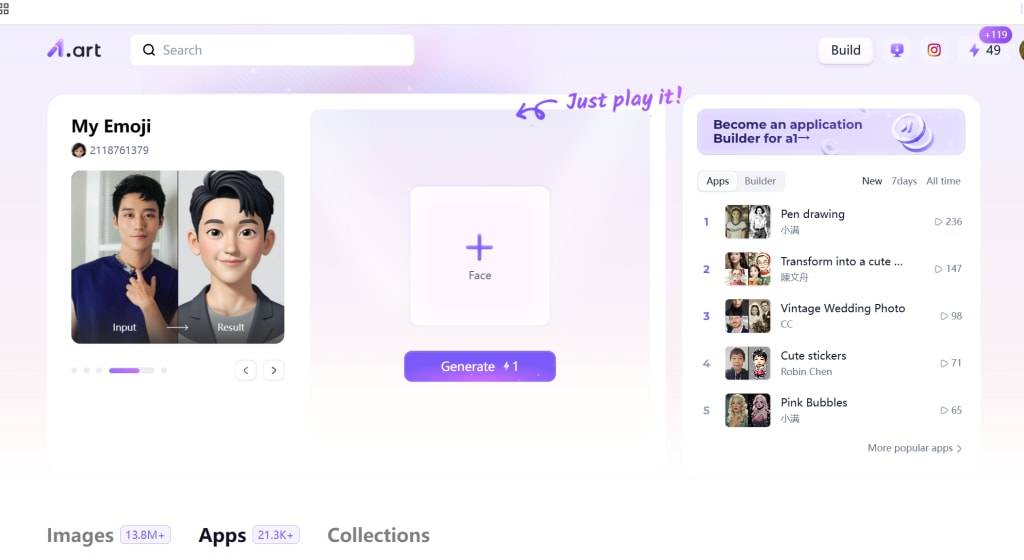
What is a1.art?
a1 is an advanced platform that uses artificial intelligence to generate images from text prompts or uploaded images. It’s designed to be easy to use, even for those with no prior design experience. a1 is perfect for those looking to experiment with room design ideas, as the platform offers an array of features that allow users to create both realistic and imaginative room layouts.
One of the standout features of a1 is its ability to take simple descriptions or uploaded photos and transform them into visually striking artworks. From modern minimalism to vintage-inspired rooms, the AI can interpret your design preferences and generate unique room designs based on your input.
How AI Can Revolutionize Room Design
AI has transformed many industries, and interior design is no exception. Here are some reasons why AI-generated room designs are becoming so popular:
Instant Visualization: Designing a room can often involve a lot of trial and error, especially when it comes to choosing the right color scheme, furniture, and layout. AI tools like a1 can instantly create multiple versions of your room design, allowing you to visualize different options quickly.
Customization: Whether you want to create a cozy bedroom, a sleek office, or a vibrant living room, a1 allows you to input specific details about your space. The platform's flexibility means you can generate countless variations of your design, ensuring that the final room is exactly what you envision.
Access to Professional-Quality Designs: AI doesn’t just help you visualize designs—it can also assist you in generating sophisticated, professional-looking layouts and artwork. Even without experience, you can create beautiful, functional designs that look like they were made by an expert interior designer.
Efficient Workflow: The speed of AI is one of its greatest advantages. Instead of spending hours refining a room layout or worrying about color coordination, a1 allows you to experiment with different designs quickly. In just a few clicks, you can generate beautiful room designs that meet your preferences.
How to Design Your Ideal Room with a1.art
Creating your dream room with a1 is a straightforward process. Here's a step-by-step guide to help you get started:
Step 1: Visit the a1.art Website
The first step is to go to a1. The website has a simple, user-friendly interface that makes it easy to begin creating your room design. No account is required to start generating images, but creating an account can give you access to additional features, such as saving your designs and accessing more customization options.
Step 2: Choose a Starting Point
Once you're on the platform, you can either upload a photo of the space you’re designing or start from scratch by typing a description of the room you want to create. For instance, if you're designing a cozy living room, you might type in something like, "A modern living room with light gray walls, minimalist furniture, and natural wooden accents." The AI will then use your input to generate a room design that reflects the style and elements you've described.
The AI image generator will take your prompt and create a stunning visual representation of your room, tailored to your specific preferences. If you’ve uploaded an image of your room, the AI can also apply artistic filters or transformations to enhance the design.
Step 3: Apply AI Image Generation
After entering your text prompt or uploading an image, a1 uses its AI image generation technology to create a realistic or artistic room design. You can experiment with different types of room designs, such as modern, bohemian, industrial, or contemporary, simply by adjusting your prompt.
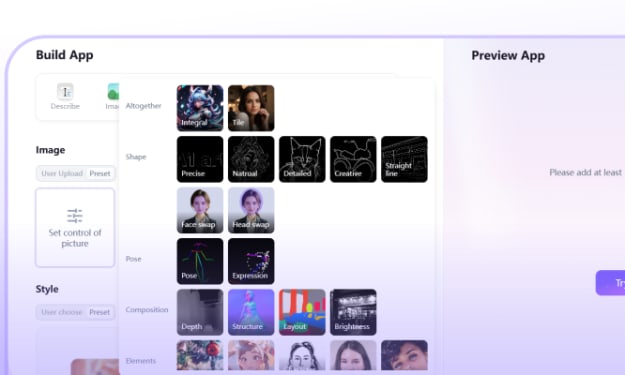
One of the key advantages of using a1 is that it gives you creative control. You can adjust parameters such as color schemes, furniture placement, and the ambiance of the room, allowing you to explore multiple possibilities before settling on your ideal design.
Step 4: Customize with Photo Filters
To make your room design even more unique, a1 offers a variety of photo filters that can enhance the mood and lighting of your generated room. Whether you're looking for a vintage look, a more vibrant, contemporary style, or a calm, subdued atmosphere, the photo filters allow you to adjust the overall tone and style of the room.
For example, if you prefer a room with a cozy, warm ambiance, you can apply filters that create soft lighting and warm tones. Alternatively, if you want a sleek, modern look, you can experiment with filters that enhance contrast and sharpness.
Step 5: Download and Share Your Room Design
Once you’re satisfied with your AI-generated room design, you can download it in high resolution. This makes it perfect for sharing on social media, using in personal projects, or even talking to a professional designer for further refinement. The beauty of a1 is that you can generate as many room designs as you like without worrying about costs, making it a great option for anyone experimenting with different interior design ideas.
Room Design Ideas You Can Create with a1.art
To inspire your creative process, here are a few room design concepts you can generate with a1:
Modern Minimalist: Create a spacious, clean-looking room with minimal furniture, neutral color palettes, and sleek design elements. Use prompts like “A minimalist living room with white walls, gray sofa, and Scandinavian-style furniture” to generate a chic and uncluttered space.
Cozy Cottage: Design a warm, inviting room with rustic touches like wooden beams, soft textiles, and cozy lighting. Try a prompt like “A cozy cottage living room with a stone fireplace, plaid throw blankets, and wooden furniture.”
Industrial Loft: Generate an edgy, urban loft design with exposed brick walls, metallic furniture, and dramatic lighting. A prompt like “An industrial loft with exposed brick walls, large windows, and modern steel furniture” will create a stylish, trendy space.
Tropical Escape: Bring the outdoors inside by designing a tropical-themed room filled with lush plants, vibrant colors, and natural materials. A prompt such as “A tropical living room with indoor plants, bamboo furniture, and colorful accents” will result in a lively and fresh space.
Conclusion
Interior design has evolved significantly with the advent of AI, and platforms like a1 are at the forefront of this transformation. With a1, you can effortlessly design your ideal room, customize it to your liking, and even enhance it with artistic filters to create the perfect ambiance. Whether you're looking for inspiration or want to visualize your room before committing to changes, a1 provides an intuitive, creative, and cost-effective solution for all your room design needs. Start exploring the world of AI-driven design and transform your living spaces today!
About the Creator
Emma
Passionate about AI art, enjoys using AI tools to explore works in various styles, from cyberpunk to impressionism, always open to experimentation.
John LoPinto on Travel as Perspective
Travel is often viewed as leisure or escape, but John LoPinto sees it as something more purposeful. For him, travel is a tool for perspective. By exploring new markets, cultures, and operating environments, leaders sharpen their strategic thinking and gain insights that are difficult to access from a distance. Exposure to unfamiliar contexts challenges assumptions and strengthens decision making.
By John LoPinto2 days ago in Art



Comments
There are no comments for this story
Be the first to respond and start the conversation.