
How to AI Video Face Swap Like a Pro (For TikTok & Instagram)
Ready to join the viral AI video face swap trend on TikTok & Instagram? Our ultimate guide shows you how, from easy in-app filters to pro-level tools for flawless, high-quality swaps. Learn the secrets to go viral today!
You’ve seen them. The impossibly funny videos flooding your "For You" page on TikTok and your Instagram Reels feed. Your favorite creator suddenly looks like a character from a blockbuster movie. A historical figure is flawlessly singing a trending pop song. Your friend just swapped their face onto a clip of a soaring eagle. Welcome to the hilarious, mesmerizing, and wildly creative world of the AI video face swap trend.
It’s a phenomenon that has captured millions, blending cutting-edge technology with pure, unadulterated fun. But as you scroll, you might be wondering: How are they actually doing this? Is it a secret TikTok filter? A complicated app?
You’re in the right place. Consider this your definitive, all-access guide to mastering the AI video face swap. We'll break down everything, from the quick-and-easy method using built-in social media filters to the "pro-level" techniques that deliver jaw-droppingly realistic results. By the end of this post, you'll not only know how to join the trend but how to create content that truly stands out.
What Exactly is the AI Video Face Swap Trend (And Why is it Everywhere?)
At its core, an AI video face swap does exactly what it says on the tin: it uses artificial intelligence to take a person's face from a photo (the "source") and realistically map it onto the face of someone in a video (the "target"). The AI analyzes facial features, expressions, lighting, and head movements to create a seamless and often shockingly convincing new video.
From Silly Filters to Hyper-Realistic Swaps
This technology isn't entirely new. We've had basic face swap filters on apps like Snapchat for years, often resulting in distorted, goofy, and obviously fake images. What’s different now is the accessibility and quality. The AI has become so sophisticated that it can produce results that are:
High-Fidelity: Preserving the fine details and textures of the source face.
Expression-Matched: Accurately mimicking the smiles, frowns, and speech of the person in the target video.
Motion-Stable: Keeping the swapped face "locked on" even during fast movements and head turns.
This leap in quality has transformed the trend from a simple gimmick into a powerful tool for comedy, parody, and creative storytelling.
The Psychology of Virality: Why We Love Face Swaps
So, why is this trend so sticky? It taps into a few core human desires:
Identity Play: It allows us to vicariously step into the shoes of someone else—be it a celebrity, a movie character, or even an animal.
The Element of Surprise: There's an inherent "wow" factor in seeing a familiar face in an unexpected context. This juxtaposition is the heart of its comedic appeal.
Low Barrier to Creativity: With modern tools, you don't need Hollywood-level VFX skills to create something amazing. This democratization of content creation fuels viral participation.
Now that you understand the "what" and the "why," let's get to the "how."
The "Easy Mode": How to Use AI Face Filters Directly on TikTok
For many, the first entry point into this trend is through TikTok's own ecosystem. The platform frequently rolls out AI-powered effects that allow for simple face swapping. This is the fastest way to get your feet wet.
Step-by-Step: Finding and Using the TikTok AI Filter
While the exact name of the viral filter can change, the process to find and use it is generally consistent. Here’s how you can access TikTok AI and use its face filters.
Open TikTok and Tap the '+' Icon: Start by opening the app and going to the camera screen to create a new video.
Tap 'Effects': Look for the 'Effects' icon, usually located to the left of the record button. This opens TikTok's vast library of filters and AR effects.
Search for the Filter: Tap the magnifying glass icon to search. Use terms like "face swap," "AI portrait," or "AI style." Often, the currently trending filter will be featured on the "Trending" tab.
Select the Effect and Your Photo: Once you select the filter, it will typically prompt you to choose a photo from your camera roll. This will be the "source" face that gets swapped into your video.
Record Your Video: With the effect active, simply frame your face in the camera and record. The AI will map the facial data from your chosen photo onto your live video in real-time.
Add Sounds, Text, and Post: Finish your video with a trending sound, add some witty text, write a great caption with relevant hashtags (#aifaceswap, #faceswapchallenge), and post!
Common Challenges and Quick Fixes
"I can't find the filter!": TikTok rolls out effects regionally. If you can't find it by searching, look for a video that's using the effect. Above the creator's username, you'll see the effect name (e.g., "AI Style"). Tap it, and you'll be taken to the effect's page where you can use it yourself.
"It looks glitchy.": In-app filters rely on your phone's processing power and good lighting. Make sure you're in a well-lit area and hold your phone steady for the best results.
Using TikTok's built-in filters is fantastic for quick, fun participation. But what if you want more control, higher quality, and the ability to swap faces onto any video, not just a live recording of yourself? For that, you need to level up.
Level Up: The Best AI Video Face Swap Tools for Flawless Results
While in-app filters are fun, they are limited. You can't use them on pre-existing video clips from movies, memes, or your own camera roll. This is where dedicated AI video face swap applications come in, offering unparalleled power and quality.
Why Use a Dedicated Tool?
Ultimate Control: You choose both the source photo and the target video. Want to put your cat's face on the "I'm the king of the world!" scene from Titanic? You can.
Superior Quality: These tools use powerful cloud-based servers to process the video, resulting in much more realistic and stable swaps than real-time phone filters.
Fewer Restrictions: You aren't limited by TikTok's specific effect parameters. You have total creative freedom.
The Freemium Contenders vs. The Professional's Choice
You've probably heard of some popular apps that offer face swapping. Many operate on a "freemium" model. You might ask, "What is the free video face swap tool?" While many apps offer a free trial or limited free swaps, they often come with trade-offs:
Watermarks: A large, distracting logo on your final video.
Low Resolution: Free versions often export in lower quality.
Limited Selections: You may be forced to use their library of GIFs and videos instead of your own.
Ads and Queues: You'll likely face advertisements and long waiting times for your video to process.
These are fine for a quick laugh, but for content that looks clean, professional, and is truly your own, a dedicated, high-quality tool is the answer. This is where a service like aideatuner shines. It's designed for creators who value quality over compromise, delivering crisp, watermark-free results that make your content look polished and professional.
Your Step-by-Step Guide to a Perfect AI Face Swap
Ready to create a masterpiece? Learning how to add face in video AI with a dedicated tool is a straightforward process. Let’s walk through it.
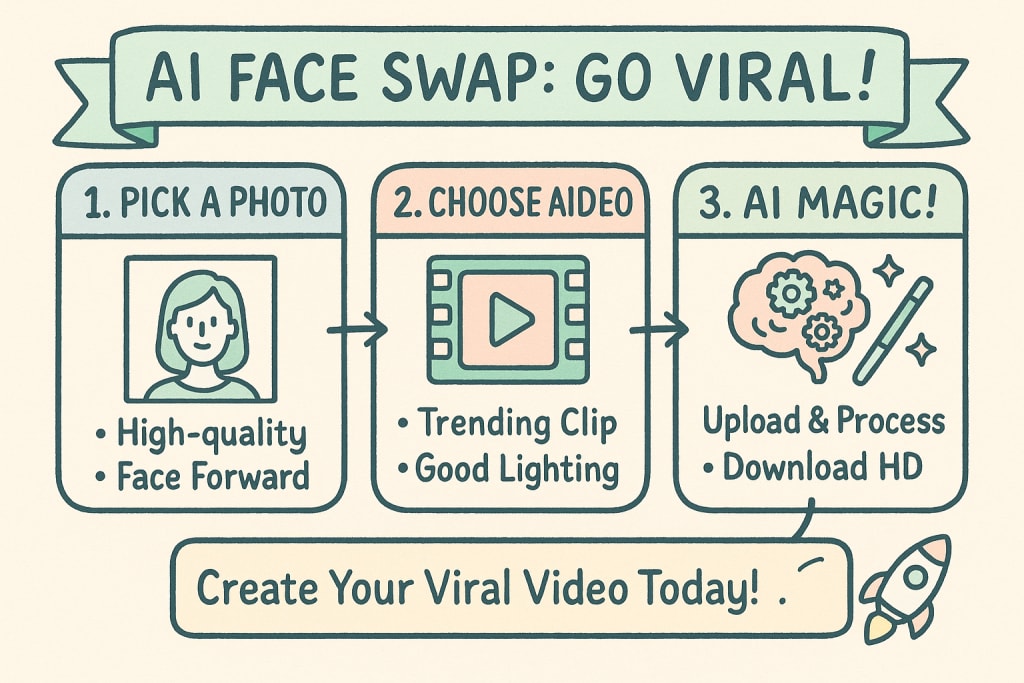
Step 1: Choose Your Target Video
This is the video clip you want to insert a face into. It can be anything:
A famous movie scene
A viral meme or GIF
A clip of a celebrity singing or dancing
A video of a friend or family member (with their permission, of course!)
Pro Tip: For the best results, choose a video where the subject's face is clearly visible, well-lit, and facing forward for at least part of the clip.
Step 2: Select the Perfect Source Photo
This is the single most important step for a high-quality swap. Your source photo (the face you're adding) should be:
High-Resolution: No blurry, pixelated, or compressed images.
Well-Lit: Clear, even lighting with no harsh shadows.
Facing Forward: A straight-on portrait shot works best.
Unobstructed: No sunglasses, hats casting shadows, or hands covering the face.
The AI needs clear facial data to work its magic. A great source photo is the difference between a "meh" swap and a "wow" swap.
Step 3: The AI Magic - Upload and Process
This is where a tool like aideatuner makes it easy. The interface is simple:
Upload the Target Video: Select the video file you chose in Step 1.
Upload the Source Photo: Select the high-quality portrait you chose in Step 2.
Start the Process: Click the "Generate" or "Swap" button. The platform will take your files and process them on its powerful servers. The AI gets to work, meticulously analyzing both the face and the video to perform the digital transplant.
Step 4: Review, Refine, and Download
After a short processing time, your new video will be ready. Review it to make sure you're happy with the result. If you followed the tips for choosing a good source photo and target video, you'll be amazed at the realism. From here, you can download the high-resolution, watermark-free video file directly to your device, ready to be shared on TikTok, Instagram, or anywhere else.
Pro Tips from the Trenches: How to Make Your Video Go Viral
Knowing how to face swap with AI is one thing. Making it go viral is another. Here are some insider tips to give your content an edge.
Tip 1: Relevance is King. Swap faces onto currently trending memes, movie trailers, or news clips. Tapping into the cultural zeitgeist gives your video instant relevance and shareability.
Tip 2: The Uncanny Valley is Your Friend (Sometimes). A swap that is almost perfect but just slightly "off" can be even funnier than a flawless one. Don't be afraid to experiment with cross-gender swaps or putting human faces on animals.
Tip 3: Tell a Mini-Story. Don't just post the swapped clip. Use TikTok's Stitch or Duet features to react to it, or add text captions that create a narrative or a joke. The swap is the punchline, but you need to set up the joke first.
Tip 4: Master the Sound. Your video's audio is 50% of the experience. Use trending sounds on TikTok and Reels to dramatically increase your video's reach. A perfectly synced face swap to a popular audio clip is a recipe for success.
Playing it Safe: The Ethics and Privacy of AI Face Swapping
With great power comes great responsibility. While the AI video face swap trend is overwhelmingly used for fun and parody, it's important to be mindful of the ethics.
Respecting Consent: Don't Swap Without Permission
The golden rule is simple: Only use photos of people who have given you their explicit permission. Swapping a friend's face onto a funny video is great if they're in on the joke. Using a stranger's photo or creating swaps of a private individual without their consent is an invasion of privacy and can be deeply harmful. Stick to using your own face, the faces of friends who have agreed, or the faces of public figures in the context of parody and commentary.
Understanding App Permissions and Data Privacy
When you use any AI tool, be mindful of what you're agreeing to. Read the terms of service to understand how your data (both your photos and the videos you create) is stored and used. Reputable platforms prioritize user privacy and are transparent about their data policies.
Fun vs. Malicious Deepfakes
It's crucial to distinguish between this fun, creative trend and malicious "deepfakes" created for misinformation or harassment. The tools and intent are different. As a responsible creator, your goal is entertainment and parody, not deception.
Your Turn to Create: The Future is on Your Face
You are now officially equipped with everything you need to dive headfirst into the AI video face swap trend. You know how to start with simple TikTok filters and how to graduate to professional-grade tools for breathtaking results. You understand the secrets to a high-quality swap and the strategies to help your creation catch fire online.
The trend is more than just a fleeting challenge; it represents a new frontier of accessible, AI-powered creativity. It’s a way to remix culture, craft unique comedy, and tell stories in a way that was impossible just a few years ago.
Now, the only thing left to do is create. Think of the funniest, most clever, or most epic video you can, find that perfect source photo, and bring your vision to life.
Ready to move beyond basic filters and create truly stunning, high-definition swaps that will leave your followers speechless? It's time to use a tool built for quality. You can create your own incredible ai video face swap with aideatuner and see the professional difference for yourself.
About the Creator
Keep reading
More stories from Zenobios Tomiko and writers in Art and other communities.
Uncensored AI Image Generator: The 2025 Definitive Guide
You’ve been there. You craft the perfect, intricate prompt—a detailed character, a dramatic scene, a specific artistic style. You hit "Generate" with anticipation, only to be met with a cold, robotic message: "This prompt violates our safety policy." or "Unable to create image." It’s a frustrating roadblock that stifles creativity and leaves you wondering: is there a way to break free from these digital guardrails?
By Zenobios Tomiko7 months ago in Art
“What If It Happens?”
Monday, 11 April 2022 Ishrat Jahan One of our friends, Mr. Farooq, is a middle-aged man, yet he has still not been able to free himself from his deeply suspicious and fearful nature. These days, I happened to have some free time, so I thought it would be a good idea to meet him and try to untangle the puzzle of his constant worries. By coincidence, he himself arrived at my humble home, jolting along in a rickshaw.
By Sudais Zakwana day ago in Art
Introduction to Organic Solutions
In the realm of fitness, the role of nutrition cannot be overstated, and organic supplements are increasingly recognised as essential components of a well-rounded training regime. Unlike their synthetic counterparts, organic supplements are derived from natural sources, ensuring that fitness trainers can provide their clients with products that are free from harmful additives and chemicals. This not only promotes better health but also supports the body’s natural processes, thereby enhancing overall performance and recovery.
By Organic Products 6 days ago in Art


Comments