
Clipping Path vs. Clipping Mask: Which Technique is Best for Your Design Needs?
Clipping Path vs. Clipping Mask: A Detailed Comparison
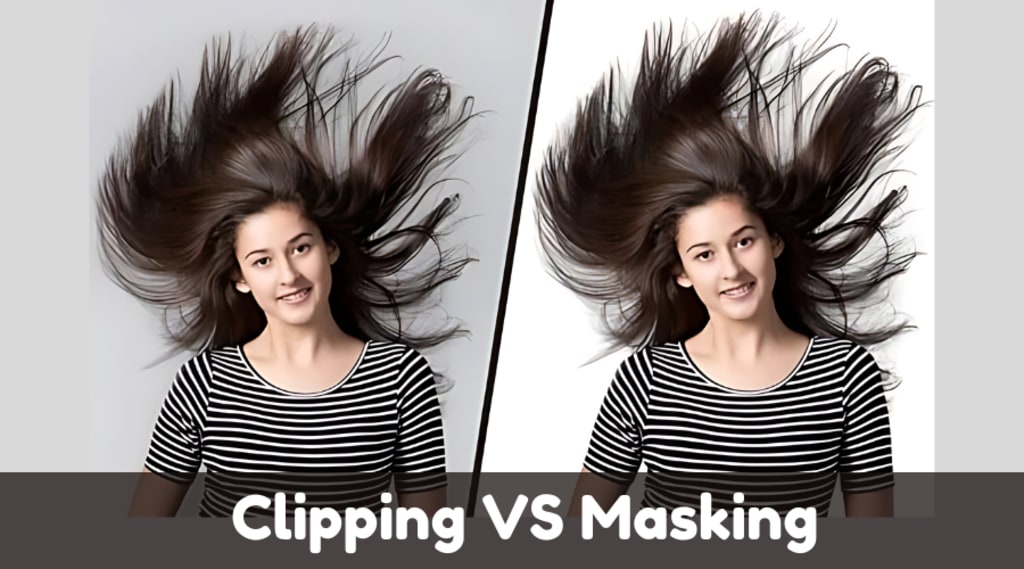
In the world of photo editing, especially for e-commerce and graphic design, two techniques stand out for isolating objects from backgrounds—clipping path and clipping mask. While both are essential tools in image manipulation, they serve different purposes and are used in distinct scenarios. Understanding the differences between these two techniques is crucial for selecting the right one for your project. Here’s a detailed breakdown:
What is a Clipping Path?
A clipping path is a vector-based technique used to create a precise outline or boundary around an object within an image. The path is typically created using a pen tool in image editing software like Adobe Photoshop or Illustrator. This method is most effective when dealing with well-defined objects that have sharp edges, such as products, fashion items, or geometric shapes.
Key Features of Clipping Path:
Vector-Based: It uses vector lines, making the cut-out clean and sharp.
Hard Edges: Best for objects with clear, defined edges like logos, furniture, and electronics.
Precision: Allows for high accuracy, enabling precise cut-outs of objects.
File Format Compatibility: It works well in formats like .jpg, .png, and .tiff.
Non-Destructive: The original image remains intact, and only the portion outside the path is masked or hidden.
When to Use a Clipping Path:
Product Photography: Ideal for isolating products from their backgrounds for e-commerce platforms.
Graphic Design: Used when combining objects with different backgrounds or creating composite images.
Print Materials: Works well for brochures, catalogs, and marketing materials requiring clean product images.
What is a Clipping Mask?
A clipping mask is a technique used to control the visibility of an image layer based on the transparency of another layer. It involves using one layer (the mask) to define which parts of another layer are visible. This technique is pixel-based, meaning it can handle more intricate and complex selections than a clipping path.
Key Features of Clipping Mask:
Pixel-Based: Works on pixel data, allowing for more complex shapes and softer transitions.
Soft Edges: Ideal for images with gradients, shadows, or fuzzy edges like hair or smoke.
Layer Dependency: The mask is dependent on the layer beneath it to define the visible areas.
Adjustability: Allows for more flexibility, as the mask can be modified or refined at any time.
Non-Destructive Editing: Similar to clipping paths, the underlying image remains unchanged.
When to Use a Clipping Mask:
Complex Selections: When dealing with images that have soft edges, such as portraits or images with a lot of intricate details.
Layered Design Projects: Perfect for projects that involve multiple layers, such as digital artwork, web design, or complex photo manipulations.
Transparency Effects: Clipping masks are useful for achieving smooth blending effects in image compositions, as they allow for gradual transitions between visible and invisible areas.
Clipping Path vs. Clipping Mask: Key Differences
Technique: Clipping paths rely on vector shapes, while clipping masks work with pixel data.
Application: Clipping paths are best for simple objects with hard edges, whereas clipping masks are better suited for complex selections with soft or gradient edges.
Precision: Clipping paths offer higher precision for clean, sharp cutouts, while clipping masks offer flexibility for detailed and subtle areas.
Edge Quality: Clipping paths give crisp, defined edges, while clipping masks allow for smooth transitions and gradients.
Usage: Clipping paths are mainly used in product photography and graphic design, while clipping masks are used in creative design projects, photo retouching, and composite images.
Choosing the Right Technique:
If you need a precise, clean cut-out for an object with clear, defined edges, like a product or logo, a clipping path is the best option.
If your image has soft edges, intricate details, or requires blending and transparency effects, then a clipping mask will give you more control and flexibility.
Conclusion:
Both clipping paths and clipping masks are invaluable tools in the world of photo editing, but their effectiveness depends on the nature of the image and the desired outcome. By understanding their key differences and applications, you can choose the right method to streamline your workflow, whether you are editing product photos for an e-commerce site or working on a creative design project.
About the Creator
Perfect Retouching
Perfect Retouching offers the best solution for all photo retouching services. We provide Jewellery, Product, Beauty, and Headshot Retouching Services by our expert team at budget price.
Visit here- https://www.perfectretouching.com/
Keep reading
More stories from Perfect Retouching and writers in Art and other communities.
Perfecting the Portrait: The Power of Professional Headshot Retouching
In today’s highly competitive job market, a polished and professional image is crucial. Whether you're a corporate executive, an aspiring actor, or a freelance professional, your headshot is often the first impression you make. That’s where headshot retouching services come in—a crucial tool for refining and enhancing your image to its fullest potential.
By Perfect Retouchingabout a year ago in Art
Why Strategic Branding Is Essential for Long-Term Business Growth
In today’s fast-paced digital environment, businesses face constant pressure to stand out. Consumers are exposed to endless choices every day, making attention harder to earn and trust harder to keep. While quality products and services are important, they are no longer the only factors that determine success. Strategic branding plays a key role in helping businesses grow steadily and remain relevant over time.
By Ayush Bagwari5 days ago in Art
Ida shaghoian and the Inner Geography of Painting
In contemporary painting, the most compelling work often resists easy definition. It lingers, unfolds, and asks the viewer to participate emotionally rather than observe from a distance. Ida shaghoian belongs to this tradition. Her paintings explore the fluid relationship between memory, feeling, and the natural world, creating spaces that feel both deeply personal and widely resonant. Through a refined balance of abstraction and suggestion, her work challenges conventional ideas of place, time, and perception.
By Ida Shaghoian6 days ago in Art



Comments
There are no comments for this story
Be the first to respond and start the conversation.