
WinX DVD Ripper Review and Alternative DVD Ripping Tool
This article reviews WinX DVD Ripper in detail. Moreover, the best alternative to WinXDVD is provided.

About WinX DVD Ripper
WinX DVD Ripper, developed by Digiarty Software, is a DVD ripping tool that can rip copy-protected DVDs to popular digital formats such as MOV, MP4, AVI, WMV, and MP3. It also provides dedicated profiles so that you can output videos compatible with the specific device. The output files can be played on your Plex server, home theatre, or portable devices like Android and Apple phones/tablets.
WinX DVD Ripper Free Edition for Windows and Mac is not a standalone application but is integrated into the full version of WinX DVD Ripper Platinum. When you download and install the program, you will automatically install the Platinum version.
When you run the software, you will get a message indicating that you need to buy the full version to remove the 5-minute limitation. In our tests, the free version allows for a 10-minute conversion of each title.
WinX DVD Ripper Platinum Review
- Supported OS: Windows 11/10 or lower and macOS
- Rating on Trustpilot: 4.5 out of 5
- Price:$65.95 Lifetime Windows License / 1 PC (the price might change over time)
Like the free version, WinX DVD Ripper Platinum handles physical DVDs, ISO images and DVD folders, and bypasses region protection for new as well as old DVDs. In addition, the Platinum version is more compatible with those problematic DVDs. Thus, if you need to make an emergency backup of damaged DVDs, using this program can really help you to avoid further losses! This version provides over 350 profiles: Besides MOV, MP4, AVI, and WMV output video formats, you can easily access device profiles such as Microsoft/Sony devices, Apple TV, iMovie, Android Pad/Mobile such as Samsung, Google, and Huawei, and more.
WinX DVD Ripper Platinum also allows you to make a master title copy and a full disc copy of the DVD, so that you can get all the video, audio, and subtitles of the DVD disc.
Test Experience of the WinX DVD Ripper Free Version
To give you a more concrete impression of the software's features, we have converted DVD to MP4, a popular format, and compiled the tests. The details are as follows:
- Test version: WinX DVD Ripper Free version
- Test device: Laptop - Windows 10 (22H2) - 64-bit / Intel(R) Core(TM) i7-10510U CPU @ 1.80GHz 2.30 GHz / RAM- 16GB
- Test movie title: 10 minutes of the main movie title (Title 1) of Moana (DVD ISO image file)
- Output format: MP4 - a commonly used video format
For the AVC (H.264) codec with AAC audio codec, the Medium quality output had a file size of 95.5 MB, an average FPS of 407, and required more computational resources but showed good effectiveness. The HD quality output resulted in a larger file size of 188 MB with an average FPS of 400.
For the MPEG4 codec with AAC audio codec, Medium quality output produced a 117 MB file with an average FPS of 450, while HD quality output produced a 210 MB file with an average FPS of 460. This codec is noted as suitable for some low-resource devices.
Best Alternative Tool to WinX DVD Ripper
Whenever WinX can't handle some tricky situations, DVDFab DVD Ripper comes as the best alternative to rip any encrypted DVD as well as ISO image files and DVD folders. It is compatible with both Windows and macOS systems. In comparison to WinX DVD Ripper, DVDFab DVD Ripper supports a long list of popular video formats, including MP4, AVI, MOV, and WMV, as well as converts DVDs to MKV (H.264/H.265), FLV, WEBM, Hi-Fi Flac/WAV, MP3, and many other output formats, allowing you to play the created files on mobile, tablets, Plex, home theater, and more.
Main features of DVDFab DVD Ripper
- Rating on Trustpilot: 4.6 out of 5
- Remove copy protection from old and new DVDs.
- Rip DVD to more than 1,000 video and audio formats and over 260 profiles for devices.
- Convert DVD to subtitles in SRT format and output to Hi-Fi audio.
- Allow to crop, rotate, and trim the video, and change playback speed.
- The software can take advantage of the GPU hardware to increase the batch conversion speed.
- Ability to add external subtitles, and personalized watermarks, adjust human sounds, and add effects like saturation, brightness, contrast, and white balance.
How to Rip a DVD with WinX DVD Ripper Alternative
Step 1: Run DVDFab after completing the installation of DVDFab.
Step 2: Switch to the Ripper module.
Step 3: Put a DVD into the physical drive connected to your PC. DVDFab will automatically detect and analyze the DVD and add the main movie title as the source.
Rename the title, and deselect the audio tracks or subtitles you do not want to keep in the output file.
The default profile settings for DVD will be displayed the first time you add a DVD as below. However, you can change your profile by clicking the profile option on the main window of DVDFab.
You can also open the "Advanced Settings" panel to change the codec, and resolution, set the encoding method to use CRF, fast encoding, or high-quality encoding, frame rate as well as set the output size based on bitrate or pixel.
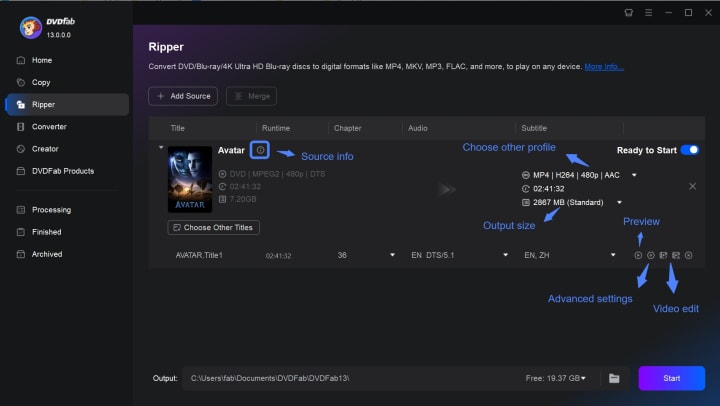
Step 4: Edit and trim the video. In the Edit window, you can crop the video, change the video effect, add the picture or text as a watermark, import subtitles and change the subtitle position, increase audio volume and remove background noise, and playback speed.
Step 5: Change the output path in the lower area and then click the "Start" button to initiate the conversion.
About the Creator
Diana
I’m a passionate Blu-ray collector who loves preserving the magic of physical media. Every now and then, I enjoy burning precious family videos onto discs, keeping memories alive in a tangible way.
Understanding Crossdressing Culture and Modern Crossdresser Shops in Australia
Crossdressing refers to the act of wearing clothing traditionally associated with another gender. Throughout history, people have practiced crossdressing for cultural, theatrical, personal, or social reasons. Historical records show that crossdressing has appeared in many civilizations, including ancient societies where clothing and gender roles were more fluid than often assumed.
By James Mburu6 days ago in 01
Multi Directional Forklift: The Future of Flexible Warehouse Handling
Modern warehouses and logistics centers rely heavily on efficient material‑handling equipment. Among the many machines used in warehouses, the Multi Directional Forklift stands out as one of the most versatile solutions for handling complex loads in tight spaces. As storage facilities become more compact and demand faster operations, businesses are increasingly adopting advanced forklifts that maximize space, safety, and productivity.
By charliesamuel5 days ago in 01
The Politics of Playing Dress-Up
Well, to start off I'd like to say a happy world book day to all who celebrate. I know I haven't really posted anything on my socials about it but I'm not a jubilant kind of person. I lay low most of the time. Let's start off with a popular anecdote from the vaults...
By Annie Kapur6 days ago in Geeks



Comments
There are no comments for this story
Be the first to respond and start the conversation.