
WinX DVD Copy Review: A Reliable Solution for Your DVD Backup Needs
Effortless DVD Duplication, Key Features, How-to Guide, and a Look at DVDFab DVD Copy as an Alternative

In an age where digital media is king, physical DVDs can sometimes feel left behind. However, many users still treasure their DVD collections, hoping to preserve their favorite movies and precious memories for years to come. DVD copying software has thus become an invaluable tool, enabling users to make exact backups of their discs and transfer content onto their devices. One such solution is WinX DVD Copy. In this WinX DVD Copy Pro review, we’ll explore its main features, performance, and introduce an excellent alternative—DVDFab DVD Copy.
Overview of WinX DVD Copy
WinX DVD Copy is designed to help users clone DVDs effortlessly and fast. Whether you want to create backups of your favorite movies, safeguard your rare discs, or simply digitize your collection, WinX DVD Copy positions itself as a user-friendly solution.
Key Features
- Full DVD Clone: Allows 1:1 duplication of DVDs to blank discs, preserving original audio and video quality.
- DVD to ISO/MPEG2: Capable of copying DVDs to ISO image files or MPEG2 digital files, making them compatible with a range of devices.
- Flexible Copy Modes: Offers options like copying the main movie, extracting specific chapters, or cloning only audio and subtitle tracks.
- CSS Decryption: Supports most common DVD encryption methods, expanding compatibility.
- User-Friendly Interface: Intuitive design is accessible to both novices and seasoned users.
How to Use WinX DVD Copy Pro
Using WinX DVD Copy Pro is straightforward, even for users who are new to DVD backup software. Here’s a simple step-by-step guide:
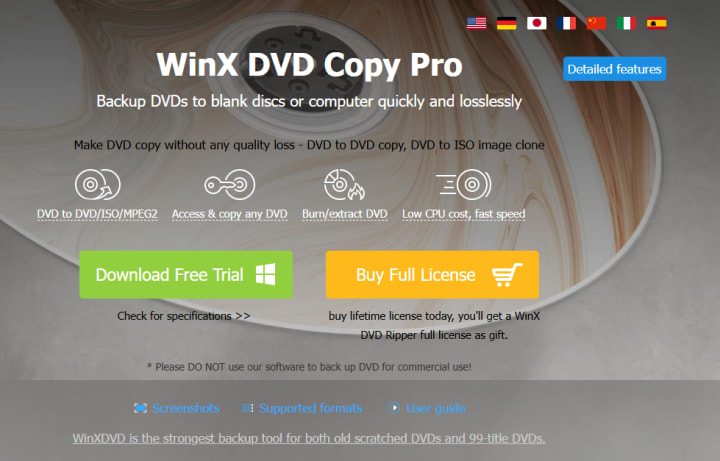
1. Download and Install
Download WinX DVD Copy Pro from the official website and install it on your computer.
2. Insert Your DVD
Place the DVD you want to copy into your computer’s DVD drive.
3. Launch the Program
Open WinX DVD Copy Pro. The software will automatically detect your DVD.
Choose a Copy Mode ; Select your preferred copy mode—such as “Clone DVD to DVD,” “Clone DVD to ISO,” or “Copy DVD Title to MPEG2.” Each mode is clearly labeled for different needs.
4. Set Your Destination
For direct disc-to-disc copies, insert a blank DVD as the target. For digital copies, choose a destination folder on your hard drive.
5. Start the Copy Process
Click the “Run” button to begin. The software will process your DVD and create a backup in the selected format.
Performance
WinX DVD Copy stands out for its speed and reliability. The software is lightweight, with minimal system requirements, and runs smoothly on most Windows PCs. During testing, it handled both old and new DVDs well, maintaining quality without noticeable loss. The copy process is straightforward and requires just a few steps, which is ideal for users seeking a hassle-free experience.
Limitations
While WinX DVD Copy covers the essential functions for personal DVD backups, it focuses primarily on standard DVD formats rather than more advanced options like Blu-ray. Additionally, features such as video editing or conversion to various other formats are limited.
An Alternative Worth Considering: DVDFab DVD Copy
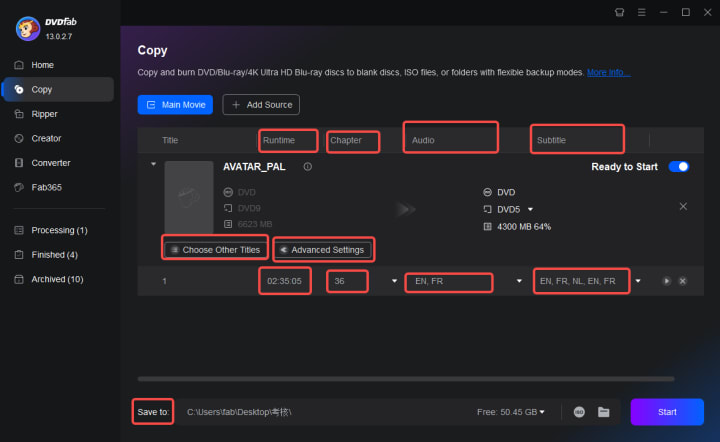
If you’re exploring other options, DVDFab DVD Copy is another reputable name in the DVD backup field. DVDFab offers a similar range of features along with additional functionalities that may appeal to advanced users.
- Highlights of DVDFab DVD Copy
- Comprehensive Copy Modes: Includes full disc, main movie, split, merge, customize, and clone/burn.
- Wide Format Support: In addition to standard DVDs, DVDFab offers compatibility with Blu-ray and 4K UHD discs in its broader suite.
- Advanced Customization: Allows users to select specific titles, audio tracks, subtitles, and even compress content for different output sizes.
- Regular Updates: DVDFab is regularly updated to handle new disc protections and improve performance.
- Cross-Platform Availability: Available for both Windows and Mac operating systems.
User Experience
DVDFab’s interface is modern and straightforward, though it may feel more feature-rich compared to WinX DVD Copy. It provides guidance throughout the copy process, making it accessible to beginners, but also includes enough customization options for power users.
Conclusion
Both WinX DVD Copy and DVDFab DVD Copy are effective solutions for DVD backup and duplication. WinX DVD Copy is an excellent choice for those who want an easy-to-use, fast, and stable tool for standard DVD backup tasks. On the other hand, DVDFab DVD Copy is well-suited for users who may need more advanced features, format versatility, and frequent updates.
Ultimately, the best choice depends on your specific needs and preferences. Whether you’re a casual user protecting a home movie collection or an enthusiast managing an extensive library, both options enable you to safeguard your discs for the future.
About the Creator
DVDLOVER
Sharing the latest on DVD & Blu-ray releases, E-book downloads, and trending TTS. Stay tuned for updates, tips, and exclusive content!
App Development Cost in Wisconsin: What You Need to Know
So, you’ve got a "million-dollar idea" for an app. Great. But before you start dreaming of Silicon Valley exits, we need to talk about the actual bank balance you’ll need to get a dev team in the Badger State to look at your specs. Real talk, building software in 2026 isn't the Wild West it used to be, but it sure isn't cheap.
By Sherry Walkerabout 5 hours ago in 01
Service in major U.S. cities is disrupted by a massive Verizon network outage. Cities
On Wednesday, January 14, 2026, Verizon Communications experienced a widespread network failure that disrupted voice and data services for tens of thousands of customers across the United States. Users were unable to make calls, send texts, or access mobile internet for several hours as a result of the outage, which was one of the largest in recent memory for the nation's largest wireless carrier. This prompted emergency alerts to be issued in some cities and prompted fresh inquiries regarding the reliability of networks in a world that is becoming increasingly connected.
By Raviha Imran5 days ago in 01
Center Stage with Paul Stewart
*** I'm keen to republish the interviews I did for my series with Vocal creators. It's been a few years and I thought it might be nice to revisit these wonderful conversations. I'll be releasing them one at a time for a few weeks/months.
By Heather Hubler4 days ago in Interview



Comments
There are no comments for this story
Be the first to respond and start the conversation.