
Why Log Management is Important
‘Logging Made Easy' in a nutshell

In this blog, we will be introducing a solution backed by the National Cyber Security Centre, solving the struggle of small companies and the implementation of a simple, cost-effective log management system.
But before we delve into this new solution, it's important to have a good understanding of what log management is and why it shouldn't be overlooked in organisations.
The Importance of Log Management
Log management can play an integral role in the security infrastructure of your company, helping to oversee network activity, inspect system events, and store user actions that occur inside your operating system (OS) or network.
Log management can identify crucial information about the happenings on your company's OSs and networks being documented. This can include:
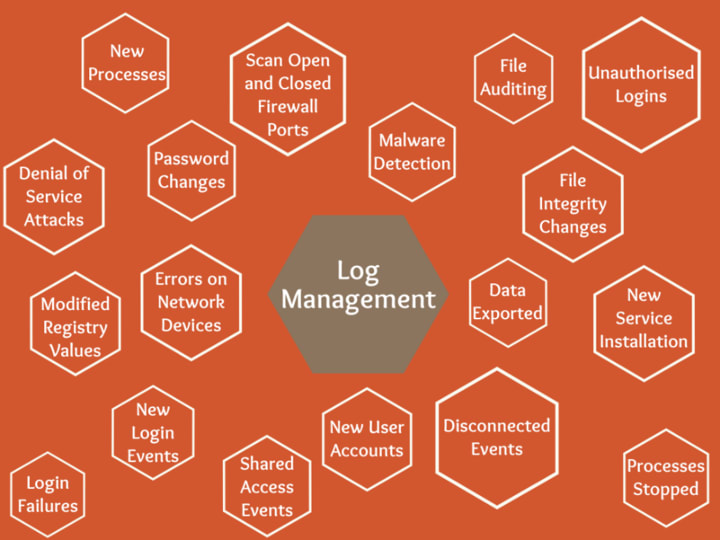
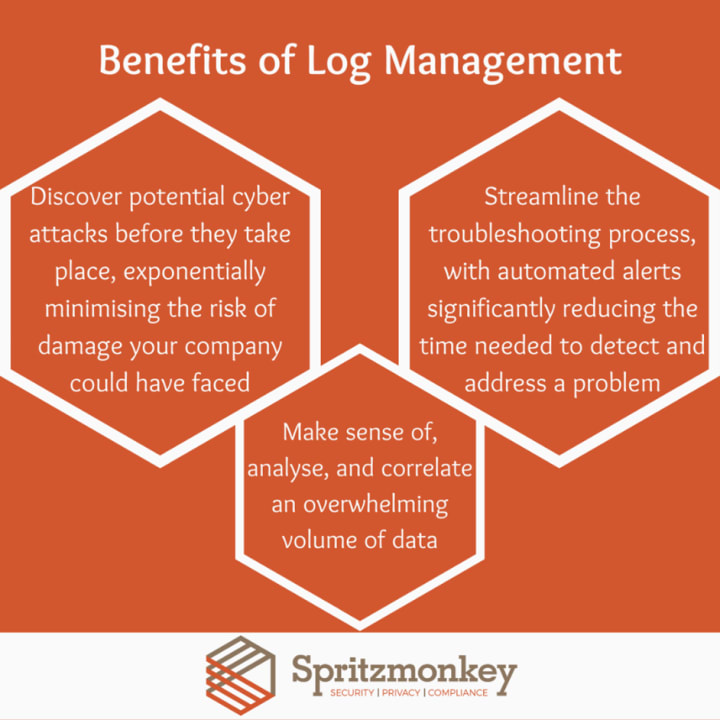
Having this intel logged has a variety of benefits, such as:
With the importance of log management now established, you've mostly likely concluded that implementing such a system is a good idea. However, the process can be a bit more complicated than you might envision. A system administrator needs to decide what to log, how to transport the data that's been collected, where to store it, and for how long. Furthermore, the largest question is how to analyse the logs. Dedicated log management products can end up costing a large sum, which could be too much to invest for a small organisation.
But don't be alarmed, help is at hand. With the backing of the National Cyber Security Centre (NCSC), there is a cost-efficient, simple solution of implementing your very own Log Management System in your organisation called 'Logging Made Easy' that tackles all the aforementioned hurdles.
What is Logging Made Easy?
Logging Made Easy (LME) is a framework of free software that, in collaboration, provides robust, end-to-end Windows logging capabilities and a set of tools for viewing and analysing all the data that is gathered.
To be more precise, it can:
- Tell you how up-to-date your devices are with software patches;
- Show where administrative commands are being run on enrolled devices;
- See who is using which device;
- And detect the presence of an attacker in the form of Tools, Techniques and Procedures (TTPs).
Due to the open-source nature of the framework, the system can be developed further and is highly customisable to the small organisation's needs, making for a very flexible solution.
The current structure of LME is based on Windows Clients, Microsoft Sysmon, Windows Event Forwarding and the Elasticsearch, Logstash, Kibana (ELK) stack. Elasticsearch, Logstash and Kiban are three open-source projects that perform the following:
Elasticsearch is a search and analytics engine.
Logstash is a server‑side data processing pipeline that ingests data from multiple sources simultaneously, transforms it, and then sends it to a "stash" like Elasticsearch.
Kibana lets users visualise data with charts and graphs in Elasticsearch.
Would LME be suitable for my organisation?
It can be suitable for any organisation that qualifies for the following:
Has limited time, understanding or budget to fully develop their own logging system or purchase a professional solution.
Currently has no SOC, SIEM or any monitoring practices currently in place in the organisation, and recognises the need to begin gathering logs and monitoring their IT.
What kind of IT skills do I need to install LME?
It is advised to have at least the skill level of a systems administrator, having experience performing the following tasks:
- Firewall management
- Windows Server deployment and management
- Group policy object (GPO) deployment and management
- Familiarity of with Linux OS and usage of Secure Shell.
What software/tools do I need to install LME?
You will need the following software and tools to set up LME:
- Sysmon and SigCheck - Free installation from the Sysinternals team at Microsoft
- ELK and Winlogbeat - Free installation from the Elastic.co GitHub page (Including guide)
- Docker Community Edition - Free installation from the official Docker website
- A Windows Active Directory - Microsoft provides a guide for the setting up an AD
- A server with two processor cores and at least 8GB RAM
- A Linux server with two processor cores and at least 16GB RAM
Where can I find a guide for the installation of LME?
The complete installation guide for LME can be found on the dedicated LME GitHub page
Conclusion
It's plain to see why NCSC is backing Logging Made Easy, with its cost-effective, easy-to-implement logging solution, as well as helping to fill a hole in a (sometimes neglected) security infrastructure within organisations.
If you're interested in learning more about Logging Made Easy, please get in contact with us or visit the NCSC website.
Definitions
LME - Logging Made Easy
GPO - Group Policy Object
SOC - Security Operations Centre
SIEM - Security Information and Event Management
RAM - Random Access Memory
SSH - Secure Shell
TTPs - Tools, Techniques and Procedures
NCSC - National Cyber Security Centre
OS - Operating System
ELK - Elasticsearch, Logstash, Kibana
About the Creator
Grace Morris (she/her)
Sales and Marketing Co-Ordinator at Spritzmonkey, organisational geek helping companies improve their cybersecurity one step at a time.
Keep reading
More stories from Grace Morris (she/her) and writers in 01 and other communities.
These Billionaires Bet Big On GreenLand—After Trump Took Interest
Topline Just months after President Donald Trump first expressed interest in the United States possibly gaining control over Greenland, some of the richest people in the world—including Jeff Bezos, Bill Gates and Michael Bloomberg—began making strategic investments in the mineral-rich island.
By Dena Falken Esq3 days ago in 01
How, Too
Many people wonder how, too. You are not alone, and I am an expert. I will teach you how, too! First, you need to remit a small application fee and fill out an application describing the nature of your financial situation and how often payments will be made, as this will have great bearing on how well I teach you how, too.
By Harper Lewis3 days ago in Fiction




Comments
There are no comments for this story
Be the first to respond and start the conversation.