
What is Data Recovery in Practice?
From lost files to restored memories: understanding the process, tools, and experts behind data recovery.


Data loss is something most people experience at least once, whether it’s a lost photo or an important document. Data recovery may seem too complicated, almost like magic, but it actually relies on clear methods and reliable technology. When files disappear, recovery tools and specialists work to bring them back.
We want to walk you through the basics of the data recovery process, explain the main types, show how does data recovery work and how software can track down missing files, and share what professionals do when the situation is more serious.
Why Does Data Loss Happen?
Data recovery is the process of restoring files that have been deleted, lost, corrupted, or made inaccessible. We need it because digital storage, while convenient, is not flawless. From work projects to personal photos, our data is vulnerable to many risks, and recovery provides a second chance when mistakes or failures strike.
Data loss can happen for various reasons. It may be a simple mistake or a more complex issue that will require more advanced recovery methods. Among the most common causes are:
- Human error is the leading cause of missing files. You might delete something important while cleaning up folders, overwrite the wrong document, or even format an entire drive by accident. Once these actions are done, they’re hard to reverse without recovery tools.
- Hardware failure. Storage devices like hard drives and SSDs don’t last forever. Over time, they can develop faults such as bad sectors, mechanical issues, or sudden breakdowns. Since failures often happen without warning, valuable files may be lost in an instant.
- Software or system crashes. Operating systems and applications sometimes crash unexpectedly, which can cause data to be inaccessible. This often happens when devices overheat or when updates and patches are neglected.
- Power surges can damage files too. A blackout or surge during a storm may interrupt saving processes, leading to corrupted data.
While these are the most visible reasons, they are not the only ones. Data loss can also stem from external threats that are harder to control. Malware and ransomware attacks, for example, can encrypt or completely destroy files, locking users out of their own systems until a ransom is paid. In fact, according to Statista, the total number of malware attacks worldwide hit 6.06 billion in 2023.
And, of course, natural disasters like floods, fires, or earthquakes can wipe out entire storage systems in one event.
Tools and Methods Used in Data Recovery
When data disappears, the tools and methods used depend on the type of problem. Sometimes recovery is as simple as using software, while other cases require professional intervention.
1. Data Recovery Software
When files vanish, the most common rescue method is data recovery software. How does data recovery software work? These programs scan your storage device and search for traces of files that the system has marked as “deleted” but hasn’t yet overwritten. Think of it as looking for faint footprints on a trail. The file may not be visible in your folders, but the fragments are still there until new data takes their place.

Once files are found, the software lets you preview and restore them to a safe location. Popular tools include Disk Drill, known for its clean interface, advanced capabilities, and preview feature; Recuva, a free option great for personal use; PhotoRec, which recovers over 400 file formats; and TestDisk, a powerful open-source tool for fixing partitions and recovering lost data structures. Together, they show how data recovery software works and guide users through data recovery step by step, giving a second chance to save valuable information.
2. System Utilities
Not all data loss requires heavy-duty software. In some cases it is possible to recover files with built-in system tools like backups. Files also often end up in the Recycle Bin (Windows) or Trash (macOS), where they can be restored with a single click. Some systems also provide “Undo Delete” shortcuts or Recently Deleted folders that keep items temporarily before permanent removal.
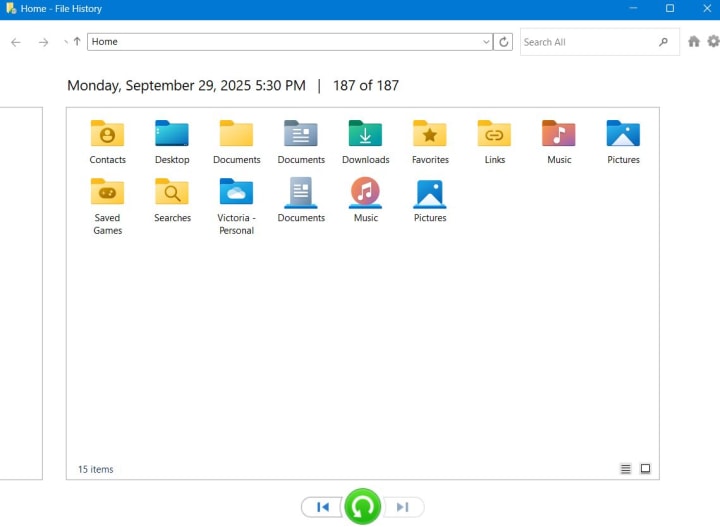
For ongoing protection, built-in or cloud-based backup solutions such as File History (Windows) or Time Machine (macOS) are invaluable, but they only help if they were properly set up and active before the data loss occurred. They allow users to roll back changes and restore previous versions of files without the need for advanced recovery.
3. File Carving
When file-system metadata (the “map” of file locations) becomes corrupt or disappears, recovery experts use file carving. The method reassembles files by analyzing raw sectors and searching for recognizable signatures that mark file boundaries (for example, JPEG files start with the bytes FF D8 FF). Even when the disk scatters a file into fragments, file-carving tools can find the pieces and stitch them back together.

Large files fragment more often, so the task grows harder. Advanced algorithms such as bifragment gap carving and SmartCarving apply heuristics and statistical models and rebuild files that standard tools miss. Forensic investigators and professional labs rely on file carving. Although the work takes time, the approach restores data even after a system formats or repartitions a drive.
4. RAID, NAS, and SAN Systems
In business and enterprise settings, data recovery often involves complex systems like RAID arrays, NAS (Network Attached Storage), or SAN (Storage Area Networks). When drives fail, specialists use dedicated tools to rebuild data from redundancy or parity information spread across the disks. Enterprise-grade recovery requires a careful, methodical approach since mishandling can make large volumes of data permanently unrecoverable.
5. Professional Labs
When physical failures occur such as damaged read/write heads, burned PCBs, or corrupted firmware, the only option is sending the device to a professional data recovery lab. Engineers work in cleanroom environments, swap donor components, repair firmware modules, and clone platters bit by bit.

These methods are costly but sometimes the only way to retrieve irreplaceable data such as company financial records, legal evidence, or one-of-a-kind personal files. In these cases, the investment is worth it.
6. Mobile Phone Recovery
Data loss isn’t limited to computers. Smartphones can suffer from accidental deletion, failed updates, or physical damage. Specialized mobile recovery software can scan internal memory (usually requires root access) and SD cards. You can also remove the SD card from your phone, connect it to your computer and run data recovery software. Professional labs may use hardware tools, chip-off techniques, and firmware repair to extract data. These services are often used when devices are locked, water-damaged, or completely unresponsive.
How to Reduce Data Loss Risks
From our experience in data recovery, we can confidently say prevention is far easier than dealing with full-scale recovery later. The following steps are proven everyday practices to keep both personal and business data secure.
Tip 1. Back Up Regularly
We recommend following the 3-2-1 rule: keep three copies of your files, store them on two different media types, and keep one copy offsite or in the cloud. We’ve seen too many cases where people only had a single copy, and once it failed, recovery was costly or incomplete. Regular backups save you from that risk.
Backups are only useful if they actually work. Test them by restoring sample files every few months. On the human side, remind your team (or yourself) not to store all work in one location, not to overwrite files without a copy, and to double-check before formatting drives. Many of the most painful recovery cases came down to avoidable human error.
Tip 2. Invest in Reliable Storage
Not all storage is created equal. Hard drives wear out, SSDs have limited write cycles, USB sticks and SD cards are more fragile than they look. We’ve seen many clients trust a single aging device only to lose years of files in seconds. Replace drives before they fail, and monitor their health with third-party tools like CrystalDiskInfo or vendor diagnostics.
Tip 3. Secure Your Power Supply
Power issues cause more data loss than most people realize. A sudden blackout or surge during a save process can corrupt an entire file system. We advise protecting your setup with a surge protector or, better yet, an uninterruptible power supply (UPS). It’s a small investment that protects your hardware and keeps your files intact when the lights flicker.
Tip 4. Strengthen Security
Viruses, ransomware, and other forms of malware are responsible for a growing share of data loss. Protect your system with up-to-date antivirus software, enable firewalls, and encrypt sensitive files. Strong passwords and access controls also lower the risk of unauthorized access.
Tip 5. Plan Ahead with Recovery Drills
Even the best protections mean little without preparation. Create a simple recovery plan, test it, and make sure everyone who depends on the data knows what to do if files go missing. Recovery drills help you stay prepared and avoid scrambling under pressure when something goes wrong.
In short, these strategies reduce your reliance on recovery tools and keep your digital life far safer. After years of working with data recovery cases, our best advice is simple: prepare in advance, because prevention always costs less than recovery.
Final Thoughts
Data recovery shows that lost files aren’t always gone forever, but prevention through backups and secure storage is the best defence. From our experience, most data loss cases don’t involve serious hardware failures. In fact, many people who have never dealt with data recovery before manage to restore files on their own using software and online resources such as 7 Data Recovery Experts.
With that in mind, we’d love to hear your own experiences with data recovery. Have you ever lost files and managed to get them back?
Share your story in the comments, and check our social media: Facebook, X, LinkedIn, and YouTube for more helpful information and updates.
About the Creator
7 Data Recovery Experts
7 Data Recovery Experts is a consulting team of experienced tech professionals delivering tested recovery advice, expert software reviews, and step-by-step guides to help you safely restore lost data - no advanced skills needed.
Keep reading
More stories from 7 Data Recovery Experts and writers in 01 and other communities.
Proven Picks from 7 Data Recovery Experts: The Best Software to Restore Data in 2025
In 2025, data loss is a fact. SSDs break, ransomware damages drives, and one click can wipe years of labour. Modern recovery programs can now restore files when they are most needed by using crisper scans and being compatible with more devices.
By 7 Data Recovery Experts5 months ago in 01



Comments
There are no comments for this story
Be the first to respond and start the conversation.