
What are the 7 Stages of Web Development?
Discover the 7 stages of web development, from planning and design to deployment and maintenance, and learn how each step shapes a successful website.

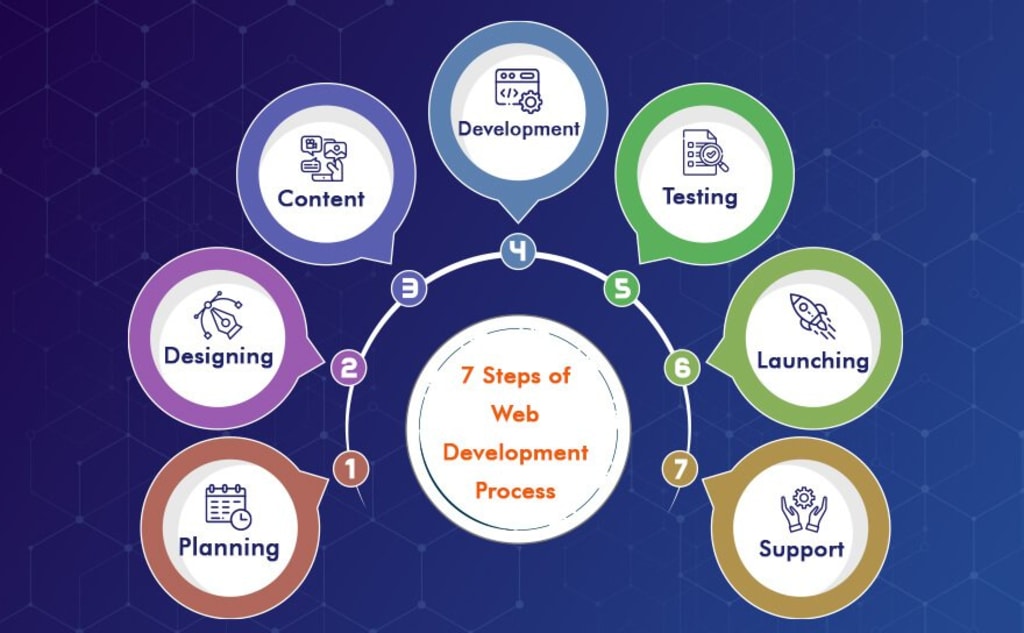
In today’s digital world, having a strong online presence is no longer optional it’s essential. That’s where web development comes in. It’s the process of creating websites and web applications that function seamlessly on the internet or within a private network (intranet). From layout design to backend logic, web development brings together a mix of skills like programming, user interface design, server configuration, and database management.
Understanding how web development works especially the key stages involved is important for both clients and developers. It ensures everyone is on the same page, reduces confusion, and helps deliver high-quality, goal-driven websites. A clear development process also leads to better collaboration and long-term success.
Requirement Gathering and Analysis
Understanding client needs
Every successful project starts with listening. The first stage is all about understanding what the client actually wants. This includes diving into their business goals, audience, core functionalities, and their vision for the site. A professional web development company will guide this phase carefully to capture every important detail and align expectations early on.
Defining project goals and scope
Once the needs are understood, the next step is to clearly define what the website should achieve. This includes outlining specific goals, deciding what features are necessary, setting realistic timelines, and clarifying budget boundaries. When the scope is clear, everyone can move forward with confidence and avoid unexpected changes down the road.
Planning
Creating a project roadmap
With the goals set, it’s time to plan the actual work. This means mapping out all the project phases, setting important milestones, and laying down deadlines. A detailed roadmap ensures the project stays organized and on schedule.
Technology stack selection
Here, the technical choices are made. What frameworks, programming languages, CMS platforms, or databases will be used? The right tech stack depends on the project’s size, budget, and future scalability.
Resource allocation and timeline
Planning also includes deciding who does what. The team’s roles are defined, resources are assigned, and a timeline is created to keep development running smoothly.
Design
Wireframing and prototyping
Before anything is coded, a visual blueprint of the website is created. Wireframes outline the layout, and prototypes help simulate how users will interact with the site. These early visuals help shape the user experience before any design is finalized.
UI/UX design principles
Now comes the creative part. Designers focus on building an interface that’s visually appealing and easy to navigate. This involves selecting the right colors, fonts, and structure all while ensuring the experience is intuitive and accessible.
Client feedback and revisions
Once a draft design is ready, it’s shared with the client for review. Their feedback leads to revisions, adjustments, and fine-tuning until everything matches the original vision.
Development
Front-end development
Here’s where the real build begins. Front-end developers turn the design into actual code using HTML, CSS, JavaScript, and frameworks so that users can interact with the website across devices.
Back-end development
While the front-end handles what users see, the back-end powers the system behind it. This includes server-side logic, user authentication, database communication, and integrating third-party tools or APIs.
Database setup
Data plays a huge role in most websites. Developers set up and configure the database to make sure data storage, access, and performance are reliable and secure.
Testing and Quality Assurance
Functional testing
Before the launch, everything must work as expected. Testing checks if features like forms, buttons, and navigation function correctly and consistently.
Performance and security testing
Beyond functionality, developers test the website for speed, mobile responsiveness, and security. These checks help avoid downtime, slow load times, and potential vulnerabilities.
Bug fixing and improvements
Any issues found during testing are resolved. This stage is all about polishing the website so that users get a smooth, bug-free experience.
Deployment
Launching the website on a live server
Once testing is complete, the website is moved to a live server making it publicly accessible. This is the moment the project goes live and starts delivering value.
Domain and hosting configuration
To make sure everything runs smoothly, domain settings, hosting setup, and SSL security certificates are configured properly. This step ensures the website is secure, fast, and accessible to users worldwide.
Maintenance and Updates
Regular updates and patches
The launch isn’t the end it’s just the beginning. Websites require regular maintenance to update plugins, apply security patches, and keep everything running efficiently.
Performance monitoring
Ongoing monitoring helps track speed, user activity, and performance issues. These insights help make informed improvements over time.
Adding new features and improvements
As the business grows, new features or content may be needed. This stage ensures the website stays relevant, competitive, and aligned with evolving goals.
Conclusion
Web development isn’t just about building a website it’s a process that moves through seven essential stages. From gathering requirements to long-term maintenance, each step ensures that the final product is user-friendly, secure, and aligned with business objectives. By understanding and following this structured approach, both developers and clients can work together more effectively to create web solutions that truly deliver results.
About the Creator
Nico Gonzalez
Hi, I'm Nico Gonzalez! I'm passionate about technology, software development, and helping businesses grow. I love writing about the latest trends in tech, including mobile apps, AI and more.
Keep reading
More stories from Nico Gonzalez and writers in 01 and other communities.
GDS Integration Pricing Models: Fixed, Subscription, or Custom?
Global Distribution System (GDS) integration is essential for travel businesses looking to access a vast inventory of flights, hotels, car rentals, and more. It connects travel agencies and service providers to major GDS platforms like Amadeus, Sabre, and Galileo, enabling real-time booking and data management.
By Nico Gonzalez8 months ago in 01
The Future of Productivity Is Voice
Introduction The future of Productivity is rapidly shifting toward voice. In 2026, advanced AI technology allows Virtual Assistants to do more than follow commands — they understand context, anticipate needs, and help you manage your day effortlessly. Speaking to your assistant is faster, more natural, and often more efficient than typing or clicking.
By MUHAMMAD SHAFIE4 days ago in 01
Review of 'Man on the Run'
My wife and I saw Man on the Run, a nearly 2-hour documentary on Amazon Prime, about Wings, Paul McCartney's group that flew around the world from shortly after The Beatles broke up in early 1970 to shortly after John Lennon was murdered at the end of 1980, making a Beatles reunion forever impossible.
By Paul Levinson5 days ago in Beat




Comments
There are no comments for this story
Be the first to respond and start the conversation.