
Ways to Apply CSS
This article is part of a free full CSS Course: Beginner to Expert

If you’ve ever admired a beautifully designed website, you’ve witnessed the magic of CSS (Cascading Style Sheets) at work. CSS is the tool that transforms plain HTML into visually engaging and interactive web pages. However, CSS is more than just a single technique — it offers several ways to apply styles, each with its own set of strengths and use cases. Whether you’re a beginner or someone looking to refine your skills, understanding the different ways to apply CSS is crucial for creating well-structured, maintainable, and scalable websites.
In this article, we’ll explore the various methods to apply CSS to your HTML documents, discuss the pros and cons of each, and provide practical examples to help you decide which method works best for your specific needs.
1. Inline CSS: The Quick and Dirty Solution
What Is Inline CSS?
Inline CSS is the simplest way to apply CSS directly within an HTML element using the style attribute. It’s like giving instant fashion advice to a specific HTML element right where it stands. Here's how it looks in practice:
<p style="color: red; font-size: 16px;">This is a red paragraph with inline styling.</p>
In this example, the paragraph is styled with red text and a font size of 16 pixels, all within the HTML element itself.
When to Use Inline CSS
Inline CSS is handy for quick, one-off style changes or for testing styles directly in the HTML. If you’re making small changes or debugging specific elements, inline CSS can save time. It’s also useful when working with HTML emails, where external stylesheets might not be supported.
Drawbacks of Inline CSS
While inline CSS might be convenient, it comes with significant downsides:
- Repetition: You have to repeat styles across multiple elements, which can lead to bloated and difficult-to-maintain code.
- Separation of Concerns: Inline CSS mixes content (HTML) with presentation (CSS), violating the principle of keeping them separate.
- Scalability: For larger projects, inline CSS becomes a nightmare to manage, making it challenging to update styles consistently across the site.
Practical Example of Inline CSS
Let’s say you want to highlight a single word within a paragraph:
<p>This is an example of <span style="color: blue; font-weight: bold;">inline CSS</span> applied to a word.</p>
Here, the word “inline CSS” is styled directly within the HTML using inline CSS. While this is fine for a single instance, imagine doing this across a hundred pages — your fingers and patience will surely be tested!
2. Internal CSS: Keeping It All in One Place
What Is Internal CSS?
Internal CSS involves placing your CSS rules within a <style> tag in the <head> section of your HTML document. This method allows you to apply styles to the entire document without scattering your CSS all over the place like inline styles do. Here's an example:
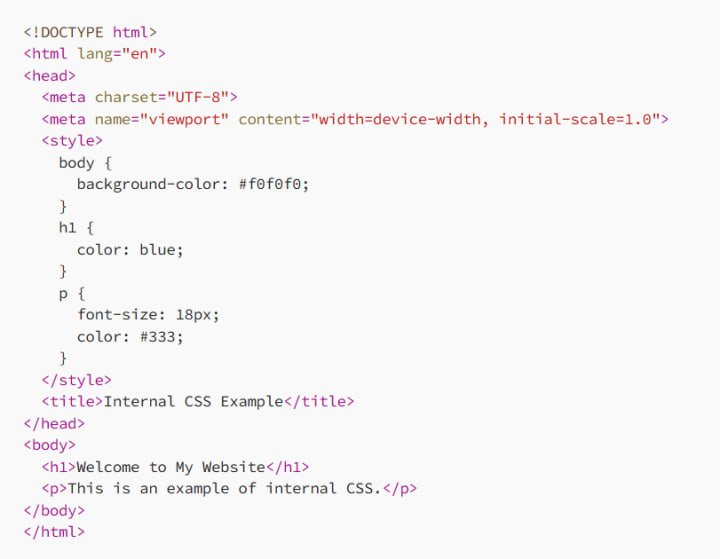
In this example, the entire document is styled using CSS within the <style> tag. The styles apply to all relevant elements within that document.
When to Use Internal CSS
Internal CSS is ideal when you’re working on a single HTML document or when you need to apply unique styles that won’t be reused across multiple pages. It’s particularly useful for small websites or standalone pages where managing external stylesheets might seem overkill.
Drawbacks of Internal CSS
Internal CSS is a step up from inline styling, but it still has its limitations:
- Not Reusable: Styles are confined to a single document, meaning you’ll need to duplicate your CSS if you want to apply the same styles to multiple pages.
- Performance: Placing a lot of CSS directly in the HTML file can increase the file size, leading to slower load times.
- Maintenance: As your CSS grows, it can become cumbersome to manage within a single HTML document, especially if you’re dealing with complex styles.
Practical Example of Internal CSS
Imagine you’re creating a landing page for a special promotion. You want all the text to be centered, with a specific background color:
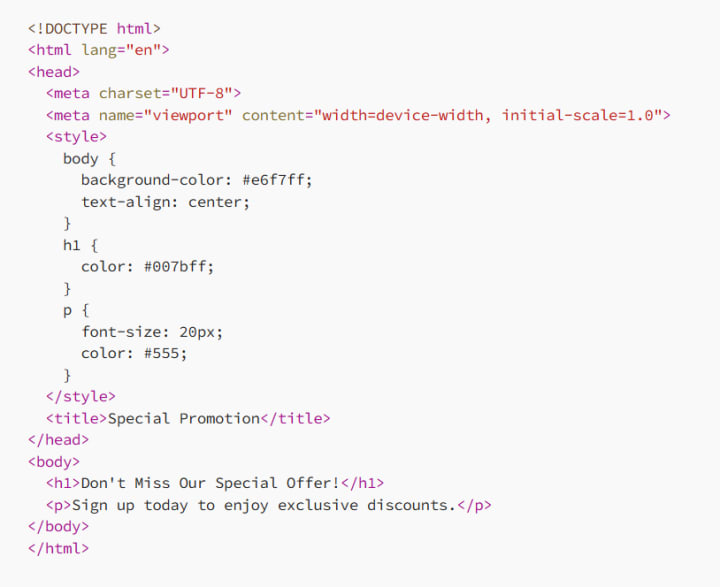
Here, internal CSS is used to style the entire promotion page, making it cohesive and visually appealing. However, if you plan to reuse these styles on other pages, you’ll need to copy the entire <style> block each time.
3. External CSS: The Professional’s Choice
What Is External CSS?
External CSS involves linking a separate .css file to your HTML documents. This method allows you to maintain a single stylesheet that can be applied across multiple pages, making your code cleaner, more modular, and easier to manage. Here’s how you link an external CSS file:
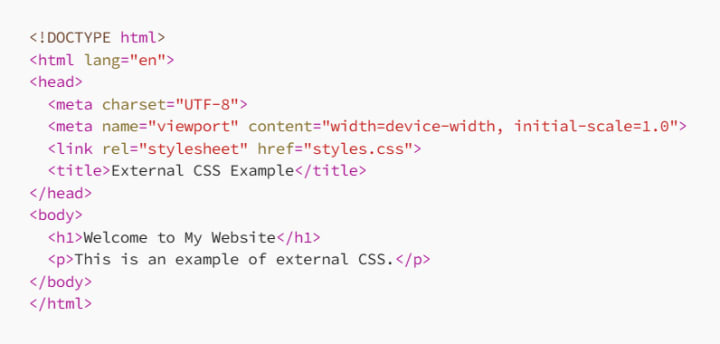
And here’s what the styles.css file might look like:
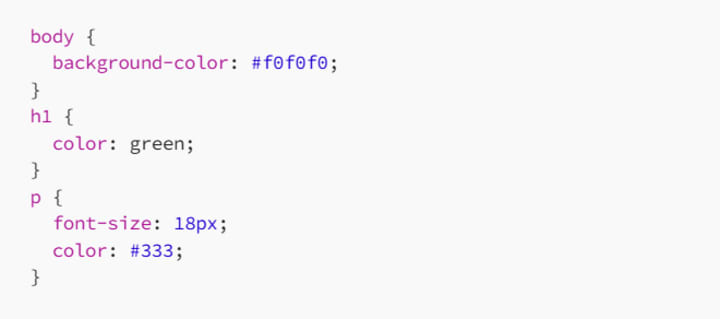
When to Use External CSS
External CSS is the preferred method for larger projects, multi-page websites, or any situation where you need to apply consistent styles across multiple HTML documents. It’s also essential for collaboration, as it allows developers to work on the CSS file independently of the HTML.
Advantages of External CSS
- Reusability: One stylesheet can be linked to multiple HTML documents, reducing duplication and ensuring consistency across your site.
- Maintenance: Updating your styles is as easy as editing one file, and the changes are instantly reflected across all linked pages.
- Performance: Browsers cache external CSS files, meaning once the file is loaded, it doesn’t need to be downloaded again, speeding up subsequent page loads.
Practical Example of External CSS
Suppose you’re working on a website with multiple pages, such as a blog, a contact page, and an about page. You want all pages to share the same styling for consistency:
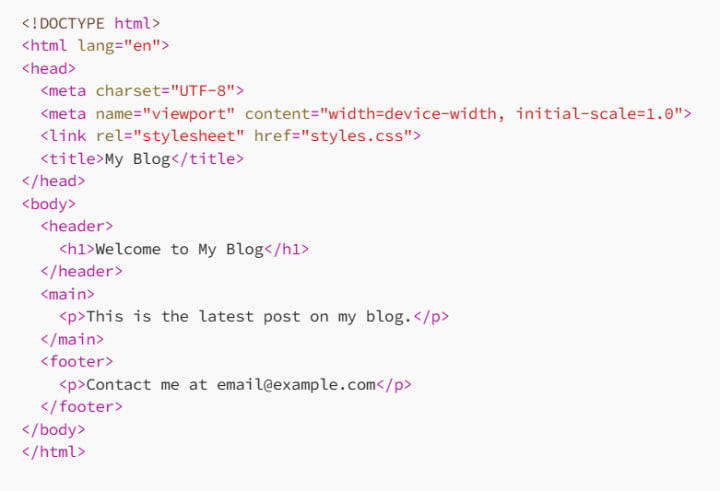
With external CSS, the styles.css file controls the look of your entire website. You only need to edit this single file to change the appearance of all your pages, making it the most efficient and scalable way to apply CSS.
4. CSS Frameworks: Speeding Up Development
What Are CSS Frameworks?
CSS frameworks like Bootstrap, Foundation, and Tailwind CSS are pre-built libraries that provide a collection of CSS styles, components, and utilities. They help speed up development by providing a base of pre-designed elements, such as buttons, forms, and navigation bars, so you don’t have to start from scratch.
When to Use CSS Frameworks
CSS frameworks are perfect when you need to build a website quickly or when you want to ensure that your site is responsive and well-structured without spending hours writing custom CSS. They’re also great for beginners who want to learn best practices in web design.
Advantages of CSS Frameworks
- Consistency: Frameworks provide a consistent design language across all components, ensuring your site looks cohesive.
- Responsiveness: Most frameworks include built-in responsiveness, making it easier to create mobile-friendly designs.
- Community Support: Popular frameworks have extensive documentation and large communities, making it easier to find help and resources.
Practical Example Using Bootstrap
Here’s an example of using Bootstrap, one of the most popular CSS frameworks:
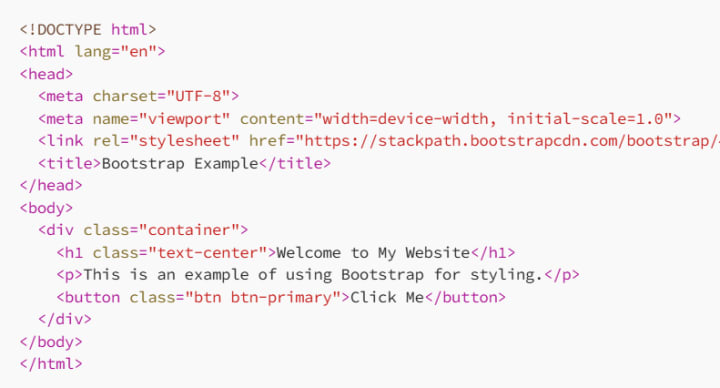
With just a few classes provided by Bootstrap, you can create a responsive and visually appealing web page in minutes.
Conclusion: Choosing the Right CSS Method
Understanding the different ways to apply CSS is key to building efficient, maintainable, and scalable web projects. Whether you’re making quick changes with inline CSS, styling a single document with internal CSS, managing a multi-page site with external CSS, or speeding up your workflow with a CSS framework, each method has its place in the web developer’s toolkit.
As you continue to develop your CSS skills, you’ll learn when to use each method to your advantage. So experiment, practice, and find the approach that works best for you and your projects. By mastering the various ways to apply CSS, you’ll be well on your way to creating beautiful, functional, and user-friendly websites.
About the Creator
MariosDev
Hi, I’m Marios! I’ve been a developer for over 9 years, crafting cool stuff and solving tricky tech puzzles. I’m a total tech enthusiast and love sharing my thoughts and tips through blogging. Also, in love with my bike!
How a Local Exterminator Handles Rodent Infestations: Complete Rodent Control Guide
Rodent infestations are a common problem in both homes and businesses. Mice and rats can enter buildings through very small openings, contaminate food, damage property, and spread harmful diseases. Because rodents reproduce quickly, even a small problem can grow into a serious infestation in a short time. This is why professional rodent control is essential for protecting your property and health.
By Jamal Moore2 days ago in 01



Comments (1)
Inline CSS is great for quick fixes, like when I'm debugging. But it's not ideal for big projects. It gets messy with repetition. How do you think we can balance using inline CSS for small changes while keeping the code clean for larger sites? Also, I wonder if there are better ways to handle HTML emails without relying too much on inline CSS. And separating concerns is super important. What are some practical ways to avoid mixing content and presentation when using CSS?