
How CSS Works with HTML
If you’ve dipped your toes into web development, you’ve likely encountered HTML (HyperText Markup Language) and CSS (Cascading Style Sheets).

If you’ve dipped your toes into web development, you’ve likely encountered HTML (HyperText Markup Language) and CSS (Cascading Style Sheets). These two technologies are the bread and butter of web design, working together to create everything from simple blogs to complex, interactive websites. While HTML provides the structure and content, CSS is the style artist that transforms this raw structure into something visually appealing and user-friendly. In this article, we’ll explore how CSS and HTML work together, why their relationship is crucial, and how you can leverage both to create stunning web pages.
Understanding the Role of HTML: The Foundation of the Web
Before we dive into how CSS interacts with HTML, it’s essential to understand the role of HTML itself. HTML is the skeleton of your web page. It defines the structure and content by using elements like headings, paragraphs, images, links, and forms. Think of HTML as the blueprint of a building. It lays out where everything should go, but without CSS, it would look bare and unstyled — just like a blueprint isn’t the final appearance of a building.
Each HTML element has a specific purpose. For example:
- <h1> to <h6> tags represent headings, with <h1> being the most important.
- <p> tags define paragraphs of text.
- <img> tags embed images.
- <a> tags create hyperlinks.
- <div> and <span> tags are used for grouping elements together and applying styles, though they don't add any semantic meaning on their own.
HTML is crucial because it gives meaning to the content. It tells the browser what each piece of content is supposed to be, but it doesn’t dictate how that content should look. That’s where CSS comes in.
The Role of CSS: Bringing HTML to Life
While HTML lays the groundwork, CSS breathes life into your web pages. CSS allows you to take that structured content and make it visually appealing. It’s like the interior design of a house, where you choose the colors, arrange the furniture, and add decorations. Without CSS, every website would look like a basic, unstyled document — functional, but not engaging or attractive.
CSS works by applying styles to HTML elements. You can control almost every aspect of how an element appears, including its size, color, spacing, positioning, and even animations. With CSS, you can create responsive designs that adapt to different screen sizes, making your website look great on both desktops and mobile devices.
The Basic Syntax of CSS
To understand how CSS works with HTML, you need to know how CSS is structured. A CSS rule set consists of a selector and a declaration block.
1. Selectors
Selectors specify which HTML elements you want to style. There are different types of selectors:
- Element Selector: Targets all instances of a specific HTML element. For example, p selects all paragraph elements.
- Class Selector: Targets elements with a specific class attribute. It’s indicated by a dot (.). For example, .highlight would select all elements with the class “highlight.”
- ID Selector: Targets a single element with a specific ID attribute. It’s indicated by a hash (#). For example, #header would select the element with the ID “header.”
2. Declarations
Declarations define what you want to do with the selected elements. A declaration consists of a property and a value. The property is what you want to change (like color or margin), and the value is what you want to change it to (like red or 10px).
Here’s an example of a basic CSS rule:

This rule selects all <p> elements (paragraphs) and styles them with blue text and a font size of 16 pixels.
How CSS is Integrated with HTML
To bring CSS into your HTML document, you have a few different options. Let’s look at each method and its use case.
1. Inline CSS
Inline CSS is applied directly to HTML elements using the style attribute. This method is quick and easy for applying specific styles to individual elements. However, it’s not ideal for maintaining a large website because it mixes content with presentation.
Here’s an example of inline CSS:

While this method is straightforward, it’s best used sparingly, as it can make your HTML code harder to read and maintain.
2. Internal CSS
Internal CSS is defined within a <style> tag in the <head> section of your HTML document. This method is useful when you want to apply styles to a single HTML document without affecting others.
Here’s an example of internal CSS:
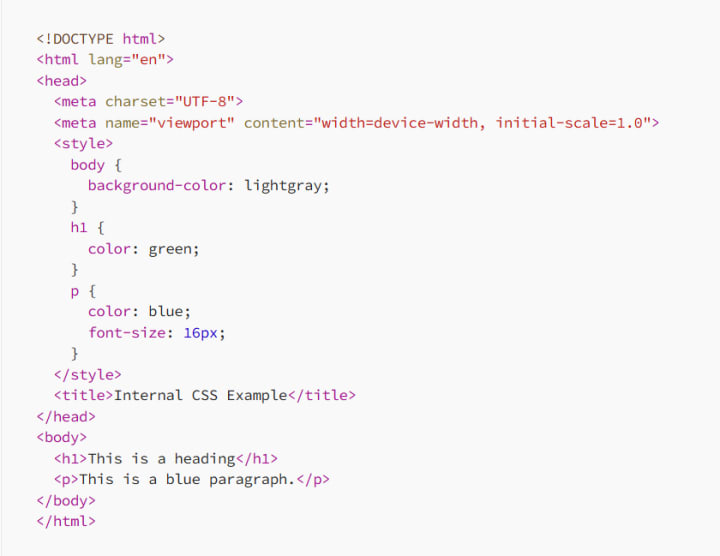
Internal CSS is more efficient than inline CSS when you need to style multiple elements but is still confined to a single HTML document.
3. External CSS
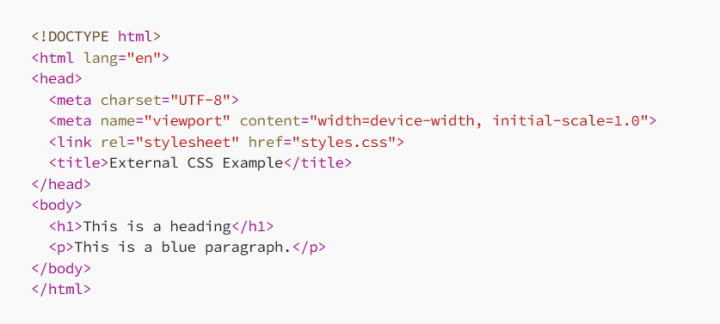
External CSS is the most powerful and widely used method. It involves creating a separate .css file that contains all your styles and linking it to your HTML documents. This approach allows you to use the same stylesheet across multiple HTML files, making your code more modular and easier to maintain.
Here’s how you link an external CSS file:
And here’s what your styles.css file might look like:
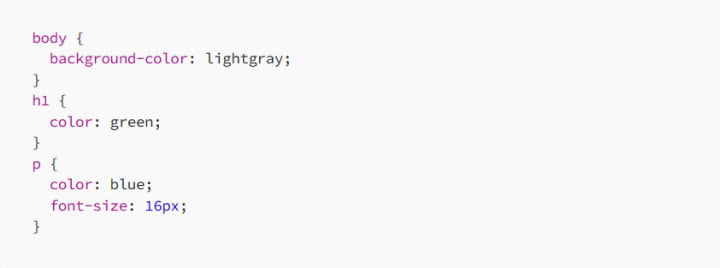
By separating the content (HTML) from the presentation (CSS), external CSS makes your web design process more efficient, especially as your website grows in complexity.
This article is part of a free full CSS Course: Beginner to Expert
The Cascade in CSS: Understanding How Styles Are Applied
The “Cascading” part of Cascading Style Sheets isn’t just a fancy name; it’s a fundamental concept of how CSS works. The cascade refers to the order in which styles are applied to an HTML element, and understanding this will help you write more effective CSS.
1. Importance of Source Order
When multiple styles are applied to an element, the order in which they appear matters. CSS is read from top to bottom, so if two conflicting styles apply to the same element, the one that appears last in the CSS file will take precedence. For example:

In this case, all paragraphs will be red because the second rule overrides the first.
2. Specificity: Deciding Which Rule Wins
CSS uses a concept called specificity to determine which styles apply when there are conflicting rules. Specificity is calculated based on the types of selectors used:
- An element selector (e.g., p) has the lowest specificity.
- A class selector (e.g., .highlight) has higher specificity.
- An ID selector (e.g., #header) has the highest specificity.
For example, if you have the following CSS:
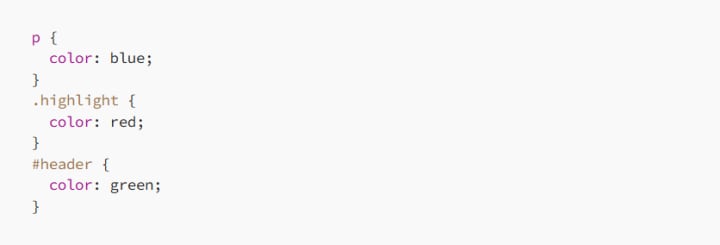
A paragraph with both the highlight class and header ID will be green because the ID selector has the highest specificity.
3. Inheritance: Passing Down Styles
Certain CSS properties are inherited from parent elements by their children. For example, if you set the color property on the <body> element, all text within that body will inherit that color unless otherwise specified.
Here’s an example:
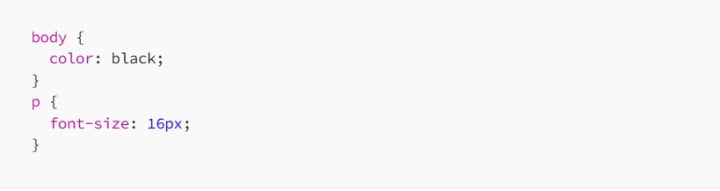
In this case, all text inside the <body> will be black, including the text in paragraphs. The paragraphs will also have a font size of 16 pixels.
4. The !important Rule: Overriding Everything
If you absolutely need a style to take precedence over all others, you can use the !important rule. However, this should be used sparingly as it can make your CSS difficult to manage.

In this case, the paragraph text will be blue no matter what other styles are applied.
Practical Examples of CSS and HTML Working Together
To see how CSS and HTML work together in a real-world context, let’s explore a couple of examples.
1. Styling a Simple Web Page
Suppose you have a basic HTML page with a heading, a paragraph, and a button. Here’s the HTML:
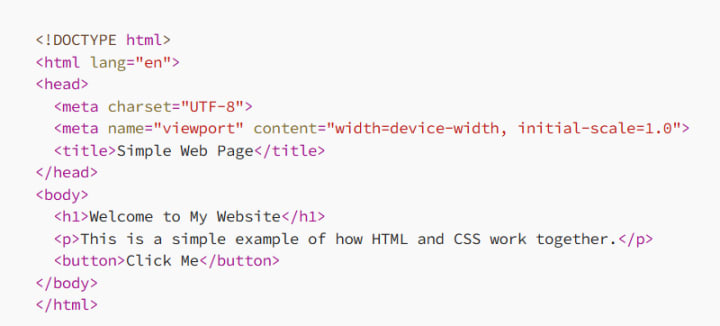
With CSS, you can style this page to make it more visually appealing:
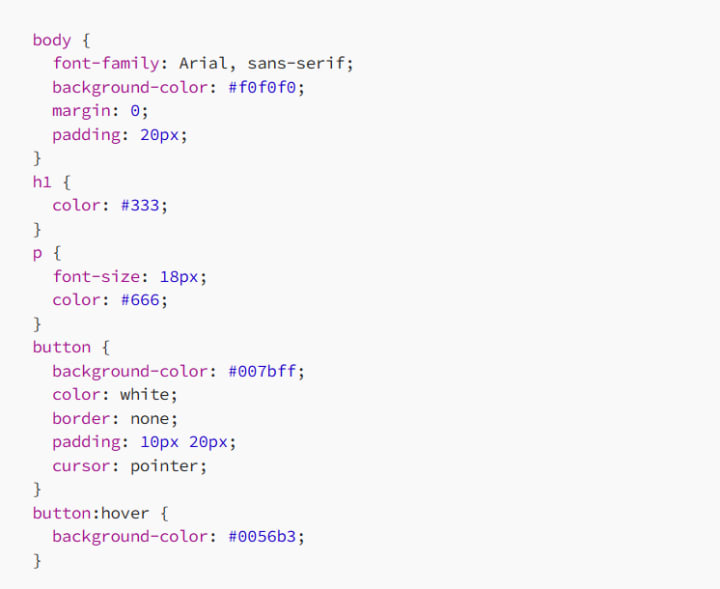
Now, your web page looks modern and inviting, with a clear, readable font, contrasting colors, and a button that changes color when hovered over. All of this was achieved by layering CSS styles on top of the HTML structure.
2. Creating a Responsive Layout
Let’s take it a step further and create a responsive layout that adjusts based on the screen size. Here’s a simple HTML structure:
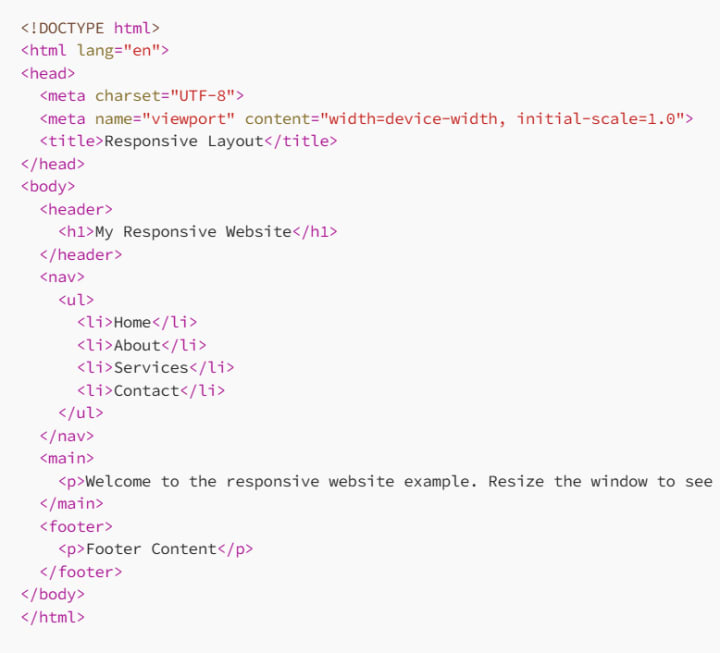
With CSS, you can make this layout responsive:
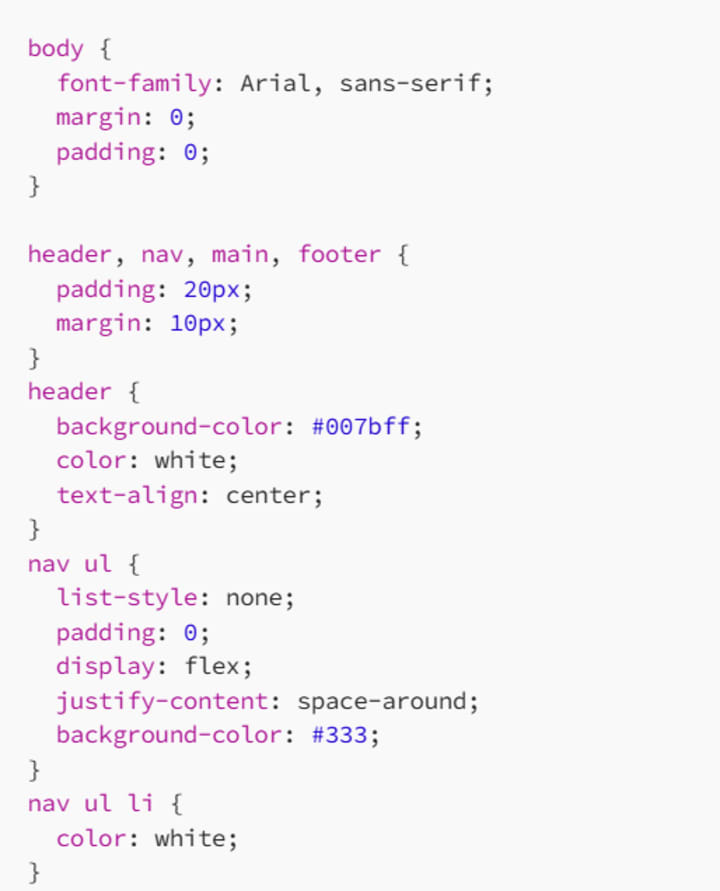
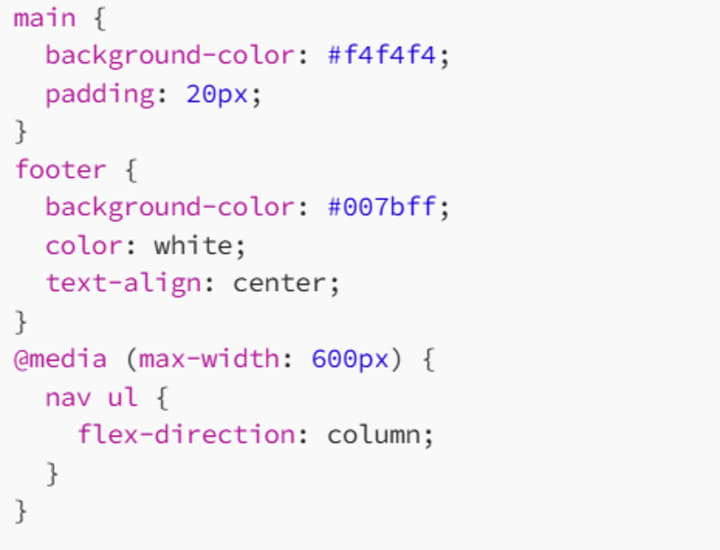
With this CSS, your layout will adapt when viewed on a smaller screen, such as a mobile device. The navigation menu will change from a horizontal layout to a vertical one, ensuring a better user experience across different devices.
This article is part of a free full CSS Course: Beginner to Expert
Conclusion: The Power of CSS and HTML Together
CSS and HTML are a dynamic duo that forms the foundation of web design. While HTML provides the structure and content of your web pages, CSS brings that content to life with style, color, and layout. By understanding how these two technologies work together, you can create websites that are not only functional but also visually appealing and user-friendly.
Whether you’re just starting with web development or looking to enhance your skills, mastering the interaction between CSS and HTML is key to creating beautiful, responsive, and maintainable websites. So go ahead, experiment with different styles, and see how you can transform your HTML structures into works of art with the power of CSS!
About the Creator
MariosDev
Hi, I’m Marios! I’ve been a developer for over 9 years, crafting cool stuff and solving tricky tech puzzles. I’m a total tech enthusiast and love sharing my thoughts and tips through blogging. Also, in love with my bike!
Hidden App Development Costs St Louis Owners Miss
The initial quote for a digital project often feels like the finish line. However, for experienced founders, it is merely the starting block. In the current market, a common disconnect exists. This is especially true within the Midwest tech corridors. Owners often miss the link between the sticker price and ownership costs.
By Devin Rosario3 days ago in 01
The Ultimate Guide to Choosing the Best Greenhouse Kits in Canada
Gardening in Canada can be challenging due to long winters and unpredictable weather. However, using a greenhouse allows gardeners to extend their growing season and protect plants from harsh conditions. Whether you're a hobby gardener or a serious grower, investing in a greenhouse for sale can transform the way you grow vegetables, herbs, and flowers.
By charliesamuel4 days ago in 01




Comments
There are no comments for this story
Be the first to respond and start the conversation.