
Using Web Fonts — Typography Without Limits
This article is part of a free full CSS Course: Beginner to Expert


Typography is the voice of your website. It tells your visitors if you’re sleek and modern, playful and bold, or professional and elegant. But how do you go beyond the basic, overused fonts like Arial, Times New Roman, and Comic Sans? Enter web fonts.
Here you will find a full free course of CSS
Web fonts empower you to break free from the shackles of “safe” fonts and bring personality and flair to your designs. Let’s dive into what web fonts are, how to use them, and some best practices to keep your site looking sharp and loading fast.
1. What Are Web Fonts?
Web fonts are fonts that are downloaded from the web and rendered by the browser. Unlike system fonts (which are pre-installed on the user’s device), web fonts are hosted online and can be accessed by any device with an internet connection.
This means you’re no longer limited to the fonts installed on your visitors’ devices. You can choose from thousands of beautiful fonts to match your brand and style.
1.1 Popular Web Font Services
There are several services that provide a vast collection of web fonts:
- Google Fonts: Free, easy to use, and with an extensive library.
- Adobe Fonts: A premium option with high-quality typefaces.
- Fonts.com and Typekit: Other premium services with unique selections.
1.2 Why Use Web Fonts?
- Creative Freedom: Access a variety of styles and weights to elevate your designs.
- Consistency: Web fonts ensure your typography looks the same across devices.
- Brand Identity: Unique fonts help you stand out and build a recognizable brand.
2. How to Use Web Fonts in CSS
Using web fonts in CSS is straightforward. You’ll generally follow these steps:
Choose a Font: Pick a web font from a provider like Google Fonts.
Embed the Font: Add a link or @font-face rule in your CSS to load the font.
Apply the Font: Use the font-family property to style your text.
2.1 Adding Web Fonts via Google Fonts
Let’s use Google Fonts as an example. Suppose you want to use the font Lato.
Step 1: Include the Font in Your HTML
Go to Google Fonts, select Lato, and copy the embed link. Add it to your HTML <head>:
<link href="https://fonts.googleapis.com/css2?family=Lato:wght@400;700&display=swap" rel="stylesheet">
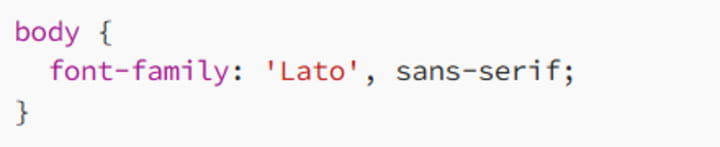
Step 2: Apply the Font in CSS
Now you can style elements with the font-family property:
2.2 Using the @font-face Rule
For more customization or self-hosted fonts, use the @font-face rule. This method lets you load fonts directly from your server.
Example
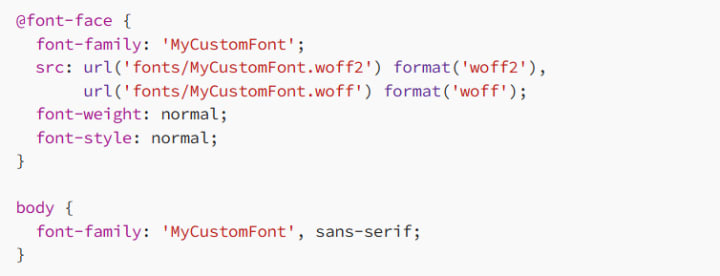
Here, you upload the font files to your server and reference them in your CSS.
3. Best Practices for Using Web Fonts
While web fonts offer creative freedom, they can also affect your site’s performance. Here are some tips to balance design and speed:
3.1 Limit the Number of Fonts
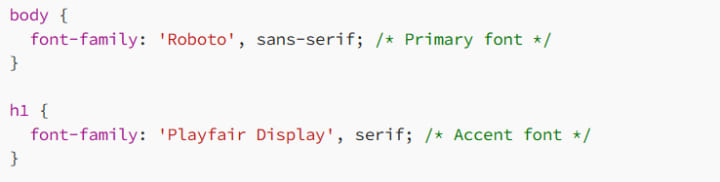
Using too many fonts can slow down your website. Stick to two to three font families at most. For example:
3.2 Use Variable Fonts
Variable fonts are like having multiple font styles in one file. Instead of downloading separate files for different weights (e.g., bold, italic), you can load a single variable font and adjust its properties in CSS.
Example:

3.3 Optimize Loading with font-display
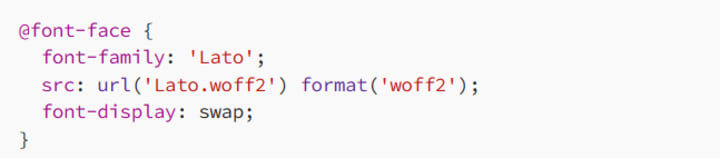
The font-display property controls how text is displayed while the font is loading.
- swap: Displays fallback text until the web font loads.
- block: Hides the text until the font is fully loaded.
- fallback: Displays fallback text if the font takes too long to load.
Example:
3.4 Use Fallback Fonts
Always specify fallback fonts in case the web font fails to load.

In this example, the browser will use Arial if Lato fails.
3.5 Test Your Fonts
Typography looks different across devices and browsers. Always test your fonts for readability and style consistency.
4. Responsive Typography with Web Fonts
Web fonts work beautifully with responsive designs. Use relative units and media queries to ensure your text looks great on all screen sizes.
Example
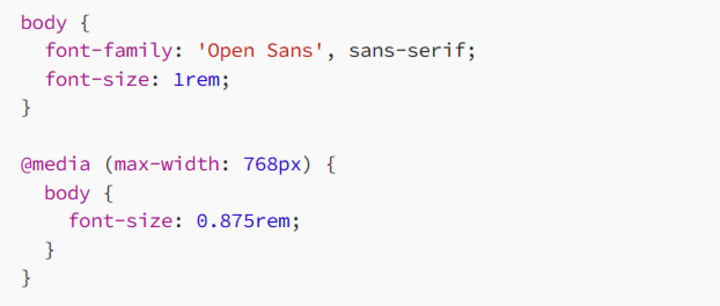
This example adjusts the font size for smaller screens to maintain readability.
5. Tools for Web Fonts
Here are some handy tools to level up your web typography:
- Google Fonts: Free fonts with customizable weights and styles.
- Font Squirrel: Downloadable web fonts, including kits for self-hosting.
- WhatFont Tool: Browser extension to identify fonts used on any website.
6. Common Pitfalls to Avoid
6.1 Ignoring Performance
Heavy font files can slow down your site. Always optimize and preload fonts where possible.
Example
<link rel="preload" href="fonts/Lato.woff2" as="font" type="font/woff2" crossorigin="anonymous">
This ensures fonts are loaded early for faster rendering.
6.2 Poor Fallback Choices
Fallback fonts should match the style and spacing of your web font as closely as possible to prevent layout shifts.
7. Conclusion: Unleash Your Typography Potential
Web fonts are a game-changer in modern web design. They give you the creative freedom to craft unique, engaging typography that aligns perfectly with your brand. By following best practices like optimizing loading times, using fallbacks, and limiting the number of fonts, you can create designs that are both beautiful and fast.
So, go ahead — ditch the default fonts and explore the endless possibilities of web fonts. Your site’s typography deserves it!
Happy styling, and remember: a great font is like a great outfit — it sets the tone and steals the show!
About the Creator
MariosDev
Hi, I’m Marios! I’ve been a developer for over 9 years, crafting cool stuff and solving tricky tech puzzles. I’m a total tech enthusiast and love sharing my thoughts and tips through blogging. Also, in love with my bike!
Why Specialized Pediatric EMR Systems Are Becoming Essential
Digital health technology is transforming healthcare systems worldwide, but pediatric care presents a unique set of challenges. From growth tracking and vaccination schedules to age-specific medication dosing, pediatricians need tools that are designed specifically for children rather than adapted from adult healthcare systems. As healthcare providers increasingly adopt digital solutions, specialized systems are becoming essential for efficient pediatric care.
By Steve Waugh5 days ago in 01




Comments
There are no comments for this story
Be the first to respond and start the conversation.