
Text Decoration and Transformation — Stylize Your Text Like a Pro
This article is part of a free full CSS Course: Beginner to Expert


When it comes to text, the devil is in the details. Sure, fonts, sizes, and colors get all the attention, but let’s not forget about the unsung heroes: text decoration and text transformation. These properties give you the power to tweak, enhance, and completely change how your text looks and feels.
In this article, we’ll dive into the essentials of text decoration and transformation. From underlines to uppercase conversions, we’ll cover how to use these properties effectively to create polished and professional designs.
1. What Are Text Decoration and Text Transformation?
Before we jump into code, let’s define these two properties:
Text Decoration: This property allows you to apply effects to your text, such as underlines, line-throughs, and overlines. Think of it as accessorizing your text to make it stand out or fit a specific style.
Text Transformation: This property changes the casing of your text (uppercase, lowercase, or capitalized). It’s like giving your text a quick wardrobe change!
Together, these tools can elevate your typography game from plain to eye-catching.
2. Text Decoration: Adding Flair to Your Text
The text-decoration property lets you style your text with effects like underlines, overlines, strikethroughs, or none at all.
2.1 Syntax of Text Decoration
Here’s the basic syntax:
- text-decoration: value;
- Values include:
- none: Removes any existing decoration.
- underline: Adds a line beneath the text.
- overline: Adds a line above the text.
- line-through: Strikes through the text.
- blink: Makes the text blink (not widely supported).
2.2 Examples of Text Decoration
Underlined Text

This is perfect for adding emphasis or creating traditional hyperlink styling.
Strikethrough Text

Use this for indicating something outdated or unavailable, like pricing in sales banners.
Removing All Decoration

This is often used to style links without underlining them. Pair it with hover effects to keep links visually clear.
2.3 Text Decoration Styling
With the text-decoration-style and text-decoration-color properties, you can fine-tune the look of your decoration.
Styling Underlines
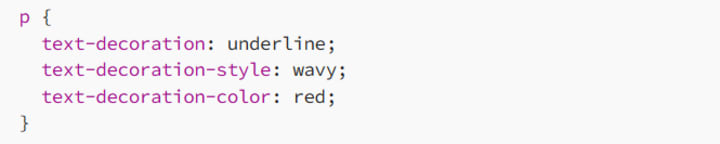
This adds a wavy red underline, great for creative or playful designs.
2.4 Use Cases for Text Decoration
Links: Underlines are the classic indicator of clickable text.
Error Messages: Use color and underline styles to highlight errors or warnings.
Crossed-out Pricing: Strikethroughs are essential for showing discounts.
3. Text Transformation: Changing Text Case
The text-transform property is your go-to tool for changing the casing of your text without altering the original HTML.
3.1 Syntax of Text Transformation
Here’s how it works:
text-transform: value;
Values include:
- none: Leaves the text as is (default).
- uppercase: Converts all letters to uppercase.
- lowercase: Converts all letters to lowercase.
- capitalize: Capitalizes the first letter of each word.
3.2 Examples of Text Transformation
Uppercase Headlines

This styling is bold and impactful, perfect for headlines or titles.
Capitalized Menu Items

This gives menu items a polished look by capitalizing the first letter of each word.
Lowercase Subheadings

This creates a more minimalist and modern feel, often used in avant-garde designs.
3.3 When to Use Text Transformation
- Consistency: Use text-transform to maintain consistent styling across your site, regardless of how the text is written in your HTML.
- Emphasis: Uppercase and capitalize are great for drawing attention to headlines or buttons.
- Aesthetic: Lowercase can add a sleek, understated look.
4. Combining Text Decoration and Transformation
Here’s where the magic happens! By combining these two properties, you can create truly dynamic text styles.
Example: Styled Navigation Links
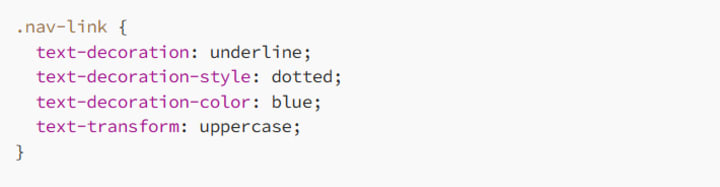
This creates bold, uppercase navigation links with dotted blue underlines — a unique and modern twist.
Example: Highlighted Error Message
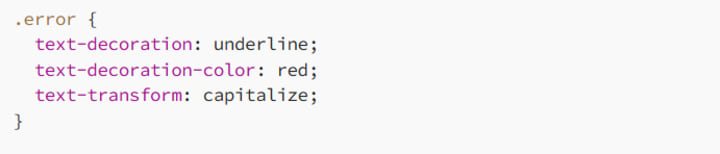
This style is perfect for drawing attention to error messages, making them stand out.
5. Responsive Design and Accessibility
Text decoration and transformation aren’t just about style — they’re also about functionality. Let’s ensure your designs are user-friendly and accessible.
5.1 Responsive Adjustments
On smaller screens, text styling needs to adapt to fit the layout.
Example: Simplify Decorations on Mobile

This removes unnecessary decorations and adjusts text casing for better readability on small devices.
5.2 Accessibility Tips
Don’t Rely on Decoration Alone: Underlines and strikethroughs should be paired with other visual indicators for users with visual impairments.
Maintain Readability: Avoid overly decorative styles that make text hard to read, especially for body text.
6. Best Practices for Text Decoration and Transformation
6.1 Keep It Subtle
While decorations and transformations can be eye-catching, don’t overdo them. Excessive styling can make your design feel cluttered.
6.2 Match the Tone
Choose styles that fit your website’s tone. For example:
Use wavy or dotted underlines for playful designs.
Use uppercase transformations for bold, authoritative text.
6.3 Test Across Devices
Make sure your text styles look good on various screen sizes and resolutions. Responsive testing is key!
7. Conclusion: Text That Shines
Text decoration and text transformation may seem like small details, but they have a big impact on how your content is perceived. Whether you’re adding a subtle underline or shouting your headlines in uppercase, these tools help bring your typography to life.
So go ahead, experiment with styles, and make your text not just readable, but memorable!
Happy styling, and remember: great design lives in the details. Make every line and letter count!
About the Creator
MariosDev
Hi, I’m Marios! I’ve been a developer for over 9 years, crafting cool stuff and solving tricky tech puzzles. I’m a total tech enthusiast and love sharing my thoughts and tips through blogging. Also, in love with my bike!
ICO Marketing Explained: A Beginner’s Roadmap for 2026
The blockchain industry continues to evolve rapidly, and Initial Coin Offerings (ICOs) remain one of the most powerful fundraising mechanisms for blockchain startups and Web3 projects. Even though the crypto market has matured significantly over the past decade, ICOs in 2026 are experiencing a resurgence due to improved regulatory clarity, stronger investor protection frameworks, and advanced marketing technologies that help projects reach a global audience. However, launching a successful ICO is not just about developing a great blockchain product; it requires a well-structured marketing strategy that builds trust, generates awareness, and attracts the right investors. ICO marketing has transformed dramatically compared to the early days of crypto fundraising. In the past, many projects relied on hype and aggressive promotion to raise funds, but today's investors are far more informed and cautious. They expect transparency, detailed roadmaps, credible teams, and strong community engagement before investing in a token sale. As a result, ICO marketing in 2026 focuses on strategic storytelling, community building, influencer collaborations, data-driven campaigns, and regulatory compliance.
By Jack santo5 days ago in 01




Comments
There are no comments for this story
Be the first to respond and start the conversation.