
Understanding Color in CSS — Make Your Web Designs Pop
This article is part of a free full CSS Course: Beginner to Expert


Color is one of the most powerful tools in your design arsenal. It grabs attention, sets the mood, and guides users through your website. But with great power comes great responsibility. Misusing color can lead to inaccessible designs, clashing aesthetics, or a website that looks like it’s stuck in the early 2000s.
In this article, we’ll explore the fundamentals of color in CSS, covering everything from syntax to accessibility tips. By the end, you’ll wield the power of color like a pro!
1. Why Is Color Important in CSS?
Colors do more than just make your website look pretty. They influence how users perceive and interact with your content.
- Branding: Colors create a visual identity for your brand (think Facebook blue or Coca-Cola red).
- Emotion: Warm tones evoke energy and passion, while cool tones feel calm and trustworthy.
- Accessibility: Thoughtful color choices ensure everyone, including users with color blindness, can navigate your site.
CSS gives you the tools to control colors with precision, but you need to know how to use them effectively.
2. The Basics: How to Set Colors in CSS
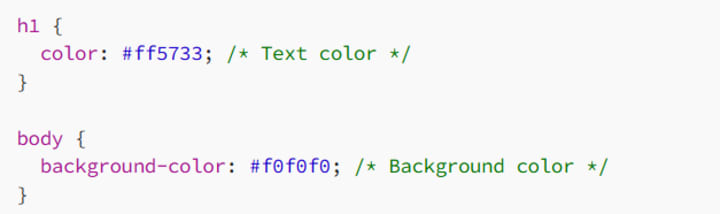
In CSS, you can apply colors to almost anything: text, backgrounds, borders, shadows — you name it. The color and background-color properties are your bread and butter.
Example
3. CSS Color Formats
CSS supports multiple ways to define colors. Let’s explore each one.
3.1 Hexadecimal (Hex)
Hex codes are a six-digit representation of colors in the format #RRGGBB. Each pair represents the intensity of red, green, and blue (RGB), with values ranging from 00 to FF.
Example

You can also use shorthand, like #FFF for white.
3.2 RGB and RGBA
The rgb() function lets you define colors using red, green, and blue values between 0 and 255. rgba() adds an alpha channel for transparency.
Example

3.3 HSL and HSLA
The hsl() function represents colors using hue, saturation, and lightness. hsla() adds an alpha channel for transparency.
- Hue: The color’s position on the color wheel (0–360°).
- Saturation: Intensity of the color (0% = grayscale, 100% = full color).
- Lightness: Brightness of the color (0% = black, 100% = white).
Example

3.4 Named Colors
CSS comes with 140 predefined color names like red, blue, goldenrod, and tomato.
Example

It’s simple, but for professional designs, stick to more precise formats.
3.5 CSS Variables for Colors
For consistent and reusable color schemes, use CSS custom properties:
Example

This approach makes your code clean and easy to update.
4. Applying Colors to Your Designs
Colors can be used for more than just text and backgrounds. Let’s explore some creative applications.
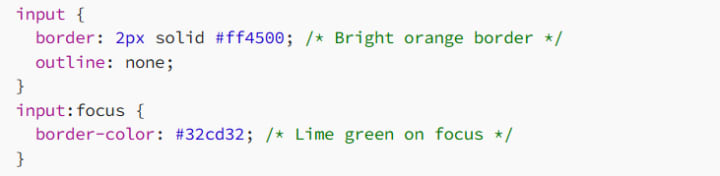
4.1 Borders and Outlines
Add colorful borders to emphasize elements:
4.2 Gradients
Gradients are smooth transitions between two or more colors. Use the linear-gradient or radial-gradient functions for stunning effects.
Example

4.3 Shadows
Add depth with colorful shadows using the box-shadow or text-shadow properties.
Example

5. Accessibility and Color Contrast
Designing with color isn’t just about aesthetics — it’s also about usability. Many users rely on good contrast to read and interact with your site.
5.1 Contrast Ratios
The Web Content Accessibility Guidelines (WCAG) recommend a contrast ratio of at least:
4.5:1 for normal text.
3:1 for large text.
Use tools like WebAIM Contrast Checker to ensure your colors meet these standards.
5.2 Avoiding Color-Only Indicators
Never rely solely on color to convey important information. Pair colors with text or icons for clarity.
Bad Example

Good Example

6. Tips for Choosing the Right Colors
Choosing colors can be overwhelming, but these tips will help you nail it:
6.1 Use a Color Scheme
Pick a palette based on your brand’s personality. Tools like Adobe Color or Coolors make it easy to generate harmonious color schemes.
6.2 Follow the 60–30–10 Rule
Distribute colors like this:
60%: Primary color (e.g., backgrounds).
30%: Secondary color (e.g., headers, buttons).
10%: Accent color (e.g., highlights, call-to-actions).
6.3 Test on Real Screens
Colors look different on different devices. Always test your designs on multiple screens for consistency.
7. Conclusion: Color Your World
Understanding and using color in CSS is more than just picking your favorite hues. It’s about creating designs that are visually appealing, accessible, and aligned with your brand’s identity. By mastering formats like hex, RGB, and HSL, and applying them thoughtfully, you can turn any website into a masterpiece.
So, go forth and add some color to the web — but remember, with great color power comes great design responsibility.
Happy coding, and may your gradients always be smooth!
About the Creator
MariosDev
Hi, I’m Marios! I’ve been a developer for over 9 years, crafting cool stuff and solving tricky tech puzzles. I’m a total tech enthusiast and love sharing my thoughts and tips through blogging. Also, in love with my bike!
How Natural Language Processing in Healthcare Is Turning Clinical Data Into Smarter Care Decisions
Healthcare organizations generate enormous volumes of unstructured data every day. Clinical notes, discharge summaries, lab reports, medical literature, and patient feedback collectively create a massive information ecosystem. Unfortunately, much of this data remains underutilized because it is written in natural language rather than structured formats. This is where natural language processing in healthcare is transforming how healthcare systems interpret and use medical information.
By Steve Waugh2 days ago in 01




Comments (1)
Color is super important in CSS. It's not just for looks; it affects how users interact. I like how you covered different color formats. Hex is handy, but I often use RGB for more control. It's cool to see how transparency works with rgba() and hsla(). How do you decide which format is best for a specific design element? And what about using gradients? That can add some really neat effects.