
Top Chrome Extensions Every SEO Needs in 2025 (Expert Picked & Ranked)
Boost Rankings, Save Time – These Extensions Do It All


Disclaimer: This content was generated using AI.
Introduction
Let’s be honest — most SEO Chrome extensions either overwhelm you with too many features or offer just one solid function that ends up being surprisingly useful.
I’ve tested them all.
From quick keyword tools to in-depth SERP analyzers, redirect checkers to on-page optimizers — I’ve tried dozens over the years. Some earned a permanent place in my browser. Others got the boot within hours.
Here’s the truth: Chrome extensions won’t replace your entire SEO toolkit, but they’ll make your workflow faster and smarter — especially when you’re juggling research, writing, and audits in real time.
Here’s a curated list of the most useful SEO Chrome extensions for 2025.
🔍 Quick Comparison Table
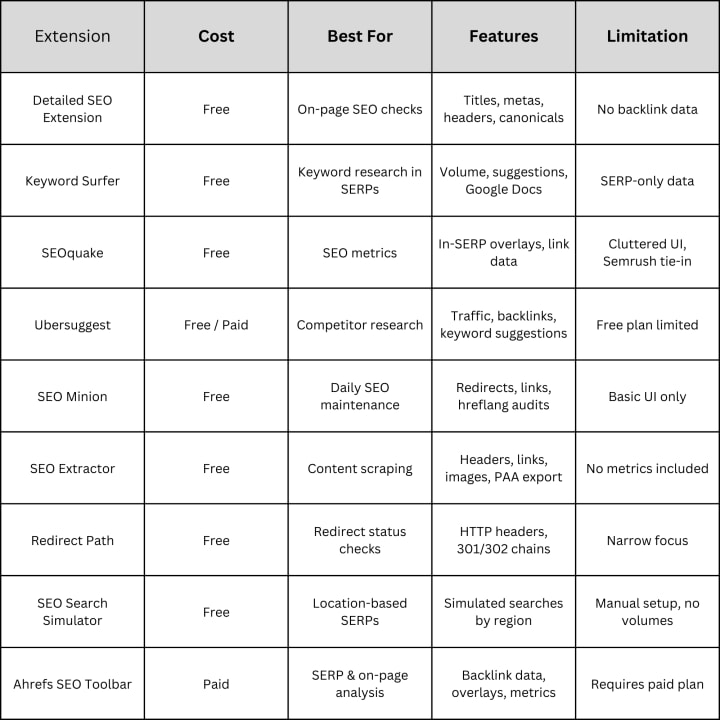
1. Detailed SEO Extension – Best for Fast On-Page Audits
This lightweight extension offers a clean view of key on-page elements. Quickly view page titles, meta descriptions, headers, canonicals, and word counts.
Highlights:
- No clutter
- Great for quick audits
- Loads instantly
Downsides:
- Doesn’t include keyword or link data
Use Case:
Ideal for SEOs and writers who need fast access to core content structure while editing or analyzing live pages.
2. Keyword Surfer – Best for Quick Keyword Insights
Keyword Surfer pulls search volumes, keyword suggestions, and similarity scores directly into your Google results page.
Highlights:
- Free keyword volumes on the fly
- Related terms shown in SERPs
- Google Docs integration for real-time writing
Downsides:
- No deep keyword analysis or historical trends
Use Case:
Perfect for content creators doing fast research or optimizing blog posts.
3. SEOquake – Best for At-a-Glance Metrics
SEOquake by Semrush adds in-depth metrics to search results and web pages. It shows link data, keyword densities, and can export entire SERPs.
Highlights:
- View domain strength and traffic estimates
- Instant overlays on SERPs
Downsides:
- Interface can feel overwhelming
- Requires Semrush for full features
Use Case:
Best for technical SEOs and marketers doing quick competitive reviews.
4. Ubersuggest – Best for Competitive Research
Ubersuggest helps you spy on what’s working for others — including traffic estimates, backlink profiles, and keyword ideas.
Highlights:
- See top-performing pages of any site
- Track keyword opportunities
Downsides:
- Free plan has data limits
Use Case:
Great for beginners analyzing competitors or planning content.
5. SEO Minion – Best for Everyday SEO Tasks
This extension checks broken links, previews SERPs, analyzes hreflang tags, and more — all in one dashboard.
Highlights:
- Multi-use tool for SEO maintenance
- Visual link highlighter (nofollow/dofollow)
Downsides:
- UI feels dated
Use Case:
Ideal for site audits and daily checks before publishing.
6. SEO Extractor – Best for Scraping Data from Pages
If you need to export headings, links, images, or People Also Ask content — this tool does it in a click.
Highlights:
- Clean exports to CSV
- Works across SERPs and individual pages
Downsides:
- No metrics or traffic data
Use Case:
Perfect for competitive analysis or building content briefs.
7. Redirect Path – Best for HTTP Status and Redirect Checks
Redirect Path shows real-time HTTP codes, headers, and redirect chains.
Highlights:
- Instantly spot 301s, 302s, 404s
- Flags redirect issues
Downsides:
- Only does redirects
Use Case:
A must-have for technical SEOs working on migrations.
8. SEO Search Simulator – Best for Testing SERPs by Region
Need to see how a keyword ranks in another city or country? This simulates real search results by location — no VPN needed.
Highlights:
- Simulates SERPs in any country
- Easy UI
Downsides:
- Manual input required
- No search volume data
Use Case:
Great for international SEO and local audits.
9. Ahrefs SEO Toolbar – Best for Full SERP + On-Page Analysis
Ahrefs users will love this toolbar — it overlays keyword difficulty, backlink data, and ranking insights straight into the browser.
Highlights:
- SERP metrics + backlink counts
- URL-level analysis
Downsides:
- Requires paid Ahrefs plan
Use Case:
Perfect for agencies and experienced SEOs who already rely on Ahrefs.
Which Chrome SEO Extensions Should You Use in 2025?
Here’s a quick cheat sheet:
✅ Beginners: Start with Detailed SEO Extension + Keyword Surfer
✅ Writers: Add SEO Minion or SEO Extractor to speed up workflows
✅ Competitor Research: Try Ubersuggest or the Ahrefs Toolbar
✅ Technical Audits: Use Redirect Path + SEOquake
✅ Local SEO: Simulate with SEO Search Simulator
These tools don’t replace platforms like Answer Socrates or Semrush. But when you need instant, browser-based SEO insights, they’re essential.
Install a few. Test them out. Build your SEO stack — right in your browser.
Happy optimizing 🚀
About the Creator
James Oliver
I help entrepreneurs build profitable online businesses. Sharing proven strategies and insights as I grow my own affiliate marketing business to $1M per year.
Keep reading
More stories from James Oliver and writers in 01 and other communities.
Should You Target Zero Search Volume Keywords in 2025? (Full SEO Guide)
Disclaimer: This content was generated using AI. Introduction Zero Search Volume Keywords (ZSVKs) used to be my go-to strategy. They felt like the SEO world's hidden gems—easy to rank for, low competition, and extremely targeted. I loved how they converted well despite showing “0” in keyword tools. But as Google’s ranking systems evolved, the game changed.
By James Oliver9 months ago in 01
How Businesses Actually Choose the Best SEO Services Today?
Most businesses do not begin their SEO search with excitement. They begin with frustration. They have tried agencies that promised rankings without explaining trade-offs. They have paid for reports that looked impressive but changed nothing. By the time they start looking again, the question is no longer who sounds confident. It is who understands consequences.
By Jane Smith6 days ago in 01



Comments (1)
Thank you so much for being transparent about using AI 😊