
The Types of Computer Motherboards: What's The Difference?
You've got questions, we've got answers.

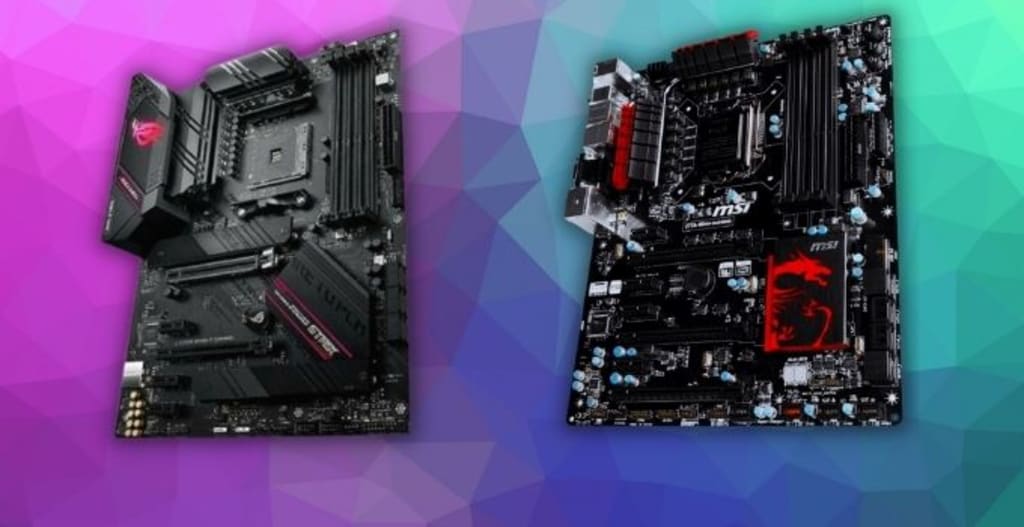
Computer motherboards are an important part of any computer. They provide the connection between the CPU and other types of hardware, such as hard drives and graphics cards.
There are four types of motherboard types that you need to know about: ATX, Mini ITX, Micro ATX, and Flex ATX. Each type is a little different from another in terms of size and features offered
These types of computer motherboards can be broken down into several categories:
- Socket type (CPU)
Socket types refer to the types of CPU that are compatible with a given motherboard, there are multiple socket types and they vary incompatibility with different processors.
Every manufacturer uses its own socket type like Intel motherboards come with LGA sockets like LGA 1155, 1156,1200, etc while AMD uses Socket AM4 in their recent builds.
- Chipset types
Chipsets are responsible for controlling communication between the motherboard's hardware components, including CPU, RAM, video card, etc
- Form factor types - ATX, mATX, ITX etc. & Flexibility required for expansion cards. The most common range is the full-size ATX motherboard range which you'll find in most custom-built home computers, as well as business, builds such as those used with data entry or any kind of office work that requires more than one monitor to be hooked up at a time(multiple video outputs). Motherboards also come in different types depending on how many PCI slots they have available if your biggest need for this component is gaming then make sure it has enough space.
1. What is a motherboard and how does it work?
A motherboard is the main component of a computer. The motherboard contains the CPU, memory slots, ports, and other important computer parts.
The motherboard is responsible for communicating with all of your other components to make sure they are working correctly. If there was no motherboard then everything would be disconnected from each other preventing proper communication between devices.
A motherboard can include many types of hardware including integrated graphics chips, networking cards (wireless or wired), sound card/audio inputs & outputs, etc... which vary depending on what kind of device it's being used in. For example, a regular desktop computer may not need something like an audio input while a server might have this included because you'll be using it to communicate over phone lines or radio waves as part of its function
2. The different types of Computer motherboards
Motherboards are the base of all tech gadgets. In every device, there's a motherboard that determines its shape and size which can be changed easily by you as opposed to other laptops or smartphones for example which would require replacing with something new due in part because they're difficult-to-replace parts!
The most common form factor among manufacturers is ATX (advanced technology extended). Intel introduced this standard back when they first invented PC architecture way back in 1995 so it's still going strong today - meaning if your computer uses one type now then odds will always favor compatibility down through time even if newer models come out later on(keep up with new trends!). There may also exist MicroATX
3. How to choose the right one for your needs?
When choosing a motherboard, the first thing you need to do is identify what types of devices and components your computer will have. Knowing this information allows for finding out which types of connections are necessary on the motherboard.
For example: If you choose a MicroATX board with PCI Express slots, then it's likely that it's not compatible with SLI or CrossFire because those types of graphics cards require an ATX form factor motherboards with specific connectors. However, if your PC needs only one video card, but has multiple SATA drives and a Gigabit Ethernet network controller (or better), you should be looking at ATX-board like ASUS P67 Sabertooth. This model has room for two expansion boards and can accommodate up to six internal hard.
4. Differences in desktop vs laptop motherboards?
Laptops are very different from traditional desktops. They have a smaller footprint, which makes them perfect for people who want to move around with their computer or take it on the go. There are types of desktop motherboards and types of laptop motherboards that make each unique in its own way.
Desktop computers can be upgraded more easily than laptops because they come apart easily while laptops cannot support upgrades as much since all components must remain together for portability purposes. However, if you plan to use your computer mainly at home then upgrading is not necessary but still possible if needed just don't expect to upgrade every time you get a new component. Laptop motherboards often have fewer slots available because everything has been integrated into one single unit instead of having separate components.
Desktop motherboards have been around for a long time and are responsible for some of the biggest technological advances in history such as Internet connections, playing games with friends across countries, converting old text messages into sound using speech synthesizers,
etc., whereas laptop motherboards were created to make laptops smaller and more portable while still being powerful enough to meet the needs of their users.
Conclusion:
Motherboards are the base of all types of computers. Each computer requires a different type of motherboard depending on what it will be used for since each has its own unique needs and specifications.
The types of computer motherboards can vary in size, shape, connection ports available to use, etc., which makes choosing one difficult when there is so much.
About the Creator
Keep reading
More stories from writers in 01 and other communities.
Understanding Car Key Replacement in Modern Cities
Losing access to a vehicle is one of those problems that seems small until it happens. For many people, a car is not a luxury but a daily necessity tied to work, family responsibilities, and personal independence. When a key goes missing or stops functioning, the disruption can be immediate and stressful. This reality has made car key replacement a topic that many drivers only think about once they are forced to deal with it.
By charliesamuel6 days ago in 01



Comments
There are no comments for this story
Be the first to respond and start the conversation.