
The Different Types of SSDs
And Which One To Use In A Custom Build Or Upgrade

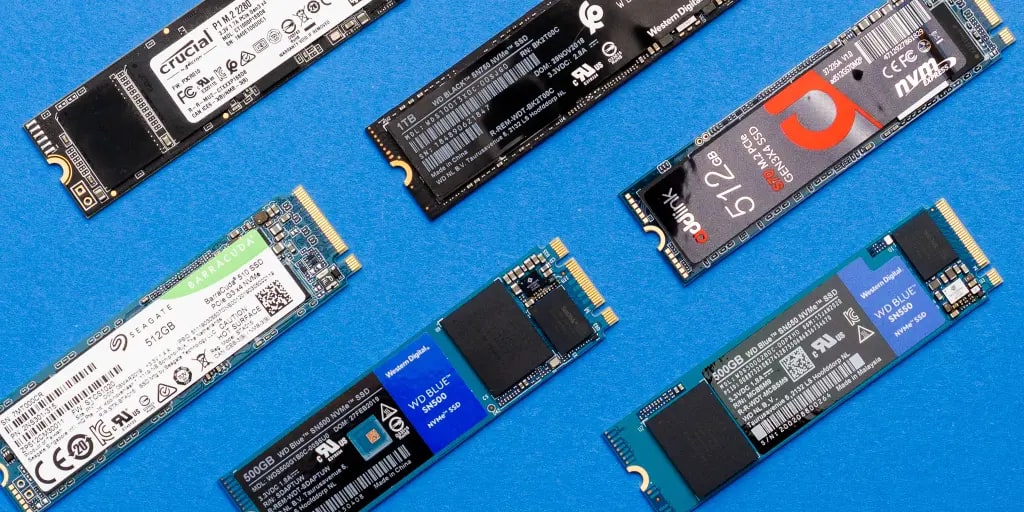
When it comes to Solid State Drives (SSDs), there are various types available in the market. Each type offers specific features and benefits, making it essential to understand their differences and determine which one suits your needs best. In this article, we will explore the different SSD types and guide you in choosing the right one for your requirements.
1. SATA SSDs: The Traditional Choice
SATA (Serial Advanced Technology Attachment) SSDs are the most common and widely used type of solid-state drives. They provide a significant performance boost compared to traditional hard disk drives (HDDs) and are compatible with most computers.
These SSDs utilize the SATA interface, which limits their speed potential due to bandwidth constraints. However, they still offer faster boot times, improved file transfer speeds, and overall snappier system performance compared to HDDs.
2. NVMe SSDs: Unleashing Lightning-Fast Speeds
If you seek even faster performance and have a motherboard that supports it, an NVMe (Non-Volatile Memory Express) SSD is the way to go. NVMe SSDs leverage the PCIe (Peripheral Component Interconnect Express) interface, enabling them to deliver unparalleled data transfer speeds.
With NVMe SSDs, you can experience blazing-fast boot times, near-instantaneous file transfers, and reduced load times in demanding applications. They are ideal for content creators, gamers, and professionals who require superior performance for their work or entertainment.
3. M.2 SSDs: The Compact Powerhouses
M.2 SSDs are a form factor that can use either the SATA or NVMe interface. These SSDs are incredibly compact and fit directly onto the motherboard, eliminating the need for additional cables and connectors.
While M.2 SATA SSDs offer similar performance to traditional SATA SSDs, M.2 NVMe SSDs provide an extra edge due to their faster interface. They are commonly found in high-end laptops and ultrabooks, as well as desktop computers with M.2 slots.
4. PCI Express SSDs: Uncompromising Performance
For users who demand the very best performance, PCI Express (PCIe) SSDs are worth considering. These SSDs connect directly to the PCIe slot on the motherboard, bypassing any SATA or M.2 interfaces that may hinder speed.
PCIe SSDs can deliver mind-boggling transfer rates and ultra-low latency, making them perfect for tasks that require lightning-fast storage access, such as 3D rendering, video editing, or running resource-intensive applications.
CLICK HERE TO FIND ALL SSD TYPES AND MODELS ON AMAZON
Choosing the Right SSD for Your Needs
Now that we have explored the different types of SSDs, let's determine how to choose the right one for your specific needs:
1. Consider Your Use Case
Think about how you will be utilizing your SSD. If you require fast storage for everyday computing tasks, a SATA SSD will suffice. For demanding applications, gaming, or content creation, consider an NVMe or PCIe SSD for optimal performance.
2. Evaluate Compatibility
Ensure that your computer's motherboard supports the chosen SSD interface. NVMe and PCIe SSDs may require a compatible motherboard with the necessary slots or connectors.
3. Determine Your Budget
SSD prices vary based on the type and capacity. Set a budget and choose an SSD that offers the best value for your money while meeting your performance requirements.
4. Consider Future Upgrades
If you plan to upgrade your system in the future, consider investing in a high-performance SSD that will remain relevant for a longer period. This will ensure you can enjoy the benefits of fast storage even after future hardware upgrades.
Conclusion
When it comes to SSDs, understanding the different types and their strengths is crucial in making an informed decision. SATA, NVMe, M.2, and PCIe SSDs each offer unique benefits, catering to various user needs and budgets. Consider your specific requirements, compatibility, budget, and future upgrade plans to select the perfect SSD that will enhance your computing experience.
About the Creator
GlobeTech Gazette
At the Globetech Gazette, we are passionate about providing our readers with a comprehensive platform where they can access the latest tech and travel news, insightful articles, valuable advice, and much more.
Keep reading
More stories from GlobeTech Gazette and writers in 01 and other communities.
From Slow Internet to Missing Files
Tech Problems can be extremely frustrating, especially when it is an issue as common as slow internet. But if you knew how to prevent or fix slow internet it would not bother you that much, if at all, now would it. Technology has become an integral part of our lives, permeating every aspect of society. However, even the most advanced devices and systems encounter problems from time to time. In this article, we will explore some of the most common tech problems people encounter and provide practical solutions to help you troubleshoot and resolve these issues.
By GlobeTech Gazette3 years ago in 01
Digital Detox: Why It Is Becoming Popular in a Hyperconnected World
Digital Detox: Why It Is Becoming Popular in a Hyperconnected World In today’s fast-moving digital age, it is almost impossible to imagine life without smartphones, laptops, and social media. Screens dominate our daily routines from the time we wake up until we go to bed. Notifications, emails, reels, news alerts, and endless scrolling have become a normal part of life. However, a growing number of people are now choosing to step back. This movement is known as a digital detox, and it is becoming increasingly popular across the world.
By Farida Kabir7 days ago in 01




Comments
There are no comments for this story
Be the first to respond and start the conversation.