
The Complete Guide to Recovering Your Snapchat Password (Legitimate Methods & Protection Tips)
Learn legitimate methods to recover your Snapchat password in 2026, essential protection techniques, and how to secure your account against unauthorized access.


Losing access to your Snapchat account can be frustrating and concerning. Whether you've forgotten your password or suspect unauthorized access, this comprehensive guide provides legitimate recovery methods, essential protection strategies, and answers to frequently asked questions. It's crucial to emphasize that hacking into someone else's Snapchat account is illegal and unethical. This article focuses exclusively on legitimate account recovery for your own account and protective measures.
Legitimate Methods to Recover Your Snapchat Password
Official Snapchat Account Recovery
The safest and most reliable method is through Snapchat's official recovery system:
- Password Reset via Email or Phone
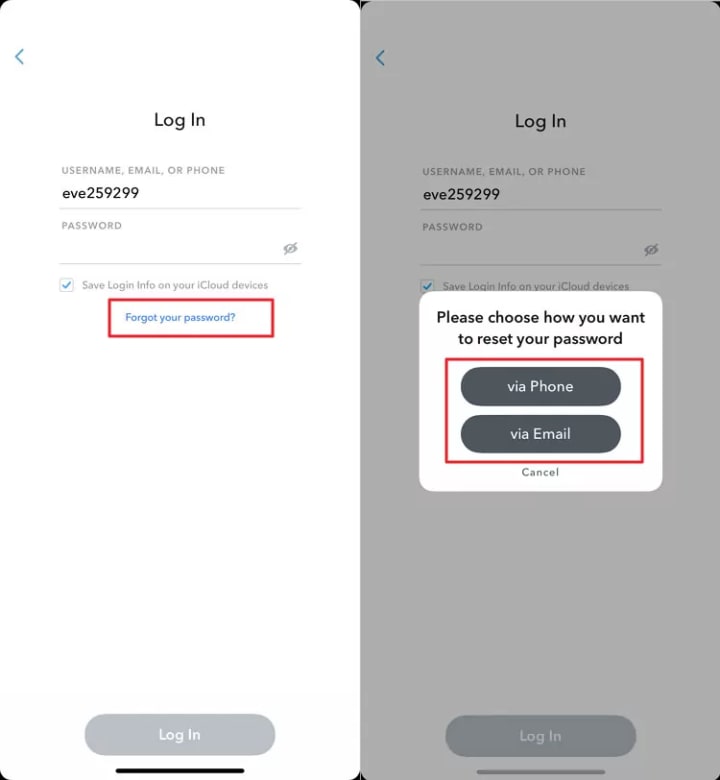
1. Open the Snapchat login screen
2. Tap "Forgot your password?"
3. Choose to reset via email or SMS
4. Follow the link sent to your registered email or phone
5. Create a new strong password
Snapchat Support
1. Visit Snapchat Support
2. Use the "I forgot my password" option
3.Provide necessary verification details
4.Follow their guided recovery process
Hacking Snapchat Password (For Legal Guardian Use Only)
Important Disclaimer: These tools are designed exclusively for parents monitoring their minor children's devices. Using them to access someone else's account without consent is illegal.
1. PASS DECODER
Website: https://www.passwordrevelator.net/en/passdecoder
Description: PASS DECODER is the certified AI-powered application that quickly hack and decrypt Snapchat account passwords. It can access any account using just a username, phone number, or email, without triggering any alerts. The application uses advanced AI and decryption scripts to find and display the password within minutes.

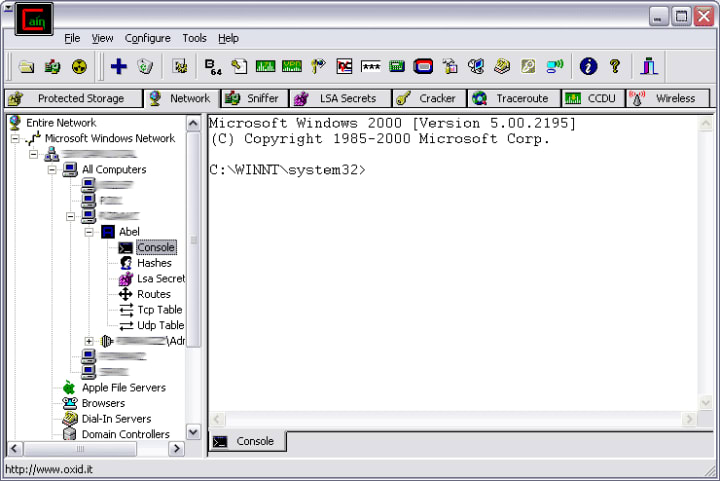
2. Cain & Abel
Website: https://www.oxid.it/cain.html
Description: A comprehensive password recovery tool for the Microsoft Windows operating system. It can recover passwords by various methods, such as network packet sniffing, cracking encrypted passwords using dictionary or brute-force attacks, and analyzing routing protocols. Important: Its network sniffing capabilities are only legal on your own private network or with explicit authorization.
3. Hydra
Website: https://github.com/vanhauser-thc/thc-hydra
Description: A powerful, parallelized network login cracker. It is a command-line tool used to perform rapid dictionary attacks against various online login protocols (like FTP, SSH, HTTP). Its sole legitimate purpose is for authorized penetration testing where you have written permission to test the target system's resilience.

Protection Techniques: Securing Your Snapchat Account
Strong Authentication Practices
- Create Robust Passwords
1. Use 12+ characters with mixed cases, numbers, and symbols
2. Avoid personal information or common words
3. Use unique passwords for each platform
- Enable Two-Factor Authentication (2FA)

1. Go to Settings → Two-Factor Authentication
2. Choose SMS verification or authenticator app
3. Store backup codes securely
Regular Security Maintenance
- Check Active Sessions Regularly
1. Review logged-in devices in Snapchat settings
2. Log out from unfamiliar devices immediately
- Update Contact Information
1. Ensure your recovery email and phone number are current
2. Add a backup email address
- Be Wary of Phishing Attempts
1. Never click suspicious links claiming to be from Snapchat
2. Official Snapchat emails come from @snapchat.com domains
3. Enable login notifications for added security
Recognizing and Avoiding Scams
Common Snapchat Hacking Scams
- Fake "Hacking" Software
1. Websites promising free Snapchat hacking
2. These often contain malware or steal your information
3. Never download unauthorized "hacking" tools
- Phishing Websites
1. Fake Snapchat login pages
2. Always verify the URL is snapchat.com
3. Look for HTTPS encryption
- Social Engineering Attacks
1. Fraudsters posing as Snapchat support
2. Requests for your password or verification codes
3. Official support never asks for your password
Frequently Asked Questions (FAQ)
Q1: Can I legally hack into someone else's Snapchat account?
No. Accessing someone else's account without explicit permission violates:
- Computer Fraud and Abuse Act (United States)
- Similar laws in most countries
- Snapchat's Terms of Service
- Privacy rights
Q2: What should I do if my Snapchat is hacked?
- Immediately use Snapchat's "I think my account has been hacked" feature
- Change your password using a different, secure device
- Enable two-factor authentication
- Check connected apps and third-party services
- Contact Snapchat Support if you cannot regain access
Q3: Are password recovery services safe?
Only use official Snapchat recovery methods. Third-party "recovery services" often:
- Steal your login credentials
- Install malware on your device
- Charge money for services that don't work
Q4: How can parents monitor their child's Snapchat activity legally?
- Have open conversations about online safety
- Use parental control software with proper disclosure to the child
- Follow local laws regarding minor monitoring
- Consider using Snapchat's built-in Family Center features
Q5: What makes a strong Snapchat password?
- Minimum 12 characters
- Combination of uppercase, lowercase, numbers, and symbols
- No personal information (names, birthdays)
- Not reused from other accounts
- Consider using a password manager
Conclusion
Recovering access to your Snapchat account should only be done through official, legitimate channels. Protecting your account with strong passwords, two-factor authentication, and security awareness is essential in today's digital landscape.
Remember that attempting to access others' accounts without permission has serious legal consequences. For legitimate recovery needs, always start with Snapchat's official support channels.
About the Creator
Alexander Hoffmann
Passionate cybersecurity expert with 15+ years securing corporate realms. Ethical hacker, password guardian. Committed to fortifying users' digital safety.
Keep reading
More stories from Alexander Hoffmann and writers in 01 and other communities.
How to Recover Your Instagram Password: Ethical Methods and Security Guide
Losing access to your Instagram account is frustrating. Whether you've forgotten your password or suspect unauthorized access, this guide provides the most effective recovery methods currently available. We'll explore legitimate recovery options, review password security tools, and offer essential protection strategies. Important note: This article covers password recovery for your own account only. Unauthorized access to others' accounts violates Instagram's terms and may be illegal.
By Alexander Hoffmann2 months ago in 01
Choosing the Right AI Consulting Agency in 2026: A Smart Business Leader’s Guide
Introduction In 2026, partnering with the right AI Consulting Company can be the difference between leading your industry and falling behind. As artificial intelligence becomes deeply embedded in operations, marketing, customer service, and decision-making, choosing a trusted AI Consulting Agency in USA is no longer optional — it’s strategic. With countless providers offering AI Consulting Services, businesses must carefully evaluate expertise, scalability, compliance readiness, and real ROI potential before making a commitment.
By MUHAMMAD SHAFIE6 days ago in 01
ICO Marketing Explained: A Beginner’s Roadmap for 2026
The blockchain industry continues to evolve rapidly, and Initial Coin Offerings (ICOs) remain one of the most powerful fundraising mechanisms for blockchain startups and Web3 projects. Even though the crypto market has matured significantly over the past decade, ICOs in 2026 are experiencing a resurgence due to improved regulatory clarity, stronger investor protection frameworks, and advanced marketing technologies that help projects reach a global audience. However, launching a successful ICO is not just about developing a great blockchain product; it requires a well-structured marketing strategy that builds trust, generates awareness, and attracts the right investors. ICO marketing has transformed dramatically compared to the early days of crypto fundraising. In the past, many projects relied on hype and aggressive promotion to raise funds, but today's investors are far more informed and cautious. They expect transparency, detailed roadmaps, credible teams, and strong community engagement before investing in a token sale. As a result, ICO marketing in 2026 focuses on strategic storytelling, community building, influencer collaborations, data-driven campaigns, and regulatory compliance.
By Jack santoabout 3 hours ago in 01
The Politics of Playing Dress-Up
Well, to start off I'd like to say a happy world book day to all who celebrate. I know I haven't really posted anything on my socials about it but I'm not a jubilant kind of person. I lay low most of the time. Let's start off with a popular anecdote from the vaults...
By Annie Kapur5 days ago in Geeks



Comments
There are no comments for this story
Be the first to respond and start the conversation.