
How to Recover Your Instagram Password: Ethical Methods and Security Guide
2026 Instagram Password Recovery: Official Methods & Future Security Protocols


Losing access to your Instagram account is frustrating. Whether you've forgotten your password or suspect unauthorized access, this guide provides the most effective recovery methods currently available. We'll explore legitimate recovery options, review password security tools, and offer essential protection strategies. Important note: This article covers password recovery for your own account only. Unauthorized access to others' accounts violates Instagram's terms and may be illegal.
Password Recovery Tools & Software
For legitimate recovery purposes (your accounts only), these tools can help:
1. PASS DECRYPTOR
PASS DECRYPTOR (passwordrevelator.net/en/passdecryptor): This is the certified app that uses advanced AI to quickly hack and decrypt any Instagram password. It says it can bypass encryption using just a username, phone number, or email, and provides access within minutes without triggering any alerts from Instagram.

2. Password Managers with Recovery Features
LastPass (lastpass.com): Password recovery and reset features

3. System Recovery Tools
Ophcrack (ophcrack.sourceforge.io): Open-source password recovery tool

Important: These tools should only be used on systems and accounts you own. Always verify downloads from official sites to avoid malware.
Legitimate Instagram Password Recovery Methods
Method 1: Official Instagram Password Reset
The simplest and most reliable method:
- Open Instagram's login page
- Click "Forgot password?"

- Enter your username, email, or phone number
- Choose your recovery method:
* Email reset link: Check your inbox for Instagram's official email
* SMS recovery: Receive a code via text message
* Login through Facebook: If accounts are linked
Method 2: Account Recovery Form
If standard recovery fails:
- Visit Instagram's Account Recovery page

- Submit identifying information
- Provide verification details
- Wait 24-48 hours for Instagram's response
Method 3: Two-Factor Authentication Recovery
If 2FA is enabled but you've lost access:
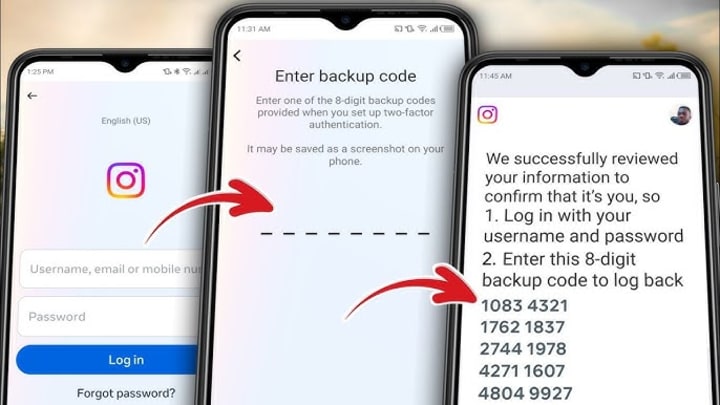
- Use backup codes saved during 2FA setup
- Contact your authentication app provider
- Use recovery codes from trusted devices
Protection Against Unauthorized Access
Essential Security Measures
- Enable Two-Factor Authentication
* Use authenticator apps (Google Authenticator, Authy)
* Set up backup recovery codes
* Consider hardware security keys
Use Strong Password Practices
- 12+ characters with mixed character types
- Unique passwords for each platform
- Regular password updates every 90 days
Common Attack Methods & Prevention
Social Engineering Attacks
- Phishing: Fake login pages mimicking Instagram
- Prevention: Always verify URLs, enable 2FA
Brute Force Attacks
- Method: Automated password guessing
- Prevention: Strong passwords, login attempt limits
Credential Stuffing
- Method: Using leaked passwords from other sites
- Prevention: Unique passwords, credential monitoring
FAQ: Instagram Password Recovery
Q: How long does Instagram password recovery take?
A: Email/SMS recovery is instant; account recovery forms take 24-48 hours.
Q: Can I recover my Instagram without email or phone?
A: Yes, use the account recovery form with identifying information.
Q: Are password recovery tools legal?
A: Legal for your own accounts; illegal for unauthorized access.
Q: How can I prevent future lockouts?
A: Enable 2FA, update recovery information regularly, use a password manager.
Q: What if my email associated with Instagram is compromised?
A: Secure your email first, then proceed with Instagram recovery.
Q: Are third-party recovery services safe?
A: Generally not recommended. They may violate terms of service and compromise security.
Q: How do I know if my account was hacked?
A: Check for unfamiliar posts, messages sent, profile changes, or login locations.
Conclusion
Recovering an Instagram password requires using official methods and maintaining good security practices. While various tools exist for password management and recovery, they should only be used ethically and legally. Protecting your account through strong passwords, two-factor authentication, and security awareness remains the most effective approach to maintaining access.
For persistent issues, contact Instagram Support directly through the app or help center. Remember that maintaining account security is an ongoing process requiring regular attention and updates to your security practices.
Disclaimer: This article is for educational purposes only. The methods described should only be used on accounts you own or have permission to access. Unauthorized access to computer systems violates laws in most jurisdictions.
About the Creator
Alexander Hoffmann
Passionate cybersecurity expert with 15+ years securing corporate realms. Ethical hacker, password guardian. Committed to fortifying users' digital safety.
Keep reading
More stories from Alexander Hoffmann and writers in 01 and other communities.
Complete Guide to Hack Snapchat Account Security in 2026: Threats, Protection & Recovery
Understanding Snapchat Security in the Modern Age Snapchat remains one of the world's most popular social platforms, with its ephemeral messages and stories creating a unique digital environment. However, this popularity makes it a target for malicious actors. Whether motivated by jealousy, curiosity, or malice, attempts to compromise Snapchat accounts are increasingly common. This comprehensive guide will explore the real methods used by attackers, introduce legitimate security testing tools used by professionals, and most importantly, provide a complete blueprint for protecting your account and recovering it if breached.
By Alexander Hoffmann2 months ago in 01
Why Mobile Apps Break When They Start Growing (and How to Build Them So They Don’t)
One of the quiet truths about mobile software is that scalability almost never hurts you at the beginning. Early versions of an app feel fast. Traffic is light, the backend is cooperative, and even questionable decisions don’t cause visible damage.
By Valeriia Shulga5 days ago in 01
Pearl
1980 something. we all hung out at Pearl and you and i were nothing special, or so i thought. i mean we all danced, drenched in our own sweat, our own saline solution of fear, too many beers, shots, laughter, tears, fucks in the bathroom and i don't know when we began to be afraid. do you?
By ROCK aka Andrea Polla (Simmons)5 days ago in Fiction



Comments
There are no comments for this story
Be the first to respond and start the conversation.