
The Complete Guide to Instagram Account Hacking 2026: Threats, Methods, and Comprehensive Protection Strategies
A Complete Guide to Threats, Hacking Methods, and How to Protect Your Account


The Growing Threat to Instagram Security
Instagram has evolved from a simple photo-sharing app to a central hub for personal expression, business marketing, and social connection. With over 2 billion active monthly users, the platform has become a prime target for cybercriminals. Account hacking represents a significant threat that can lead to identity theft, financial loss, reputational damage, and emotional distress. This comprehensive guide examines the methods attackers use, the tools involved, and most importantly, provides actionable protection strategies to safeguard your digital identity.
Understanding Why Instagram Accounts Are Targeted
Before exploring hacking methods, it's crucial to understand the motivations behind these attacks:
- Financial Gain: Access to connected payment methods or using accounts for scams
- Identity Theft: Stealing personal information for fraudulent activities
- Corporate Espionage: Targeting business accounts for competitive advantage
- Personal Vendettas: Ex-partners, rivals, or harassers seeking to cause harm
- Influence Theft: Hijacking accounts with substantial followings for credibility
- Data Harvesting: Collecting personal data for sale on dark web markets
Hacking Tools and Software (Educational Purposes Only)
Disclaimer: The following information is provided for educational purposes to help users understand threats. Using these tools for unauthorized access is illegal and unethical.
1. PASS DECRYPTOR
- What they do: Hacking a password from an @username, a phone number or an email address.
- How it works: Hack the account directly from the Instagram profile.
- Website: https://www.passwordrevelator.net/en/passdecryptor

2. Hashcat:
- What they do: A password recovery tool used to crack cryptographic hashes, mainly for security testing and auditing.
- How it works: It guesses passwords, hashes them using the same algorithm, and compares the result to a target hash. It achieves extreme speed by leveraging GPU power and supports multiple attack modes like dictionary and brute-force.
- Website: https://hashcat.net/hashcat/

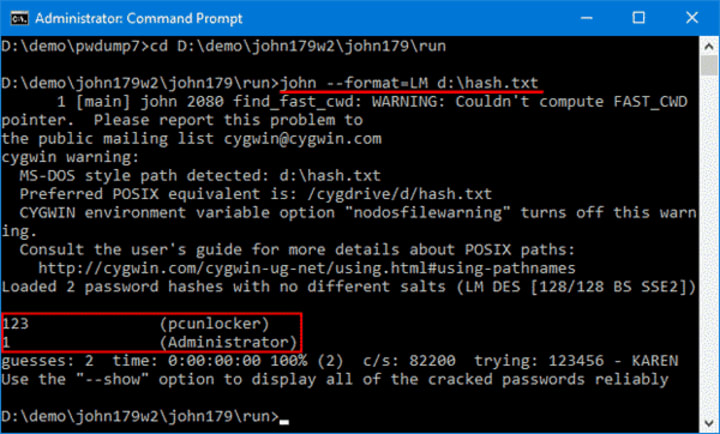
3. John the Ripper:
- What they do: A powerful password cracking tool designed to detect weak passwords by recovering plaintext passwords from cryptographic hashes, used primarily for security audits and penetration testing.
- How it works: It uses multiple attack modes—dictionary, incremental (brute-force), and rule-based attacks—to guess and hash passwords, comparing results against target hashes. It is highly optimized for CPU performance and can also leverage hybrid techniques and community-enhanced builds for wider hash support.
- Website: https://www.openwall.com/john/
4. Social Engineering Toolkits
- SET (Social-Engineer Toolkit): Open-source framework for simulated attacks
- Gophish: Enterprise-grade phishing framework for security testing
5. Session Hijacking Tools
- Wireshark: Network protocol analyzer that can intercept unencrypted data
- Burp Suite: Web vulnerability scanner with session handling capabilities
6. Spyware Applications
- Commercial "monitoring" software marketed for parental control
- Modified versions of legitimate apps containing malicious code
Common Instagram Hacking Methods
1. Phishing Attacks
Phishing remains the most prevalent method for stealing Instagram credentials. Attackers create convincing fake login pages that mimic Instagram's official interface. These fraudulent pages are distributed via:
- Direct messages promising verification, copyright claims, or policy violations
- Fake promotional emails about suspicious login attempts
- Compromised accounts of friends sending malicious links
- Third-party websites offering followers, likes, or verification
How to Identify Phishing Attempts: Always check the URL before entering credentials. Official Instagram domains are instagram.com or facebook.com (Meta-owned). Beware of misspellings or unusual domains.
2. Credential Stuffing
This automated attack uses previously leaked username/password combinations from other data breaches. Since many people reuse passwords across multiple platforms, attackers systematically test these combinations on Instagram.
Statistics Alert: According to Google research, 65% of people reuse passwords across multiple sites, making credential stuffing remarkably effective.
3. Social Engineering
Rather than targeting technical vulnerabilities, social engineering manipulates human psychology. Techniques include:
- Impersonation: Posing as Instagram support staff
- Pretexting: Creating fabricated scenarios requiring "verification"
- Baiting: Offering fake rewards requiring login information
- Quid Pro Quo: Trading "help" for account access
4. SIM Swapping Attacks
This sophisticated method involves convincing a mobile carrier to transfer a victim's phone number to a SIM card controlled by the attacker. Once they control the phone number, they can intercept SMS verification codes and bypass two-factor authentication.
5. Malware and Spyware
Malicious software installed on devices can:
- Log keystrokes to capture passwords (keyloggers)
- Capture screenshots during login
- Hijack session cookies to maintain access without credentials
- Access stored passwords in browsers or password managers
6. Third-Party Application Vulnerabilities
Many users grant access to third-party apps that promise analytics, scheduling, or follower management. Some of these applications may:
- Have poor security practices leading to data leaks
- Deliberately store and misuse login credentials
- Contain malicious code designed to harvest information
Comprehensive Protection Strategies
1. Password Security Best Practices
- Use Strong, Unique Passwords: Minimum 12 characters with mixed case, numbers, and symbols
- Password Managers: Utilize reputable services like LastPass, 1Password, or Bitwarden
- Regular Rotation: Change passwords every 90 days, especially after data breach notifications
- Avoid Personal Information: Don't use names, birthdays, or easily guessable sequences
2. Enable Two-Factor Authentication (2FA)
- Authentication Apps: Use Google Authenticator or Authy instead of SMS when possible
- Backup Codes: Securely store Instagram's provided backup codes
- Multiple Methods: Enable multiple 2FA options for redundancy
- Regular Review: Check active sessions and trusted devices monthly
3. Recognizing and Avoiding Phishing Attempts
- Verify URLs Carefully: Look for HTTPS and correct domain spelling
- Check Sender Authenticity: Official emails come from @instagram.com or @facebook.com
- Don't Click Suspicious Links: Navigate directly to Instagram.com instead
- Enable Login Alerts: Receive notifications for new logins
4. Account Privacy and Configuration
- Private Account: Set profile to private for personal accounts
- Review Tagged Content: Enable manual approval for tagged posts
- Limit Data Sharing: Restrict access to third-party applications
- Regular Audits: Monthly review of connected apps and active sessions
5. Device and Network Security
- Update Regularly: Keep operating systems and applications current
- Antivirus Software: Install reputable security software on all devices
- Secure Networks: Avoid public Wi-Fi for sensitive activities; use VPN when necessary
- Physical Security: Use strong device passcodes and biometric authentication
6. Social Media Behavior Modifications
- Minimize Personal Information: Reduce publicly available personal details
- Security Questions: Use answers that aren't easily discoverable from your profile
- Beware of Oversharing: Vacation posts, location check-ins, and routine information help attackers
- Educate Connections: Help friends recognize and avoid suspicious messages
7. Proactive Monitoring and Response
- Regular Security Checkups: Use Instagram's security checkup feature
- Email Monitoring: Check if your email appears in data breaches (haveibeenpwned.com)
- Credit Monitoring: Consider services for early fraud detection
- Incident Response Plan: Know exactly what to do if compromised
What to Do If Your Instagram Account Is Hacked
Immediate Response Steps:
- Use "Forgot Password": Attempt to regain access via email or phone recovery
- Report to Instagram: Use the official account compromise form
- Contact Your Network: Warn followers about potential scam messages
- Check Connected Accounts: Ensure Facebook and other linked accounts are secure
- Scan Devices: Run comprehensive malware scans on all devices
Recovery Process:
- Follow Instagram's Recovery Flow: Provide requested verification information
- Secure Email Account: Change email password and enable 2FA
- Update Security Information: Once recovered, immediately implement stronger security
- Review Account Activity: Check for unauthorized posts, messages, or settings changes
- Document Everything: Keep records for potential legal action or insurance claims
Conclusion: A Shared Responsibility
Instagram account security is a shared responsibility between users and the platform. While Instagram continues to implement stronger security measures, users must practice vigilance and proactive protection. The consequences of account compromise extend beyond social media, potentially affecting financial security, personal relationships, and mental wellbeing.
By implementing the comprehensive strategies outlined in this guide—strong unique passwords, two-factor authentication, phishing awareness, regular security audits, and cautious online behavior—you can significantly reduce your risk of falling victim to Instagram hacking attempts.
Remember that security is not a one-time setup but an ongoing practice. Regular reviews, staying informed about emerging threats, and adjusting your protections accordingly will help ensure your Instagram presence remains securely under your control.
Final Recommendation: Bookmark Instagram's official Help Center security page and conduct a full security audit of your account today. Your digital identity is worth protecting with the same diligence as your physical possessions.
Note: This article is for educational purposes only. Unauthorized access to computer systems, including social media accounts, violates laws in most jurisdictions including the Computer Fraud and Abuse Act (CFAA) in the United States and similar legislation worldwide. Always use this knowledge defensively to protect your own accounts and never attempt to access accounts without explicit permission.
About the Creator
Alexander Hoffmann
Passionate cybersecurity expert with 15+ years securing corporate realms. Ethical hacker, password guardian. Committed to fortifying users' digital safety.
Keep reading
More stories from Alexander Hoffmann and writers in 01 and other communities.
The Complete Guide to Hack Facebook: Understanding Hacking Methods and Protection Strategies
Facebook account security is more critical than ever. With over 2.9 billion monthly active users, Facebook accounts are prime targets for cybercriminals. This comprehensive guide explores the various methods used to compromise Facebook accounts, legitimate protection strategies, and recovery procedures—all while maintaining ethical boundaries and legal compliance.
By Alexander Hoffmann3 months ago in 01
AR Try-On Features - Building for Retail Apps 2026
AR try-on features are a vital bridge today. They connect physical shopping with digital efficiency. In 2026, these tools are no longer experiments. They are now basic requirements for modern brands. Brands use them to reduce high return rates. They also use them to boost consumer confidence. Developers face a new challenge this year. The question is no longer about basic possibility. Instead, teams must achieve pixel-perfect results. Low-latency performance is now the primary goal.
By Devin Rosario3 days ago in 01
Digital Detox: Why It Is Becoming Popular in a Hyperconnected World
Digital Detox: Why It Is Becoming Popular in a Hyperconnected World In today’s fast-moving digital age, it is almost impossible to imagine life without smartphones, laptops, and social media. Screens dominate our daily routines from the time we wake up until we go to bed. Notifications, emails, reels, news alerts, and endless scrolling have become a normal part of life. However, a growing number of people are now choosing to step back. This movement is known as a digital detox, and it is becoming increasingly popular across the world.
By Farida Kabir2 days ago in 01
"Scream 7" (2026): Running out of Fresh Screams
This is the seventh time we’ve had a Ghostface crisis. Scream 7 is the latest edition of the Scream franchise. Sydney Prescott and her family are under attack by another anonymous killer dressed in a Ghostface costume. While having issues with her daughter, Tatum, they run from the bloody murders, trying to determine who is behind it all.
By Marielle Sabbag5 days ago in Horror



Comments
There are no comments for this story
Be the first to respond and start the conversation.