
The Complete Guide to Hack Facebook: Understanding Hacking Methods and Protection Strategies
Understanding Common Threats, Essential Protection Tools, and Step-by-Step Recovery


Facebook account security is more critical than ever. With over 2.9 billion monthly active users, Facebook accounts are prime targets for cybercriminals. This comprehensive guide explores the various methods used to compromise Facebook accounts, legitimate protection strategies, and recovery procedures—all while maintaining ethical boundaries and legal compliance.
Understanding Facebook Hacking Methods
1. Phishing Attacks
Phishing remains the most common attack vector. Cybercriminals create fake Facebook login pages that resemble the legitimate site. When users enter their credentials, the information is sent directly to attackers.
How it works:
- Victims receive emails or messages with urgent requests to login
- Links redirect to sophisticated fake login pages
- Credentials are harvested and used for unauthorized access
2. Social Engineering
This psychological manipulation technique exploits human behavior rather than technical vulnerabilities.
Common approaches:
- Impersonating Facebook support staff
- Pretending to be friends in distress needing account access
- Gathering personal information from public sources to answer security questions
3. Credential Stuffing
Attackers use previously breached username/password combinations from other sites, knowing many users reuse credentials across platforms.
4. Malware and Spyware
Malicious software installed on devices can capture login information.
Examples include:
- Keyloggers: Record keystrokes to capture passwords
- Session hijackers: Steal browser cookies to gain access without credentials
- Mobile spyware: Monitor device activity on compromised phones
5. Password Guessing
Simple or common passwords are vulnerable to brute-force attacks where automated tools try numerous password combinations.
Legitimate Security Hacking Tools (For Educational Purposes Only)
Important Disclaimer: The following tools should only be used on systems you own or have explicit permission to test. Unauthorized access to computer systems is illegal in most jurisdictions.
1. PASS FINDER

- Purpose: Facebook hacking password
- Legitimate Use: Security professionals use AI to hack password security, including authentication mechanisms
- Features: Intruder tool for automated attacks
- Website: https://www.passwordrevelator.net/en/passfinder
2. John the Ripper
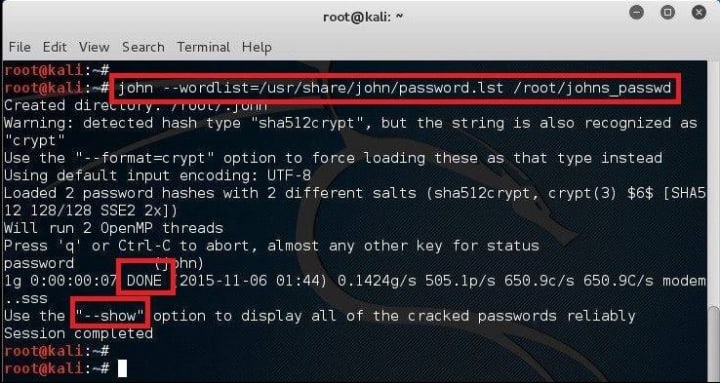
- Purpose: Password security auditing tool
- Legitimate Use: Testing password strength in controlled environments
- Features: Detects weak passwords, supports hundreds of hash types
- Website: openwall.com/john
3. Wireshark

- Purpose: Network protocol analyzer
- Legitimate Use: Troubleshooting network problems, analyzing protocol interactions
- Features: Captures and interactively browses network traffic
- Website: wireshark.org
Comprehensive Facebook Protection Strategies
1. Strong Authentication Measures
- Enable Two-Factor Authentication (2FA): Use authentication apps (Google Authenticator, Authy) rather than SMS when possible
- Use Strong, Unique Passwords: Minimum 12 characters with mixed character types
- Consider Password Managers: Tools like LastPass or Bitwarden generate and store complex passwords
2. Privacy and Security Settings
- Regular Security Checkups: Facebook's built-in tool reviews login locations and active sessions
- Configure Login Alerts: Receive notifications for unrecognized logins
- Review App Permissions: Remove access for unused third-party applications
3. Behavioral Best Practices
- Verify Links Before Clicking: Hover over links to see actual destinations
- Be Skeptical of Urgent Requests: Facebook will never ask for your password via email
- Use Different Email for Recovery: Don't use your primary Facebook email for other accounts
4. Technical Safeguards
- Keep Software Updated: Regularly update browsers, operating systems, and antivirus software
- Use Secure Connections: Avoid public Wi-Fi for sensitive activities; use VPN if necessary
- Enable Encrypted Notifications: In Facebook settings, turn on encrypted email notifications
Facebook Account Recovery Process

If You Can Still Access Your Account:
- Immediately change your password
- Review active sessions and log out unfamiliar devices
- Enable two-factor authentication if not already active
- Check and update recovery information
If You're Locked Out:
- Visit facebook.com/hacked
- Use the "My Account Is Compromised" option
- Follow the identity verification process
- Choose a trusted contact if you've previously set this up
Advanced Recovery Options:
- Trusted Contacts: Pre-selected friends who can provide recovery codes
- Government ID: Upload identification for verification (use cautiously)
- Email/Phone Recovery: Access via previously verified contact methods
What to Do After Account Recovery
Security Audit:
- Check recent activity and posts
- Review messages sent during compromise
- Verify friend requests and group memberships
Damage Control:
- Inform friends about the compromise
- Report any malicious content
- Check connected accounts (Instagram, etc.)
Prevent Future Compromises:
- Implement all recommended security measures
- Consider using Facebook's advanced protection options
- Regularly monitor account activity
Frequently Asked Questions (FAQ)
Q1: Can someone hack my Facebook with just my phone number?
A: Yes, while phone numbers can be used in targeted attacks (like SIM swapping), it's enought for the hacker to steal your account.
Q2: How can I tell if my Facebook has been hacked?
A: Signs include unfamiliar posts/messages, friend requests you didn't send, changes to personal information, unknown devices in active sessions, or being locked out of your account.
Q3: Are password cracking tools like John the Ripper illegal?
A: These tools are legal to possess and use on systems you own or have permission to test. Using them to access others' accounts without authorization is illegal under laws like the Computer Fraud and Abuse Act in the U.S. and similar legislation worldwide.
Q4: How secure is two-factor authentication?
A: 2FA significantly improves security, making accounts 99.9% less likely to be compromised according to Microsoft studies. Authentication apps are more secure than SMS-based 2FA, which can be vulnerable to SIM swapping.
Q5: What should I do if a friend's account sends me suspicious messages?
A: Don't click any links. Contact the friend through another method to verify if they sent the message. Report the suspicious activity to Facebook using the report feature on the message.
Q6: How often should I change my Facebook password?
A: Current security best practices recommend changing passwords only when there's suspicion of compromise, rather than arbitrarily. Focus on using a strong, unique password and enabling 2FA.
Q7: Can biometric authentication protect my Facebook account?
A: Biometrics (fingerprint, facial recognition) on mobile devices add an additional layer of security for device access but aren't a substitute for strong passwords and 2FA for account protection.
Conclusion
Facebook account security requires both technical measures and behavioral vigilance. While understanding hacking methods helps recognize threats, the focus should remain on implementing robust protection strategies. Regular security reviews, strong authentication practices, and cautious online behavior form the foundation of account security. Remember that legitimate security tools serve protective purposes when used ethically, and unauthorized account access violates both Facebook's terms of service and laws in most countries.
Final Recommendation: Invest time in configuring Facebook's security settings thoroughly, use unique passwords with two-factor authentication, and maintain healthy skepticism toward unsolicited messages requesting personal information or urgent action.
About the Creator
Alexander Hoffmann
Passionate cybersecurity expert with 15+ years securing corporate realms. Ethical hacker, password guardian. Committed to fortifying users' digital safety.
Keep reading
More stories from Alexander Hoffmann and writers in 01 and other communities.
The Anatomy of TikTok Hacking: Techniques Used by Cybercriminals and How to Fortify Your Account
In the dynamic world of social media, TikTok has emerged as a cultural phenomenon, boasting over a billion active users worldwide. This massive reach, combined with the platform's integration of personal data, creative content, and sometimes financial transactions, has made it an attractive target for cybercriminals. This article delves into the sophisticated methods hackers employ to compromise TikTok accounts, demystifies their techniques, and provides a comprehensive guide to protecting your digital presence. Understanding these threats is the first step toward building an effective defense.
By Alexander Hoffmann3 months ago in 01
How RWA Tokens Are Distributed in 2026: What Models Are Dominating the Market?
In 2026, Real World Asset Tokenization has moved beyond pilot programs and proof of concept initiatives. Financial institutions, private equity firms, real estate developers, commodity traders, and infrastructure funds are issuing digital tokens backed by tangible and financial assets at a pace that would have seemed unrealistic just a few years ago. While attention initially focused on compliance, custody, and valuation, distribution models have now become the decisive factor behind successful offerings.
By Ethan hunt7 days ago in 01
Flower Bloom 369
FLOWER Bloom 2/25/26 Wednesday By Mariann Carroll Karen had been with Tony for 7 years. Tony started acting strangely after her surgery. He would mow the lawn in the rain and be on his cellphone. He started pushing Karen away. Tony came clean about seeing someone. Karen moved out two months later. Karen moved in with a friend. She felt betrayed.
By Mariann Carroll4 days ago in Fiction




Comments
There are no comments for this story
Be the first to respond and start the conversation.