
The Cascade and Inheritance: Mastering CSS’s Core Concepts
This article is part of a free full CSS Course: Beginner to Expert


When it comes to CSS, understanding how styles are applied and managed is crucial. Two of the most fundamental concepts that dictate how your web pages look are the cascade and inheritance. These principles form the backbone of CSS, determining which styles take precedence and how they are passed down from one element to another. Whether you’re new to CSS or looking to refine your skills, mastering the cascade and inheritance is essential for writing efficient and effective stylesheets.
In this article, we’ll dive deep into these two concepts, exploring how they work together to control the appearance of your web pages. By the end, you’ll have a solid understanding of how to leverage the cascade and inheritance to create beautifully styled, well-organized websites.
1. What Is the Cascade?
The “C” in CSS stands for “Cascading,” and it’s not just a fancy word — it’s a core concept that determines how styles are applied when there are multiple rules that could affect an element. The cascade is CSS’s way of deciding which styles to apply when more than one rule matches a given element.
1.1 The Role of Specificity
Specificity is the mechanism CSS uses to determine which rule should be applied when multiple rules could apply to the same element. Each CSS selector has a specificity value, and the rule with the highest specificity wins.
Here’s how specificity is calculated:
- Inline styles (written directly in the HTML element’s style attribute) have the highest specificity.
- ID selectors (e.g., #header) have high specificity.
- Class selectors (e.g., .highlight), attribute selectors (e.g., [type="text"]), and pseudo-classes (e.g., :hover) have moderate specificity.
- Element selectors (e.g., div, p) and pseudo-elements (e.g., ::before) have the lowest specificity.
Here’s an example to illustrate specificity in action:
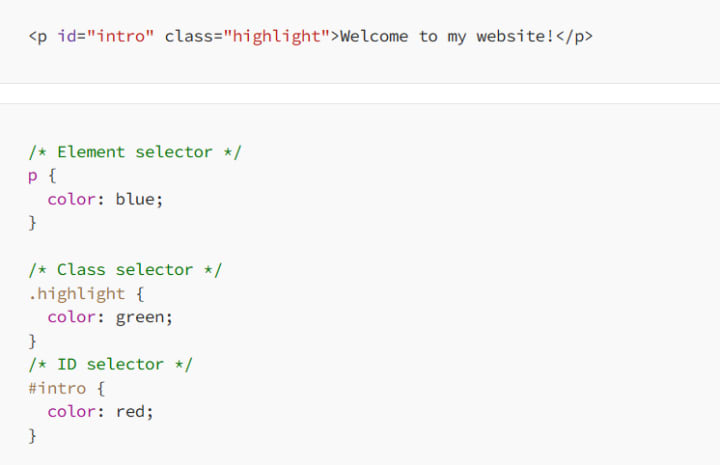
In this case, the text in the paragraph will be red because the ID selector #intro has the highest specificity.
1.2 The Importance of Order
If two rules have the same specificity, the order in which they appear in the stylesheet determines which one is applied. The rule that appears last in the CSS file wins:
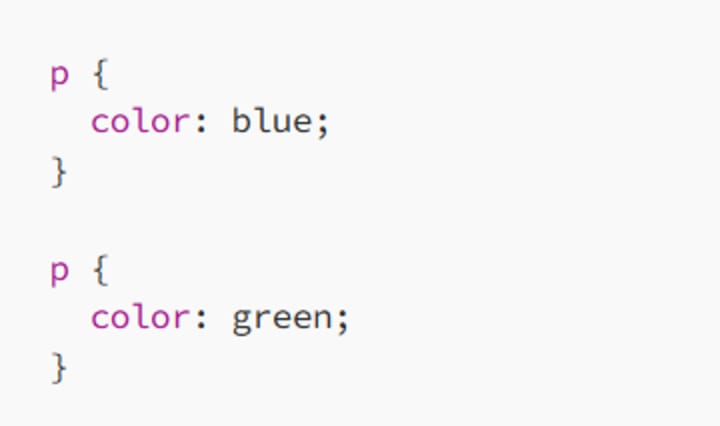
Here, the paragraph text will be green because the second rule overrides the first due to its later position in the CSS file.
1.3 The Power of !important
The !important declaration is the most powerful tool in the CSS cascade. It forces a rule to override all others, regardless of specificity or order:
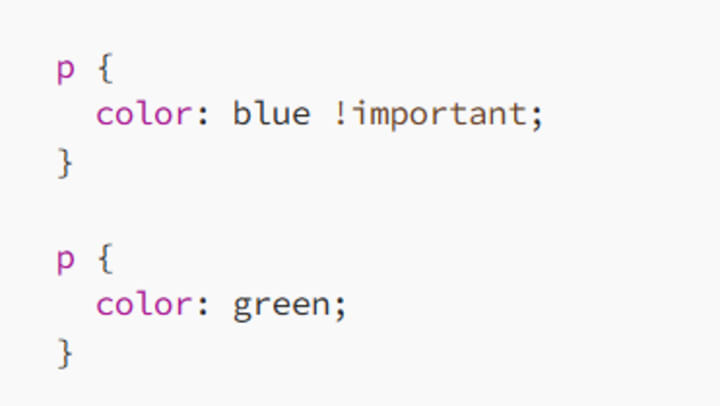
In this scenario, the paragraph text will be blue because !important takes precedence over everything else. However, it’s important to use !important sparingly, as it can make your CSS harder to maintain and debug.
2. Understanding Inheritance in CSS
While the cascade determines which styles win, inheritance is the process by which styles are passed down from parent elements to their children. Think of it like a family heirloom — some CSS properties are naturally inherited, while others are not.
2.1 Properties That Are Inherited
Certain CSS properties are automatically inherited by child elements. These are usually properties related to text and font styling:
Color: If a parent element has a color defined, its child elements will inherit that color unless overridden.
body { color: darkblue; }
Font-family: This property specifies the typeface used in an element. If applied to a parent, all child elements will use the same font unless they have their own font-family specified.
body { font-family: Arial, sans-serif; }
Line-height: The line height (spacing between lines of text) is inherited by child elements.
body { line-height: 1.5; }
2.2 Properties That Are Not Inherited
Not all CSS properties are inherited by default. Properties related to the box model, positioning, and layout are not inherited. These include:
Margin: Controls the space outside an element’s border.
div { margin: 20px; }
Padding: Controls the space inside an element, between its content and its border.
div { padding: 10px; }
Border: Defines the border around an element.
div { border: 1px solid black; }
2.3 Forcing Inheritance with inherit
You can explicitly tell a child element to inherit a property from its parent using the inherit keyword:
div {
border: 2px solid blue;
}
.child {
border: inherit;
}
In this example, the .child element will inherit the border from its parent <div>, even though borders are not inherited by default.
2.4 Overriding Inheritance
You can also override inherited styles by defining a new value for a child element:
body {
color: gray;
}
h1 {
color: black;
}
Here, the body text will be gray, but the h1 text will be black, overriding the inherited color.
3. The Cascade and Inheritance in Action: Practical Examples
To see how the cascade and inheritance work together, let’s look at some practical examples.
3.1 Styling a Basic Web Page
Consider this HTML structure:
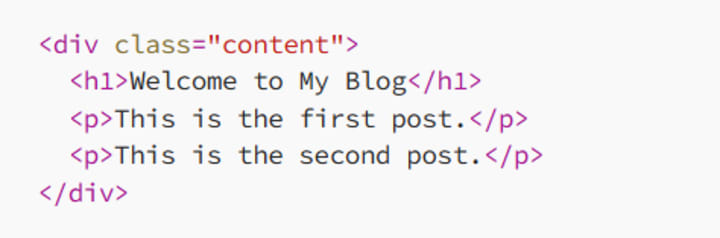
And the corresponding CSS:
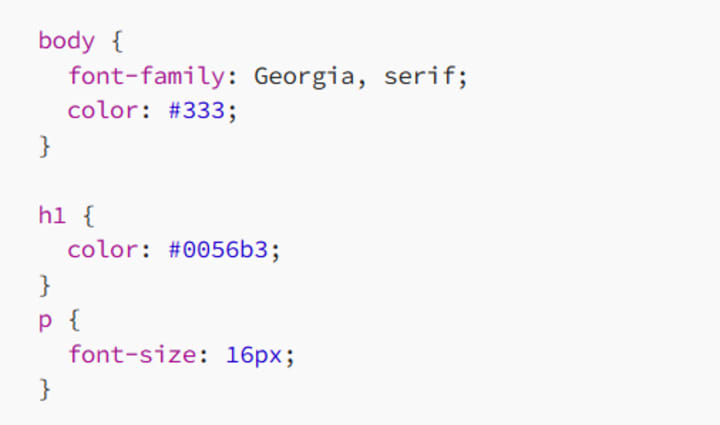
In this example:
- The body element sets the font family to Georgia and the text color to dark gray. These styles are inherited by all child elements.
- The h1 element has its color overridden to a specific shade of blue (#0056b3).
- The p elements inherit the font family and color from the body, but they have their font size explicitly set to 16px.
3.2 Using Media Queries with the Cascade
Media queries allow you to apply different styles based on the screen size, and the cascade helps ensure that the appropriate styles are applied:
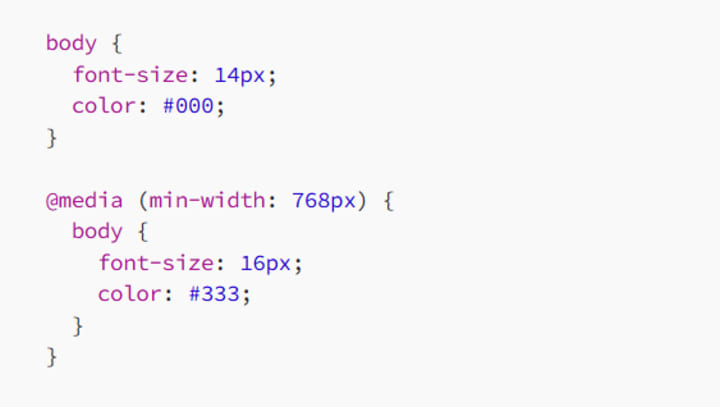
Here, the text will be 14px and black on smaller screens. On larger screens (768px and above), the text will change to 16px and dark gray. The cascade ensures that the media query styles take precedence when the conditions are met.
4. Common Pitfalls with the Cascade and Inheritance
Even with a solid understanding of the cascade and inheritance, there are some common pitfalls to watch out for.
4.1 Overuse of !important
The !important declaration is a quick fix, but overusing it can lead to CSS that’s difficult to manage. It can cause unexpected results and make it hard to understand why certain styles are applied. Try to rely on specificity and the natural flow of the cascade before resorting to !important.
4.2 Unintended Inheritance
Inheritance can sometimes cause unintended styling, especially if you’re not careful about which properties are inherited. For example, setting a large font size on a parent element might result in all child elements having disproportionately large text. Always test how styles cascade and inherit across your page to ensure the desired effect.
4.3 Specificity Wars
When multiple styles compete, you can end up in a “specificity war,” where increasingly specific selectors are needed to override previous styles. This can make your CSS unnecessarily complex. Instead, aim for simplicity in your selectors and avoid using IDs unless absolutely necessary.
5. Best Practices for Managing the Cascade and Inheritance
To effectively manage the cascade and inheritance, follow these best practices:
5.1 Organize Your CSS
Organize your CSS to group related styles together and maintain a logical flow. This will help you see how styles will cascade and where inheritance will occur. Use comments to break up sections and explain your choices, making it easier to maintain your stylesheet.
5.2 Keep Specificity Low
Aim for low specificity in your selectors to avoid unnecessary conflicts. Use classes for most styling and reserve IDs for unique elements that require specific styling.
5.3 Test Across Devices
Test your styles on different devices and screen sizes to ensure that the cascade and inheritance work as expected. Responsive design often involves complex interactions between different styles, so thorough testing is essential.
5.4 Use Variables for Consistency
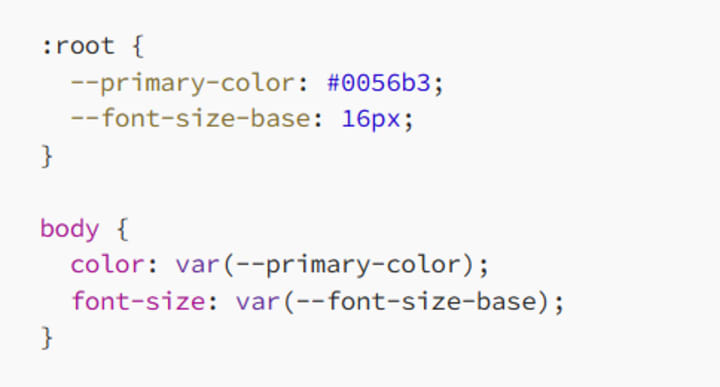
CSS variables (custom properties) can help maintain consistency across your stylesheet, making it easier to manage the cascade and inheritance:
Conclusion: Mastering the Cascade and Inheritance
The cascade and inheritance are foundational concepts in CSS that allow you to control how styles are applied and inherited across your web pages. By understanding these principles, you can write cleaner, more efficient CSS that’s easier to maintain and debug.
Remember, the cascade determines which styles win when there’s a conflict, while inheritance controls how styles are passed down from parent to child elements. By mastering these concepts, you’ll have the tools you need to create beautiful, well-organized websites with confidence.
So, take the time to practice these concepts, experiment with different selectors, and refine your understanding of how CSS works. The more you work with the cascade and inheritance, the more intuitive they’ll become — and the better your web designs will be. Happy styling!
About the Creator
MariosDev
Hi, I’m Marios! I’ve been a developer for over 9 years, crafting cool stuff and solving tricky tech puzzles. I’m a total tech enthusiast and love sharing my thoughts and tips through blogging. Also, in love with my bike!
The Technology Driving Interactive Education Apps
Education has evolved significantly in recent years, largely due to rapid advancements in digital technology. Traditional classroom learning is no longer the only method for gaining knowledge. With the rise of smartphones, tablets, and high-speed internet, learning has become more accessible, flexible, and engaging. Interactive education apps are at the center of this transformation, offering students and educators innovative ways to connect, learn, and share knowledge anytime and anywhere.
By Nayel Basim Al Shehhi3 days ago in 01




Comments
There are no comments for this story
Be the first to respond and start the conversation.