
The Best Mobile APP for API Testing
Everybody who reads this article owns a smartphone and, on average, has around a 3-hour of screen time daily. But how often do you shift work that you normally only do on PC to your phone? And are there any simple, convenient, and logically organized apps that will help in your particular line of work?


Everybody who reads this article owns a smartphone and, on average, has around a 3-hour of screen time daily. After the pandemic, mobile phones have become even more crucial for work-life balance, and now we know that that is the best tool to work remotely. And clearly, mobile users prefer the app experience over the web interface as it’s the most convenient way to perform a specific task.
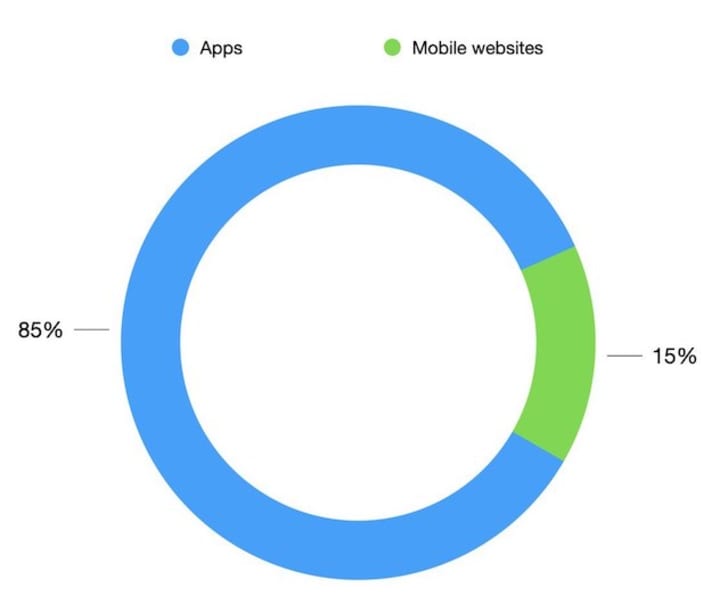
As displays are becoming bigger and brighter, and mobile devices themselves are significantly more powerful, mobile apps are set to become valuable working tools, which in many ways, can replace computers. Studies show that mobile apps can boost productivity dramatically, and 82% of IT executives said smartphones are essential to employee engagement.
But how often do you shift work that you usually only do on PC to your phone? And are there any simple, convenient, and logically organized apps that will help in your particular line of work?
If you are into tech, we are sure you would have come across the term API or API testing. With increasing awareness and use of technology, the use of API has also increased drastically. As per Google’s The State of API Economy 2021 report, more than half of inquest developers confirm the prerequisites of using API while creating new products or improving existing ones.
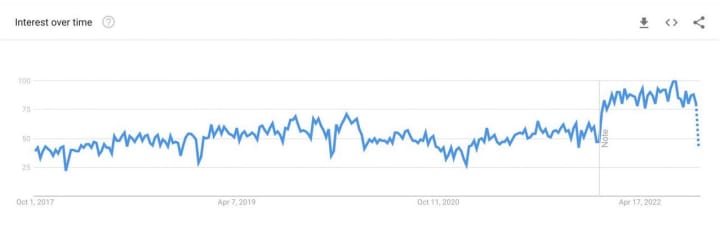
I work for an IT company as a Senior Quality Assurance Engineer, and in particular, I specialize in testing APIs. Unfortunately, app stores offer a small number of apps for API testing; even the well-known Postman doesn’t have a mobile version. And this is although the interest in API testing has been growing over the past five years, according to Google Trends.
There is a lot of testing software available for software developers and QA engineers to perform API tests. But not that many good apps. There are three things I want from an API testing mobile app: basic functionality for building and sending requests; support for different APIs types; and a feature for importing collections (as I have hundreds of requests I use for my work). Of course, a friendly UI is a great plus too.
API Tester is the best mobile app for API testing, which meets all the above conditions. It can be downloaded to your phone from the App Store, Google Play, and App Gallery, and there are also apps for iPad, MacBook, and Apple Watch. Functionality that I find remarkable:
- REST, GraphQL, WebSocket, and SOAP API types can be tested;
- option to manually build requests of any method like GET, POST, PUT, or even PATCH, OPTIONS, or HEAD;
- import of collections from Postman, Swagger, or URL;
- simple UI that helps to construct complex requests step-by-step with path variables, query params, authorization, body params, headers, and cookies;
- feature for sending all requests at once for running your API checklist; test results are conveniently presented on the main screen;
- global variables, performant code editor, and docs tab for GraphQL.
As a great addition to its functionality, the app is pretty accessible to all levels of testers and developers. The Guides on their website have all the API Tester’s features documented and provide all the information about the main services API and how to test them with the app. Plus, they have a great community, so you can get your questions about the app answered quickly. All in all, API Tester does a great job. This mobile app is minimalistic and full of functions, allowing you to do very complex tasks on a small screen.
API Tester is a feature-rich well-designed app that, in many terms, is superior to its desktop equivalents. In addition, the new world of work is increasingly focused on greater flexibility, so this app is an essential tool for talented API testers worldwide.
About the Creator
Keep reading
More stories from writers in 01 and other communities.
What are Development Miami Trends Every Leader Should Know
In 2026, most CEOs in Miami no longer treat mobile apps as supporting tools. The app is often the brand, the revenue engine, or the operational backbone. When it slows down, breaks, or fails compliance checks, the impact lands at the executive level. This is the moment when trend awareness stops being a curiosity and becomes a responsibility.
By Mary L. Rodriquez5 days ago in 01
Smart phones, Humans and Aliens.
WARNING. I will be tapping into one of your favorite creative tensions: The absurdity of humans worshipping their glowing rectangles as if they were tiny oracles. There’s something deliciously poetic about that contradiction, and it lends itself beautifully to an instructive proviso.
By Novel Allen7 days ago in Poets


Comments
There are no comments for this story
Be the first to respond and start the conversation.