
Streamline Your Video Collection: The Top 5 Best ISO to MP4 Converters and How to Use Them
Looking to convert your DVD ISO files to MP4? Check out our guide featuring the top 5 best ISO to MP4 converters. Streamline your video collection and watch your favorite videos on any device with ease!

Introduction
DVDs used to be the most popular format for storing and sharing videos, but now they are slowly being replaced by digital formats. DVD ISO files are digital images of DVD discs that contain all the data and structure of the original DVD. Converting DVD ISO files to MP4 format allows you to watch your favorite videos on various devices, such as smartphones, tablets, and computers. In this article, we will discuss the top 5 best ISO to MP4 converters, their pros and cons, and how to convert DVD ISO to MP4.
Top 5 Best ISO to MP4 Converters
HandBrake
HandBrake is a free and open-source video converter that supports various video formats, including DVD ISO files. It has a simple interface and offers many features, such as batch conversion, video filtering, and custom presets. HandBrake is available for Windows, Mac, and Linux.
Pros: Free, open-source, easy to use, supports many features.
Cons: May be slow for large files, limited output formats.
Any Video Converter
Any Video Converter is a popular video converter that supports various input and output formats, including DVD ISO files. It has a user-friendly interface and offers many features, such as video editing, DVD ripping, and batch conversion. Any Video Converter is available for Windows and Mac.
Pros: Easy to use, supports many features, supports many output formats.
Cons: Free version may contain ads, limited video editing options.
Freemake Video Converter
Freemake Video Converter is a free video converter that supports various video formats, including DVD ISO files. It has a simple interface and offers many features, such as video editing, DVD ripping, and batch conversion. Freemake Video Converter is available for Windows.
Pros: Free, easy to use, supports many features.
Cons: May contain adware, limited output formats.
DVDFab DVD Ripper
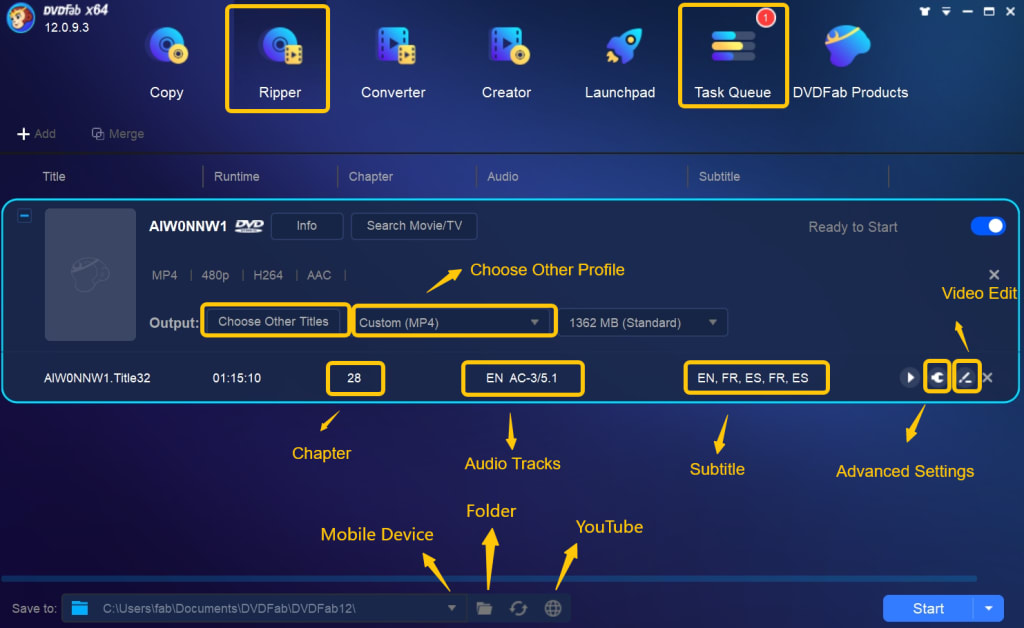
DVDFab DVD Ripper is a professional DVD ripper that supports various input and output formats, including DVD ISO files. It has a user-friendly interface and offers many features, such as video editing, DVD ripping, and batch conversion. DVDFab DVD Ripper is available for Windows and Mac.
Pros: Professional features, fast conversion speed, supports many output formats.
Cons: Not free, limited trial version.
WinX DVD Ripper Platinum
WinX DVD Ripper Platinum is a professional DVD ripper that supports various input and output formats, including DVD ISO files. It has a user-friendly interface and offers many features, such as video editing, DVD ripping, and batch conversion. WinX DVD Ripper Platinum is available for Windows and Mac.
Pros: Fast conversion speed, supports many output formats, supports hardware acceleration.
Cons: Not free, limited trial version.
How to Convert DVD ISO Files to MP4
- Download and install a DVD ISO to MP4 converter, such as HandBrake.
- Open the converter and select the DVD ISO file you want to convert.
- Select the output format as MP4 and choose the video and audio settings.
- Start the conversion process and wait for it to finish.
- Once the conversion is complete, you can find the MP4 file in the output folder.
Conclusion
Converting DVD ISO files to MP4 format allows you to watch your favorite videos on various devices. There are many ISO to MP4 converters available, each with its own pros and cons. HandBrake, Any Video Converter, Freemake Video Converter, DVDFab DVD Ripper, and WinX DVD Ripper Platinum are some of the best ISO to MP4 converters available. When converting DVD ISO files to MP4, it's important to choose the right converter and select the appropriate video formats. So, choose as your need and preference.
About the Creator
Wenny
Hi there, I'm Wenny, a technical writer sharing multimedia solutions accessible for everyone. Read my articles to turn "how?" into "let's do it!"
Real-World SharePoint Migration Scenarios and How to Solve Them?
SharePoint has now evolved significantly over time, from on-premises solutions to SharePoint Online. Many small organizations and large enterprises rely on SharePoint to collaborate and manage documents. Now, they are migrating to SharePoint Online for better collaboration, scalability, and integration with Microsoft 365.
By Xanthe Clay5 days ago in 01
How Crypto Trading Bots Actually Work in Real Market Conditions
Crypto trading bots are often described as automated tools that can trade faster and more efficiently than humans. While this sounds appealing, the real value of a crypto trading bot becomes clear only when we understand how it behaves in live market conditions. Crypto markets are volatile, unpredictable, and influenced by many external factors. A bot’s performance depends not just on automation, but on how it reacts to real-time price movements, liquidity changes, and sudden market shifts. This article explains how crypto trading bots actually function in real markets and what traders should realistically expect from them.
By smithtaylor7 days ago in 01
My New Book is Finally Here
My poetry collection Beautiful and Brutal Things is done. It's actually done and finally published over 270 pages. Over a year of my life went into this book. More than a year, really. Long days at my computer, sometimes seven days a week because I couldn't stop even when I probably should have. Then two months of editing that felt harder than the writing itself. But it's finished, and I'm still standing, and the book is real.
By Tim Carmichael2 days ago in BookClub




Comments
There are no comments for this story
Be the first to respond and start the conversation.