
Top 5 Free DVD Ripping Software You Shouldn't Miss!
The article provides a thorough examination of the features and functions of each of free 5 software for ripping DVDs in 2026.

I still keep a shelf of DVDs at home, even though most of the movies and shows I watch now are streamed online. Some of those discs are old purchases I made years ago, and some were gifts from friends or family, so I have always felt that they were worth keeping. That is reason I have spent quite a bit of time trying different best DVD ripping software. Sometimes I just wanted to turn a DVD into an MP4 file so I could watch it more easily on a tablet or laptop.
Of course, not every DVD ripping software offers the same experience. Some programs focus on simplicity, while others provide advanced settings for users who want greater control over video quality, file size, subtitles, or audio tracks. There are also differences in output format support, conversion speed, and interface design. To make the search easier, here are five best free DVD ripping programs that are still worth considering in 2026.
HandBrake
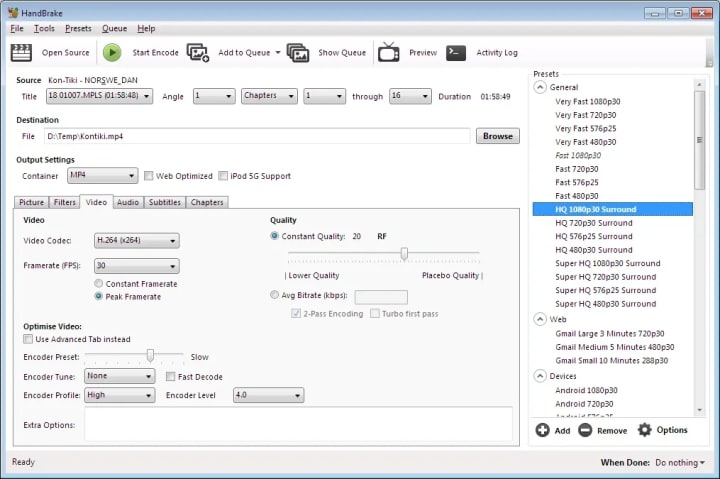
HandBrake is a popular open-source DVD ripping program that is well-known for its adaptability and customization features. It can convert DVDs to various digital formats, and is compatible with Windows, Mac, and Linux operating systems.
What stood out to me most about HandBrake was how much control it gives the user. It can convert DVD content into formats such as MP4 and MKV, and it allows you to adjust settings like resolution, bitrate, frame rate, subtitles, chapters, and audio tracks. I think this is one reason it has remained popular for so long. It works well for people who do not just want a quick conversion, but also want to fine-tune the balance between video quality and file size.
That said, HandBrake can feel a little technical at first. The interface is not confusing once you get used to it, but beginners may need a little time to understand the settings. Even so, for a free program, it offers a level of flexibility that is hard to ignore. It also supports batch processing, which makes it useful for anyone trying to work through several DVDs instead of converting them one at a time.
DVDFab DVD Ripper
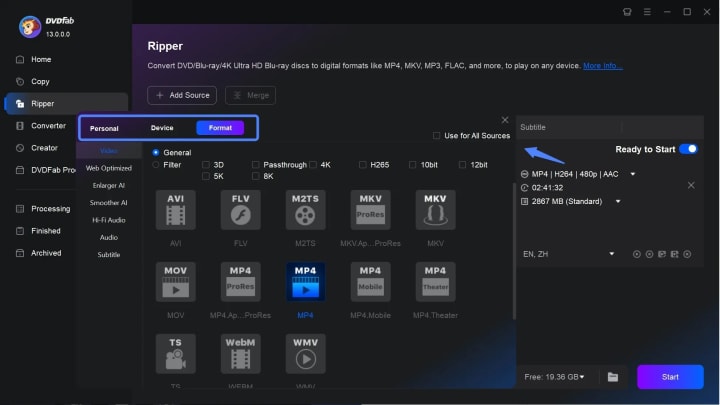
DVDFab DVD Ripper is often mentioned as he best DVD ripping software because it offers more than just basic ripping features. It is part of a broader media toolkit that also includes disc copying, disc burning, and format conversion functions. For users who prefer an all-in-one solution, DVDFab can feel more comprehensive than some lightweight alternatives.
The software supports a wide range of output formats, including MP4, AVI, and MKV, and its interface is relatively easy to understand. Even users who do not have much technical experience can usually find the main settings without much confusion. This ease of use is one of the reasons it remains popular among people who want to convert DVDs without spending too much time learning the software.
Another notable strength is performance. DVDFab supports hardware acceleration, which can help improve conversion speed on compatible systems. This can be especially helpful when handling longer videos or multiple discs. For users who value convenience, speed, and a polished interface, DVDFab is often seen as a strong option to explore, especially when compared with more bare-bones free tools.
XMedia Recode
XMedia Recode is a free DVD ripping program that can also convert DVDs to digital formats such as MP4. It supports a wide range of output options and gives users more control over video and audio settings, making it suitable for those who want both flexibility and cost-free DVD conversion.
Format support is one of its features. For users who prefer smaller files or output that is device-friendly, XMedia Recode offers direct DVD to MP4 conversion along with a number of editing and customization options. It is better suited for personal discs or unprotected sources, though, as it only functions with non-copy-protected DVDs.
XMedia Recode also includes editing-related features that can be useful in certain cases. Depending on the source and the user's goals, it may be possible to adjust video parameters, trim content, or optimize the output for specific devices. Its interface may look less modern than some competing tools, but for users who value function over appearance, it can still be one of the best free DVD ripping software solution in 2026.
MakeMKV
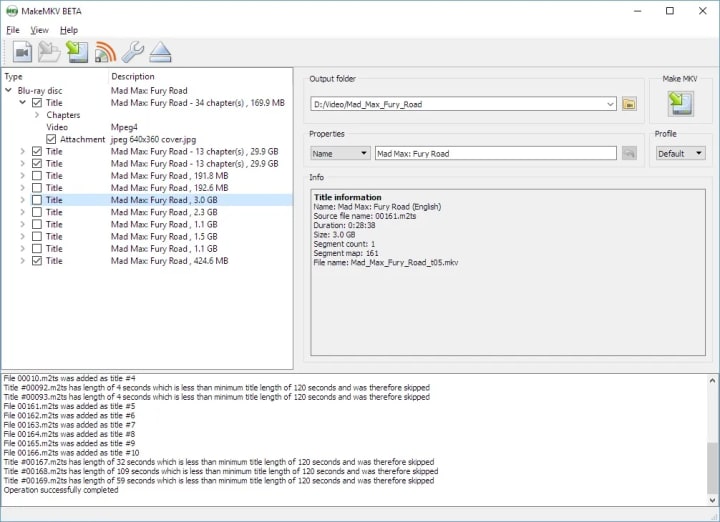
MakeMKV is a powerful yet simple DVD ripping program that focuses on converting DVDs to MKV format. This program has a user-friendly interface that makes it easier to use and is compatible with Windows, Mac, and Linux operating systems.
Its ability to maintain the original DVD quality is its most notable feature. MakeMKV ensures that the final MKV file is the same size as the original DVD by not compressing the output file. Furthermore, batch processing is supported by this software, enabling users to rip multiple DVDs at once.
VLC Media Player
You can use VLC Media Player to play videos and music, and it can also rip DVDs. It can change DVD to MP4, AVI, and other common video files, and it does so in a way that is easy for most people to understand.
Its biggest strength is that it can do many things. VLC is a good all-in-one choice because it can play almost any type of media file or disc, not just DVDs. VLC also has built-in streaming and conversion tools, so people who only need to back up DVDs or change their format may find it useful without having to install any extra software.
Conclusion
There is no single best DVD ripping software that fits everyone's needs. Some users want a clean and simple experience, while others prefer advanced settings and more control over quality, format, and compression. That is why choosing the right software often depends on what matters most to you, whether that is ease of use, conversion speed, output flexibility, or preservation of video quality.
The five DVD ripping prograns listed above each bring something different to the table. HandBrake is highly flexible, MakeMKV is great for quality-focused users, and DVDFab DVD Ripper appeals to people who like an all-in-one and reliable environment. In 2026, free DVD ripping tools still have an audience, and with the right choice, it is possible to make your DVD collection more accessible in a digital format that better fits modern viewing habits.
About the Creator
Wenny
Hi there, I'm Wenny, a technical writer sharing multimedia solutions accessible for everyone. Read my articles to turn "how?" into "let's do it!"
How One EdTech App Doubled Retention With AI in 90 Days
In the competitive landscape of 2026, the primary challenge for educational platforms is no longer the delivery of content. It is the persistence of the learner. For many developers, AI in EdTech has shifted from a speculative feature to the core engine of user stickiness. This transition is critical because, despite the massive influx of digital learning tools over the last decade, the industry has long struggled with a "completion crisis." The average course completion rate often hovered below 15% for non-mandatory content.
By Del Rosario4 days ago in 01
The Role of AI in Transforming Modern eLearning App Development
In the digital era, education is no longer confined to traditional classrooms. The demand for personalized, accessible, and interactive learning experiences has driven the growth of eLearning app development. Among the most transformative technologies shaping this space is Artificial Intelligence (AI). By integrating AI into educational platforms, businesses and institutions are revolutionizing how content is delivered, assessed, and adapted to learners’ needs.
By keith laurance4 days ago in 01
Guard Your Battery
Why are some people so attractive just by standing there? It’s not because they are "likable," but because they don’t need everyone to like them. I realized later that truly charismatic people allow themselves to be criticized, but they never criticize themselves. They never try to please the world; instead, the world stops to watch them.
By Emily Chan - Life and love sharing6 days ago in Poets




Comments
There are no comments for this story
Be the first to respond and start the conversation.