
Spotify HiFi Lossless Audio: How to Download Spotify HiFi (Lossless Quality)
How to Enable Spotify Lossless Audio
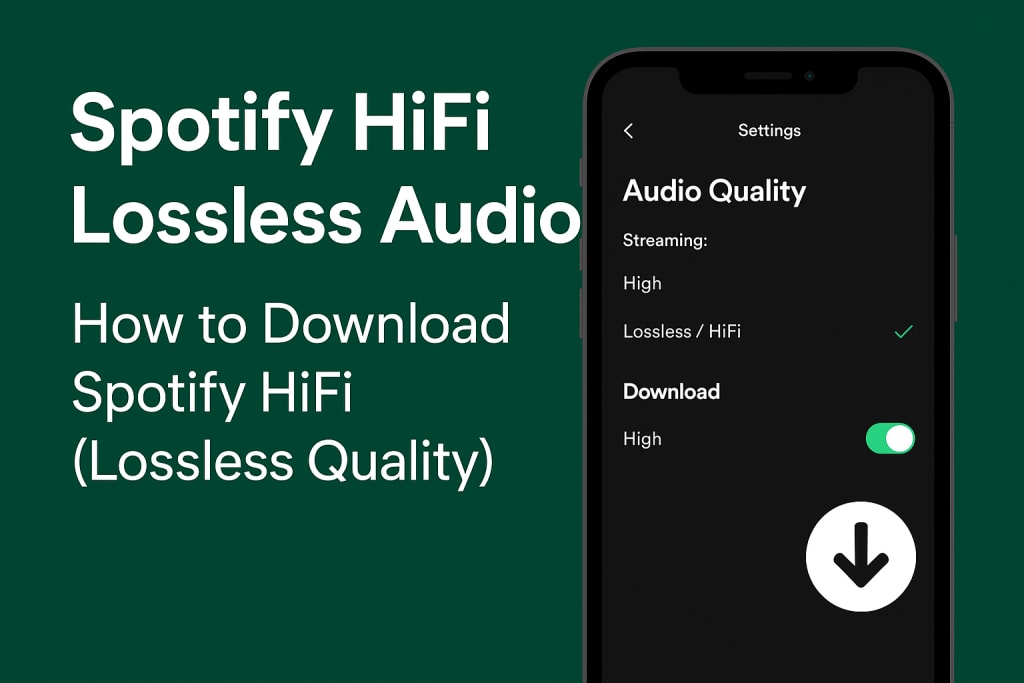
Spotify has been the leading music streaming platform for years, but one feature that audiophiles have been eagerly waiting for is Spotify HiFi. With the announcement of lossless audio streaming, Spotify aims to compete with services like Tidal, Apple Music, and Amazon Music Unlimited, all of which already provide high-resolution or lossless audio.
In this guide, we’ll cover everything you need to know about Spotify HiFi, how to enable it once it’s available, and how to download Spotify HiFi (lossless quality) tracks for offline listening.
What is Spotify HiFi Lossless Audio?
Spotify HiFi is an upcoming lossless audio tier that delivers CD-quality sound. Unlike the standard Ogg Vorbis compression Spotify currently uses, lossless audio preserves all the details of the original recording, offering richer, more immersive sound.
Standard Spotify audio quality: up to 320 kbps (compressed).
Spotify HiFi audio quality: up to 1,411 kbps (16-bit / 44.1 kHz, FLAC or similar).
For casual listeners, the difference might be subtle. But for music lovers using high-quality headphones, speakers, or a Hi-Fi system, lossless audio provides a much clearer and more natural sound.
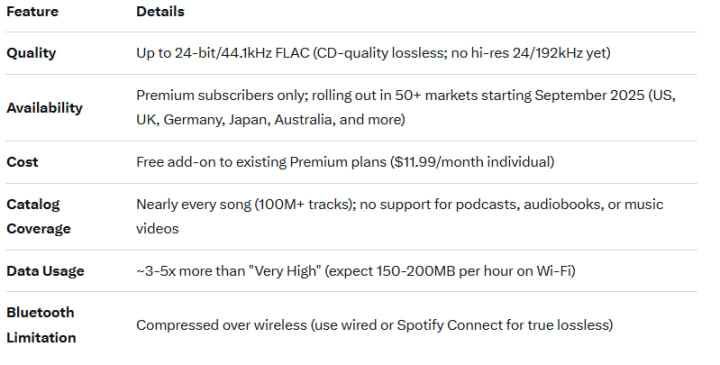
Compared to competitors:
Apple Music: Lossless + spatial audio at no extra cost since 2021.
Tidal: HiFi Plus tier with 24/192kHz and Dolby Atmos ($19.99/month).
Amazon Music: Unlimited includes HD/lossless for free.
How to Enable Spotify Lossless Audio
Enabling Spotify HiFi is straightforward, but you'll need to tweak settings per device (mobile, desktop, etc.) for the full effect. Premium required, of course—grab it here if you haven't.
On Mobile (iOS/Android)
- Check your subscription plan – Spotify HiFi may be part of a Premium Plus tier or add-on. Make sure your account supports HiFi streaming.
- Update your Spotify app – Ensure you’re running the latest version on desktop, mobile, or smart devices.
- Go to Settings > Audio Quality – In this section, Spotify will provide an option to switch from "High" to Lossless / HiFi.
- Choose Wi-Fi or Cellular streaming quality – Adjust settings to ensure lossless streaming both online and offline.
- Use compatible devices – Some smart speakers, DACs, or Hi-Fi systems may be required to take full advantage of lossless playback.
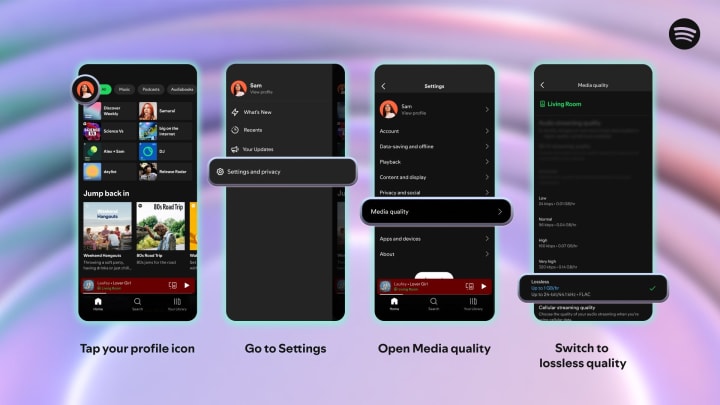
On Desktop (Windows/Mac)
Launch Spotify and click your profile > Settings.
Scroll to Audio Quality > Streaming and Downloads.
Toggle to Lossless for both.
For external devices, click the Devices Available icon during playback and select a compatible Spotify Connect speaker.
How to Download Spotify HiFi Lossless Audio for Offline Listening
You can download lossless tracks for offline use within the Spotify app—no hacks needed. But these are encrypted cache files, locked to your account and device. Want to export true FLAC files for your DAP (digital audio player), car stereo, or eternal backup? That's where third-party tools come in. We'll cover both official and advanced methods.
Official Method: In-App Offline DownloadsEnable Lossless in Downloads settings (as above).
- Find a playlist/album/track > Tap the Download button (down arrow icon).
- If tracks were previously downloaded at lower quality, delete them first (long-press > Remove Download) and re-download for HiFi glory.
- Access offline mode via Your Library > Downloads.
- Storage alert: A 100-song playlist could eat 4-5GB. Downloads expire after 30 days without internet check-ins.
Advanced Method: Export to True Lossless FLAC Files
Spotify prevents direct exports, but reputable converters let you rip tracks as standalone FLAC files while preserving metadata (artist, album art) and quality. Macsome Music One "record" the stream intelligently, converting at 10x speed without re-encoding losses. Always use for personal, non-commercial backups—respect copyrights!
- Convert Spotify HiFi tracks to MP3, FLAC, WAV, AIFF, ALAC, or AAC.
- Preserve lossless sound quality.
- Allow playback on any device without Spotify restrictions.
- This makes it possible to enjoy true lossless audio offline beyond the Spotify ecosystem.
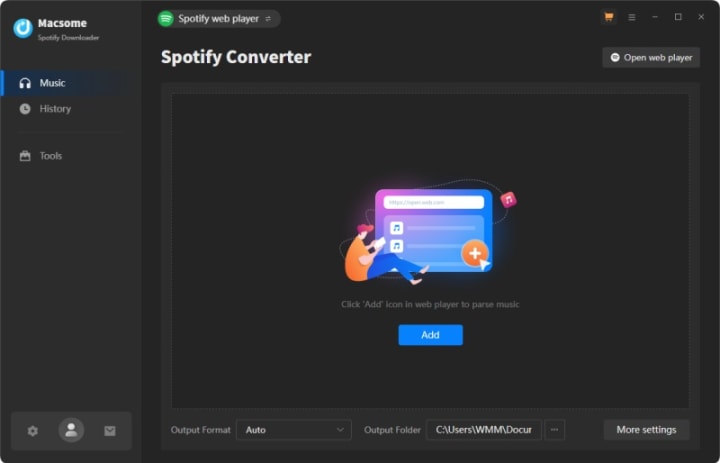
Wrapping Up: Your HiFi Journey Starts Now
Spotify's lossless launch feels like vindication for patient fans—finally, the world's top streamer delivers studio-grade sound without upcharges. Enable it today, download for offline adventures, and if you're archiving for life, grab a converter like Macsome Music One to lock in those FLAC gems.
About the Creator
How to Hire White Label WordPress Developer
Digital agencies are expanding, and client demands tend to rise more rapidly than internal resources. The development teams may be stretched to the limit when dealing with multiple site projects, maintenance, and custom feature requests. This is where hiring a white-label developer comes as an option. Most of the agencies engage the services of outside specialists to expand their services without affecting the brand or the quality of delivery.
By Rutvik Sangani7 days ago in 01


Comments (1)
What is this? Is this a new version?