
Physics Wallah PiBook Review: Affordable Laptop for Students
A budget-friendly laptop designed to meet all student needs effortlessly.

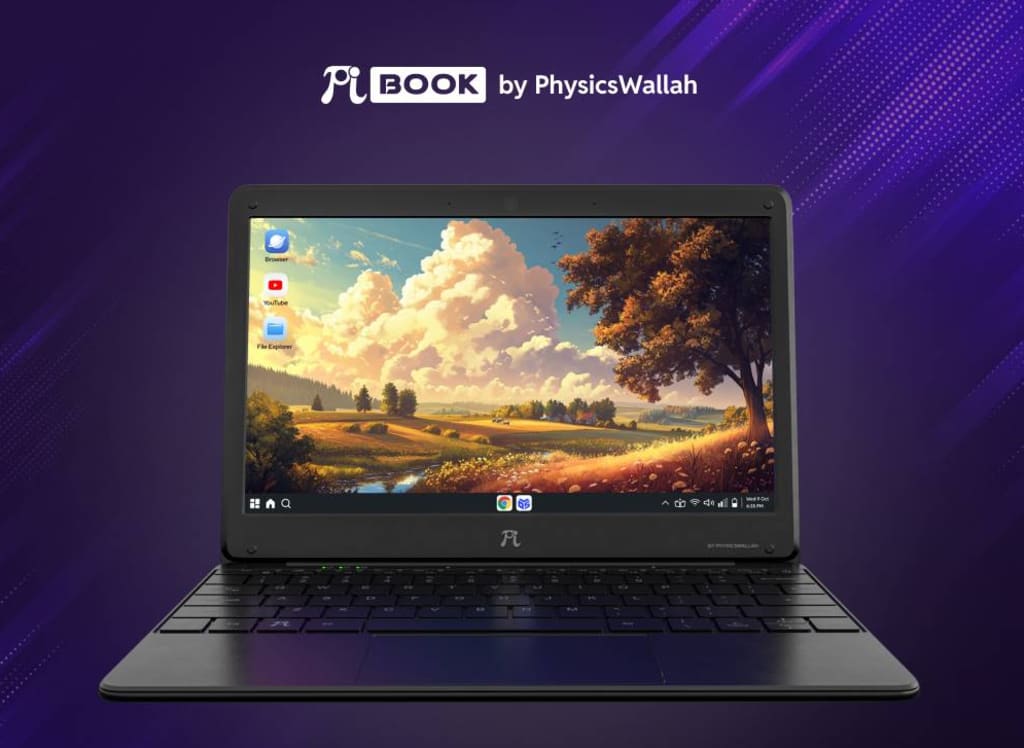
Physics Wallah’s PiBook: A Student-Friendly, Budget Laptop
Finding the right laptop that is affordable and designed for education can be tricky. That’s where Physics Wallah’s PiBook comes in—a low-cost laptop that is lightweight, efficient, and packed with features to help students thrive. In this article, we’ll cover all the details about the PiBook, including its specs, features, advantages, disadvantages, and why it’s a smart choice for students.
________________________________________
What Is the PiBook?
The PiBook is a budget-friendly laptop launched by Physics Wallah, an Indian ed-tech platform. It’s designed for students and comes at an affordable price of ₹14,999 (about $180 USD), offering great value for its price.
________________________________________
Key Features of the PiBook
• Price: ₹14,999 (around $180 USD)
• Display: 11.6-inch HD screen
• Processor: MediaTek Octa-Core 8788
• RAM: 6GB
• Storage: 128GB (expandable up to 512GB)
• OS: PiBook OS (based on Android 13)
• Connectivity: 4G LTE, Wi-Fi, Bluetooth
• Battery Life: Long-lasting for study sessions
________________________________________
Design and Portability
The PiBook is sleek, lightweight, and easy to carry around. Its compact design makes it perfect for taking to class or working from anywhere. The matte black finish gives it a modern, stylish look, and the build quality is sturdy enough for everyday use.
________________________________________
Performance and Usability
The laptop’s MediaTek Octa-Core 8788 processor and 6GB of RAM ensure smooth performance for everyday tasks like:
• Attending virtual classes
• Browsing the web
• Streaming educational videos
• Taking notes
It can handle multiple apps without lag, making it a great choice for students.
________________________________________
PiBook OS and Software
PiBook OS, based on Android 13, offers a user-friendly experience similar to a smartphone or tablet. It’s simple and intuitive, with access to:
• The Google Play Store
• Educational apps
• Productivity tools
This operating system is ideal for students who are already familiar with Android.
________________________________________
Storage Options
The PiBook comes with 128GB of internal storage, giving plenty of room for:
• Notes
• Assignments
• Videos and presentations
If you need more space, you can expand the storage up to 512GB with a memory card.
________________________________________
Connectivity
Staying connected is easy with the PiBook’s multiple options:
• 4G LTE: Internet on the go
• Wi-Fi: Fast and reliable connections
• Bluetooth: Connect wireless peripherals like headphones, keyboards, and mice
________________________________________
Battery Life
The PiBook’s battery is built to last through long study sessions. You can watch videos, attend classes, and work on assignments for hours without constantly needing to recharge.
________________________________________
Educational Features
Physics Wallah has included features that cater specifically to students:
• Pre-installed Educational Apps: Get access to study materials right away.
• Distraction-Free Mode: Focus on your work without interruptions.
• Integration with Physics Wallah’s Platform: Access online courses and lectures seamlessly.
________________________________________
Advantages of the PiBook
• Affordable Price: At ₹14,999 (around $180 USD), the PiBook is budget-friendly for students.
• Lightweight and Portable: Its compact design makes it easy to carry.
• Good Performance: The 6GB RAM and MediaTek processor ensure smooth multitasking.
• Expandable Storage: You can add up to 512GB of extra storage.
• Educational Focus: Pre-installed learning apps and seamless access to Physics Wallah’s courses enhance the learning experience.
• Android Familiarity: Many students are already comfortable with the Android interface.
________________________________________
Disadvantages of the PiBook
• No Windows Support: The PiBook runs on PiBook OS (based on Android), so it doesn’t support Windows apps.
• Limited Gaming Capabilities: It’s not suitable for high-end gaming.
• No Touchscreen: Some users may prefer a touchscreen, which the PiBook lacks.
• Basic Build Quality: While sturdy, the build is simple and not as premium as more expensive laptops.
________________________________________
How Does the PiBook Compare to Other Laptops?
Compared to other budget laptops like Primebook and Jiobook, the PiBook offers:
• Better sound quality
• A wider selection of apps from the Google Play Store
• The latest Android 13 operating system
Many users prefer the PiBook for its superior performance and overall value.
________________________________________
What Are Users Saying About the PiBook?
Here’s what some early users have shared:
• Sreehari K: “Really very good for this price. Better than Primebook and Jiobook.”
• Shahid: “Best for study.”
• Prithviraj Sharma: “Good, only for studies.”
These reviews highlight the PiBook’s strengths for education and ease of use.
________________________________________
How to Buy the PiBook
The PiBook is available for purchase through the official Physics Wallah website and select online stores. At ₹14,999, it’s an affordable option for students who need a reliable learning tool.
________________________________________
Summary
The PiBook by Physics Wallah is an affordable, reliable, and student-friendly laptop. It offers all the essential features needed for educational success, including long battery life, smooth performance, and access to educational apps. While it’s not a replacement for high-end laptops, it’s perfect for students looking for a cost-effective study companion.
________________________________________
OUR OTHER POSTS:-
1. How DeepSeek AI Was Created With a $6 Million Investment
2. Top 10 Best Budget Gaming Headsets
3. Archimedes: The Brilliant Mind That Shaped Science and Engineering
4. Leonardo da Vinci: The Genius Who Shaped the Renaissance
5. Best Free AI Video Makers in 2025
FAQs About the PiBook
1. Can I use Microsoft Office apps on the PiBook?
Yes, you can download Microsoft Office apps from the Google Play Store.
2. Is the PiBook good for online classes?
Absolutely! It’s designed for virtual learning, with good audio, a quality display, and compatibility with video conferencing apps.
3. Can I expand the storage if I run out of space?
Yes, the PiBook supports expandable storage up to 512GB with a memory card.
4. Does the PiBook have a touchscreen?
No, the PiBook has a traditional laptop screen without touch functionality.
5. What’s the warranty on the PiBook?
The PiBook comes with a standard one-year warranty for hardware defects.
________________________________________
Please don’t forget to view our other POSTS.
About the Creator
Valuable Knowledge
See the growing technology of the world, Sub my profile to be connected to the world's Tech
Sub to Youtube Channel
https://www.youtube.com/@whatsnew9825?sub_confirmation=1
Keep reading
More stories from Valuable Knowledge and writers in 01 and other communities.
How DeepSeek AI Was Created With a $6 Million Investment
How DeepSeek AI Was Created With a $6 Million Investment: A Beginner-Friendly Guide Artificial intelligence (AI) is everywhere these days—from chatbots helping you shop online to apps predicting the weather. But have you ever wondered how a brand-new AI like DeepSeek comes to life? Today, we’re pulling back the curtain to show you how a small team with a big vision built DeepSeek AI, all thanks to a $6 million investment. Whether you’re new to AI or just curious about the magic behind the tech, this story is for you!
By Valuable Knowledgeabout a year ago in 01
Random video chat didn’t die — it just stopped being 2009.
In the winter of 2025, Mina still kept the old laptop on her desk even though it wheezed like an asthmatic dog every time she opened more than three tabs. She wasn't nostalgic for the past exactly; she was just bored in a very specific, bone-deep way that only comes from scrolling feeds that know you too well.
By CEO A&S Developers6 days ago in 01
Early March 2026: 4 Goals Accomplished
It's early March and I've now accomplished my 4th writing goal for the year of 2026. Before diving into the behind-the-scenes of it... why not tell you up front what that accomplishment was? I was published in a 2nd publication for this year. Published in Helix Literary Magazine out of Central Connecticut State University. You can read it for free right now!
By Stephen Kramer Avitabile3 days ago in Writers




Comments (1)
This review is probably written without actually using the device hands-on. The device is a serious waste of money and doesn't provide anything mentioned in this review. Please donot write junk reviews like these just for the sake of posting something just like any other piece of AI generated non-sense these days on the internet. I have personally used the device as a friend of mine bought it and no it's mostly not what this review mentions. It's sluggish, laggy, in many ways a really bad device for even someone who just wants to watch lecture videos. It comes with a modified variant of Android or Linux which makes this more difficult for the user to troubleshoot. The build quality is also really bad and I don't think it'll stand the rugged use or even 1 year of normal usage. Repairability also seems like a problem. I would rather recommend anyone to buy any tablet from lenovo or samsung for even cheaper price if one wants to it watch lecture videos. If you want something more of a PC where you want to operate on a software such a Microsoft office (this can also be done on the before mentioned tablet) , programming, media consumption, etc then you're better off buying a second hand ThinkPad which you can get at the same price from Amazon. Just install Linux and you're good to go. A note to the review writer, you're posting false information on the internet. Donot write reviews about products for which you donot know anything. Your claims of "smooth" , "lag free experience", etc are far from the truth. If possible take this review down and save some poor students who'll get the wrong idea after reading this review. I know this is posted by some Indian dude who doesn't care what I said but think of those who might get the wrong idea and waste their hard earned money. Please refrain of mass producing content on the internet just to write something and increase the number of junk you've written.