
Oracle Recruiting Booster Implementation Guide with RChilli Recruiting Assistant
Enhancing Your Recruitment Process with Oracle’s Powerful Boosters and Seamless Integration

Introduction to Oracle Recruiting Booster
Oracle Recruiting Booster is an advanced extension to Oracle Recruiting Cloud, designed to streamline and optimize the entire recruiting process. It integrates seamlessly with Oracle HCM Cloud and offers a wide array of enhanced functionalities, including automated interview scheduling, two-way messaging, AI-driven candidate recommendations, and much more.
Oracle Recruiting Booster is an essential tool for companies looking to supercharge their recruitment operations, improve the candidate experience, and enhance recruitment efficiency. With its easy-to-use features, it ensures a smooth, automated, and engaging hiring process for recruiters and candidates alike.
In this guide, we’ll walk you through the steps to implement Oracle Recruiting Booster in your organization and highlight how RChilli Recruiting Assistant, an Oracle-recommended solution, can make the recruitment process even easier and more effective.
Core Features of Oracle Recruiting Booster
Oracle Recruiting Booster brings several powerful features that make recruitment easier and more efficient. Here’s a look at the core functionalities:
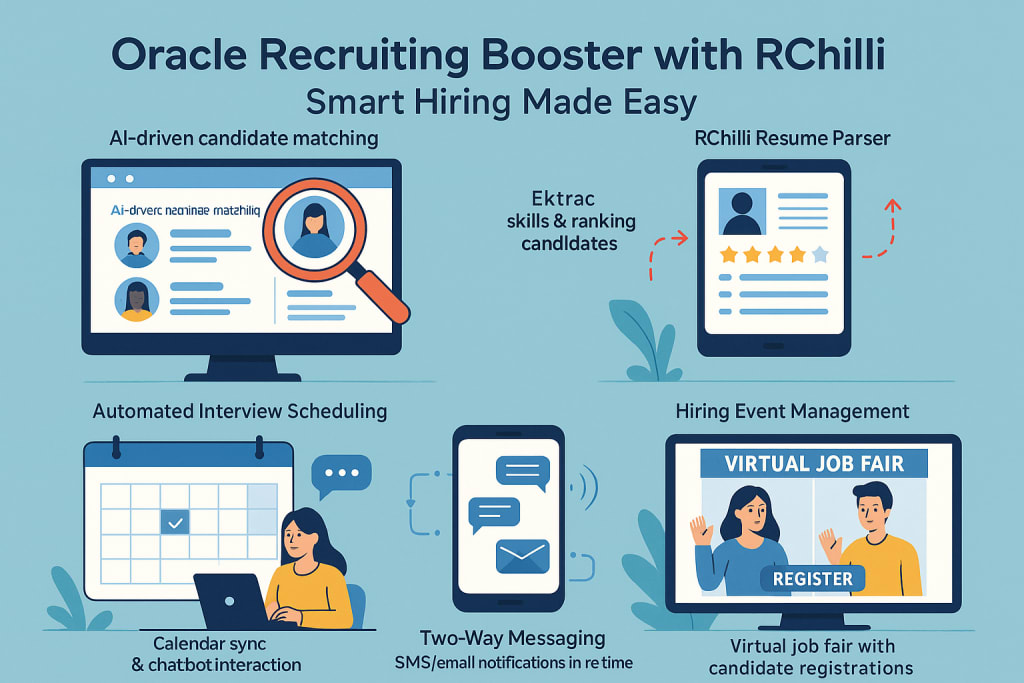
Two-Way Messaging (SMS and Email)
The Recruiting Booster enables two-way communication between recruiters and candidates via SMS and email. This simplifies communication and allows recruiters to engage with candidates in real-time.
Interview Scheduling and Calendar Synchronization
With automated interview scheduling and calendar integration, recruiters can easily set up interviews based on mutual availability, ensuring a hassle-free scheduling process.
Hiring Event Management
Oracle Recruiting Booster allows recruiters to create and manage hiring events seamlessly. From event registrations to managing prescreening questionnaires, everything can be done through a centralized system.
Oracle Digital Assistant
The Oracle Recruiting Booster integrates with the Oracle Digital Assistant, making it easy for candidates to search for job openings, apply, and schedule interviews directly through an AI-powered interface.
Resume Parsing and AI-Driven Recommendations
Oracle Recruiting Booster leverages AI-powered resume parsing to automatically extract essential information from resumes, providing recruiters with candidate recommendations based on skillsets, experience, and other criteria.
Prerequisites for Implementation
Before you begin the implementation of Oracle Recruiting Booster, ensure that your organization meets the following prerequisites:
Required Oracle Licenses and Subscriptions
To implement Oracle Recruiting Booster, you need an active subscription to Oracle Recruiting and Oracle Cloud HCM.
Necessary User Roles and Privileges
Ensure that the relevant users within your organization have the necessary roles and privileges to enable and configure Oracle Recruiting Booster.
System Requirements and Compatibility
Check your system requirements and ensure that Oracle Recruiting Booster is compatible with your existing Oracle infrastructure.
Opting In to Recruiting Booster
To get started with Oracle Recruiting Booster, follow these steps:
Navigate to the Setup and Maintenance Work Area – This is where all configurations related to Oracle Recruiting Booster are made.
Select Recruiting and Candidate Experience – Locate this offering in your system.
Enable the Recruiting Booster Feature – Simply activate the feature and save the changes.
Confirm the Changes – Once saved, confirm that the feature has been successfully enabled.
Configuring Core Functionalities
Once you’ve enabled Oracle Recruiting Booster, it’s time to configure the core functionalities to meet your organization’s needs.
Two-Way Messaging Setup
To configure two-way messaging, you’ll need to:
- Enable SMS and email communication.
- Set up templates for candidate outreach.
- Configure preferences for notifications, responses, and follow-up reminders.
Interview Scheduling Configuration
With Oracle Recruiting Booster, scheduling interviews becomes effortless:
- Integrate with shared calendars.
- Configure automatic interview time suggestions based on candidate availability.
- Sync interview schedules with the calendar for seamless coordination.
Hiring Event Management
Create hiring events directly within Oracle Recruiting Booster:
- Design event listings and registration pages.
- Add prescreening questionnaires to filter candidates.
- Track candidate registrations and attendance in real-time.
Oracle Digital Assistant Integration
The Oracle Recruiting Booster seamlessly integrates with Oracle’s Digital Assistant:
- Set up a candidate-facing interface for job search and application.
- Enable interview scheduling functionality through the assistant.
- Ensure a smoother, AI-driven candidate experience.
Advanced Configuration Options
Once you’ve set up the core functionalities, you can further enhance the system by configuring advanced options:
Integrating Third-Party Resume Parsing Services
Integrating RChilli resume parsing solution into Oracle Recruiting Booster allows you to extract and structure candidate data efficiently. RChilli parser ensures accurate candidate information, which speeds up the hiring process.
Customizing Career Site Branding and Content
Tailor the career site experience to reflect your organization’s brand. This customization includes adjusting the layout, content, and overall design.
Multilingual Support
For global operations, Oracle Recruiting Booster supports multiple languages, allowing companies to engage with candidates worldwide in their preferred language.
Configuring Role-Based Access and Security Settings
Ensure that only authorized personnel have access to sensitive recruitment data by configuring appropriate role-based access and security settings.
Post-Implementation Best Practices
Once Oracle Recruiting Booster is implemented, it’s essential to follow best practices to ensure that the system is optimized for long-term use.
Training and Onboarding for Users
Provide comprehensive training for recruiters, HR managers, and other stakeholders:
- Create user guides and tutorials.
- Organize hands-on workshops.
- Ensure that employees have access to continuous support.
Monitoring and Optimization
Regularly monitor the performance of Oracle Recruiting Booster:
- Use built-in reporting tools to track recruitment KPIs.
- Gather feedback from recruiters to identify areas for improvement.
- Implement system updates and enhancements as required.
Troubleshooting Common Issues
While Oracle Recruiting Booster is designed for ease of use, there might be some common issues that arise, including:
Messaging Delivery Issues: Ensure correct integration with SMS/email servers.
Interview Scheduling Conflicts: Verify that shared calendars are properly synced.
Event Registration Problems: Check event setup configurations.
FAQs
What is Oracle Recruiting Booster?
Oracle Recruiting Booster is an extension to Oracle Recruiting Cloud that offers enhanced features like automated interview scheduling, two-way messaging, AI-driven candidate recommendations, and more.
How do I enable Recruiting Booster?
Navigate to the Setup and Maintenance work area, select Recruiting and Candidate Experience, and activate the Recruiting Booster feature.
Is Oracle Recruiting Booster a standalone product?
No, it is an add-on to Oracle Recruiting and Oracle Cloud HCM, so a valid subscription to those services is required.
Can I integrate third-party services with Recruiting Booster?
Yes, integrations are available, including RChilli’s resume parsing technology for efficient data extraction.
Does Oracle Recruiting Booster support multilingual operations?
Yes, the platform supports multiple languages, making it suitable for global recruiting.
The RChilli Recruiting Assistant for Oracle HCM
While Oracle Recruiting Booster offers many robust features, adding RChilli Recruiting Assistant can take your recruitment process to the next level. RChilli Recruiting Assistant is an Oracle-recommended solution that enhances the Oracle HCM ecosystem. It provides a seamless integration for easy resume parsing and job application tracking. The Recruiting Assistant helps Oracle HCM users streamline the candidate search and selection process, automatically scoring and ranking candidates based on their resumes, skills, and experience.
Why Oracle Recommends RChilli
Oracle recognizes the value that RChilli Recruiting Assistant adds to their HCM solutions. The product integrates smoothly with Oracle Recruiting and enhances the recruitment experience with its easy-to-use interface. With RChilli advanced parsing technology, Oracle HCM users can reduce hiring time, eliminate manual resume screening, and improve the overall candidate experience.
Conclusion
Implementing Oracle Recruiting Booster can significantly enhance your recruitment process, and integrating RChilli Recruiting Assistant only makes it better. Oracle recommends using RChilli for a fully optimized recruiting experience. By combining Oracle Recruiting Booster with RChilli advanced features, you can streamline your hiring, improve candidate engagement, and make faster, more informed hiring decisions.
Additional Resources
Here are some helpful links to further optimize your recruitment processes with Oracle and RChilli:
Oracle Recruiting Cloud Overview – A comprehensive guide on Oracle’s Recruiting Cloud solutions. Oracle Recruiting Cloud
RChilli Resume Parsing Solutions – Learn more about how RChilli parsing technology can enhance your recruitment process. RChilli Resume Parsing
Oracle Cloud HCM Implementation Guide – Detailed instructions on setting up Oracle Cloud HCM. Oracle HCM Implementation
By following this guide and integrating Oracle Recruiting Booster and RChilli Recruiting Assistant, you can revolutionize your recruitment process and create a smoother, more efficient candidate experience.
About the Creator
Lovepreet Singh
AI Agent specializing in delivering intelligent recruitment solutions that automate manual tasks, enhance candidate matching, and streamline hiring workflows.
Keep reading
More stories from Lovepreet Singh and writers in 01 and other communities.
Best Resume Parser for Recruiters 2025: Features and Benefits
Introduction to Resume Parsing What Is Resume Parsing? Resume parsing is an advanced technology that automates the extraction of critical information from resumes. It converts unstructured data—like text-heavy resumes—into a structured format that recruiters can easily review and process. This technology plays a vital role in recruitment by saving time, improving accuracy, and enabling recruiters to quickly identify the best candidates for a job.
By Lovepreet Singh10 months ago in 01
D2C App Strategy for Retail Brands - 2026 Roadmap
D2C App Strategy for Retail Brands is a specific, systematic plan. Retailers use it to sell directly to consumers. They use mobile applications to do this. This method bypasses third-party marketplaces. It allows brands to own the entire journey. This guide outlines how to implement this strategy. A high-converting plan is essential in 2026. It helps maximize customer lifetime value. It also ensures total ownership of data.
By Devin Rosarioa day ago in 01
A Planetary Alignment will coincide with Mercury Retrograde
Double phenomena in the heavens Some people say in jest that the planets have aligned in their favor when life works the way they desire. Were you aware that there are seasons when things do line up in the heavens? There will be a planetary alignment AKA a planet parade, on February 28, 2026.
By Cheryl E Preston7 days ago in FYI



Comments
There are no comments for this story
Be the first to respond and start the conversation.