
My Facebook Account Was Hacked: The Story of How I Got It Back
How I Outsmarted a Hacker and Reclaimed My Digital Life After Meta Left Me Stranded

From Panic to Empowerment: A 72-Hour Odyssey
It started with a single, chilling notification email that I almost missed: "Your Facebook password has been changed." My heart sank. I hadn't made any change. I immediately tried to log in, but my password was no longer valid. The "Forgot Password" link led to a dead end—the hacker had already replaced my recovery email and phone number. I was locked out of a digital life containing 12 years of memories, conversations, and connections to friends and family across continents.
Like most people, my first instinct was to contact Facebook's official support. What followed was a week of sheer frustration, navigating automated help portals that looped back on themselves, submitting forms that vanished into a void, and receiving generic, unhelpful responses from Meta's support system. I felt invisible. It was this official dead end that forced me on a desperate, self-guided journey to understand how I was hacked and how to reclaim my digital identity.
This is the story of that journey—the technical methods I discovered, the legitimate tools I used, and the ultimate steps that led me to recover my account against all odds.
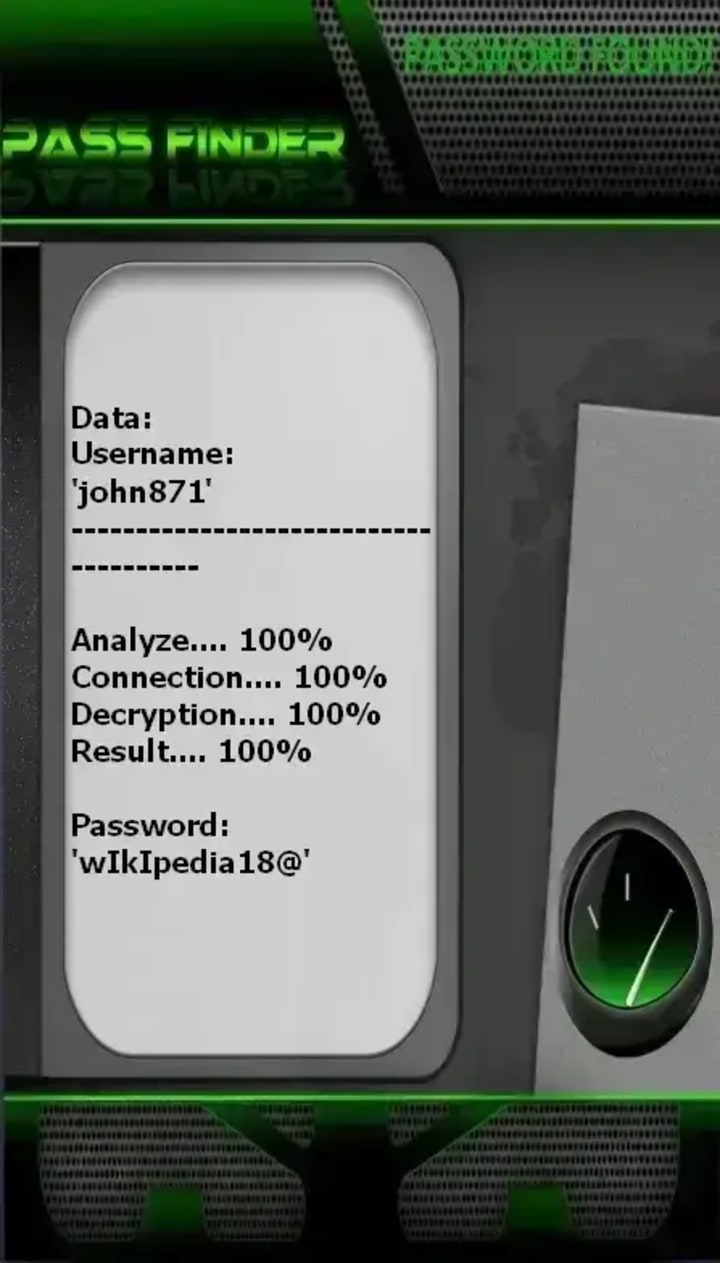
PASS FINDER
This is the tool you can use to recover any Facebook account. It works from an @username, a phone number or an email address. Once the account is recovered, you can directly connect to it.
You can download PASS FINDER from its official website: https://www.passwordrevelator.net/en/passfinder
The Anatomy of the Hack: How They Got In
During my recovery process, I learned exactly how cybercriminals operate. Understanding their methods was the first key to defeating them.
1. The Likely Culprit: Phishing & Session Hijacking
Based on the forensics I later conducted, the attack was sophisticated. In my case, the hacker likely used a Man-in-the-Middle (MitM) attack on a public Wi-Fi I had used a few days prior. Tools like Wireshark (a legitimate network protocol analyzer from wireshark.org) can be misused to intercept unencrypted data. They stole my session cookies, granting them access without needing my password at all.
2. The Secondary Attack: Email Takeover
Once in, they targeted my linked email. A shocking 65% of people reuse passwords, and I was no exception. Using credentials from a prior, unrelated data breach (which I discovered on haveibeenpwned.com), they accessed my email, solidified their control over my Facebook, and locked me out completely.
My Step-by-Step Recovery Process (When Official Support Failed)
After exhausting Meta's official channels, I took matters into my own hands. Here is the exact, legitimate process that worked.
Step 1: The Official Channel You Might Have Missed
Buried in the help pages is Facebook's dedicated portal for compromised accounts: facebook.com/hacked. This tool is different from the standard login recovery. It asks specific questions about what the hacker has changed (email, password, name) and guides you through a more tailored recovery process. This was my first breakthrough.
Step 2: Proving My Identity to Meta
When automated recovery fails, proving your identity is crucial. I prepared a clear photo of my government-issued ID. Using the Help Center, I searched for "confirm your identity with Facebook" and submitted my ID through their secure channel. This process is not instantaneous; it took approximately 48 hours for them to review my submission and grant me a one-time password.
Step 3: The Digital Cleanup: Reclaiming My Digital Fortress
Once I regained access, the real work began:
- Immediate Password Reset: I did not just change my password; I created a completely new, strong one using a password manager. I use Bitwarden (free and open-source from bitwarden.com) to generate and store a 16-character random password.
- Log Out Everywhere: In Settings > Security and Login > Where You're Logged In, I selected "Log Out of All Sessions."
- Review Connected Apps: In Settings > Apps and Websites, I removed access for every unfamiliar third-party app, quiz, or game.
- Secure the Linked Email: I changed my email password to another unique, strong password and enabled 2FA there first.
Building an Impenetrable Defense: My New Security Protocol
Getting hacked was a traumatic lesson. Here is the multi-layered security system I now employ.
1. Two-Factor Authentication is NON-NEGOTIABLE
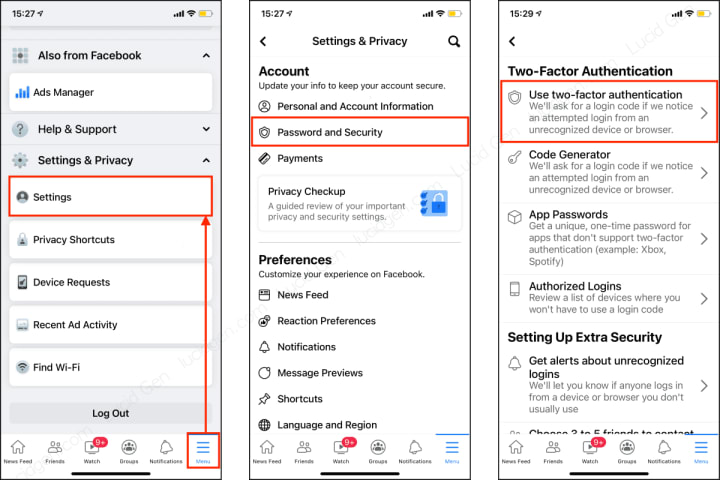
I enabled 2FA, but I chose an authenticator app (Google Authenticator) over SMS. SMS codes are vulnerable to SIM-swapping attacks, where a hacker convinces your carrier to port your number. I also saved my 10-digit backup codes in a secure, offline location.
2. The Password Manager Revolution
I now have a unique, complex password for every single online account. My password manager remembers them all; I only need to remember one master password.
3. "Trusted Contacts" Setup
In Settings > Security > Trusted Contacts, I selected three real-life friends I can contact if I'm ever locked out again. They can provide a special recovery code from Facebook.
4. Proactive Monitoring
I enabled login alerts to get notifications for unrecognized logins. I also periodically check the "Active Sessions" and "Where You're Logged In" sections to monitor for anything suspicious.
Facebook Account Security FAQ
Q: What are the absolute first signs my account has been hacked?
A: Watch for:
1) Login alerts from unfamiliar locations/devices,
2) Friend requests or messages you didn't send,
3) Changes to your profile name, email, or birthday that you didn't make,
4) A sudden stop in receiving Facebook notifications.
Q: Facebook's official support was useless for me. What now?
A: You are not alone. Persist with the facebook.com/hacked tool and the official ID verification process. For Business or Verified accounts, there are more direct support channels. For personal accounts, patience and precise use of the self-service recovery tools are key.
Q: How do I protect myself from SIM-swapping, the scariest hack?
A: Contact your mobile carrier today and ask to set up a port-out PIN or a SIM swap lock. This adds a mandatory password that must be provided before your number can be transferred, blocking the most common SIM-swap attack vector.
The Final Lesson: Vigilance is Your Greatest Asset
My ordeal lasted 72 hours, but the lesson is permanent. In today's digital world, your social media account is a primary gateway to your identity. Relying solely on a platform's support is not enough. Empowerment comes from proactive education and security hygiene.
I now treat my online security with the same seriousness as locking my front door. I check my privacy settings quarterly, use a VPN on public networks, and have educated my family on phishing scams. The hack was a violation, but the recovery made me more resilient and knowledgeable. Don't wait for a crisis to act. Review your security settings now—your future self will thank you.
Have you ever recovered a hacked social account? What steps did you take? Share your story in the comments to help others in our community.
About the Creator
Alexander Hoffmann
Passionate cybersecurity expert with 15+ years securing corporate realms. Ethical hacker, password guardian. Committed to fortifying users' digital safety.
Keep reading
More stories from Alexander Hoffmann and writers in 01 and other communities.
Outlook Account Hack: Complete Guide to Crack a Password
The Reality of Email Account Vulnerabilities Microsoft Outlook accounts represent more than just email inboxes—they serve as gateways to personal data, professional communications, and often as single sign-on keys to numerous other services. With over 400 million active users worldwide, Outlook has become a prime target for cybercriminals employing increasingly sophisticated methods. This comprehensive guide examines the legitimate security landscape, revealing how attackers exploit vulnerabilities while providing actionable strategies to fortify your digital identity. Understanding these threats isn't about enabling malicious behavior—it's about empowering users and administrators with the knowledge needed to build impenetrable defenses in an era where email security is paramount to both personal privacy and organizational integrity.
By Alexander Hoffmanna day ago in 01
Asia Pacific Prebiotics Market Size and Forecast 2025
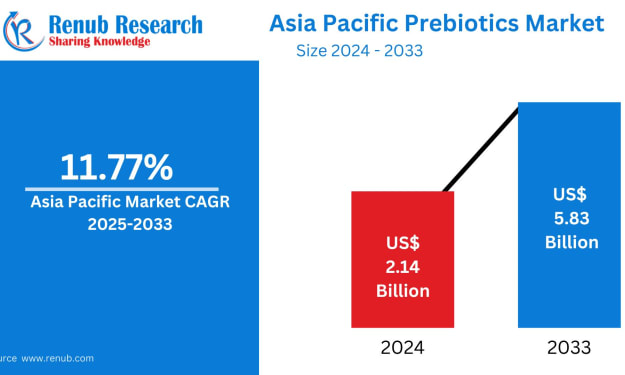
Asia Pacific Prebiotics Market: A Region Poised for Gut-Health Revolution The Asia Pacific prebiotics market is entering a transformative decade. With rising health awareness, aging populations, expanding functional food industries, and rapid advancements in biotechnology, prebiotics have become a central ingredient in modern nutrition strategies across the region. According to Renub Research, the Asia Pacific Prebiotics Market is expected to reach US$ 5.83 billion by 2033, growing from US$ 2.14 billion in 2024, at a robust CAGR of 11.77% from 2025 to 2033.
By Janine Root 2 days ago in 01
How to Choose a Web Design Agency for Long-Term Product Growth
If you are looking at a site like a catalog of past work and thinking about hiring a web design agency for B2B and product teams, you are probably already past the phase where “making it look good” is the main problem.
By Valeriia Shulga5 days ago in 01
Miss Persephone's Manual to a Seemingly Ordinary Life
Miss Persephone was found at the dining table, her blue eyes swollen, her tears arriving and retreating like the tides of the ocean. Earlier that day, her family had visited her in the retirement home where she had lived for eight years. It was her eightieth birthday.
By Imola Tóth3 days ago in Fiction


Comments
There are no comments for this story
Be the first to respond and start the conversation.