

This is the third in the short series of MQ for z/OS blogs that discuss the collection and processing of monitoring statistics and accounting data using SMF.
The first blog “MQ and SMF – Why, which and how?” in this short series explained how to enable the collection of MQ statistics and accounting data, also referred to SMF 115 and SMF 116 records respectively, as well as how to configure the data collection frequency using the STATIME attribute. The blog also discussed the available destinations for the SMF records, namely SMF datasets, SMF logstreams including compressed logstreams and in-memory logstreams.
The second blog “MQ and SMF – What, when and how much?”, discussed the options required to collect MQ for z/OS’ statistics and accounting data, when and how much data is collected and the cost of data collection.
This third blog discusses what tools you might use to process the SMF data that has been collected relating to your MQ for z/OS queue manager.
There are many tools available to process SMF data produced by MQ for z/OS, some of which provide a dump of the SMF data in a basic formatted view, some that allow the data to be loaded into spreadsheets, as well as some that offer insights into the data. Additionally, there are options that allow the SMF data to be presented in a graphical form, or in a form suitable for processing by other applications such as Splunk.
A brief return to SMF destination-types.
The reason for this return to the SMF destination types is to expand on the latest type available, which is pertinent to the discussion on how to process SMF data, particularly when timeliness is important.
In the first blog of this series “MQ and SMF – Why, which and how?” we discussed that there were 2 SMF destination types, namely data sets and logstreams. We also briefly mentioned that since z/OS v2r2, a third SMF destination type was available i.e. in-memory logstreams, which allows for real-time streaming of SMF data, and these can be used in parallel with logstreams.
If you are already using SMF logstreams, the additional configuration for in-memory logstreams is relatively simple.
If you are not already using SMF logstreams, then I would ask why not? The blog "SMF: When are you going to step up and move to logstream mode" offers a number of compelling reasons for the move, and certainly from a performance perspective you are able to exploit z/OS platform features such as compression in hardware to improve logstream capacity.
This blog does not discuss how to extract data from existing SMF data sets or SMF log streams but links are provided to the z/OS applications that perform that process, as I hope that you have already some experience of processing SMF data, even if that experience is not specifically with MQ.
As discussed in “MQ and SMF – Why, which and how?”, data stored in SMF data sets and SMF logstreams (whether compressed or not) are dumped using IFASMFDP and IFASMFDL respectively, however for in-memory logstreams it is typically necessary to create a custom application to extract the data from the stream. There is a sample available on Github named “SMFReal”. It is worth noting that the IBM Z Common Data Provider (CDP), discussed later, is also capable of extracting data from in-memory logstreams.
The documentation for setting up SMF in-memory logstreams is relatively straight-forward and simple to follow, but we found that making the following RACF definitions were required to allow our use of the logstreams:

Setting up SMF real-time streaming
As per the documentation to set up real-time streaming, security resources must be defined as above, and then the stream must be defined. The stream definition can be done in the PARMLIB member SMFPRMxx, for example:
Member: USER.PARMLIB(SMFPRMA1)

In the above example, we have defined an in-memory logstream which will capture only SMF type 115 records.
Note: The MQ specific logstream named IFASMF.MQ will capture both SMF 115 and 116 data.
Use the following command to activate the option: /SET SMF=A1 - where A1 is the 2 character suffix of the PARMLIB member.
To check that the in-memory stream is active: /D SMF

Extracting the SMF data
To extract the in-memory SMF data, we have taken a copy of the “SMFReal” sample code and built into a batch application. The output is written to a Unix System Services File named /tmp/ifasmfreal.out.

The sample program is hard coded to connect to the IFASMF.INMEM logstream, get each record and write the contents to the output file.
Example tools
MQ sample code CSQ4SMFD
This is a simple example program that is provided with an MQ installation. The application prints a dump-like format of SMF 115 and 116 records, but does not offer any context to the data, for example whether a particular value is an indication of a problem.
For large volumes of data, CSQ4SMFD is an aide to understanding how to process the MQ SMF data rather than offering insight into the data that has been collected.

In the above example, we have information that indicates there was page set read I/O required, i.e. qpstrio = 10937, but in order to know that, requires additional knowledge of the use of the data fields.
MQ supportPac MP1B “Interpreting accounting and statistics data, and other utilities”
The performance supportPac MP1B, provides a program MQSMF to print accounting and statistics data, as well as offer some insights into the analysed data. For example MQSMF can report when there are high volumes of data being driven through the log task in MQ for z/OS, which can help determine when the log task is processing at peak capacity.
The MQ for z/OS Performance Team use program MQSMF on a regular basis to review the SMF data collected from regression test runs.
Examples of MQSMF reports
In these examples, we reuse the data from the CSQ4SMFD sample mentioned earlier, where we can see that buffer pool 1 required disk read I/O to and from page set(s). The output produced by program MQSMF however is in a more consumable form and offers some insight into the data.
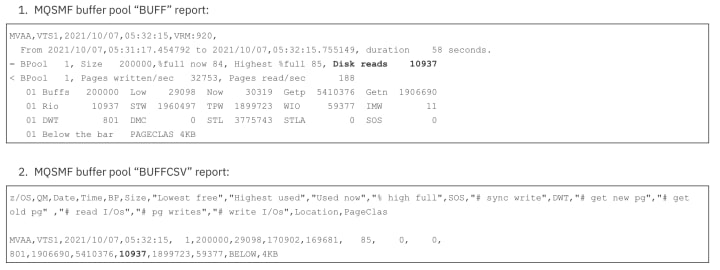
Note: Program MQSMF can generate report names suffixed with CSV, which a Comma Separated Value reports that can be fed into a spreadsheet or other graphical based tool that requires data in a CSV format.

In the BUFFIO report, we can see that the I/O is primarily from buffer pool BP01 to page set, as the write requests account for 84.5% of the total I/O requests.
The IMW (Immediate Write) field being non-zero also indicates that some writes requests were processed synchronously because the buffer pool was too small for the workload.

The insights report shows that the buffer pool was filled many times and required pages to be read from disk (page set), and concludes that the buffer pool is too small for the working set of messages.
Application mq-smf-csv
The mq-smf-csv sample application available on Github is a simple application for formatting SMF records produced by MQ for z/OS, to assist with importing into spreadsheets and databases.
The Github package has been created to simplify the task of performing your own analysis of SMF records produced by MQ for z/OS system, by making it easy to import formatted records into a spreadsheet or database.
The application takes input data from a z/OS dataset that has been downloaded to a local file, and can be run on a Windows or Unix system to create standard CSV (comma separated value) output files.
The application can also be used to load data into database tables, specifically Db2 for z/OS. However, with slight modifications, the definitions can also be used to load into a MySQL database running in a Docker container.
Application mq-smf-csv can also process real-time data from a file extracted from in-memory logstreams (as mentioned earlier when discussing sample program “SMFReal”) using a command similar to:

This command will ‘ssh’ into the target z/OS system and tail the output of the temporary file containing the output from SMFReal, piping that into mq-smf-csv.
By default, mq-smf-csv will write the output to comma separated value (CSV) files in the local directory where the files will be named SMF-<type>.csv, e.g. SMF-QPST.csv.
It is relatively straightforward to generate a script to process these CSV files in real-time, generating a graphical representation of the data, for example using matplotlib functions in a python script.
Program mq-smf-csv does not interpret the SMF data to offer any insights of the data.
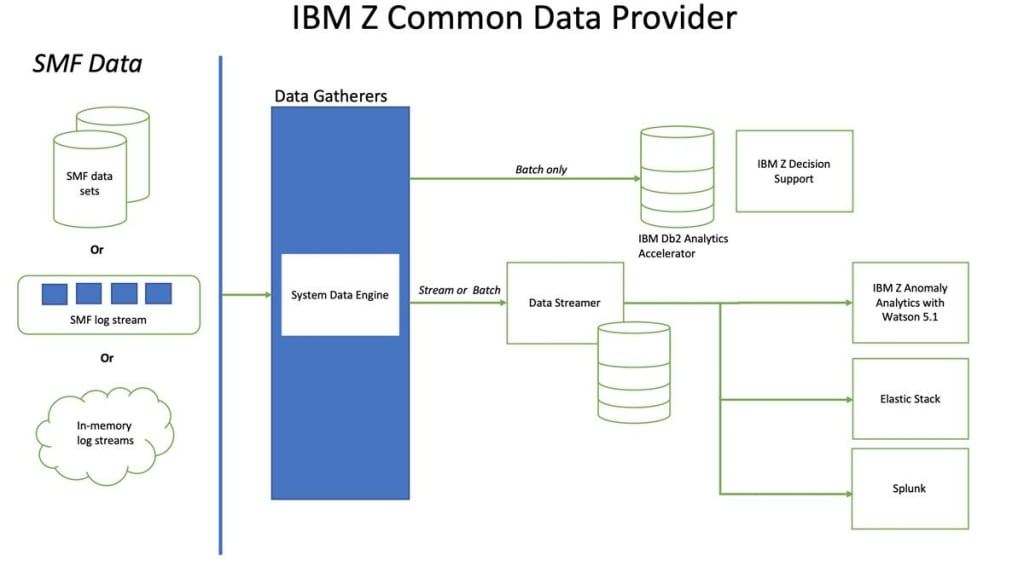
IBM Z Common Data Provider
The IBM Z Common Data Provider (CDP) provides the facility to extract the SMF data in real-time and pass into the application of your choice to provide analysis of the data. For example, this could be an off-the-shelf product like IBM Z Anomaly Analytics with Watson™, a bespoke application written perhaps using Splunk or a graphical system like Grafana.
A good overview of the IBM Z CDP can be found at: https://www.ibm.com/docs/en/zcdp/2.1.0?topic=overview-components-z-common-data-provider
The following diagram offers a representation of the flow of data amongst IBM Z CDP components to multiple analytics platforms.
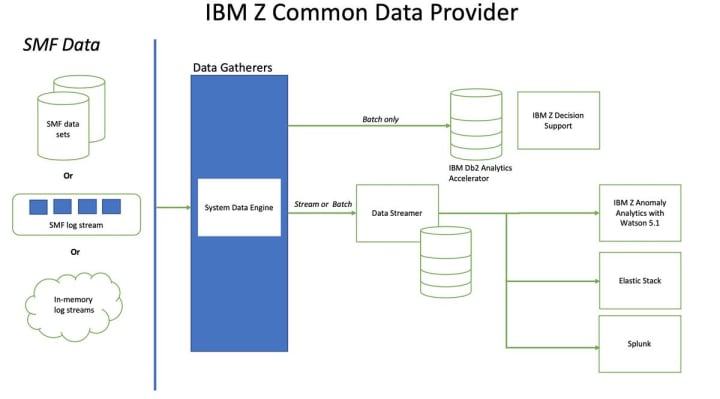
Note that:
- SMF data is just one of multiple data sources for the Data Gatherer component of the IBM Z CDP.
- Not all of the systems on the right-hand side of the diagram have support for MQ SMF data but are included to offer insight into the CDP’s function.
- Additionally, these systems are not a complete list of options for processing data extracted by the IBM Z CDP.
IBM Z Anomaly Analytics (ZAA) with Watson 5.1
As mentioned by my colleague, Matt Leming, in his blog, IBM Z Anomaly Analytics (ZAA) was previously called IBM Z Operational Analytics (IZOA).
IBM ZAA consumes historical SMF data from a variety of z/OS subsystems and uses these to generate a model for what is normal for a set of Key Performance Indicators (KPIs). IBM ZAA then consumes real time SMF data, which is compared to the model, and if the KPIs deviate from the model the user is alerted. This allows users to take remedial action before problems occur.
The latest version comes with support for IBM MQ for z/OS SMF 115 statistics data.
Starter education on IBM ZAA with Watson can be found at: https://www.ibm.com/docs/en/z-anomaly-analytics/5.1.0.
How do I know which is the right tool?
The answer really depends on how proactive you intend to be with the data and how much experience you have in managing, monitoring and tuning your MQ subsystems.
In some cases, you may be happy to take the most basic SMF data and provide the interpretation yourself, or conversely you may want to implement a system that provides visual alerts to issues in your MQ infrastructure, without having to rely on many years of deep learning of the intricacies of your implementation.
In summary
What this blog aims to offer is a set of examples that can be used to interpret the SMF data produced by your MQ for z/OS system. Whether a print of the raw SMF data, or some basic interpretation applied to the data or something more flexible that allows either off the shelf or bespoke to consume your data, is entirely up to you.
You can use the data generated from whichever offering you choose with the information in the IBM MQ documentation and the performance reports MP16 and MP1B, to determine whether the data reported is of concern.
The tools and options discussed in this blog do not claim to be a comprehensive list of solutions for parsing and interpreting MQ for z/OS SMF data but hopefully will help give you an indication of the basic options available, and will help you understand what you actually need.
What’s next?
The final blog in this series will discuss what has changed in MQ for z/OS v924 and what implications that could have. In particular the decoupling of statistics and accounting data collection as well as the ability to collect data on a higher cadence.
Original Post: https://community.ibm.com/community/user/integration/blogs/anthony-sharkey1/2021/11/25/mq-and-smf-how-might-i-process-the-data
Author: Anthony Sharkey
Reposted and redacted with permission of Author by: Adrian Klimaszewski
About the Creator
Keep reading
More stories from Adrian Klimaszewski and writers in 01 and other communities.
Two years of evolution and innovation with IBM MQ 9.3
In June 2022 IBM released IBM MQ 9.3, the latest long term support release for IBM MQ. Many of you will know that this is two years on from 9.2 LTS, and in that time they introduced an amazing set of updates and innovation.
By Adrian Klimaszewski3 years ago in 01
The Rise of AI Gigafactories: What They Are and How They Operate
Artificial Intelligence has become a defining force in technology, industry, and economic competition. That’s why every country wants to position itself as a leader in providing AI-ready compute infrastructure. And the European Union (EU) knows it can’t just afford to sit on the sidelines. So, Europe has taken a big step forward with something called AI Gigafactories to strengthen technological sovereignty.
By Shikharsparx2 days ago in 01
Asia Pacific Prebiotics Market Size and Forecast 2025
Asia Pacific Prebiotics Market: A Region Poised for Gut-Health Revolution The Asia Pacific prebiotics market is entering a transformative decade. With rising health awareness, aging populations, expanding functional food industries, and rapid advancements in biotechnology, prebiotics have become a central ingredient in modern nutrition strategies across the region. According to Renub Research, the Asia Pacific Prebiotics Market is expected to reach US$ 5.83 billion by 2033, growing from US$ 2.14 billion in 2024, at a robust CAGR of 11.77% from 2025 to 2033.
By Janine Root 6 days ago in 01
Autonomy Is The Real Privilege
Good morning, freedom-seekers! Today we’re gonna be looking at autonomy. A strange word, I know; one many would probably look at blankly and run away from on sight. We’re gonna figure out what it actually means, consider how it’s achieved, and decipher just how deeply most of us are tangled up in dependence without realising it.
By That ‘Freedom’ Guy3 days ago in Humans




Comments