
JavaScript Daily Tips #79: How to Implement JavaScript’s Mediator Pattern
Design patterns are a powerful tool in software development, offering solutions to common problems faced when building complex systems


One such pattern, the Mediator Pattern, is widely used to manage communication between different components in an application, ensuring that they interact in a more maintainable and decoupled manner. In this article, we will dive into the Mediator Pattern in JavaScript, explore its use cases, and show you how to implement it to improve your code’s structure.
What is the Mediator Pattern?
The Mediator Pattern is a behavioral design pattern that provides an object (the mediator) that acts as an intermediary to facilitate communication between objects. Instead of objects communicating directly with one another, they send their messages to the mediator, which then handles the interaction. This reduces the dependencies between objects and promotes loose coupling, leading to cleaner, more maintainable code.
In JavaScript, this pattern is particularly useful when you have multiple components (such as UI elements or modules) that need to communicate with each other, but you don’t want to establish direct connections between them. The mediator centralizes communication, making the system more scalable and easier to modify.
Key Benefits of the Mediator Pattern:
Loose Coupling: Components don’t need to know about each other, making the system easier to maintain.
Centralized Control: The mediator acts as a central point of control, simplifying the flow of messages between components.
Simpler Object Interactions: By using a mediator, objects can focus on their primary responsibilities, without needing to worry about how to communicate with other objects.
Scalability: As your system grows and new components are added, you can easily integrate them into the communication flow by adding them to the mediator, rather than modifying the objects themselves.
How the Mediator Pattern Works
Let’s break down the key concept behind the Mediator Pattern:
- Mediator: This is the central hub that facilitates communication between objects. It doesn’t hold the business logic of the components but serves to direct messages between them.
- Colleagues (or Components): These are the objects or components that interact with one another. They send messages to the mediator instead of directly interacting with each other.
In a typical implementation, when a colleague (object) needs to interact with another, it sends a message to the mediator. The mediator then routes the message to the appropriate component(s). This approach reduces the direct dependencies between components.
Use Cases of the Mediator Pattern in JavaScript
The Mediator Pattern is useful in various scenarios, especially when you have complex object interactions. Some of the most common use cases in JavaScript include:
UI Component Communication: In modern web applications, UI components often need to interact with one another. For example, a change in one dropdown might require updating the content of another dropdown or a section of the page. The Mediator Pattern helps to manage these interactions without directly coupling components.
- Form Validation: Consider a form with multiple input fields. When one field’s value changes, the validation status of other fields might need to be recalculated. The mediator can handle the logic of coordinating these changes.
- Event Handling: In complex applications with many event listeners, the Mediator Pattern helps to centralize event handling and reduce the coupling between different parts of the application.
- Chat Applications: A chat application often requires multiple components to interact, such as sending messages, updating UI elements, and managing state. The Mediator Pattern can manage these interactions efficiently.
How to Implement the Mediator Pattern in JavaScript
Now that we understand the theory behind the Mediator Pattern, let’s see how we can implement it in JavaScript.
Step 1: Define the Mediator Class
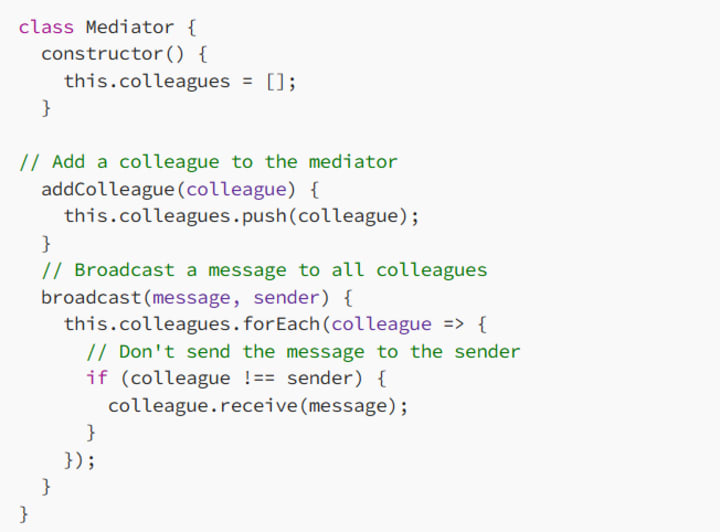
The mediator will be responsible for managing communication between various components. It will expose methods to add and remove components (colleagues) and a method for broadcasting messages between them.
Here’s a simple implementation of a Mediator class:
Step 2: Define the Colleague Class
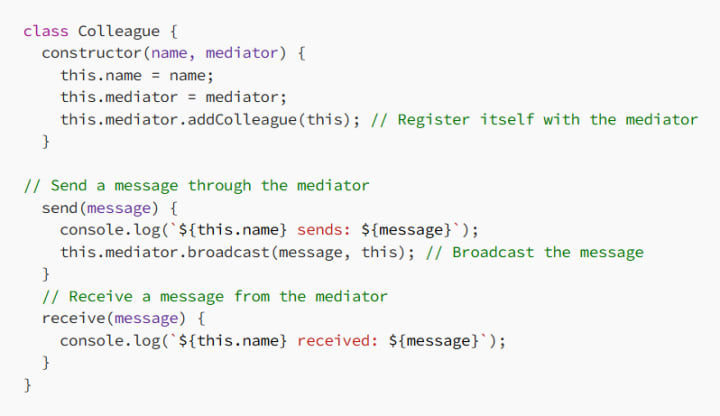
Each colleague (component) will need to communicate with the mediator. It will have a method to send messages to the mediator and a method to receive messages. The colleague should also register itself with the mediator.
Here’s how the Colleague class can be implemented:
Step 3: Using the Mediator and Colleagues
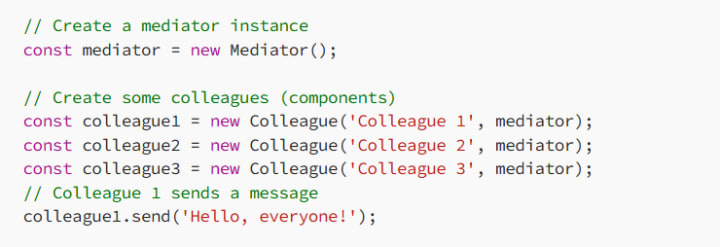
Now, let’s create instances of the mediator and colleagues, and see how they interact with each other.
Expected Output:

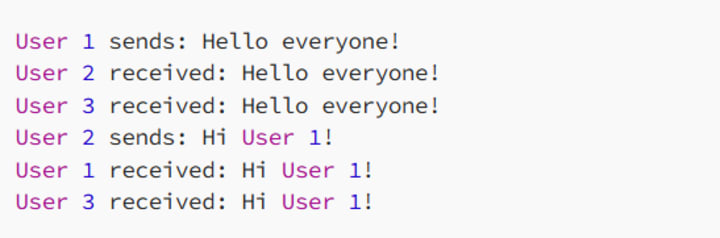
In this example, when colleague1 sends a message, the mediator broadcasts that message to the other colleagues (colleague2 and colleague3). The message is not sent back to the sender (colleague1), keeping the communication centralized.
Real-World Example: Implementing a Chat System
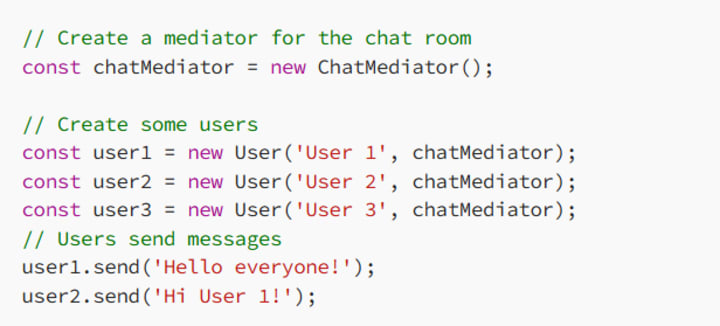
Let’s look at a more complex example where the Mediator Pattern can be applied: a chat system. In this case, the mediator will manage communication between users in a chat room.
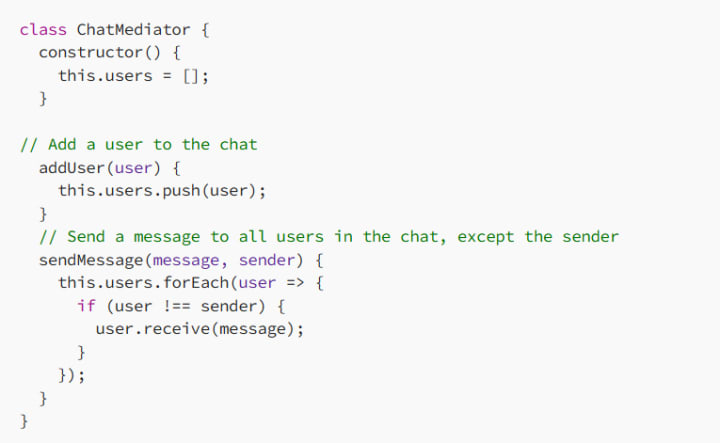
Step 1: Create the ChatMediator Class
The ChatMediator will be responsible for managing all users and distributing messages:
Step 2: Create the User Class
Each User will represent a participant in the chat room. Users can send and receive messages through the ChatMediator.

Step 3: Simulate a Chat
Now, let’s simulate a chat between multiple users.
Expected Output:
When to Use the Mediator Pattern
The Mediator Pattern is ideal for situations where:
Complex Component Interactions: When multiple components or objects need to interact, but you want to reduce dependencies between them.
UI Components: In web development, UI components often need to communicate (e.g., form fields or buttons). The mediator helps to centralize this interaction, reducing tight coupling between components.
Event Management: When events or actions need to be shared across multiple components without directly coupling the listeners to the components.
However, the Mediator Pattern should be used carefully. Overuse of this pattern can lead to a situation where the mediator itself becomes overly complex, managing too many interactions. In such cases, it may be worth reconsidering if a more straightforward communication mechanism would be more appropriate.
Conclusion
The Mediator Pattern is a powerful tool for managing complex communication between objects in a decoupled and maintainable way. By using a mediator to handle the interactions between objects, you can reduce dependencies, improve code organization, and make your systems more flexible and easier to scale. Whether you’re building a UI framework, a chat application, or any other system with multiple interacting components, the Mediator Pattern can help you keep your code clean and easy to maintain.
Happy coding! 🚀
About the Creator
MariosDev
Hi, I’m Marios! I’ve been a developer for over 9 years, crafting cool stuff and solving tricky tech puzzles. I’m a total tech enthusiast and love sharing my thoughts and tips through blogging. Also, in love with my bike!
Modern Technology in 2026: Transforming Life with Opportunities and Challenges
Introduction In the year 2026, modern technology has become deeply woven into almost every aspect of human life, influencing the way people communicate, work, learn, travel, and even think about the future of society. Over the past few decades, technological advancement has accelerated at a pace that previous generations could barely imagine, creating tools and systems that have improved efficiency, expanded knowledge, and connected people across continents in ways that once seemed impossible. However, alongside these remarkable benefits, modern technology has also introduced a range of complex challenges that affect mental health, social behavior, privacy, and economic stability, leading to an ongoing debate about whether technological progress is ultimately improving human life or quietly creating new problems that society must urgently address.
By The Curious Writera day ago in 01
My First Time Skiing and I Got Lost, Alone, in the French Alps
Looking back, I can trace some of my life’s biggest adventures to a simple action from my sister. She’d introduced me to Tommy (a very long time ago), a colleague of hers, who had overshared his penchant for Italian-looking women, and I ticked that box.
By Chantal Christie Weissa day ago in Humans




Comments
There are no comments for this story
Be the first to respond and start the conversation.