
HTML Tips #92: Building a Simple HTML FAQ Page
In this article, we will explore the process of building a simple FAQ (Frequently Asked Questions) page using HTML.


In this article, we will explore the process of building a simple FAQ (Frequently Asked Questions) page using HTML. A well-structured FAQ page can significantly improve the user experience by providing answers to common questions, helping to reduce customer support inquiries and giving visitors quick access to relevant information.
By the end of this guide, you’ll have learned how to create a basic FAQ page that is both user-friendly and effective.
What is an FAQ Page?
An FAQ page is a web page that provides answers to common questions or concerns that customers, visitors, or users might have. These questions typically address common issues related to a product, service, or website and are designed to help users find answers quickly without having to contact support.
In a typical FAQ page, questions are displayed in a list format, and the answers are either hidden or revealed when the user clicks on the question. This makes it easy for users to navigate through the questions and find relevant answers.
Why is an FAQ Page Important?
An FAQ page serves several important purposes:
- Improves User Experience: It provides instant answers to common questions, saving users time and frustration.
- Reduces Customer Support Load: A good FAQ page can reduce the number of inquiries that your support team receives, freeing them up to handle more complex issues.
- Increases Website Usability: By providing important information, an FAQ page can help guide users through your site or product.
- SEO Benefits: FAQ pages are often indexed by search engines and can help drive traffic to your site by answering common queries.
Building a Simple FAQ Page in HTML
Now that we understand the importance of an FAQ page, let’s get started with building one in HTML. Below is a step-by-step guide to creating a basic FAQ page.
Step 1: Structuring the Basic HTML Page
First, we need to create the basic structure of an HTML document. This includes the DOCTYPE declaration, the <html>, <head>, and <body> tags, as well as the essential elements like the page title and meta description.

Here’s a breakdown of the structure:
- The <!DOCTYPE html> declaration specifies that this is an HTML5 document.
- The <html lang="en"> tag defines the language of the document as English.
- The <head> section includes metadata, such as the character set, viewport settings, and description.
- The <body> section contains the visible content of the page.
Step 2: Adding the FAQ Questions
Next, let’s add the questions and answers to the page. We’ll use an ordered list <ol> to organize the FAQ questions and <li> tags for each item. This structure will allow us to easily add more questions and answers later.
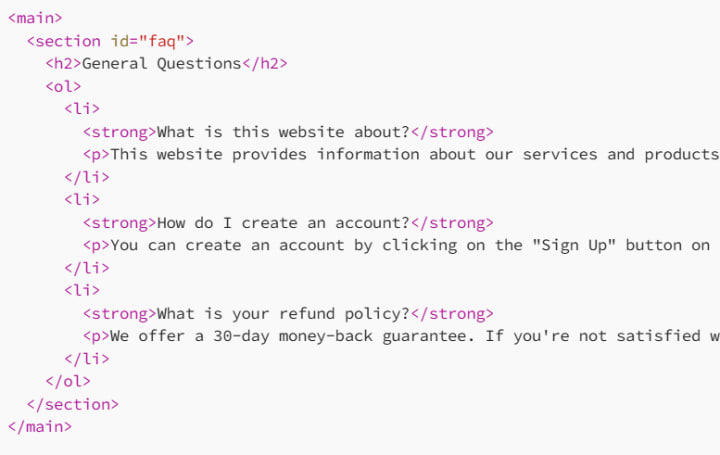
Explanation:
Each FAQ question is wrapped in a <strong> tag to make the question stand out, followed by a <p> tag containing the answer.
The questions are wrapped inside <li> elements, which are listed in an ordered list (<ol>), making the questions easy to read and navigate.
Step 3: Styling the FAQ Page
To make the FAQ page more visually appealing, let’s add some basic CSS styles. We will style the page header, list items, and questions. For this, we’ll include a <style> block in the <head> section of the document.
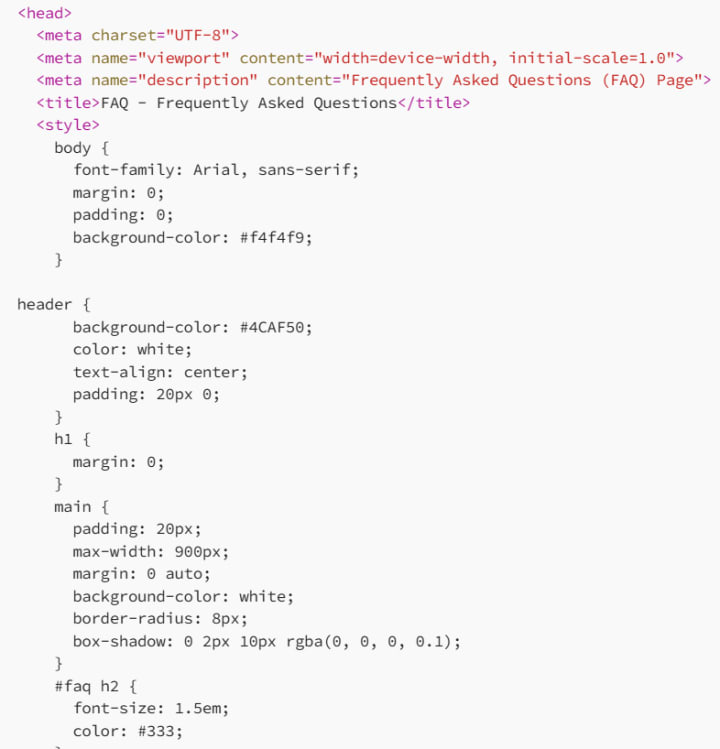
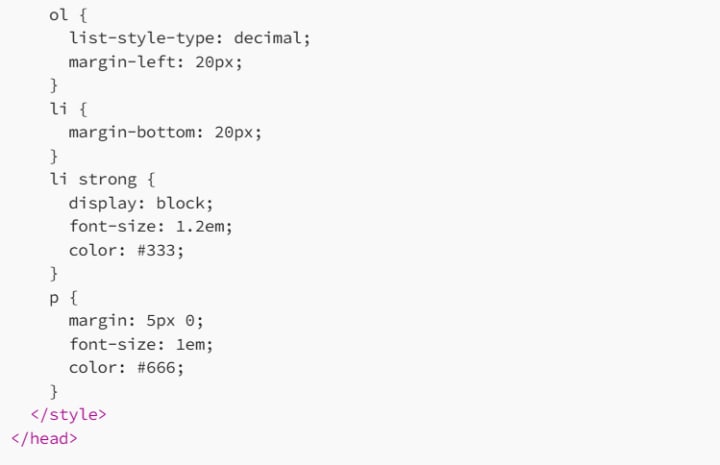
Explanation of Styles:
The body tag is styled with a font-family of Arial and a light background color for a clean look.
The header is given a green background with white text, making the title stand out.
The main content is centered on the page with padding, a white background, and rounded corners for a polished design.
Each FAQ question is bolded and separated from the answer, which is styled with a smaller font size and a lighter color for easy readability.
Step 4: Making the FAQ Interactive (Optional)
To further enhance the user experience, we can add interactivity to the FAQ section. One common feature is to make the answers collapse or expand when the user clicks on the question. This can be achieved using JavaScript. Below is a simple example of how to add this functionality.
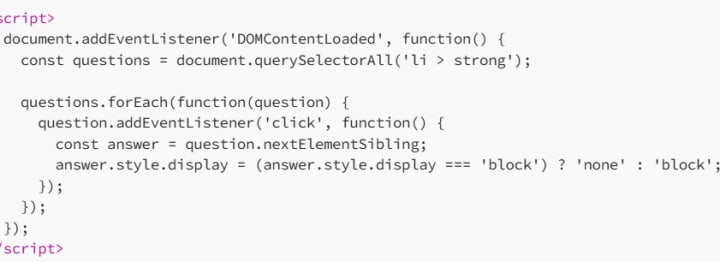
Explanation:
The script listens for clicks on the <strong> elements (which contain the questions).
When a question is clicked, it toggles the display of the corresponding answer by changing the display property between none and block.
Conclusion
In this article, we’ve built a simple FAQ page using HTML and CSS, with optional interactivity using JavaScript. This FAQ page can serve as a helpful resource for users, offering them quick answers to common questions about your product, service, or website.
Remember, you can expand on this template by adding more questions, incorporating additional design elements, or even integrating a more advanced JavaScript solution for dynamic FAQ sections.
By using HTML and CSS, you’ve created an easy-to-navigate FAQ page that is both informative and visually appealing.
About the Creator
MariosDev
Hi, I’m Marios! I’ve been a developer for over 9 years, crafting cool stuff and solving tricky tech puzzles. I’m a total tech enthusiast and love sharing my thoughts and tips through blogging. Also, in love with my bike!
How AI-Powered Design Is Changing Digital Experience Creation
Software design traditionally required human designers to manually draw every screen. A team created fixed layouts and navigation paths. Every user saw the exact same interface, regardless of their specific goals. This approach is inefficient for complex applications. Today, AI-powered design alters this entire process. It introduces algorithms that assemble interfaces dynamically. The software builds the screen based on the specific needs of the person using it in real time.
By ViitorCloud Technologies4 days ago in 01




Comments (1)
Building an FAQ page in HTML seems pretty straightforward. I've made a few simple web pages before. You start with the basic structure like you mentioned. But how do you make sure the questions and answers are easy to manage and update later? Also, any tips on making it look more professional without getting too fancy?