
JavaScript Daily Tips #77: How to Use JavaScript’s Service Workers for Offline Caching
In today’s modern web development landscape, the need for fast, reliable, and seamless user experiences is greater than ever.


One essential technique for achieving this is offline caching, allowing web applications to function even without an internet connection. This capability is made possible through Service Workers, a powerful JavaScript feature that gives developers control over network requests, caching, and background tasks.
In this article, we’ll dive deep into how to use Service Workers for offline caching, explore their capabilities, and show you how they can significantly improve the performance and reliability of your web applications.
What Are Service Workers?
Before we get into offline caching, let’s first understand Service Workers. A Service Worker is a script that runs in the background, separate from your web page, allowing you to perform tasks like caching resources, intercepting network requests, and updating content. Importantly, Service Workers enable your web app to function offline by caching files and serving them from the cache when the user is not connected to the internet.
Service Workers are supported in most modern browsers, but they only work over HTTPS (except on localhost, for security reasons). They act as a type of proxy between your app and the network, giving you the power to control how requests are handled, either by fetching them from the network or serving them from the cache.
How Do Service Workers Work?
Service Workers operate on a 3-phase lifecycle:
Installation: The Service Worker is installed in the background when the user first visits your website. This phase allows you to cache important resources like HTML, CSS, JavaScript files, and images.
Activation: Once installed, the Service Worker is activated, and it starts to control the pages that are open in the browser. At this point, it can intercept network requests and provide responses from the cache or the network, depending on your configuration.
Fetch: In the fetch phase, the Service Worker intercepts outgoing network requests and decides how to respond. This is where caching strategies come into play, allowing you to determine how resources are fetched and cached.
Example: Basic Service Worker Lifecycle
Here’s a simplified example of how a Service Worker script works:
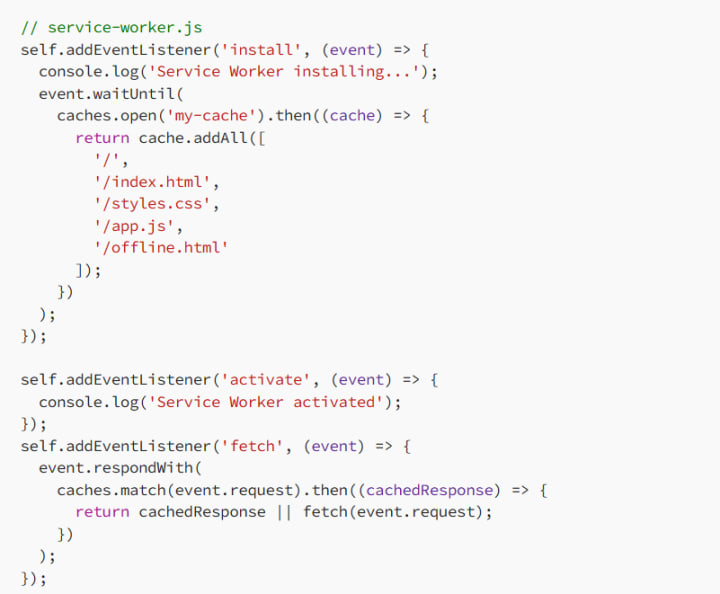
Explanation:
- Install Event: During the installation, we cache important assets such as the HTML, CSS, and JS files.
- Activate Event: Once activated, the Service Worker is ready to control the pages and intercept network requests.
- Fetch Event: The Service Worker checks if a resource is already cached and serves it. If not, it fetches the resource from the network.
- Why Use Service Workers for Offline Caching?
- Service Workers are essential for improving your web app’s performance and making it offline-first. Here’s why you should consider using them for caching:
- Offline Access: Service Workers allow users to access your web app even when they are offline. This is crucial for applications where connectivity is not always guaranteed (e.g., mobile apps in remote areas).
- Faster Load Times: By caching resources locally, Service Workers reduce the need to fetch resources from the network on each page load. This results in faster loading times, especially for users with slow or unreliable internet connections.
- Improved User Experience: Users expect fast, seamless experiences, and offline caching helps create a smoother, more reliable experience. Your app can continue to function and display cached content, even when the user loses their connection.
- Background Sync: Service Workers allow you to perform background tasks, such as syncing data with a server when the user is offline and automatically updating content once the connection is restored.
How to Implement Service Workers for Offline Caching
Now that we’ve covered the theory, let’s walk through how to implement Service Workers for offline caching in your web app.
Step 1: Check for Service Worker Support
The first step in implementing Service Workers is to check if the browser supports them. You can use the following code to verify:
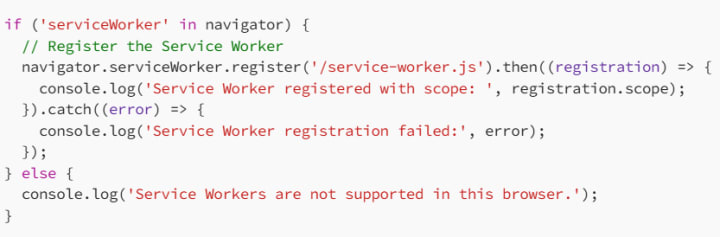
If the browser supports Service Workers, the script will attempt to register the Service Worker located at /service-worker.js.
Step 2: Caching Resources
The next step is to cache essential resources during the Service Worker’s install event. This ensures that these resources are available offline. We’ll add HTML, CSS, JS, and any other assets you want to be available offline
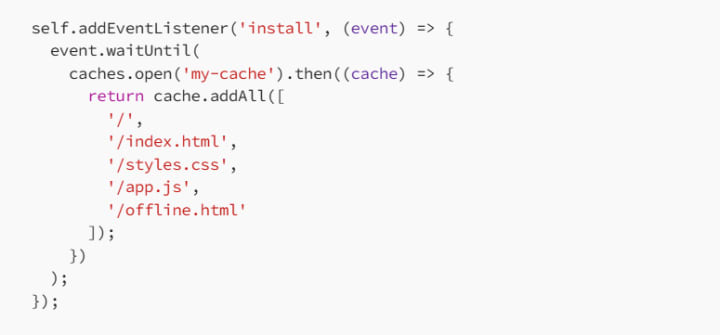
In this example, we open a cache named my-cache and add the files to it. These files will be available to your users even when they are offline.
Step 3: Intercepting Network Requests
After caching your resources, you’ll want to intercept network requests in the fetch event. This allows you to either serve the requested resource from the cache or fetch it from the network.
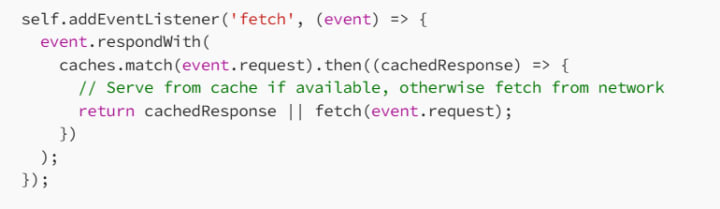
This code checks if the requested resource is in the cache. If it is, the cached version is returned; otherwise, it fetches the resource from the network.
Step 4: Handling Offline Behavior
To improve the offline experience, you can provide a fallback page or message when the user is offline. For example, you can serve an offline HTML page when a user requests a page while disconnected:
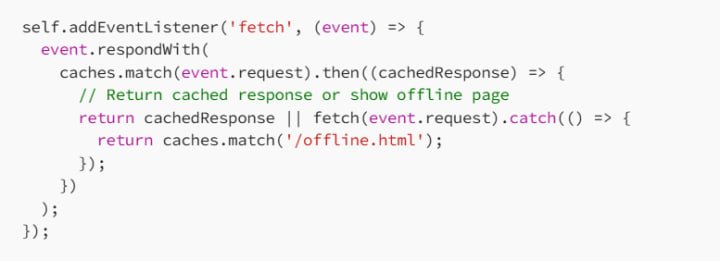
In this case, if the user is offline and a network request fails, they will see the offline.html page.
Advanced Service Worker Features
While caching resources and handling requests is the core functionality of Service Workers, there are several advanced features you can use to further enhance your app’s offline capabilities.
Background Sync
With the Background Sync API, Service Workers can synchronize data with a server when the user regains connectivity. This is useful for apps that allow users to submit data while offline and sync it later.
Push Notifications
Service Workers can also handle push notifications, which allows you to send updates to users even when they are not actively using your app. This feature is great for real-time updates and notifications.
Best Practices for Service Workers and Caching
When working with Service Workers and caching, there are a few best practices to keep in mind:
- Cache Wisely: Only cache the resources you need. Caching unnecessary files can cause your cache to grow too large and negatively impact performance.
- Version Your Cache: Version your caches (e.g., my-cache-v1, my-cache-v2) so that you can easily update them when your app’s resources change. This also helps avoid serving outdated content.
- Handle Cache Updates: Make sure to handle cache updates gracefully. You can delete old caches when new ones are created or use cache expiration strategies to ensure fresh content.
- Fallback Strategies: Always provide a fallback for critical resources, such as an offline page, in case the user is offline.
- Test in Real Conditions: Make sure to test your Service Worker implementation under real-world conditions, including network failures and slow network speeds, to ensure that your app provides a great offline experience.
Conclusion
Service Workers are an invaluable tool for building fast, reliable, and offline-capable web applications. By using Service Workers for offline caching, you can ensure that your users can access your app’s resources, even when they don’t have an internet connection. Whether you’re caching assets, handling network requests, or enabling background sync, Service Workers make it easier to build resilient and performant web apps.
By following the steps outlined in this article, you’ll be on your way to using Service Workers effectively and providing your users with an exceptional offline experience. Happy coding! 🚀
About the Creator
MariosDev
Hi, I’m Marios! I’ve been a developer for over 9 years, crafting cool stuff and solving tricky tech puzzles. I’m a total tech enthusiast and love sharing my thoughts and tips through blogging. Also, in love with my bike!
OpenClaw AI Applications: How Do Intelligent Agents Improve Modern Workflows?
Artificial intelligence is rapidly evolving beyond basic chatbots and simple automation. Platforms like OpenClaw represent a new generation of intelligent AI agents that can handle complex workflows across multiple domains. From organizing personal schedules to assisting developers and business leaders, OpenClaw enables professionals to work smarter and faster.
By Nia Higgins7 days ago in 01
My First Time Skiing and I Got Lost, Alone, in the French Alps
Looking back, I can trace some of my life’s biggest adventures to a simple action from my sister. She’d introduced me to Tommy (a very long time ago), a colleague of hers, who had overshared his penchant for Italian-looking women, and I ticked that box.
By Chantal Christie Weissa day ago in Humans




Comments (1)
Offline caching with Service Workers sounds really useful. I've worked on projects where having that fallback would've been great. You mention it caches important resources during installation. But what about handling dynamic content that changes often? How do you ensure the cached version is still relevant? Also, can you use Service Workers for multiple web apps on the same domain?