
HTML Tips #93: Using HTML5 WAI-ARIA for Accessible Webpages
Web Accessibility Initiative — Accessible Rich Internet Applications


In this article, we will explore the importance of accessibility on the web and how to use HTML5 WAI-ARIA (Web Accessibility Initiative — Accessible Rich Internet Applications) to create more accessible webpages. Accessibility is a key component of web development, ensuring that websites and web applications are usable by people with various disabilities.
WAI-ARIA is a set of attributes defined by the W3C (World Wide Web Consortium) to make dynamic content and advanced user interface controls accessible to people with disabilities. By leveraging WAI-ARIA, web developers can ensure that their websites are usable by individuals who rely on assistive technologies like screen readers or keyboard navigation.
What is WAI-ARIA?
WAI-ARIA (Web Accessibility Initiative — Accessible Rich Internet Applications) is a specification that provides additional HTML attributes designed to enhance the accessibility of dynamic content and advanced user interface elements. It is a set of guidelines developed by the W3C to improve the accessibility of web applications, especially those with rich, dynamic content.
Unlike standard HTML elements, WAI-ARIA attributes provide extra information to assistive technologies (like screen readers), helping users with disabilities navigate, understand, and interact with web content. These attributes don’t alter the visual presentation of elements but instead provide semantic information that is communicated to the user.
Why Use WAI-ARIA?
There are several reasons why WAI-ARIA is important for web development:
- Enhanced Accessibility: WAI-ARIA helps users with disabilities access web content, which might otherwise be inaccessible using just plain HTML.
- Better User Experience: When implemented correctly, WAI-ARIA can improve the navigation and interaction for users relying on assistive technologies, like screen readers, voice control, and braille displays.
- Improved Compatibility with Dynamic Content: Websites that use JavaScript or AJAX to dynamically change content often break standard accessibility features. WAI-ARIA can help make these dynamic elements accessible without requiring a complete overhaul of the website.
- SEO Benefits: Accessible websites may improve search engine optimization (SEO), as search engines often prioritize sites that are structured well for all users, including those with disabilities.
WAI-ARIA Basics: Key Roles and Attributes
To make a webpage accessible, WAI-ARIA uses a set of roles, properties, and states. These components help define how elements should be interpreted by assistive technologies. Let’s look at the most commonly used WAI-ARIA roles and attributes.
1. ARIA Roles
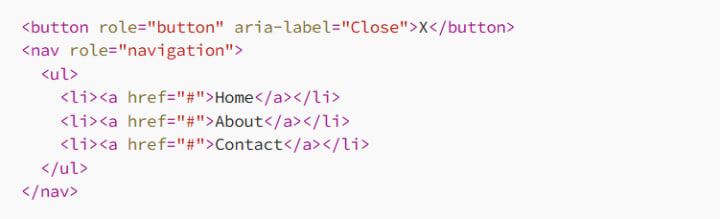
ARIA roles define the purpose or type of an element within a webpage, helping assistive technologies interpret the element’s function. For example:
- role=”button”: This role indicates that an element functions as a button.
- role=”navigation”: This role identifies a navigation section of a page.
- role=”dialog”: Used for elements that act as modal dialogs.
- role=”alert”: Denotes an important, time-sensitive message, often used for error messages.
Example of using ARIA roles:
2. ARIA Properties
ARIA properties provide additional information about elements, further enhancing their accessibility. Some common properties include:
- aria-label: Provides an accessible name for an element when it doesn’t have one.
- aria-hidden: Indicates whether an element should be ignored by screen readers.
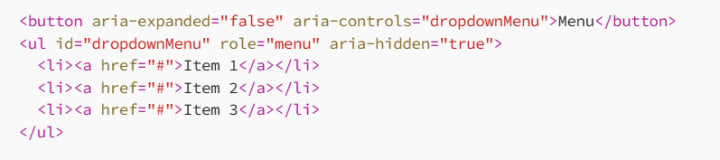
- aria-expanded: Tells whether an element, like a collapsible menu or accordion, is expanded or collapsed.
- aria-live: Indicates that an element’s content may change dynamically and informs screen readers when to announce those changes.
Example of using ARIA properties:

3. ARIA States
ARIA states define the current state of an element, such as whether a checkbox is checked or a menu is open. These states help assistive technologies provide real-time feedback to the user.
Example of ARIA states:

Common Use Cases for WAI-ARIA
Now that we understand the basic components of WAI-ARIA, let’s explore some common use cases and how to implement them for better accessibility.
1. Accessibility for Forms
Forms are a critical part of most websites, but they can be difficult for users with disabilities to navigate without the proper accessibility features. Using WAI-ARIA can make forms more accessible by providing additional information about form fields and their behavior.
For example, you can use the aria-labelledby attribute to associate form labels with input elements and the aria-required attribute to indicate required fields.
<form>
<label for="username">Username:</label>
<input type="text" id="username" name="username" aria-labelledby="username">
<label for="email">Email:</label>
<input type="email" id="email" name="email" aria-required="true" aria-labelledby="email">
<button type="submit">Submit</button>
</form>
2. Navigation and Menus
A common challenge for users with disabilities is navigating complex menus or site navigation. By adding role="navigation" to a navigation section and using aria-label for clarity, we can help assistive technologies interpret the menu structure.
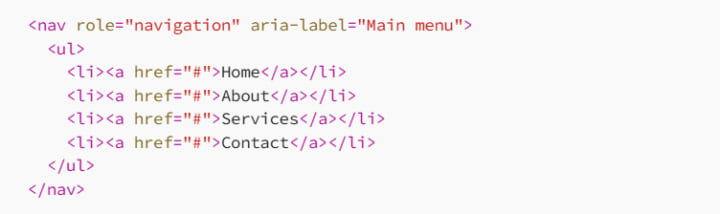
In addition, for dropdown menus, it’s important to set the aria-expanded attribute to indicate whether the menu is open or closed.
3. Modal Dialogs
Modal dialogs can be problematic for users relying on screen readers if they are not marked properly. WAI-ARIA provides the role="dialog" attribute to define modal elements, and the aria-labelledby attribute to associate the dialog with a title.
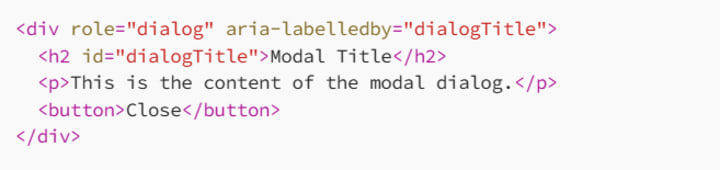
Additionally, the aria-hidden attribute can be used to hide elements that should not be focusable while the modal is open, preventing the user from interacting with content behind the dialog.
Testing and Best Practices
While WAI-ARIA is a powerful tool for improving web accessibility, it’s important to test your pages with assistive technologies and ensure that your WAI-ARIA implementations are correct. Some best practices include:
Test with Screen Readers: Ensure your page works well with screen readers, such as NVDA, JAWS, or VoiceOver. Check if your WAI-ARIA attributes are properly announced.
Use Semantic HTML First: While WAI-ARIA can improve accessibility, it should be used as a supplement to semantic HTML, not as a replacement. Always prioritize proper HTML elements (such as <header>, <footer>, <nav>, etc.) before adding WAI-ARIA attributes.
Keep WAI-ARIA Attributes Up-to-Date: WAI-ARIA states and properties may change over time. Be sure to keep your code updated and follow the latest best practices as specified by the W3C.
Conclusion
By using WAI-ARIA in your web development process, you can significantly improve the accessibility of your websites for users with disabilities. With the right combination of ARIA roles, properties, and states, you can ensure that your site is usable with screen readers, keyboards, and other assistive technologies.
Remember, web accessibility is an ongoing commitment. As you continue to develop your site, make sure you’re testing and refining your WAI-ARIA implementations to provide the best experience for all users. Whether you’re building a simple webpage or a complex application, implementing WAI-ARIA will help you create a more inclusive and accessible web for everyone.
About the Creator
MariosDev
Hi, I’m Marios! I’ve been a developer for over 9 years, crafting cool stuff and solving tricky tech puzzles. I’m a total tech enthusiast and love sharing my thoughts and tips through blogging. Also, in love with my bike!
Web3 Mobile Apps: What Actually Changes When You Build One
If you spend enough time around product teams, you’ll notice that Web3 tends to enter conversations in two very different ways. Sometimes it shows up as marketing language — the “future of the internet” narrative. Other times it appears as a practical engineering question: what actually changes when parts of your mobile stack stop living on your own servers?
By Valeriia Shulga3 days ago in 01




Comments
There are no comments for this story
Be the first to respond and start the conversation.