
HtmlAgilityPack Web Data Processing
HtmlAgilityPack Web HtmlAgilityPack is a popular HTML parsing library for .NET applications, widely used for processing and manipulating HTML documents. It can parse non-standard or poorly structured HTML and generate a well-formed DOM tree, enabling developers to easily traverse, query, and modify HTML content.Data Processing

New Year, new atmosphere! I wish you all a prosperous, flying, happy and healthy new year!
Today we are talking about HtmlAgilityPack , a framework for processing web data.
I believe that many of my peers are because of the processing of web data to write regular expressions and get burnt out, if you use this framework will allow you to fish out of water, to release the complexity of your precipitation for a long time!
Synopsis:
This is an agile HTML parser that builds a read/write DOM and supports plain xpath or xslt (you don't actually need to understand xpath or xslt to use it, don't worry...).
NET code base that allows you to parse “off the web” HTML files.
The parser is very forgiving of “real world” malformed HTML. The object model is very similar to the System.xml proposal, but for HTML documents (or streams).
Principle: Convert crawled web pages to Dom document model (xml) and then do element lookups.
(1) first create a console project learningHtmlAgilityPack
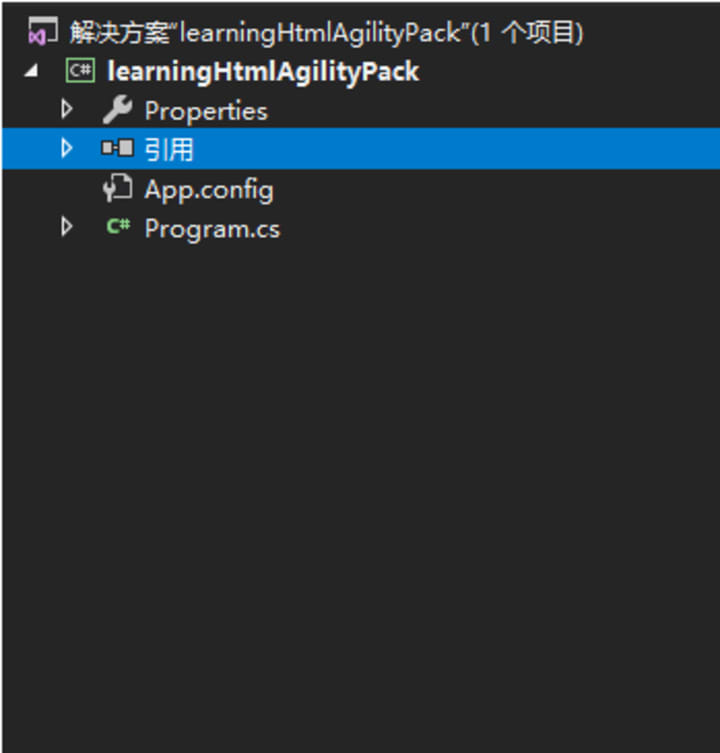
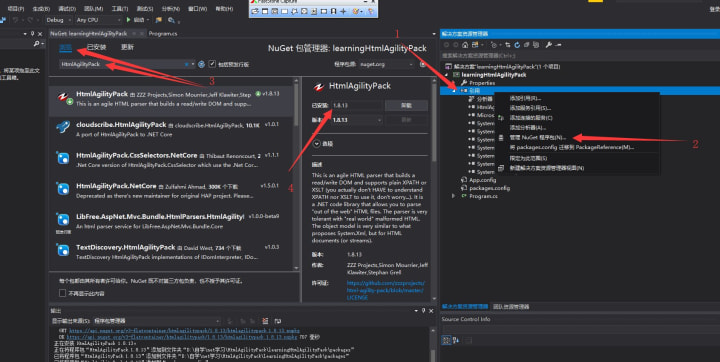
(2) Select the reference right-click --> click Manage NuGet packages --> click Browse --> Search HtmlAgilityPack
From this, we can see that the latest stable version is v1.8.13, and then click Install.
(3) After the installation is complete, we will take Baidu as a case study, from which to get the value of the Baidu search button
1, open the developer tools to get Baidu search button XPath path, confirm that there is no error after the next step (Note: Chome browser can recognize the class, id and other element attributes; Firefox will start from the / head to find the beginning of the walk)
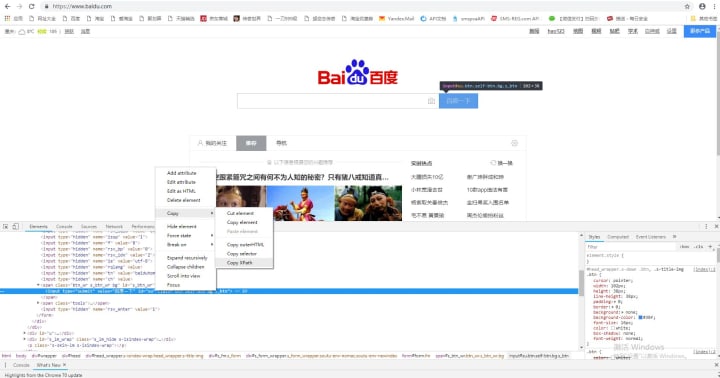

2, through the simple code to achieve the purpose
namespace learningHtmlAgilityPack
{
class Program
{
static void Main(string[] args)
{
//Instantiate the regular request method
WebClient wc = new WebClient();
//Get the web page data
var vb = wc.DownloadData("https://www.baidu.com/");
//Transcode
var str = System.Text.Encoding.UTF8.GetString(vb);
//Instantiate the HtmlAgilityPack object model.
HtmlAgilityPack.HtmlDocument doc = new HtmlAgilityPack.HtmlDocument();
//Load the document object model
doc.LoadHtml(str);
//Get the Baidu button node and paste the XPath we just copied into it.
HtmlAgilityPack.HtmlNode htmlnode = doc.DocumentNode.SelectSingleNode("//*[@id='su']");
//Get the value 1, the name of the element 2, the content to be returned when the element is not available
string value = htmlnode.GetAttributeValue("value", "");
System.Console.WriteLine(value);
System.Console.ReadKey();
}
}
}
Running Result:
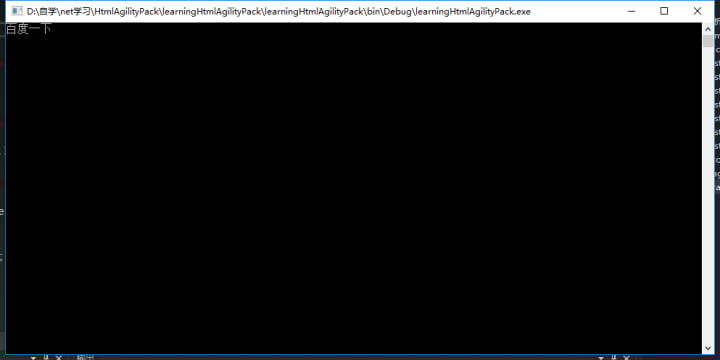
Hands-on mini-case:
(1) realize to get a collection of multiple labels (by traversing to get to each element of it)
HtmlAgilityPack.HtmlNodeCollection collection = doc.DocumentNode.SelectNodes("//*[@id='addToCart']//div");
foreach (var item in collection)
{
if (!string.IsNullOrEmpty(item.GetAttributeValue("name", "")))
{
//Do whatever you want with it xxxxxx
}
}
(2), if there are more sticky notes or a label under the item, write it the same way, except that the XPath is not needed to get the second level // of the item
HtmlAgilityPack.HtmlNodeCollection collection = doc.DocumentNode.SelectNodes("//*[@id='addToCart']//div");
foreach (var item in collection)
{
if (!string.IsNullOrEmpty(item.GetAttributeValue("name", "")))
{
//HtmlAgilityPack.HtmlNode htmlnode = item.SelectSingleNode("//*[@id='su']");
HtmlAgilityPack.HtmlNodeCollection childs = item.SelectSingleNode("ul/li");
foreach(var singeitem in childs)
{
//xxxx
}
}
}
Dynamically Modifying and Creating HTML
You can use HtmlAgilityPack to dynamically create, modify, or delete HTML nodes. For example, you can add new nodes or change the attributes and content of existing nodes.
// Create a new node
var newNode = htmlDoc.CreateElement("div");
newNode.InnerHtml = "<p>New content</p>";
// Insert the new node
htmlDoc.DocumentNode.SelectSingleNode("//body").AppendChild(newNode);
// Modify an existing node
var existingNode = htmlDoc.DocumentNode.SelectSingleNode("//h1");
if (existingNode != null)
{
existingNode.InnerHtml = "Updated Title";
}
Parsing and Extracting Data in Specific Formats
HtmlAgilityPack combined with regular expressions can extract data in specific formats from HTML, such as email addresses or phone numbers.
using System.Text.RegularExpressions;
// Extract email addresses
var htmlContent = htmlDoc.DocumentNode.SelectSingleNode("//body").InnerHtml;
var emailRegex = new Regex(@"[\w-]+@([\w-]+\.)+[a-zA-Z]{2,7}");
var emails = emailRegex.Matches(htmlContent);
About the Creator
What Tampa Startups Learn After Shipping Their First App?
Ryan Matthews remembers the launch day clearly. The app went live. Friends shared the link. Early users signed up. A few congratulatory messages came in from investors and mentors. For a brief moment, it felt like the hardest part was over.
By Mary L. Rodriquez6 days ago in 01
The State of Mobile Innovation: A Indi IT Solutions Report on the US App Economy
You know what's wild? The US app economy isn't just growing anymore. It's bloody transforming. Right in front of us. And most people reckon they understand what's happening, but the data from 2026 tells a completely different story.
By Sherry Walker3 days ago in 01
One Unchecked Box
"Republished" because it was the only way to add the embed for the newly recorded audio version of this story due to the Top Story badge. Plus it serves as a nice, informal announcement of the podcast's revival for another season (go subscribe!):
By Stephen A. Roddewig6 days ago in Fiction



Comments
There are no comments for this story
Be the first to respond and start the conversation.