


Teleparty, formerly known as Netflix Party, is a platform for online TV viewing with your friends. It can synchronize Netflix and other streaming services so that you can watch videos at the same time as family and friends. Additionally, there is a side chat bar where you and your friends can discuss the plot of the film as if you were sitting next to each other. The user icons that will appear in the chat can be selected as well.
Teleparty is a convenient way to share a great time with your family or friends who are far away from you. To know how it works, keep reading, and there will be a tutorial below. Besides, an alternative is available to you if you find Teleparty is not for you.
FAQs about Teleparty
What devices can I install Teleparty on?
Teleparty is available as both a browser extension and a mobile app. You can download Teleparty as a browser extension for the Google Chrome, Microsoft Edge, and Opera browsers on desktop and laptop. Teleparty can also be downloaded from the Google Play Store on an Android device.
Not available devices and web browsers:
For iOS devices, smart TVs, game consoles, and other devices, Teleparty is not yet accessible.
Firefox, Internet Explorer, and other web browsers do not support Teleparty.
Do all participants need their own Netflix account?
Yes, each participant must have access to a streaming service account in order to watch the show or film being discussed during the Teleparty (Hulu, HBO Max, Disney+, Netflix, Youtube, Prime Video, ESPN+, Crunchyroll, & Paramount+, for example).
Can I use the same account as my friend? It is possible to join a party using a shared account, but the account must be signed up for a Standard or Premium subscription plan that permits several users to use the streaming service at a time.
How to use Teleparty to watch Netflix?
- Install Teleparty
- Open a new tab in the Google Chrome browser and go to teleparty.com.
- Click "Get Teleparty for free!" to go the Google Chrome web store page.
- Then click "Add to Chrome" button.
- Tap "Add Extension"
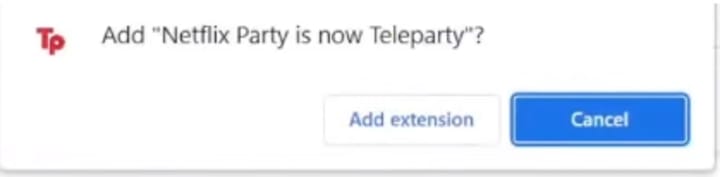
- Go to the top right of your browser, and click the Puzzle icon.
- Pin "Teleparty", and you should see a red "Tp" icon next to the address bar.

Start watching Netflix with your friends
- Open a new tab in the Google Chrome browser and log into your Netflix account.
- Search for the movie or TV show you want to share with your friends.
- Click the red "Tp" icon in the top right corner.
- Click "Start a Party", and a link will be generated.
- Copy the link and send it to your friends.
- On the right side of the screen, the chat room will show up.
When your friend joins the party, you can see from the chat room. After that, you and your friends can enjoy Netflix series or movies together.
Another way to share Netflix with your friends
Although it’s convenient using Teleparty, there are some limitations that you can’t ignore. Every participant to watch Netflix together needs a single Netflix account to use this service. Besides, compatible devices are limited. For example, you can only use Teleparty on desktop, laptop and Android devices, but not on iOS devices, smart TVs, game consoles and other devices.
If you have only one Netflix account but still want to share Netflix with your friends and family, SameMovie Netflix Video Downloader is for you. It is an amazing tool that can help you remove these limitations. It is an amazing tool that can help you remove these limitations. It is capable of downloading up to 1080p Netflix movies or series in MP4 or MKV format. Additionally, multilingual audio tracks and subtitles will be preserved. You can use screen-sharing programs like Zoom, Skype, or any other helpful software to share the screen while watching Netflix videos with your family or friends.
To get a tutorial on using this tool, please click https://bit.ly/3OjEXrr.

About the Creator
Louise Walker
Trying to find useful video downloaders.
Keep reading
More stories from Louise Walker and writers in 01 and other communities.
The 10 Best 4K Movies on Netflix
There is probably a movie genre on this list that you are interested in, from action to comedy, stop motion animation to live-action films. The majority of these movies are highly regarded and have received prestigious nominations or awards, broken box office records, or all. Believe that 4K resolution can also provide you with the greatest satisfaction. In addition you will see official trailers for these films as well as their brief introductions in the information that follow. If there are any movies you like, you can also refer to the tutorial below to download them and watch them offline anytime you want.
By Louise Walker3 years ago in 01


Comments
There are no comments for this story
Be the first to respond and start the conversation.