
How to Make Custom WordPress Plugins
How to Make Custom WordPress Plugins

Crafting a custom WordPress plugin might seem daunting at first glance, but the results can be transformative for any website. With over 58,000 plugins available in the WordPress directory, it's not a stretch to say that plugging into unique functionalities can redefine user experience. The beauty of custom plugins lies in their ability to cater to specific needs rather than a one-size-fits-all solution.
The journey of developing custom plugins for WordPress, from conceptualizing to execution, demands a mix of creativity and technical dexterity. Since 2003, WordPress has evolved from a humble blogging platform to powering over 40% of all websites globally. This transformation highlights the need for personalized solutions, echoing the impact of a finely-tuned plugin—a tool that aligns perfectly with growth strategies and business models.
Identify the plugin's purpose to address specific needs.
Create a plugin directory and main PHP file with header comments
Use WordPress hooks to implement functionalities without changing core files.
Test the plugin extensively in various environments for performance and security.
Optimize code, document thoroughly, and ensure compatibility with updates.
How to Make Custom WordPress Plugins
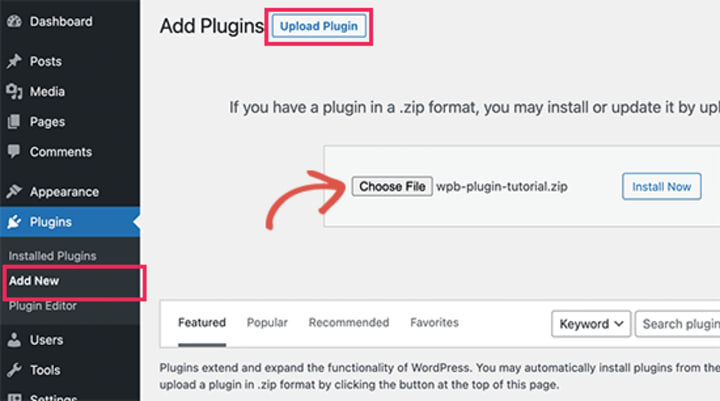
Creating custom WordPress plugins allows you to add specific functionalities to your site. The first step is understanding what your plugin needs to do. Define its purpose clearly. Then, gather basic knowledge of PHP since WordPress is built with it. PHP will help you write the functions for your plugin.
To start coding, you need a dedicated folder for your plugin within the WordPress plugins directory. Create a main PHP file in that folder. This main file will manage the core actions of your plugin. Also, add a header comment at the top of this file. This identifies your plugin to WordPress.
Use WordPress functions and hooks to interact with the site. Hooks are like connection points where you can insert your custom code. There are two types: actions and filters. Actions allow you to add data or change how WordPress works. Filters let you modify data before it's displayed.
Test your plugin thoroughly to ensure it works correctly. Activate it from the WordPress admin panel and try it out. Debugging is an essential step. If issues arise, check for PHP errors or hook issues. Transform your plugin idea into reality by focusing on clean code and proper testing.
For more in-depth tutorials and resources on creating WordPress plugins, visit Pluginic. They offer expert insights to guide you through every step of plugin development.
Identifying the Purpose of Your Plugin
Before jumping into coding, it's important to ask: what do you want your plugin to accomplish? Define the goals clearly. Perhaps you need a tool to improve website speed. Or maybe an option to enhance user interaction. This clarity will guide your development process.
Consider your audience. Who will benefit from this plugin? Knowing your users helps tailor the features. List out user needs and preferences. Ensuring your plugin meets these demands increases its usefulness.
Research existing plugins to see if others solve similar problems. If there's already a plugin available, think about how yours will differ. Identify gaps that your plugin could fill. Sometimes, merging features from different plugins into one can create value. Innovating on what's already out there can set your plugin apart.
Once you've identified the purpose, draft a simple plan outlining the key functions. Prioritize features based on user needs. Creating a list helps in managing development effectively. Moreover, having a clear roadmap ensures all necessary components are covered. Such planning makes for a smoother development journey.
Understanding WordPress Plugin API
The WordPress Plugin API is a key tool for developers. It helps you extend WordPress capabilities without altering the core files. You can add custom features by defining how your plugin interacts with WordPress. Think of it as a bridge connecting your ideas to the site’s functionalities. This connection is vital for smooth operation.
The Plugin API primarily uses hooks, which include actions and filters. Actions let you execute specific codes at a designated time. For example, you might load a script on every page load. Filters, on the other hand, allow you to modify data before it is presented. Both actions and filters provide flexibility to change and improve site behavior.
To utilize the Plugin API effectively, it's helpful to know some basic functions. The WordPress Codex offers a vast library of functions at your disposal. These functions simplify the process of adding features. By integrating with existing functionalities, your plugin becomes robust. Exploring these options enhances your coding toolbox.
Learning to leverage the Plugin API prepares you for long-term development projects. Your plugins will be more compatible with future WordPress updates. This means fewer headaches over time. It also ensures that plugins remain stable across different versions. Investing time to understand the API pays off in maintaining a seamless user experience.
Mastering WordPress Coding Standards
Understanding WordPress coding standards is crucial for any developer aiming to create plugins. These standards ensure that your code is clean, consistent, and easy to read. WordPress provides guidelines that cover different areas like PHP, HTML, CSS, and JavaScript. Following these guidelines not only helps in making your code professional but also compatible with other developers' work. Consistency in coding makes collaboration easier.
Maintaining proper indentation is important as it makes your code more readable. Use spaces instead of tabs to keep things uniform. The coding standards recommend using four spaces per indentation level. This uniformity helps in recognizing code blocks with ease. Properly indented code stands out as organized and clean.
Variable naming is another key aspect of the standards. Choose descriptive names that reflect the variable's purpose. Avoid using single letters or abbreviations that confuse others. Good variable names improve code readability and make future edits simpler. Lists of commonly used prefixes or naming conventions can assist in this task:
For functions: Use verbs like 'get', 'set', 'delete'
For variables: Use nouns or short phrases
Consistent prefixing to indicate private or public scope
Commenting is essential for explaining complex parts of your code. WordPress recommends clear and concise comments. They should describe what a specific section of code does and why it exists. Well-placed comments are incredibly helpful during code reviews or updates. A code file filled with clear comments is like having a roadmap.
Additionally, adhering to coding standards aids in code optimization. It improves performance and makes debugging less frustrating. When everyone follows the same set of rules, identifying errors gets easier. WordPress tools and plugins are available to check your compliance with these standards. Utilizing them can automate error-checking and streamline your coding process.
Developing Your Custom WordPress Plugin
Building a custom WordPress plugin starts with setting up your development environment. Begin by creating a folder for your plugin within the WordPress plugins directory. This folder will hold all your plugin files, including PHP, CSS, and JavaScript. Name the folder something relevant to its function. Having a well-structured environment prevents confusion later.
Next, create the main PHP file for your plugin. This file is crucial as it tells WordPress about your plugin. Include a header comment at the top to describe your plugin’s details like name, version, and author. This makes your plugin recognizable to WordPress. Clear documentation also aids any future updates.
Decide on the core functionalities that your plugin will offer. Use WordPress hooks to implement these features. Hooks allow your plugin to interact seamlessly with WordPress. You can add, remove, or alter features without touching core files. Using hooks effectively is a major part of plugin development.
Testing your plugin is an important phase. Run tests on a local server before deploying it on a live site. Debugging helps identify any potential issues that could arise. Consider using WordPress debugging functions to catch errors quickly. A well-tested plugin ensures smooth operation.
Finally, polish your plugin by optimizing its code and interface. Clean code improves both performance and readability. Make sure the user interface is intuitive and user-friendly. Adding a settings page can enhance the customization experience for users. This attention to detail will make your plugin valuable to others.
Common Mistakes to Avoid when Building a WordPress Plugin
One of the primary mistakes developers make is not adhering to WordPress coding standards. Ignoring these standards can lead to messy code that's hard to maintain. Consistency is key, and following the guidelines helps achieve that. Coding standards also ensure that your plugin works well with others. Failing to comply might result in conflicts and errors.
Another common error is not testing the plugin thoroughly before deployment. Skipping this step can lead to performance issues on your site. Always test your plugin on different environments. This includes both local and online servers. Address any bugs or errors identified during these tests.
Developers sometimes overlook security, leaving their plugins vulnerable. Sanitizing and validating input data is crucial to prevent security breaches. Always ensure that user inputs are checked and cleaned before processing. Secure coding practices protect both the plugin and the site using it. Neglecting this can have severe consequences.
Poor documentation is another pitfall. A lack of clear documentation can make future updates difficult. Write detailed comments within your code. Providing a readme file with installation and usage instructions is helpful. Good documentation ensures others can use and update your plugin easily.
Lastly, some developers forget to optimize their plugins for performance. Plugins that slow down the site can frustrate users. Minimize loading times by optimizing code and reducing unnecessary functions. Regularly update and refine your plugin to keep it current. Efficient coding practices lead to faster, smoother plugins.
Benefits of Using Custom WordPress Plugins
Custom WordPress plugins offer personalized functionality that standard options can't provide. These plugins allow you to tailor features based on your specific needs. Unlike pre-built plugins, custom ones are designed to complement your site's goals perfectly. This precision can greatly enhance the user experience. Visitors will have access to unique and efficient tools.
Using custom plugins can improve site performance. Tailored solutions mean no unnecessary code slowing things down. Each function serves a direct purpose, optimizing load times and resources. With faster websites come satisfied visitors who enjoy a fluid interaction with content. Improved speed is also beneficial for SEO, as search engines prefer quicker sites.
Security is another significant advantage offered by custom plugins. Since the coding isn't publicly available, it's less vulnerable to attacks than popular public plugins. You can build enhanced security features within these plugins specific to your needs. Such targeted protection helps safeguard sensitive data effectively. Peace of mind results from reducing potential vulnerabilities.
Custom plugins provide adaptability and scalability as your business grows. As your site evolves and requirements change, these plugins can easily be updated or expanded upon. There’s no need to rely on external updates that might not suit future demands. This flexibility ensures long-term stability for your online presence. An adaptable toolset supports sustainable growth strategies.
The ability to control branding through custom elements is another perk of these plugins. Seamlessly integrate desired features without compromising style or design consistency across your site pages becomes possible with tailored solutions instead of restrictive third-party options restricting alteration possibilities due exclusively focus domination dated templates determined externally-driven layouts falling short expectations inevitably arising technical constraints look independently conducted vision principles behind self-expression creativity-centric establishment final destination envisioned beforehand unvarnished aspirations fulfilled loyally
Troubleshooting Issues in Custom WordPress Plugins
Troubleshooting custom WordPress plugins involves identifying and fixing problems effectively. Begin by isolating the issue; check if it's a plugin conflict or a coding error. Deactivate other plugins to see if the problem persists. This process helps identify if the new plugin is causing the disruption. Often, incompatible plugins can affect your site's performance.
Enable WordPress debugging mode to spot errors in real-time. This mode is crucial for discovering hidden glitches. Use the error log to get a list of issues within your plugin. Read through the log to pinpoint what needs fixing. With this information, rectifying problems becomes manageable.
Review your code for common errors like missing semicolons or unmatched brackets. These small mistakes can lead to big problems. Conducting a detailed code review helps catch unnoticed issues. Implementing code validators can be helpful here. They automatically highlight errors, saving time and effort.
Reach out to the WordPress community for support if necessary. Forums and online groups often have experienced developers ready to help. Share specific details about the issue for better advice. Collaborating with the community can lead to innovative solutions. Networking also provides ongoing learning opportunities.
Finally, keep your plugins updated to prevent compatibility issues. Regular updates ensure your plugin works well with the latest WordPress version. Use version control systems like Git to manage updates. These systems track changes and help revert to previous versions if needed. Staying current minimizes risks of malfunction.
Frequently Asked Questions
Custom WordPress plugins open up a world of possibilities for website customization and functionality. They allow developers to create solutions tailored to specific needs, expanding the flexibility of their WordPress sites. Here, we address some common questions.
1. How do you test a WordPress plugin before release?
Testing a WordPress plugin thoroughly involves running it in different environments and checking for compatibility. Use local and staging servers to examine how it behaves under various conditions. Look for performance impacts, such as page load times, to ensure the plugin does not slow down the site. Consider employing automated testing tools for more comprehensive checks.
A crucial part of testing is enabling debugging mode in WordPress to spot errors. Examine the debug log to identify any potential issues. Additionally, check the plugin with multiple WordPress themes and plugins to detect conflicts or compatibility issues. Feedback from beta testers can provide invaluable insights before final deployment.
2. Why is documentation important for a custom plugin?
Documentation plays a key role in making plugins easy to use and understand for others. It provides clear instructions on installation, setup, and usage, which helps both users and developers. Comprehensive documentation also aids in maintenance and future updates, as it serves as a reference for coding standards and functionalities.
Having clear comments within the code further supports developers who might work on the plugin later. This practice minimizes errors and confusion when the code needs editing or upgrading. Well-documented plugins contribute to smoother collaborations and better user experiences overall.
3. What are the essential steps in plugin security?
Ensuring plugin security involves sanitizing and validating all user inputs to prevent vulnerabilities. It’s crucial to use nonces to verify actions on the site, reducing the risk of unauthorized access. Following WordPress security page guidelines can help reinforce these protections, keeping sensitive data safe.
Regular updates and monitoring are critical components of plugin security. They help address new vulnerabilities exposed over time. Utilize secure coding practices and tools to audit the plugin frequently. This proactive approach minimizes risks and maintains site integrity.
4. Can custom plugins affect website performance?
Custom plugins can impact website performance if not optimized properly. Poor coding may lead to slower page loads, affecting user experience. To avoid this, ensure your plugin employs efficient database queries and minimizes resource use. Performance testing helps identify areas needing improvement.
Utilizing caching strategies and compressing assets are effective techniques for enhancing performance. Regularly update your plugin to harness the advances in WordPress technologies. Optimized plugins contribute to faster, more reliable websites that meet user expectations.
5. What are common challenges when creating custom plugins?
Developers often face challenges like ensuring compatibility with various WordPress themes and plugins. Each element must work harmoniously without conflicts. Testing across different platforms is essential to address this issue. Proper planning and understanding the WordPress ecosystem mitigate these hurdles.
Another challenge is maintaining robust security throughout the plugin's lifecycle. This requires continuous attention to potential threats and timely updates to address them. Employing best practices in development and engaging with the WordPress community for support can overcome these challenges effectively.
Conclusion
Creating custom WordPress plugins is a rewarding endeavor that bridges creativity with technical expertise. By understanding the Plugin API and adhering to coding standards, developers can achieve efficient solutions tailored to precise needs. This journey requires careful planning and attention to detail, ensuring that each plugin enhances site functionality seamlessly.
While challenges may arise, thorough testing and robust security measures pave the way for successful integration. Comprehensive documentation aids in smooth operations and future updates, supporting long-term sustainability. As developers continue to innovate, custom plugins will remain pivotal in transforming the WordPress landscape.
About the Creator
Pluginic
At Pluginic, we specialize in developing innovative WordPress plugins that empower businesses to grow and succeed
Keep reading
More stories from writers in 01 and other communities.
What “Best SEO” Actually Mean for Houston Businesses?
I used to think “best” was a measurable thing. Best rankings. Best traffic growth. Best-looking reports. Then I tried to grow a business in Houston using SEO, and I learned quickly that “best” means something very different once real markets, real buyers, and real timelines get involved.
By Jane Smithabout 23 hours ago in 01




Comments
There are no comments for this story
Be the first to respond and start the conversation.