
How to Get SoundCloud Unblocked at School
Unblock SoundCloud at school, work, and anywhere
SoundCloud is a fantastic platform for discovering and streaming music, podcasts, and audio content from creators worldwide. However, many users encounter restrictions when trying to access SoundCloud at school, work, or other locations with network blocks. If you're facing this issue, don't worry! This article will guide you through effective methods to get SoundCloud unblocked at school and enjoy your favorite tracks seamlessly.
Why Is SoundCloud Blocked?
SoundCloud is often blocked on school or workplace networks to minimize distractions, conserve bandwidth, or enforce internet usage policies. These restrictions are typically implemented through firewalls or content filters that prevent access to streaming platforms. Fortunately, there are several workarounds to bypass these blocks while ensuring you stay within legal and ethical boundaries.
Methods to Unblock SoundCloud at School
Here are some practical and effective ways to access SoundCloud at blocked locations:
1. Use a Virtual Private Network (VPN)
A VPN is one of the most reliable ways to unblock SoundCloud. It works by masking your IP address and routing your internet connection through a server in a different location, bypassing network restrictions.
Steps to Use a VPN:
Choose a reputable VPN provider (e.g., NordVPN, ExpressVPN, or ProtonVPN).
Download and install the VPN app on your device (available for smartphones, tablets, and computers).
Connect to a server in a region where SoundCloud is not blocked.
Open SoundCloud in your browser or app and start streaming.
Tips:
Opt for a paid VPN for better speed and security.
Ensure the VPN has servers in multiple locations for flexibility.
Check if your school or workplace allows VPN usage to avoid policy violations.
2. Try a Proxy Server
A proxy server acts as an intermediary between your device and SoundCloud, allowing you to bypass network filters. Unlike a VPN, proxies don't encrypt your connection, but they're often easier to set up.
How to Use a Proxy:
Find a reliable web-based proxy service (e.g., Hide.me or Kproxy).
Enter SoundCloud's URL into the proxy website.
Access SoundCloud through the proxy's interface.
Note: Proxies may not work with the SoundCloud app and could be less secure than VPNs. Use them cautiously and avoid entering sensitive information.
3. Use Mobile Data Instead of Wi-Fi
If SoundCloud is blocked on your school or work Wi-Fi, switching to your mobile data can bypass the restriction entirely. This method is straightforward but depends on your data plan.
Steps:
Disconnect from the blocked Wi-Fi network.
Enable mobile data on your smartphone or tablet.
Open the SoundCloud app or website and stream as usual.
Tip: Monitor your data usage to avoid exceeding your plan's limits, as streaming audio can consume significant data.
4. Access SoundCloud via a Browser Extension
Some browser extensions, like ZenMate or Browsec, offer VPN-like functionality to unblock websites. These are lightweight and easy to use directly in your browser.
How to Use:
Install a trusted VPN or proxy extension from your browser's store (e.g., Chrome Web Store or Firefox Add-ons).
Activate the extension and select a server location.
Visit SoundCloud's website and enjoy unrestricted access.
Caution: Free extensions may have limitations, such as slower speeds or data caps. Read reviews to ensure reliability.
5. Download Tracks for Offline Listening
If unblocking SoundCloud isn't feasible, consider downloading tracks for offline use when you're on an unrestricted network. SoundCloud Go+ subscribers can save tracks directly in the app, but you can also use third-party tools like Macsome Music One to download audio legally.
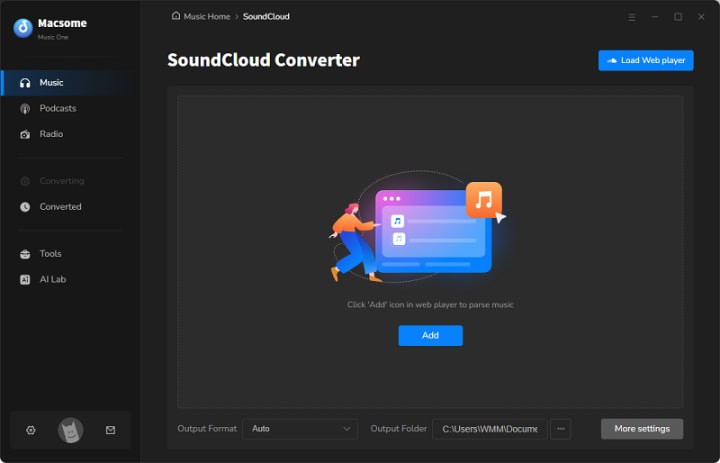
Steps for Offline Access:
Subscribe to SoundCloud Go+ for official offline listening support.
Transfer the downloaded files to your device and listen offline at school or work.
Additional Tips for Success
Check Network Policies: Before using any method, review your school or workplace's internet usage policies to avoid consequences.
Test Multiple Methods: If one approach doesn't work, try another, as network restrictions vary.
Stay Secure: Avoid shady websites or tools that promise free access but may compromise your device's security.
Optimize Streaming: Lower SoundCloud's streaming quality in the app settings to reduce buffering on slower connections.
Conclusion
Being unable to access SoundCloud at school or work can be frustrating, but with the right tools and strategies, you can bypass these restrictions and enjoy your music. Whether you opt for a VPN, proxy, mobile data, or offline downloads, always prioritize security and compliance with local rules. You can also use Macsome Music One to unblockk SoundCloud at school.
About the Creator
Why Specialized Pediatric EMR Systems Are Becoming Essential
Digital health technology is transforming healthcare systems worldwide, but pediatric care presents a unique set of challenges. From growth tracking and vaccination schedules to age-specific medication dosing, pediatricians need tools that are designed specifically for children rather than adapted from adult healthcare systems. As healthcare providers increasingly adopt digital solutions, specialized systems are becoming essential for efficient pediatric care.
By Steve Waugh3 days ago in 01
The Growing Impact of Simple AI Tools in Everyday Digital Tasks
Introduction Artificial Intelligence (AI) is becoming an important part of modern technology. Many digital platforms now use AI to help people complete tasks faster and more efficiently. From writing support to idea generation, AI tools are helping individuals improve productivity without requiring advanced technical knowledge.
By Arslan Khan7 days ago in 01
From ad men to mad men
It's after 2am in the morning when a local police patrol vehicle in Northern New Jersey spots a figure costumed as Quasimodo, The Hunchback of Notre Dame, proceeding southbound on the sidewalk along Lydecker Street. Though the hunchback’s costume stuffing offers added insulation, it's January, and friggin’ freezing. Carefully, the officers slow down, gently question the subject, and offer him a ride home.
By David W. Maury7 days ago in Humor




Comments
There are no comments for this story
Be the first to respond and start the conversation.