

Creating realistic mockups used to be a time-consuming task that required advanced design skills and expensive software. Today, thanks to AI, anyone can create stunning mockups in just a few clicks. Whether you're a small business owner, a designer, or someone trying to sell products online, AI mockups can make your life a lot easier.
In this guide, you’ll learn what AI mockups are, how to create them, which tools are best, and why Mockey is one of the top platforms to get started with.
What Are AI Mockups?
AI mockups are digital visuals that use artificial intelligence to place your design on real products like t-shirts, hoodies, mugs, phones, packaging, and more. Instead of manually editing each file or using complicated software, AI automatically adjusts your design to fit the shape, size, and perspective of the item.
These mockups look realistic and can be used for:
- Product listings on ecommerce platforms
- Social media promotions
- Branding presentations
- Print-on-demand store previews
With AI doing most of the work, you save hours of effort and get better results.
Mockey: The Best Free AI Mockup Generator
When it comes to creating AI mockups quickly and for free, Mockey is a free AI mockup generator that leads the way. It's simple, fast, and made for everyone—from designers to beginners.
Why Choose Mockey First?
Mockey stands out because it does not just offer static images. It gives you advanced features that most free tools don’t include:
- 3D Mockups: Make your designs pop with depth and realism
- Video Mockups: Animate your designs for social media and ads
- Print-on-Demand Mockups: Perfect for online sellers on platforms like Etsy or Shopify
- Weekly Updates: New mockup templates added regularly
- No Login Required: Start creating instantly
- Multiple Categories: From apparel to digital devices, there’s something for every need
Mockey lets you preview your product ideas without any learning curve. You simply upload your design, choose the product, and the mockup is ready to download.
Also Read: Best POD Mockup Generator
Other Tools for Creating AI Mockups

Mockupgenerator.AI
This tool is simple and clean. It allows you to create basic product mockups using AI. The platform is best for those who want minimal customization and fast downloads. While it does not offer video or 3D options like Mockey, it still gets the job done for simple needs.
Also Read: AI Tools for Creating Mockups
Step-by-Step Guide to Creating AI Mockups
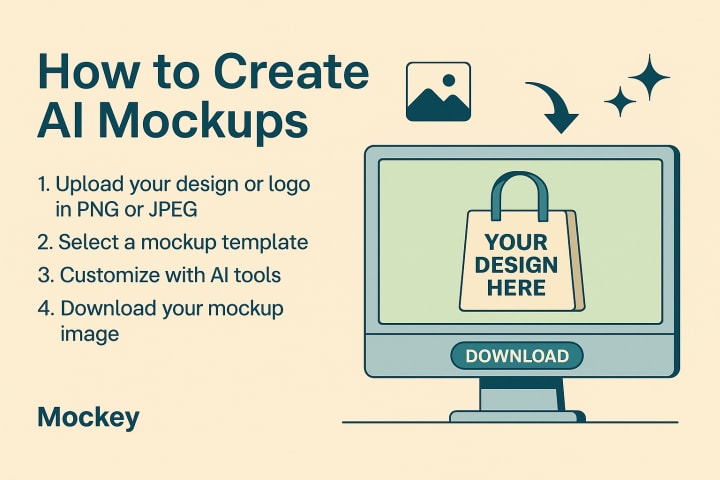
You don’t need to be a designer to create professional mockups anymore. Here’s how you can do it step by step:
Step 1: Choose Your Tool
We recommend starting with Mockey. Just open your browser and go to the website. No installation needed.
Step 2: Pick a Product Category
You’ll find many categories like:
- T-shirts
- Hoodies
- Caps
- Posters
- Devices like laptops and phones
- Packaging and more
Step 3: Upload Your Design
Click on the upload button and choose your image file. Make sure it is high resolution and in a supported format like PNG or JPG.
Step 4: Customize the Look
Change the background color, adjust placement, or choose a different angle if available. Some templates even let you edit shadows or lighting.
Step 5: Download and Use
Once satisfied, download the mockup image or video and use it wherever you like—storefronts, ads, social posts, client presentations, etc.
Why Use AI for Mockups?
AI-powered mockups are changing the way people present their designs. Here’s why:
- Saves Time: No need to spend hours editing in software like Photoshop
- Beginner Friendly: No skills required, just upload and go
- Looks Professional: Clean and realistic results every time
- Multi Use: Great for ecommerce, social media, branding, and more
- Consistent Quality: All mockups follow a professional layout
AI also helps reduce errors like wrong perspective, sizing, or alignment. It auto-fits your design in the best way possible.
Types of AI Mockups You Can Create

Thanks to platforms like Mockey, you can go beyond flat images and explore multiple mockup types.
1. 3D Mockups
These mockups give your product a lifelike appearance with shadows and depth. Great for online stores and product catalogs.
2. Video Mockups
Add motion to your designs with animated mockups. Ideal for Instagram Reels, Facebook ads, or TikTok promotions.
Also Read: How to Create Video Mockups
3. Print-on-Demand Mockups
If you sell custom products like mugs, t-shirts, or posters, POD mockups help you show the product exactly as it will be printed and delivered.
Whether you're showcasing a digital design or preparing for product launch, these mockup types cover all your creative needsv.
Tips to Make Your AI Mockups Stand Out
To get the best results, follow these helpful tips:
- Use Transparent Designs: Especially for apparel or caps, it helps fit the design better
- Choose Minimal Backgrounds: Focus on the product, not the backdrop
- Pick Multiple Angles: Show front and side views if possible
- Maintain Brand Colors: Keep a consistent theme in your mockups
- Avoid Clutter: Simple designs look more premium
- Use Video for Social Media: It captures more attention than images
Good mockups can make the difference between someone scrolling past and someone clicking “Buy Now.”
Common Mistakes to Avoid
While using AI mockup tools is easy, avoid these common errors:
- Uploading Low-Quality Designs
Blurry images will reduce the quality of your final mockup
- Ignoring Product Fit
Some designs need to be resized to fit the item properly
- Busy Backgrounds
Stick to clean backgrounds that highlight your design
- Forgetting to Preview
Always check the final look before using your mockup publicly
Conclusion
AI mockups have changed the game for creators, designers, and online sellers. What once took hours can now be done in minutes. You no longer need expensive software or technical knowledge to make your product look amazing.
Start with Mockey, the easiest and most powerful tool to create professional AI mockups for free. With 3D views, video mockups, and print-on-demand options, you have everything you need to bring your design ideas to life.
About the Creator
Keep reading
More stories from Zaheer Ansari and writers in 01 and other communities.
AI Tools for Creating Mockups
Mockups are visual representations of how a design will look in real-world scenarios—be it on a t-shirt, coffee mug, mobile screen, or packaging. They are essential tools in graphic design, product development, eCommerce, and digital marketing. Whether you are a beginner designer, an entrepreneur launching a new brand, or a content creator, mockups help showcase your ideas with impact.
By Zaheer Ansari6 months ago in 01
What is Generative SEO and How It’s Revolutionizing Content Strategy
Understanding Generative AI Generative AI is a subset of artificial intelligence that creates new content, such as text, images, video, or even audio, based on existing data. Unlike traditional AI that primarily analyzes or predicts, generative AI produces human-like outputs, making it a powerful tool for content creation. In SEO, this technology allows marketers to automate the generation of high-quality, relevant, and engaging content at scale.
By Muhammad Irfan Afzal7 days ago in 01
Low-Priced Tokens vs. Strong Fundamentals: Where Should Investors Focus?
In every crypto cycle, investors face the same dilemma: chase low-priced tokens with explosive upside potential or focus on established projects with strong fundamentals. The appeal of buying something “cheap” is powerful. A token priced under $1 feels more accessible and seems to offer greater room for growth.
By Muhammad Irfan Afzal5 days ago in 01
When the Shelter Closes
Across the street from my house, a man slept under a tree, his dog by his side. My first, naive thought: he must be traveling through. But he kept coming back, often sleeping there during the day. Then it hit me—that person might not have a home.
By Bride of Sound3 days ago in Humans


Comments
There are no comments for this story
Be the first to respond and start the conversation.