

Mockups are an essential part of the creative and design world. Whether you are a graphic designer, product developer, or entrepreneur, mockups help you present your ideas in a realistic and professional way. They allow people to visualize how a final product will look before it is actually produced. This not only saves time but also helps in making smarter design decisions.
One popular tool many designers are now using is Mockey, and it’s making mockup creation easier than ever. Mockey is an AI mockup generator that lets you turn your designs into stunning product visuals within seconds. In this article, we will explore the types of mockup you can create using Mockey, and how each one serves a unique purpose in the design process.
Let’s dive into the different types of mockups and see how they can help bring your ideas to life.
What is a Mockup?
A mockup is a realistic visual model of a product, design, or concept. It shows what your design will look like when applied to a real-world object like a t-shirt, phone screen, or product box. Mockups are not the final version but are used to test and showcase designs before actual production.
For example, if you are designing a new app, you can use a phone mockup to show how the app will look on a smartphone. If you’re creating a logo for a clothing brand, you can place it on a hoodie mockup to show clients how the logo will appear in real life.
Why Use Mockups?
Using mockups has many benefits:
- Better Presentation: Mockups make your design look more professional and real, which impresses clients or customers.
- Saves Time and Cost: Instead of printing samples, you can test your design ideas virtually.
- Improves Decision Making: Seeing your design in a real setting helps you identify what works and what doesn’t.
- Marketing and Portfolio Use: Mockups are perfect for social media posts, online stores, and design portfolios.
With tools like Mockey, you do not need advanced skills to create mockups. You can choose a blank template and upload your design to see it in action.
Different Types of Mockups

There are many types of mockup available for different design needs. Here are the most popular ones you can explore:
1. Apparel Mockups
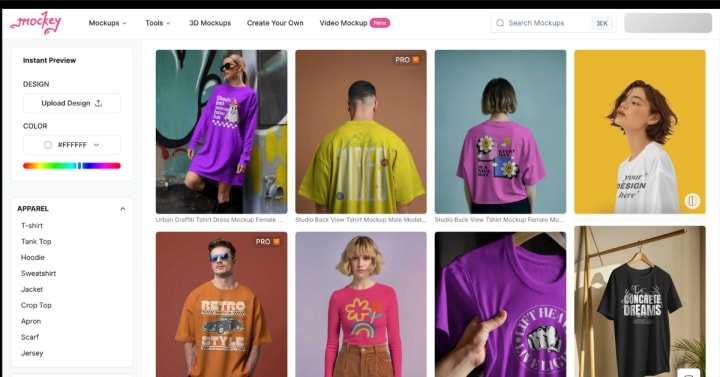
This category includes t-shirts, hoodies, caps, jackets, and more. Apparel mockups are widely used by clothing brands, fashion designers, and online print-on-demand stores.
If you want to see how your design looks on a plain white t-shirt or an oversized hoodie, apparel mockups are the best choice. These mockups help you check placement, color contrast, and fit before ordering real samples.
2. Device Mockups

Device mockups feature smartphones, tablets, laptops, and desktop screens. They are popular among app developers, UI designers, and digital product creators.
For example, if you are building a new app or website, you can use a mobile phone or laptop mockup to show how it looks on screen. Mockey offers mockups for different devices including Android phones like Samsung and Google Pixel.
3. Packaging Mockups

Packaging plays a major role in how a product is seen by customers. With packaging mockups, you can preview how your design looks on product boxes, pouches, bottles, cans, and jars.
This is useful for beauty brands, food companies, and small businesses. Before printing hundreds of boxes, you can test your layout, colors, and logos using packaging mockups.
4. Print Mockups

Print mockups include business cards, flyers, posters, brochures, and magazines. These are especially helpful for graphic designers and marketing agencies.
If you are creating a flyer for an event or a new brochure for your business, print mockups let you showcase your design in a real-life scene such as a desk, hand, or wall. It makes the print item feel more realistic and convincing.
5. Stationery Mockups

Stationery mockups focus on items used in office branding, such as notebooks, pens, folders, envelopes, and notepads. These mockups are usually used in branding presentations.
When building a visual identity for a company, showing how the branding appears on office supplies adds more trust and polish to your work.
6. Product Mockups
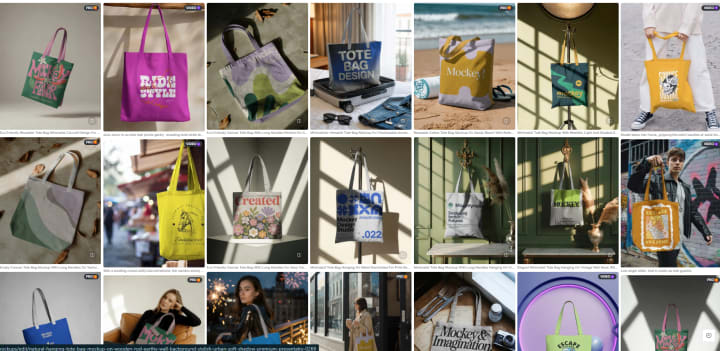
Product mockups are general mockups that feature mugs, tote bags, pillows, coasters, and other items. These are perfect for showcasing designs for ecommerce products.
For example, if you want to sell custom mugs with your artwork, you can place your design on a blank white mug mockup. This helps you promote your product online without producing a real sample first.
7. Book and Magazine Mockups

These mockups are great for authors, publishers, and content creators. You can display book covers, inside pages, and ebook designs.
Mockey offers mockups for softcover books, open magazines, and editorial-style displays. This makes it easy to showcase new publications, layouts, or literary projects in a visually attractive way.
8. Billboard and Outdoor Mockups

Billboard mockups include posters, street signs, banners, and public displays. These are mostly used by advertisers and marketers.
Using a billboard mockup, you can show how your design will look in real outdoor locations such as walls, buses, subway stations, or highways. It gives your idea a strong and professional feel.
9. Branding Mockups

Branding mockups are scenes that combine several branded items in one image. This often includes a letterhead, envelope, business card, and pen arranged together.
This is perfect when presenting a complete branding package to a client. It shows how consistent and professional the visual identity appears across different items.
10. Digital Screen Mockups
Digital screen mockups are used for screens like televisions, smartwatches, and digital signs. These help in presenting websites, advertisements, and motion graphics in a stylish format.
You can use these mockups to highlight how your video ad looks on a large screen or how your health app appears on a smartwatch.
11. 3D Mockups
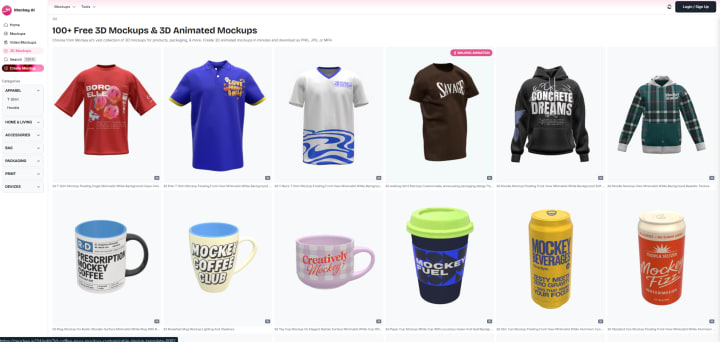
3D mockups give your design a more dynamic and realistic view by showing depth and curves. This is great for items like bottles, cans, or packaging that benefit from a full-angle look. It helps people better understand how your design will appear on real surfaces.
12. Social Media Mockups
These mockups are made to show how a design will look on social platforms like Instagram, Facebook, Twitter, or LinkedIn. You can use them to preview posts, ads, profile designs, or stories. Social media mockups are especially useful for content creators, marketers, and businesses running online campaigns.
13. Video Mockups

Video mockups take your design one step further by adding motion. They are used to create short videos that show your product from different angles or in action. These are popular in product marketing, social media, and ecommerce stores where movement helps grab attention and boost engagement.
How Mockey AI Helps With All Types of Mockup
Mockey is a powerful online platform that simplifies the process of creating mockups. You do not need to install any design software. You just select a mockup, upload your image or design, and download a ready-to-use mockup image.
Here is why people love using Mockey:
- Beginner friendly and fast
- Hundreds of categories to choose from
- Realistic and high quality mockups
- No graphic design skills needed
- Saves money and time for both small and large businesses
Whether you need a product mockup for an online store or a packaging mockup for a new launch, Mockey has something for everyone.
Tips for Choosing the Right Mockup Type
Here are some quick tips to help you select the right mockup:
- Think about your product or service and choose a relevant mockup category
- Use clean backgrounds that do not distract from your design
- Match the mood of the mockup with your brand’s style
- Use high resolution templates for better quality
- Keep the design simple and centered
Using the correct type of mockup not only enhances your presentation but also boosts your chance of winning clients or selling more products.
Conclusion
Mockups are powerful tools in today’s digital and creative world. They bring ideas to life and help people see how a design would appear in the real world. From fashion to technology, from books to billboards, there are many types of mockup available for every kind of project.
With the help of tools like Mockey, anyone can create professional mockups in just a few minutes. Whether you are showcasing a new design, building a portfolio, or launching a product, mockups make everything look more polished and ready for the world.
So go ahead, explore the different types of mockups and start creating your own stunning visuals today.
About the Creator
Keep reading
More stories from Zaheer Ansari and writers in Journal and other communities.
How to Create Video Mockups
In today’s fast-moving digital world, standing out is more important than ever. If you are trying to promote a product, service, or brand, simple pictures may not be enough. That is where video mockups come in. They help bring your product to life and show how it looks in a real environment. Whether you are an entrepreneur, designer, or content creator, using video mockups can give your brand a professional edge.
By Zaheer Ansari8 months ago in Journal
~ Fired ~
— Ai Intrusion ~ Are you Next ~ Is Ai Evolution after your job? — Few workplaces haven't been affected. Ai is in supermarkets, at doctors' offices, and even monitoring farms. I just can't think of anything this machine is not getting into, can you? For instance: Education ~ Law and Tech jobs will one day have a major influence or be taken over by these inanimate machines, with accuracy and vigor. From mechanics' diagnoses to a wide variety of everyday jobs, including fast food workers, with this input having the ability to cut their unnecessary work hours. I'm certain all of us have been touched by this with our short stories and colorful headings, have you? Even comments are very questionable 'Non-Robot' insertions.
By Jay Kantor28 days ago in Journal


Comments
There are no comments for this story
Be the first to respond and start the conversation.