
How To Choose Different Types Of Keyboards?
How To Choose Different Types Of Keyboards?


Keyboards are an important part of our computer consoles. They are also the first and most noticeable thing about a person’s work flow. Distinguishing from their historic counterparts, i.e. typewriters, they have evolved and transformed into various types. These different keyboard categories can be grouped by their sizes, number of keys, design, key placement, build quality, and many more.
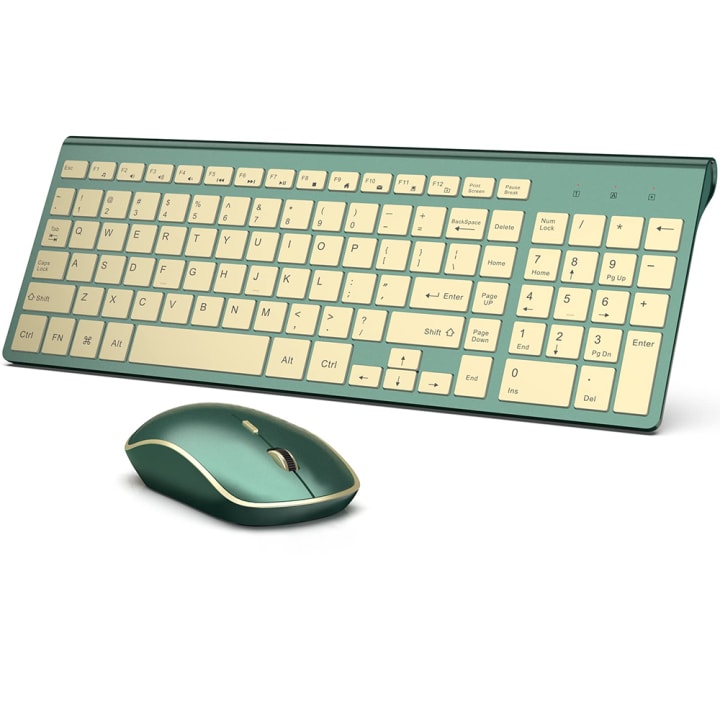
Photo from sicheadphones
With the digital age we live in, it is pretty important to find out which design works the best for you. To help you make an informed decision, here are the different keyboard categories differences.
If you enjoy my content, please click this link to support me on my blog.
Different Types Of Keyboards
Based on Keyboard Size: Keyboard categories differences based on sizes are as follows:
Full Size Keyboards: These keyboards are generally used in offices or required if one needs to deal with big data and numbers. These have extra individual functional keys and arrow keys between the alphabet-pad and number-pad.
Compact-96% Keyboard: Slightly smaller than the full sized keyboard, it comes minus the extra individual functional keys. They have a similar layout like the full-sized keyboard, but all the keys in a compact keyboard are grouped together with slightly less space.
Compact Keyboard: The compact keyboards are again of different types depending upon the total number of keys. Some don’t have the extra number keys; while some are minus the functional keys, which are generally grouped with the F keys.
Macro Keyboards: These kinds of keyboard only contain the main alphabet keys along with functional keys, or just a small number pad, or they might only contain a limited number of functional keys.
Based on Key Layout: Now, there are many different keyboard layouts, with each region or people developing their own set of layouts. Keyboard categories differences based on layouts are given below.
QWERTY Keyboard: The most common kind of keyboard, the first line of the alphabet keys starts with the letter arrangement- Q W E R T Y.
QWERTZ Keyboard: This layout is mostly used in the Central European region. This keyboard contains the letter Z in place of the letter Y in the QWERTY keyboard.
AZERTY Keyboard: This keyboard is mostly used in the regions France and Belgium and the keyboard arrangement is a lot different than the QWERTY keyboard.
Based on Connectivity: Keyboard categories differences based on connectivity are as follows:
Wired Keyboard: The most general kind of keyboard, it connects with the computer or the laptop, or any other device via a USB cord. These are add-on devices and don’t require an additional power source.
Wireless Keyboards: These keyboards connect to the computer or the laptop or any other device via Bluetooth connection, or radio frequency, or infrared. This is a great option that provides additional mobility and can be used on the go easily.
USB Keyboards: These kinds of keyboards connect to your device via a small USB dongle. It does not require any WiFi or Bluetooth connectivity, but rather transmits a signal between the keyboard and the main device.
Based on Use: Keyboard categories differences based on their use are:
Normal use keyboards: These keyboards are normal keyboards, designed for daily use. These come in the most general design. They can , however, differ in size.
Gaming Keyboards: These are designed especially for an efficient and convenient gaming experience. They are built with extra-durable materials and designed for long-hour use. They come with added elements that can help provide an avid gaming experience.
Flexible Keyboards: These are made for use on-the-go, and offer similar features as the standard keyboard. They can be easily rolled up and stored, and are generally water resistant....
Read more from:
About the Creator
sicheadphones.com
Like to share blogs about headphones&keyboards
https://www.sicheadphones.com/
Keep reading
More stories from sicheadphones.com and writers in 01 and other communities.
THE BEST 10 KEYBOARDS FOR 2023
When looking for a keyboard it is most important to look for one that offers the ebstquality features at an affordable price. Next it is important to consider what exact use you require a keyboard for, along with the key layout, key press type, keyboard and key size. Moreover, it is also important to keep in mind the warranty type, along with extra featureslike customizable options, back lights, notification panels, extra keys, and much more.
By sicheadphones.com3 years ago in 01
Adding AI to Your Mobile App: A Practical Guide
Not every app needs machine learning. But if you’re building products that serve thousands of users with different habits and expectations, static logic eventually starts to crack. The same feed, the same suggestions, the same flows for everyone — it works early on, but it doesn’t scale.
By Valeriia Shulga5 days ago in 01
How Can I Hack a Snapchat Account? The Real Techniques Used by Hackers in 2026
In the ever-evolving landscape of cybersecurity, few questions are asked with as much frequency and urgency as: "How can I hack a Snapchat account?" While this query often stems from a place of curiosity, suspicion, or even malicious intent, understanding the mechanisms behind these attacks is the first and most critical step toward preventing them. Snapchat, with its ephemeral nature and nearly one billion users, is a prime target for cybercriminals.
By Alexander Hoffmann5 days ago in 01




Comments
There are no comments for this story
Be the first to respond and start the conversation.