
How to Build Custom HR Software
Find out everything there is to know about HR software development, including the fundamentals, advanced modules, technology stack, development process, and more.


You’re buried under a mountain of spreadsheets—tracking who’s out on leave, when the last performance review happened, and whether payroll will even make it out this month. And forget about the headache of onboarding yet another remote employee scattered across different time zones.
Naturally, you turn to ready-made HR software. It looks sleek—polished dashboards, intuitive layouts—but is packed with excess features you’ll never need. You’re shelling out $12 per user each month for capabilities designed for massive corporations, complete with regulatory complexity that rivals a law library. Meanwhile, your real pain points—like aligning contractor agreements with specific project milestones or triggering automated equity vesting alerts—are completely ignored.
Here’s the thing: custom HR software isn’t just for legacy enterprises with deep pockets and huge dev teams. Thanks to smarter no-code tools, increasingly compatible APIs, and genuinely helpful AI, building a tailored HR system is now within reach—even for leaner teams.
Stick around to discover everything you need to know: essential features, the development roadmap, tech options, cost breakdowns, and more.
What is HR Software Development?
It’s about creating tools that support every stage of the employee journey—hiring, managing, and fostering a workplace where people actually thrive.
Rather than shoehorning your team into a rigid, one-size-fits-all HR model, a custom build adapts to your unique processes. Need to automate onboarding for freelance contributors who rotate in every sprint? Or sync performance feedback with your product planning cycles? A tailor-made solution makes it happen—because it’s built around your reality, not someone else’s template.
And contrary to what you might think, you don’t need to be a software engineer to start. Today, “building” can mean anything from configuring a no-code platform like Bubble or Retool to connecting services via automation tools like Make or Zapier—or even writing custom code if you’ve got developers on hand. The key is adaptability.
Why Go Custom? The Core Advantages
Out-of-the-box HR platforms may dazzle with flashy extras, but most of those features gather digital dust. A bespoke system keeps only what truly serves your team.
The first major benefit? It aligns with how your organization actually works. Say goodbye to forcing nimble, agile teams into outdated annual review cycles. Want bonuses tied directly to OKR achievements? Consider it done. Need to tag contractors separately in reports? No problem.
The second win is seamless integration. Your HR system can effortlessly connect with Slack, your payroll processor, your project management suite, and your learning management system—all without friction. Yes, there’s an initial investment, but over time, you avoid recurring fees for unused seats and redundant functionality.
Ownership brings another advantage: when issues arise or changes are needed, you’re not dependent on slow vendor support or stuck competing for attention in a crowded feature request queue. You can iterate and adjust—quickly and on your own terms.
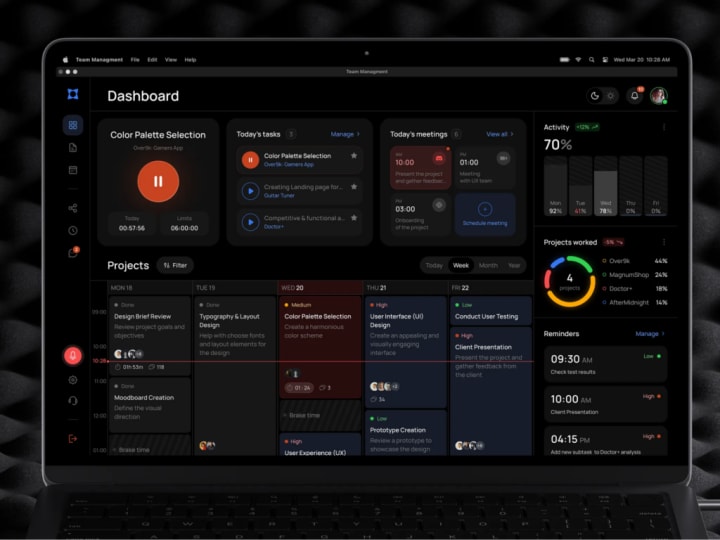
Essential HR Software Development Services
Custom HR Platform Development
You don’t need to recreate Workday from scratch to build your own HR platform—especially if you’re a startup. What you really need is a lean, purpose-built system that mirrors your team’s actual workflows, not an overloaded enterprise suite.
Too many teams burn months trying to retrofit generic tools to their needs, ending up with a fragile maze of workarounds. A custom platform cuts through that noise. You choose exactly what features to include—whether it’s applicant tracking that integrates with your existing tech stack or live-updating org charts that reflect role changes in real time. Start small: launch with a focused MVP like streamlined onboarding, validate it, then gradually add payroll, performance reviews, or other modules as you grow.
And “custom” doesn’t always mean “hand-coded from zero.” Often, it means leveraging flexible backends like Supabase or Firebase and layering a clean, intuitive front end on top—giving you speed, scalability, and easy future adjustments.
HR Mobile App Development
Today’s workforce isn’t tethered to desktops—they’re on the move, switching between devices, and managing tasks on the go. If your HR tools only work in a browser, you’re creating unnecessary friction.
Instead of relying on a sluggish or unstable progressive web app (PWA), consider a native mobile experience. A well-designed iOS or Android app lets employees request time off, log training hours, or share feedback—even while waiting in line for coffee.
Take a logistics startup, for example: its field managers rarely sit at a desk. A lightweight mobile app could let them view team availability, approve leave requests, and access company policies—even offline—ensuring nothing slips through the cracks.
Add smart push notifications (respectfully, of course)—like “Your performance review is due in 2 days”—and you’re far more likely to get timely action than with an email lost in a crowded inbox.
HR Product Design & Discovery
Many startups rush past the discovery phase, assuming they already understand user needs. But real insights often reveal surprising gaps—like hiring managers just wanting a single “Approve Hire” button.
Don’t skip this step. Talk directly to your people: HR staff, team leads, and employees. Ask naive questions. Observe their pain points—do they still print PDFs just to sign them? Are they juggling five tabs to complete one task?
A thorough discovery process helps you pinpoint genuine frustrations, prioritize features that matter, and avoid wasting time on unused functionality. Sketch user flows, test clickable prototypes with real users, and iterate quickly based on feedback. This groundwork saves months of rework later.
Third-Party System Integration
Your HR software doesn’t exist in a vacuum—it needs to connect seamlessly with the tools your company already uses: payroll providers (like ADP or Deel), communication platforms (Slack), productivity suites (Google Workspace), and specialized systems (BambooHR, Greenhouse, etc.). Without these links, your “solution” becomes another silo.
Effective integrations unlock automation and data flow. Imagine: when a new hire is added, their email account, Slack profile, and onboarding calendar invite are all created automatically from a single record. Or performance review outcomes sync directly to Lattice or 15Five—no manual copy-pasting.
Modern platforms usually offer robust APIs, and tools like Zapier or Make can handle lighter integrations. But for sensitive operations—like payroll processing or compliance tracking—direct, secure integrations are often necessary for reliability and data integrity.
HR Software Customization
Customization is often confused with full custom development, but it’s a different (and often more practical) approach. Think of it as fine-tuning an existing system rather than rebuilding the engine.
Say you’re using a solid mid-market HRIS but find the approval workflows clunky or the analytics dashboard irrelevant. Instead of scrapping it, you can tweak workflows, adjust data fields, or redesign UI elements to better suit your needs. It’s faster, more cost-effective, and frequently sufficient to resolve core issues.
This strategy works best when you have a reliable foundation that just needs a bit of tailoring. Just be cautious: over-customizing a rigid platform can eventually lead to technical debt or maintenance headaches. Know when to stop patching and consider a rebuild.
HR Software Support & Maintenance
Don’t underestimate the importance of ongoing support. Systems degrade over time—APIs get updated, team structures shift, permissions fall out of sync, and servers occasionally hiccup. Without active monitoring, small issues can snowball into major disruptions.
Dedicated maintenance includes proactive bug fixes, security patching (like updating outdated libraries to prevent vulnerabilities), and quick adjustments—such as adding a new GDPR consent checkbox when legal requirements change.
You don’t need a full in-house team. Options include a fractional engineer, a retainer with a trusted dev agency, or a skilled no-code administrator who deeply understands your setup. The key is having someone accountable. Because nothing erodes employee trust faster than a broken self-service portal right when everyone’s trying to enroll in benefits.

HR Software Development Process – A Step-by-Step Guide
Step 1: Business Analysis & Requirements Elicitation
Before writing a single line of code, clarify the core problem you’re solving. This phase is all about listening—sit down with HR professionals, team leads, and everyday employees. Observe their daily routines and pain points firsthand.
Look for recurring themes:
- What tasks eat up too much time?
- Where do errors or delays commonly occur?
- Which tools are awkwardly patched together with makeshift fixes?
From these insights, define clear requirements. Draft user stories (“As a recruiter, I need to send offer letters with one click”), map out key workflows, and distinguish essential features from optional extras. Don’t overlook non-functional needs either—performance, data security, and system reliability are just as critical.
Step 2: UX/UI Design & Interactive Prototyping
Resist the urge to jump straight into polished visuals. Start with rough wireframes that capture layout and flow—tools like Figma or Balsamiq work well for this. Then build clickable, low-fidelity prototypes to simulate real interactions.
Why prototype early? Because catching usability issues before coding begins saves significant time and budget. Get real users to test these mockups—can they easily request time off or pull up their latest payslip?
For HR platforms, usability is king. Ask: Can someone find what they need in three clicks or fewer? Is the language straightforward and jargon-free? Does it function smoothly on a mobile device late at night when checking vacation balances? Also bake in accessibility from day one—think sufficient color contrast, screen reader compatibility, and full keyboard navigation support.
Step 3: Development & System Integration
Now it’s time to build—but smartly. Agile remains the gold standard: short development cycles, frequent demos, and regular alignment with stakeholders keep the project on track.
Choose your tech stack based on goals:
- Need speed and scalability? Consider React + Node.js + PostgreSQL.
- Prefer rapid iteration with minimal coding? Platforms like Bubble or Retool, paired with API integrations, can be powerful.
- Going fully custom? Great—just ensure thorough documentation throughout.
Adopt a modular approach: develop core components (e.g., onboarding, performance reviews, payroll) as independent modules. This enables isolated testing, phased rollouts, and easier troubleshooting.
Integrate third-party systems early—not as an afterthought. Connect to payroll services, Slack, Google Workspace, and others during development to uncover API limitations or rate-limiting issues before launch. And keep HR involved: show them live previews and ask, “Does this match how you imagined the approval process?” Early validation prevents costly rework.
Step 4: Quality Assurance & Compliance Validation
QA goes far beyond casual clicking. Implement a rigorous testing strategy that covers:
- Functionality: Does the leave balance update accurately after a request?
- Edge cases: What happens if someone enters -5 days off?
- Performance: How does the system handle peak load with 1,000 concurrent users?
- Security: Are there unpatched vulnerabilities or exposed endpoints?
Also verify regulatory compliance—especially under GDPR or similar frameworks. Can users truly request data deletion? Are personal records anonymized appropriately? Are audit trails secure and immutable?
Automate repetitive tests using tools like Cypress or Selenium, but supplement with hands-on testing by non-technical staff—they often spot real-world issues developers miss. And don’t forget to test on older devices and browsers; your HR tool must work for everyone.
Step 5: Deployment & User Onboarding
Roll out gradually. Pilot the system with a single team—say, Engineering—iron out bugs, gather feedback, then scale company-wide. Use feature flags or staged releases so you can pause or revert without disruption.
Training is not optional. Don’t just drop a link in Slack and expect adoption. Instead, share a concise demo video, host a live walkthrough, or run interactive sessions. Monitor activity closely during the first week: track sign-in rates, error spikes, and support requests to catch friction points early.
Step 6: Ongoing Maintenance & Iterative Improvement
Your HR software isn’t “done” at launch. Teams evolve, regulations change, and new needs emerge. Establish a support model—whether in-house, fractional, or outsourced—to handle bug fixes, user questions, and workflow tweaks.
Continuously gather input through in-app feedback forms, suggestion boxes, and regular check-ins with power users. Use this intelligence to plan regular updates—quarterly releases work well—even if they’re minor, like adding a new report or optimizing a slow screen. Consistent, responsive evolution builds long-term trust and keeps the system relevant.

Security & Compliance Essentials for HR Software
GDPR & CCPA
You’ve likely encountered GDPR and CCPA while evaluating HR tech—perhaps even felt a jolt of anxiety during due diligence when your legal team asked, “Are we compliant?” These regulations reflect a growing expectation: people want control over their personal data. Ignore that, and you risk losing credibility fast.
The General Data Protection Regulation (GDPR) applies across the European Union and grants current and former employees specific rights: to access their data, correct inaccuracies, or request its deletion. While that sounds straightforward, the reality is complex—employee data often lives scattered across multiple systems. To comply, you must conduct a thorough audit of all data touchpoints and, where feasible, automate data deletion while maintaining clear logs of what was removed and when.
The California Consumer Privacy Act (CCPA) echoes similar principles but applies to California residents—including employees as of 2023. It requires transparency about what personal information you collect, who it’s shared with, and gives individuals the right to opt out of its “sale.” Note: even sharing data with third-party vendors can be interpreted as a sale under CCPA’s broad definition.
Don’t assume compliance is a legal or IT-only concern. Embed privacy into your HR system from the start: implement consent mechanisms, self-service data access portals, and transparent, easy-to-understand privacy policies.
ISO/IEC 27001
For B2B startups moving beyond the seed stage, ISO/IEC 27001 has become a quiet yet powerful trust signal. This international standard outlines best practices for an Information Security Management System (ISMS)—meaning you’ve formally documented how you identify, manage, and protect sensitive information through policies, risk assessments, and incident response protocols, all backed by regular audits.
Achieving certification isn’t quick: it involves mapping your data assets, assessing threats, applying security controls (like access reviews and breach notification procedures), and undergoing a third-party audit. The process can take several months, but the payoff is significant—enhanced trust from clients, partners, and investors.
Even if full certification isn’t on your roadmap yet, adopting elements of the framework delivers value: routine security awareness training, mandatory device encryption, and vendor security assessments are simple practices with outsized impact.
Single Sign-On (SSO) & Role-Based Access Control (RBAC)
Passwords are a weak link—they’re reused, shared, or guessed. In HR systems, which house highly sensitive data like salaries, Social Security numbers, and performance records, a single compromised credential can be catastrophic.
Single Sign-On (SSO) solves this by letting users authenticate once through trusted identity providers like Google, Microsoft Entra (formerly Azure AD), or Okta. After that, they securely access all connected applications without managing separate passwords. Even better: when an employee leaves, deactivating their central account instantly revokes access across HR platforms, Slack, payroll systems, and more—no manual cleanup required.
Complement SSO with Role-Based Access Control (RBAC) to ensure users only see what they need. Managers access their direct reports’ info; HR sees broader employee data; employees view only their own records; finance gets compensation reports but not confidential feedback.
Define roles clearly from day one and review permissions quarterly. Apply the principle of least privilege—many breaches originate from excessive internal access, not external hackers.
Data Encryption & Secure Storage Practices
Imagine your database backup gets stolen—or a disgruntled insider exports a spreadsheet of employee records. If that data isn’t encrypted, it’s game over.
Protect data in two critical states:
- In transit: All communications between users and your system must use TLS (i.e., HTTPS). This is table stakes in 2025, but double-check legacy integrations—they may still use outdated protocols.
- At rest: Ensure stored data is encrypted. Major cloud providers (AWS, Google Cloud, Azure) typically enable AES-256 encryption by default, but verify it’s active for your environment.
For highly sensitive fields—like bank account details, SSNs, or health information—consider field-level encryption. This ensures that even if someone gains database access, they can’t read raw values without decryption keys.
Also, follow secure storage hygiene: never store backups on personal laptops or unsecured drives. Implement key rotation policies and set up alerts for unusual download activity or unauthorized access attempts. Security isn’t just about keeping data safe—it’s about limiting damage when things go wrong.

HR Software Development Pricing Models – Explained
Fixed-Price Engagements
This is the traditional approach: you agree on a detailed project scope upfront, and the development partner provides a single, all-inclusive price. What you’re quoted is what you pay—no surprises, as long as nothing changes.
It works well when your requirements are crystal clear and unlikely to shift. However, if you later request new features or adjustments, those become formal change requests—usually with added fees. And if your initial scope was vague or incomplete, you risk delays, scope disputes, or strained relationships. In short, fixed-price suits projects with stable, well-defined goals—not those still in the discovery phase.
Time & Materials (T&M)
The T&M model offers greater agility. Instead of locking into a set price, you pay based on the actual hours worked by developers, designers, QA testers, and any associated tool or infrastructure costs. Think of it like hiring external contractors—you know the hourly rate, but the final cost depends on project duration and evolving needs.
This flexibility shines in early-stage development, where priorities often shift: one week you’re focused on time-off management; the next, integrating payroll becomes critical. With T&M, you can adapt quickly without renegotiating contracts.
The trade-off? Less predictability in total spend. To address this, many agencies (like Shakuro) prioritize transparency—offering weekly progress reports, real-time dashboards, and clear effort estimates. If you value responsiveness and iterative development over rigid budget caps, T&M feels comfortable and familiar—like your go-to pair of jeans.
Dedicated Development Team
Also known as the “extended team” model, this approach gives you a full-time, exclusive squad of professionals—engineers, QA, and sometimes product managers—who work solely on your HR platform as if they were in-house.
Pricing typically comes as a monthly retainer based on team size and composition—e.g., $8,000 to $15,000 per month for a 3–5 person team.
The biggest advantage? Continuity. With the same people involved from start to finish, you build deep product knowledge, streamline communication, and accelerate decision-making. This model is ideal for companies planning long-term HR system evolution—such as preparing for international hiring or navigating major regulatory updates. Just note: it requires a medium- to long-term commitment.
Tailored Pricing Solutions
Sometimes, none of the standard models quite fit. That’s when a custom pricing structure makes sense.
Here, you collaborate closely with your development partner to assess your unique context—core features, pain points, timeline pressures, risk tolerance—and co-create a financial plan that aligns with your goals and cash flow. This might blend approaches: fixed pricing for foundational modules, T&M for post-launch enhancements, or staged funding aligned with release milestones.
Custom pricing isn’t about complexity—it’s about relevance. Whether you need a lean solution or are reimagining your entire HR operations, this model ensures your investment matches your actual needs, not a one-size-fits-all template.
About the Creator
Shakuro
We are a web and mobile design and development agency. Making websites and apps, creating brand identities, and launching startups.
What Is the Best Way to Launch an ICO in Today’s Market?
Launching and promoting an Initial Coin Offering (ICO) in today’s market requires a structured, research-driven, and compliance-focused approach. The early days of ICOs were characterized by rapid fundraising cycles and speculative enthusiasm, but the modern crypto environment demands credibility, transparency, and measurable execution. Investors are more informed, regulators are more active, and competition among blockchain projects has intensified. As a result, launching an ICO now requires strategic planning that integrates legal clarity, sustainable tokenomics, community engagement, and long-term ecosystem development.
By Jack santo6 days ago in 01
Why Dubai’s Pet Community Is Rallying Around #EveryPetHasAShory
A decade ago, owning a pet was a niche lifestyle in the UAE. Now, dogs keep their owners company at pet-friendly cafés, cats have Instagram fan clubs, rescue organisations are at full capacity, veterinary clinics are expanding, and pet boutiques are flourishing.
By Sarath Menon5 days ago in 01




Comments
There are no comments for this story
Be the first to respond and start the conversation.