
What is CSS and Why You Should Care
Welcome to the world of web development!

If you’ve ever wondered how websites go from plain, unstyled HTML to beautifully designed pages, the answer lies in CSS, or Cascading Style Sheets. CSS is the magic behind the aesthetics of a website, and it’s one of the core technologies you need to master if you want to create visually appealing web pages. In this article, we’ll dive deep into what CSS is, how it works, and most importantly, why you should care about learning it. Spoiler alert: CSS is more important than you might think!
This article is part of a free full CSS Course: Beginner to Expert
What Exactly is CSS?
Before we get into the “why,” let’s tackle the “what.” CSS stands for Cascading Style Sheets, a language used to describe the presentation of a document written in HTML or XML. While HTML provides the structure and content of a webpage, CSS is responsible for the visual design — everything from layout, colors, and fonts to spacing, animations, and even responsive design.
Imagine HTML as the skeleton of a webpage. It holds everything in place but doesn’t offer much in terms of appearance. CSS, on the other hand, is like the skin and clothes. It brings color, life, and personality to the structure, making your website not only functional but also aesthetically pleasing.
In a nutshell, CSS allows you to control the look and feel of your website. With just a few lines of code, you can transform a bland page into something vibrant and engaging. But CSS is more than just about making things look pretty — it’s about creating a user-friendly experience that keeps visitors engaged and coming back for more.
The Basic Structure of CSS
Before we explore why CSS is so crucial, let’s take a quick look at how it works. Understanding the basics will help you appreciate its power.
1. Selectors
Selectors are the part of a CSS rule that targets the HTML elements you want to style. For example, if you want to change the color of all <h1> tags on your page, you would use the h1 selector. Selectors can be as simple or as complex as you need them to be. Here are a few common types:
Type Selector: Targets all elements of a specific type, like h1, p, or div.
- Class Selector: Targets elements with a specific class attribute, using a dot (.) before the class name, like .my-class.
- ID Selector: Targets a single element with a specific ID attribute, using a hash (#) before the ID name, like #my-id.
2. Properties and Values
Once you’ve selected an element, you can apply styles to it using properties and values. A property is what you want to change (like color, font-size, or margin), and the value is what you want to change it to.
For example, if you want to change the color of your text to blue, your CSS rule would look like this:
h1 {
color: blue;
}
This simple rule tells the browser to display all <h1> tags with blue text.
3. Cascading and Inheritance
The “Cascading” part of Cascading Style Sheets refers to how CSS rules are applied in a hierarchical manner. If there are multiple conflicting rules, CSS uses a system of specificity and inheritance to decide which styles to apply.
Specificity determines which rule takes precedence, while inheritance allows certain properties to be passed down from parent elements to child elements. For example, if you set the color property on a <div>, all text within that <div> will inherit that color unless you specify otherwise.
4. The Importance of the Box Model
The CSS box model is another fundamental concept you need to grasp. Every element in a web page is represented as a rectangular box, which consists of four parts: content, padding, border, and margin. Understanding how these parts work together is key to controlling the spacing and layout of your web elements.
For example, the padding property adds space inside the element, between the content and the border, while the margin adds space outside the element, between the border and surrounding elements.
Why CSS Matters: The Practical Reasons
Now that you understand the basics of CSS, let’s talk about why it’s such a big deal. Why should you, as a web developer or designer, care about CSS? The answer lies in the power and flexibility it gives you to create stunning, responsive, and user-friendly websites.
1. Design Control and Creativity
CSS is your tool for expressing creativity in web design. It allows you to bring your vision to life by giving you complete control over the look and feel of a website. Want a background image that stays fixed while you scroll? CSS can do that. Need a button that changes color when you hover over it? CSS has you covered.
With CSS, you’re not limited to cookie-cutter designs. You can create custom layouts, experiment with colors, play with typography, and introduce animations — all without touching the HTML structure. This separation of content (HTML) and presentation (CSS) is crucial because it allows for greater flexibility and easier maintenance.
2. Responsive Design: One Size Doesn’t Fit All
In today’s mobile-first world, creating websites that work well on all devices is non-negotiable. Responsive design — ensuring that your website looks good and functions well on screens of all sizes — relies heavily on CSS.
Through media queries, a feature in CSS, you can apply different styles based on the user’s device characteristics, such as screen width. This means you can create a single website that adjusts its layout and appearance to provide an optimal viewing experience, whether it’s being accessed on a smartphone, tablet, or desktop computer.
For example, you can use CSS to hide or rearrange certain elements on smaller screens, change font sizes, or adjust padding and margins to ensure everything fits perfectly.
3. User Experience (UX) Enhancement
Good design isn’t just about looking nice; it’s about creating a positive user experience. CSS plays a huge role in UX by allowing you to design intuitive and accessible interfaces.
Consider navigation menus, buttons, forms, and modal windows. CSS enables you to style these elements in a way that makes them easy to use and understand. You can highlight important information, guide users through a process, and make interactions more enjoyable through subtle animations and transitions.
Moreover, CSS can improve accessibility by ensuring your site is usable by people with disabilities. For example, you can use CSS to enhance the visibility of focus states for keyboard users or to ensure text has sufficient contrast against its background for visually impaired users.
4. Performance and Optimization
You might not immediately associate CSS with website performance, but it plays a crucial role in how fast your site loads and performs. Efficient use of CSS can reduce page load times, which is vital for keeping visitors on your site.
One way CSS contributes to performance is through minification and compression. Minifying CSS involves removing unnecessary characters (like spaces and comments) to reduce the file size. Compressing CSS files further shrinks their size, making them faster to download.
Additionally, you can use CSS to create visually rich pages with minimal use of images, which are often larger and slower to load. For example, CSS gradients and shadows can replace background images, and CSS animations can replace GIFs.
5. Scalability and Maintenance
As your website grows, so does the complexity of managing its design. CSS helps you keep your styles scalable and maintainable, especially when working on large projects or with a team.
By using CSS best practices — like modular design, where you create reusable components — you can keep your code organized and easier to update. Tools like CSS preprocessors (e.g., SASS or LESS) further enhance CSS by allowing you to use variables, nesting, and functions, making your stylesheets more powerful and easier to maintain.
For instance, instead of hardcoding colors throughout your CSS, you can define them as variables. If you decide to change your brand’s color scheme later, you only need to update the variable, and the change will be reflected across your entire site.
The Future of CSS: Why Learning It Now is More Important Than Ever
If you’re still on the fence about learning CSS, consider this: CSS is constantly evolving. The web is moving forward at a rapid pace, and CSS is keeping up by introducing new features and capabilities that push the boundaries of what’s possible in web design.
1. CSS Grid and Flexbox: Modern Layout Techniques
Two relatively recent additions to CSS — Grid and Flexbox — have revolutionized the way we approach layout design. Flexbox is perfect for one-dimensional layouts, such as aligning items in a row or column, while Grid excels at two-dimensional layouts, allowing you to create complex, responsive grid systems with ease.
These tools give you more control over your layout than ever before, making it easier to create designs that work across a variety of screen sizes and resolutions. Mastering Flexbox and Grid is essential for any modern web developer.
2. CSS Variables (Custom Properties)
CSS Variables, also known as custom properties, are another game-changer. They allow you to store values (like colors, font sizes, or dimensions) in a variable and reuse them throughout your CSS. This not only makes your code more maintainable but also enables dynamic theming — changing the look of a site by updating a few variables.
For example, you can create light and dark themes for your website by simply toggling between sets of variables, without rewriting your entire stylesheet.
3. CSS Houdini: The Future of Styling
Looking ahead, the CSS Houdini project is set to revolutionize how we write CSS by exposing parts of the CSS engine to developers. This will allow you to extend CSS with custom styles, animations, and layout capabilities that aren’t possible with current CSS alone. Houdini will give you the power to create truly unique and highly performant designs.
Conclusion: Why You Should Care
CSS is not just a tool for making websites look good; it’s a critical skill for anyone serious about web development or design. It empowers you to create beautiful, functional, and accessible websites that provide great user experiences. As the web continues to evolve, mastering CSS will give you the foundation you need to keep up with the latest trends and technologies.
So, why should you care about CSS? Because it’s the key to unlocking your creativity, enhancing your website’s performance, and ensuring your designs are future-proof. Whether you’re just starting out or looking to advance your skills, learning CSS is an investment in your future as a web professional. Now, roll up your sleeves, start experimenting with some styles, and see where your creativity takes you!
About the Creator
MariosDev
Hi, I’m Marios! I’ve been a developer for over 9 years, crafting cool stuff and solving tricky tech puzzles. I’m a total tech enthusiast and love sharing my thoughts and tips through blogging. Also, in love with my bike!
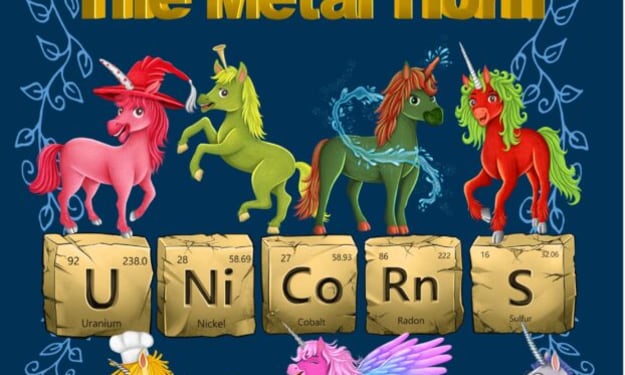
The Metal Horn Unicorns Make Science Magical: A Creative Gateway to the Periodic Table
Learning the periodic table can feel intimidating to many students when it is presented as a dense grid of symbols, atomic numbers, and unfamiliar terminology. Yet chemistry itself is full of wonder: elements form the building blocks of everything in the universe, from the oxygen we breathe to the gold in jewelry and the silicon in our electronics. When science education taps into imagination, storytelling, and creativity, students often discover that the periodic table is not merely a chart to memorize but a fascinating map of the natural world. This is exactly where The Metal Horn Unicorns Make Science Magical—a unique STEM resource—steps in.
By Bushra Rajpoot3 days ago in 01
Why Didn't Anyone Tell Us
Men, move along. This is not for you. This is for the women. I was forty-five when I began menopause. It is pretty young for that to be going on in a woman’s life, but I had undiagnosed PCOS, my entire life. Thank you to all the gynecologists I had seen my entire life. That in itself should encourage women to keep seeking second opinions, especially when you are not getting correct answers or any at all.
By Alexandra Granta day ago in Humans


Comments
There are no comments for this story
Be the first to respond and start the conversation.