
How AI is Transforming Scheduling Software for Call Centers
Transform your Business with AI


Efficient scheduling is one of the greatest challenges that call centers have. Poorly planned workforce will result in increased wait times, burning out agents, and customers getting frustrated. ContactBabel reported that more than 70% of call center costs are connected with staffing, so optimized scheduling is a critical piece in the reduction of cost on call centers' operations. Business today can automate workforce management, become efficient, and add value to service quality through AI-powered scheduling software.
In this article, we'll discuss the role of AI in call center scheduling software and guide you through the best tools and features to consider.
What is Scheduling Software in a Call Center?
Contact center scheduling software is a workforce management solution in planning agent shifts, resource allocations, and workload balancing within call centers. These systems think about such factors as call volume, an agent's availability, and peak hours when structuring optimal schedules.
This type of traditional scheduling method normally requires spreadsheets and manual inputs. It becomes quite time-consuming and error-prone. But the use of AI for scheduling software offers real-time machine learning and predictive analytics to design schedules that accurately tell the agents what number and when to work, so right people are on hand at the right time.
Advantages in the Use of AI in Scheduling Software
AI-driven scheduling tools offer a wide range of benefits for call centers. Here's how they can transform workforce management:
- AI improves efficiency: through the generation of the most efficient schedules based on historical data and real-time demand, thus reducing idle time and overstaffing.
- Reduces employee burnout: through the balancing of workloads and the optimization of shift rotations to avoid overworking agents.
- Enhanced Customer Experience: A well-optimized workforce ensures that customer calls are handled quickly, reducing wait times and improving service quality.
- Automated Shift Adjustments: AI detects unexpected changes, such as agent absences or increased call volumes, and automatically adjusts the schedule.
- Cost Savings: Efficient scheduling minimizes unnecessary labor costs while maximizing productivity.

What Are the Key Features of Scheduling Software?
Select AI-based Call Center Scheduling Software with the following key features:
- AI-Powered Forecasting: Predicts call volumes at intervals for required days into the future based on historical data to ensure adequate levels of staffing.
- Automated Shift Planning: assigns shifts based on agent availability, skill level, business needs, and so forth.
- Real-Time Adjustments: managers can adjust the schedules quickly in response to unexpected absences or demand spikes.
- Self-Service Shift Swaps: Allows agents to swap shifts or request time off using a simple interface.
- CRM & HR Systems Integration: Facilitates seamless communication between workforce management and customer support tools.
The following are some of the best scheduling tools offering the above features:
Best 3 Call Center Scheduling Software
Choosing the right free scheduling software for call centers can significantly impact workforce efficiency, agent productivity, and customer satisfaction. Below are three top AI-powered scheduling tools that help businesses streamline call center operations.
1. CrmOne – AI-Powered Workforce Optimization
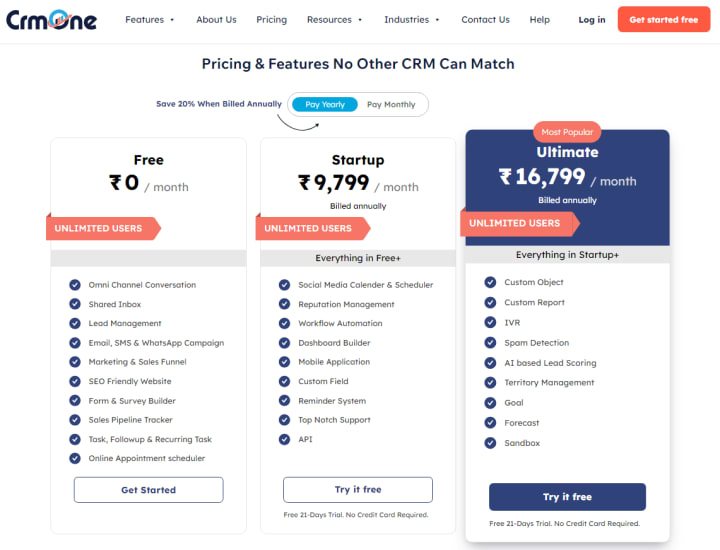
CrmOne is a potent AI-powered call center scheduling tool that helps companies automate shift planning, maximize labor productivity, and improve customer satisfaction. Call centers are constantly staffed appropriately depending on real-time requests thanks to its strong AI capabilities.
Key features:
- AI-Powered Forecasting: Utilizing historical data and predictive analytics, it determines the optimal staffing levels.
- Automated Shift Scheduling: Assign shifts according to agent availability, skill levels, and business requirements.
- Real-Time Adjustments: Schedules can be changed immediately to account for sudden absences or unexpected call spikes.
- Self-Service Portal: Agents can request shift swaps, time off, or updates using an intuitive dashboard.
- Multi-Channel Integration: Seamless synchronization with CRM, workforce management, and customer support systems.
2. Zendesk – Workforce Management
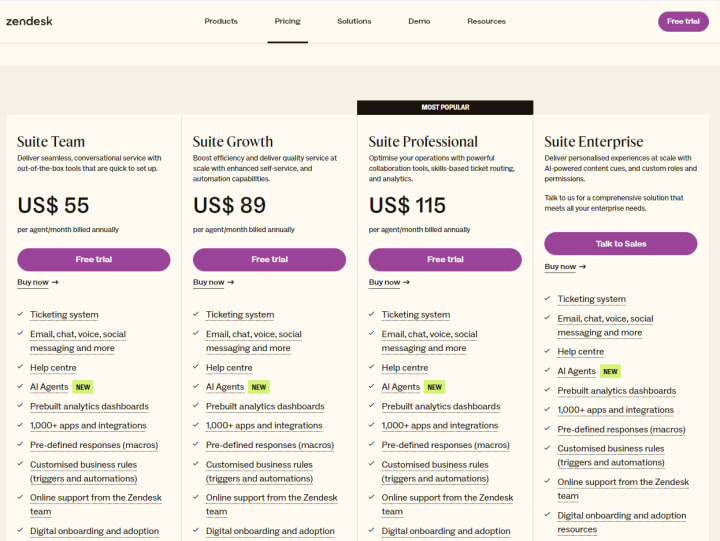
Zendesk Workforce Management is a cloud-based call middle scheduling device that uses the powers of AI to optimize shift planning and agent overall performance. It allows call facilities to put off inefficiencies by using aligning staffing with customer call.
Key Features:
- Automated Workforce Forecasting: Utilizes AI to make future call volume predictions and adjust your staff based on that.
- Customizable Scheduling Rules: This feature in Zendesk lets managers establish flexible, enforceable shift policies.
- Shift Bidding System: It allows the agents to bid for shifts based on their availability and preferences.
- Break & Overtime Management: It will follow labor laws and maintain fair work distribution.
3. Zoho Desk Scheduler – Intelligent AI-Based Call Center Scheduling
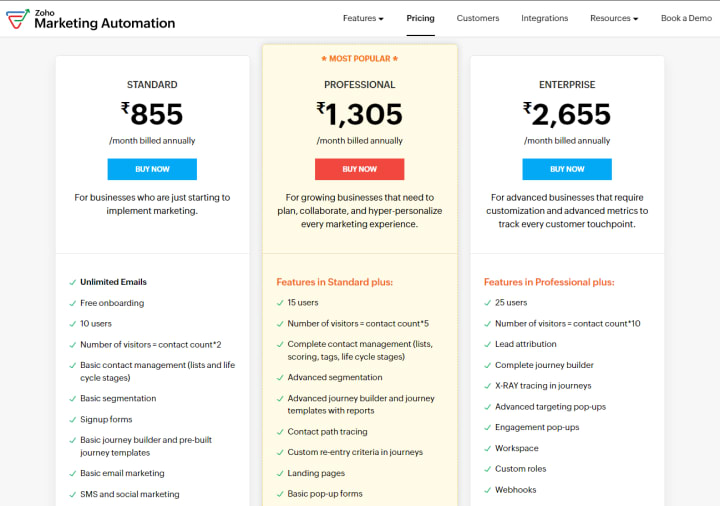
Zoho Desk Scheduler provides smart workforce planning for the call centers. It can be used by organizations to optimize the agent's shift, minimize operational costs, and enhance the customer experience. It is apt for companies requiring a flexible and user-friendly scheduling solution.
Key features:
- AI-Driven Scheduling: Shifts are automatically created based on call demand and agent workload.
- Automated Notifications & Alerts: Agents are informed of shift changes, breaks, or urgent scheduling updates.
- Multi-Location Support: Helps businesses manage scheduling across multiple offices or remote teams.
- Shift Swap & Time-Off Requests: Agents can request changes without manager intervention.
- Integrated Call Analytics: Insights into agent productivity and customer wait times.
How to Select the Perfect Scheduling Software for Your Business
The best call center employee scheduling software is determined through multiple evaluations, such as:
- Size of the Business & Call Volume – Software capabilities should match and outdo your call center's daily traffic.
- Features of AI & Automation – It must be equipped to utilize real-time shift adjustments with predictive analytics.
- Ease of Use – Find software that is user-friendly for managers and agents navigating the system.
- Customization & Flexibility – Opt for a tool that allows customized scheduling rules and shift preferences.
- Integration Capabilities – Ensure the software integrates with your CRM, HR, and communication tools.
Final Words
AI-based totally scheduling software is revolutionizing name middle workforce control by streamlining shift making plans, reducing operational costs, and improving customer experience. As businesses attempt to come to be more green, investments in AI-primarily based scheduling answers like CrmOne, Zendesk, and Zoho can assist organizations stay in advance of the curve.
Automation and intelligent forecasting can streamline the operations of a call center, reduce agent burnout, and deliver the best customer experience.
Searching for the best scheduling tool for your call center? Learn more about AI-powered solutions now!
About the Creator
jane smith
SEO Fresher for aspiring SEO professionals with a knack for building effective free backlinks to improve online visibility and boost website rankings.
Keep reading
More stories from jane smith and writers in 01 and other communities.
Automate Your WhatsApp Marketing with These Powerful Tools
WhatsApp is now among the most potent marketing tools for businesses. With 2 billion users, it presents a direct approach to connecting customers. According to studies, WhatsApp campaigns are known to reach 45-60% conversion rates, much higher than other classic channels such as email and SMS, which tend to reach rates of 2-5%.
By jane smith10 months ago in 01
Can AI Predict a Successful Brand Name? Let’s Find Out
Did you know that a staggering 9 out of 10 startups fail? While many factors contribute to this grim statistic, the strength and memorability of a brand name often play a surprisingly significant role in a business's initial traction and long-term success.
By Ecom Mediatech3 days ago in 01




Comments
There are no comments for this story
Be the first to respond and start the conversation.