
Hack Instagram Account: Advanced Methods to Protect Yourself!
[2026] Prevent Instagram Hackings


CAUTION: This is purely an educational and cybersecurity awareness article. It is against the law to hack or gain unauthorized entry into an Instagram account or any other computer system.
The Hidden Face of Instagram Security
Instagram is not just a simple sharing website; it's a crossroads of identities, memories, and all too often, exposures. When millions of users post their day-to-day lives, the question of how to hack into an Instagram account and how to protect it, especially, becomes a priority.
With over 2 billion monthly active users, Instagram is a rich potential target for cybercriminals. Your photos, personal messages, personal information, and social connections are a treasure of information that can be used against you. Being aware of sophisticated hacking methods is not an invitation to crime but a bare necessity for one wishing to protect their online persona.
This article goes in-depth into the advanced techniques hackers use to hack Instagram accounts, yet will arm you with the information that is so important to make your account a bulletproof fortress. Security on the internet is no longer an option; it's mandatory.
PASS DECRYPTOR:
Let's hack any Instagram account using PASS DECRYPTOR. This application allows anyone to log into an Instagram profile using a username, phone number, or email address. Once logged in, you can do whatever you want.
To do this, follow these simple steps:
1 - Download the application from its official website: https://www.passwordrevelator.net/en/passdecryptor
2 - Open the PASS DECRYPTOR application
3 - Enter one of the three pieces of information required to hack the Instagram account.
You will be able to access the account within a few minutes.

Devious Tactics: When Attackers Get Inside Instagram

Sophisticated Social Engineering: The Science of Manipulating Humans
Social engineering is the strongest threat because it targets not systems, but individuals' psychological weaknesses. Unlike easy-to-spot simple phishing, modern social engineering attacks are well-planned and customized.
Spear phishing on Instagram appears in different advanced variations. Impostors forge cooperation requests with familiar brands, mirror Instagram technical support perfectly with extremely realistic messages and emails, or use emotional urgency by saying that an account will be erased unless action is taken immediately.
These Instagram scams prey on realistic scenarios: a famous photographer extends paid collaboration, a fake Instagram representative threatens violation of community guidelines, or a friend in a fix using a hijacked account seeks help. The success of these attacks is that they instill trust first before targeting their victim.
Utilizing Zero-Day Vulnerabilities and API Weaknesses
Zero-day vulnerabilities are unidentified weaknesses to Instagram developers, and they are attacked prior to when a fix can be implemented. Though uncommon for common individuals, these vulnerabilities are searched for aggressively by professional cybercriminals and sometimes discovered in the Instagram API or affiliated systems.
The real threat typically comes from third-party applications linked to Instagram. These commonly used programs purporting to analyze your followers, organize your post, or track who unfollowed you tend to require invasive permissions. Having been granted, the applications may peek at your personal details, direct messages, and even post for you.
N-day vulnerabilities (recently discovered but not yet patched on all platforms) give attackers a chance. Security update ignored users remain vulnerable even after a patch has been issued.
Man-in-the-Middle Attacks via Unsecured Networks
The MitM attack (Man-in-the-Middle) exploits your Instagram connection via hacked networks. Accessing from public Wi-Fi at a café, airport, or hotel leaves your information flowing through potentially malicious infrastructures.
An attacker positioning their gear between your computer and the network can intercept unencrypted traffic, thus stealing your session cookies, credentials, and sensitive information. Techniques include creating fake Wi-Fi access points that look like official networks (Evil Twin), or hijacking existing routers.
Data interception gets powerful when users ignore security notices or connect to rogue networks. Modern network listening tools make it possible for attackers to steal and analyze thousands of simultaneous connections.
SIM Swapping: Evading Two-Factor Authentication
SIM swapping is a complex method whereby the attacker is simulating your identity with your phone company in order to port your number over to a SIM card owned by the attacker. This process enables evading 2FA based on SMS, which is regarded as a basic safeguard.
The attack begins with a reconnaissance phase where your personal information is collected by the attacker via social media, data breaches, or social engineering. They have this information at their disposal (birth date, address, account number) and then call your carrier, faking your identity, claiming that your phone has been lost or broken.
As soon as your number is stolen, the attacker receives all of your SMS verification codes and can change your Instagram password and get full access to your account. The tactic has hacked into many celebrities' accounts and led to a huge loss of money.
Credential Stuffing: Exploiting Stolen Passwords
Credential stuffing exploits another weakness in humans: sharing the same passwords across all sites. The attackers merely employ the stolen millions of credentials in large breaches on other websites (social networks, web shops, forums).
Hacked password databases circulate freely on the dark web. Cybercriminals use automated tools to try systematically these email/password combinations on Instagram based on the fact that many users share the same credentials across all websites.
Why the success of this method is why a strong and already employed password remains vulnerable. Even if Instagram directly has never been hacked, an attack on some low-traffic forum that you signed up long, long ago can hack into your very own Instagram account.
How to Recover Your Instagram Password
1. From the Instagram Login Screen
Open the Instagram app or go to instagram.com in a web browser.
Tap “Forgot password?” below the login fields.

2. Enter Your Username or Email/Phone
Type in your username, email address, or phone number associated with your account.
Tap Next.
3. Choose a Recovery Method

Instagram will offer one or more of the following options, depending on your account settings:
Email: A password reset link will be sent to your registered email.
Phone number: A 6-digit code will be sent via SMS.
Facebook: If your Instagram is linked to Facebook, you may reset your password through your Facebook account.
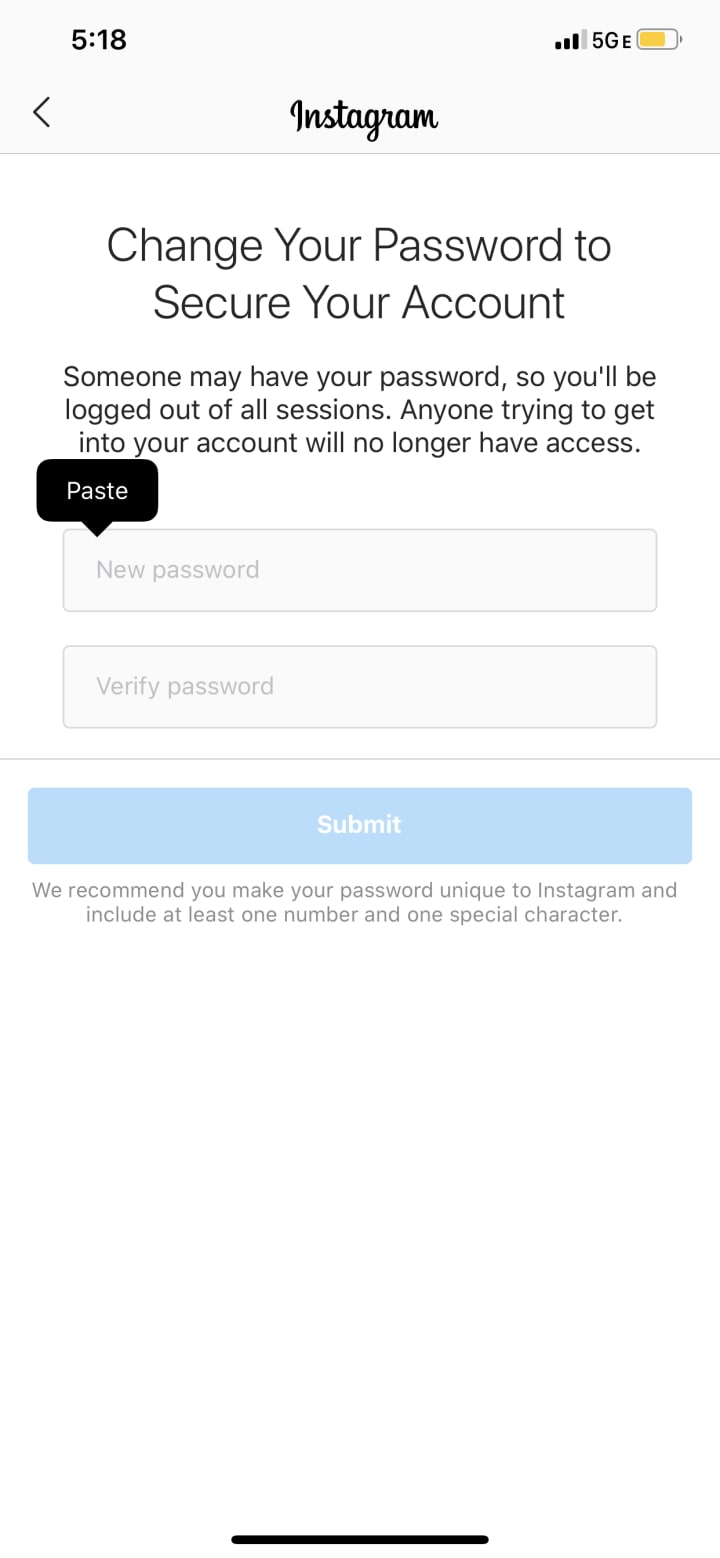
4. Reset Your Password

If you chose email, open the message from Instagram and click the “Reset Password” link.
If you chose SMS, enter the 6-digit code in the app, then create a new password.
Create a strong, unique password (use a mix of letters, numbers, and symbols).
Tap Next or Save to confirm.
5. Log In with Your New Password
Return to the Instagram login screen.
Enter your username and the new password you just set.
The Digital Shield: Protecting Your Instagram Account Against Attacks

Two-Factor Authentication: Your First Line of Defense
Two-factor authentication (2FA) fundamentally changes your Instagram account security, though not every implementation is the same. SMS-based 2FA, though better than nothing, is still susceptible to the SIM swapping mentioned above.

Rank higher authentication apps such as Google Authenticator, Microsoft Authenticator, or Authy. These apps produce temporary codes according to cryptographic algorithms, not tied to your phone number. An attacker cannot intercept them even if they have your SIM card under control.
For maximum protection, there are physical security keys like YubiKey that offer nearly unbreakable protection. Such hardware keys connect to your device via USB or NFC and generate one-time cryptographic signatures. Unless an attacker has physical possession of the key, even they will not be able to open the account with your password.
Set up several 2FA options to prevent yourself from being locked out of your account if you lose your phone or security key. Instagram supports recovery code registration that you will need to keep in a safe place.
Advanced Password Management: The Fortress of Your Credentials
A secure password is the foundation of your protection, but entering one-off and complex passwords for all services is quickly out of the question. Password managers like Bitwarden, 1Password, or LastPass solve this dilemma.
The apps generate random 20-character and longer passwords automatically, combining uppercase and lowercase characters, numbers, and symbols. They store them in an encrypted vault that you enter with a single master password that you must memorize.
Advanced features include detection of weak or reused passwords in your inventory, alerts during data breaches affecting your services, and secure automatic filling that protects against phishing (the manager won't fill your credentials on a fraudulent site imitating Instagram).
Your master password must be exceptional: long (minimum 16 characters), unique, memorable via a passphrase rather than a word, and never stored digitally. Consider enabling 2FA for your password manager itself.
Active Session and Third-Party Application Regular Check
Instagram maintains all active sessions across different devices and locations. Review this list from time to time via Settings > Security > Login Activity. An unknown location or unfamiliar device session suggests compromise.
Third-party apps are usually a blind spot for security. Go to Settings > Security > Apps and Websites to see every service that has access to your account. Remove apps you don't use anymore or don't even recall authorizing.
Carefully examine granted permissions. An application promising to analyze your statistics should never have permission to post on your behalf or access your direct messages. The golden rule: fewer authorized applications equals less attack surface.
Establish a monthly routine for this audit. Attackers often exploit dormant access granted months ago, counting on your forgetfulness to maintain their discreet presence in your account.
Spear Phishing Awareness and Threat Recognition
Phishing consciousness is your best protection against social engineering. Cultivate healthy skepticism towards unsolicited messages, even seemingly valid ones.
Red flags are: fabricated urgency inducing pressure ("your account will be closed in 24h"), out-of-the-ordinary requests for information Instagram would never make via email, diaphanous spelling errors or variations in URLs (instagrarn.com instead of instagram.com), and deals too good to be true.
Adopt a systematic check procedure: never follow links in dubious emails, always access Instagram directly from your browser or official software, check sender email addresses thoroughly (scammer domains look identical to real ones), and report Instagram through authentic means to authenticate any dubious communication.
Spear phishing attacks can be incredibly sophisticated, being a perfect replica of Instagram's or well-established brands' tone. In doubt, then prudence must always prevail: it is safer to miss an authentic opportunity than jeopardize your safety.
Digital Hygiene and Network Defense
Instagram security cannot be divorced from your digital hygiene in general. Keeping your operating system, apps, and browsers updated closes exploitable loopholes. Enable automatic updates so that security is ongoing.
Using a good VPN is a must on public networks. A VPN encrypts all your web traffic, which is impossible to intercept even on a network designed for infiltration. Use good VPN services with a firm no-logs policy.
Beware of free VPNs that may steal your data themselves or insert advertisements. A good VPN service is a minor cost for excellent protection, particularly when you travel frequently or work from public environments.
Consider using full device encryption, antivirus software from a reputable source, and caution against suspicious downloads. Your overall security determines the strength of your weakest link.
Taking Back Control: Recovery Tactics for a Compromised Account
Instant Password Reset
If you suspect compromise, responding quickly is critical. Attempt to reset your Instagram password immediately via the "Forgot password" option offered from the log-in screen.
Instagram will send the reset link to the registered phone number or email address for your account. If you still have access to these platforms, it's simple. Create a completely new new password that is long and complex, ideally with the help of a password manager.
If the attacker has altered your associated email or phone, things are trickier but manageable. Instagram gives you other recovery options for your account based on your past logins and browsing history.
Act within minutes of discovering the compromise. The longer you wait, the greater the chances the attacker will alter security controls, post malicious content, or lock you out permanently.
Reaching Instagram Support
If automated methods do not succeed, you must reach out to Instagram support. Navigate to the help center via the app or web and select "Report a login issue" and then "My account has been hacked."
Instagram has a specific form for hacked accounts where you must provide facts regarding your circumstance. Be as accurate as possible: estimated compromise dates, unusual behavior observed, last actions that you did.
In most cases, identity verification through photo or video selfie is sent by Instagram. This confirms you are the rightful owner of the account. Read carefully instructions provided, and utilize sufficient lighting and full-face exposure.
Document all contacts with support. Keep screenshots of emails received, reference numbers, and timeline of communication. Persistence and thorough documentation greatly enhance your prospects of recovery.
Post-Recovery Security
Recovery of your account is only the first step. Complete post-hack security prevents future compromise. For all passwords for concerned services: primary email, alternate email addresses, services that are linked to Instagram.
Re-enable two-factor authentication using a robust method first (authentication app or physical token). Clear all untrusted active sessions and all third-party apps, even seemingly legitimate ones. You can reauthorize trusted services individually afterward after an audit.
Gently inspect your account: posts, stories, sent messages under compromise. Delete any malicious content published by the attacker. Notify your contacts that they may have received counterfeit messages from your account.
Inspect the compromise process. Did you click on a threatening link? Use public network Wi-Fi? Recycle a compromised password? Identifying the reason prevents error repetition.
Conclusion: Ongoing Vigilance as a Digital Lifestyle
Instagram cyber security is a constant battle between the ingenuity of the attackers and the resilience of your defenses. Threats are continuously evolving, exploiting new technological and psychological vulnerabilities. Knowing how an Instagram account can be hacked is not promoting crime, but a requirement for anyone who wants to protect their cyber life.
Sophisticated techniques of hacking exist and will only become more complex. Your best defense is a layered one: solid and unique passwords, two-factor authentication by app or hardware key, vigilance against social engineering, rigorous digital hygiene, and regular security scans.
By implementing these state-of-the-art security practices and remaining constantly on the lookout, you transform your Instagram account into a fortress that is considerably more difficult to penetrate. Perfect security is unattainable, yet robust and informed defense discourages the vast majority of hackers who prey on convenient targets.
Your online presence is as real as your offline presence. Spend the time it takes to secure your accounts, stay current with emerging threats, and share your knowledge with those around you. Securing the net is a cooperative effort where every informed user makes the whole group more secure.
FAQ: Your Frequently Asked Questions About Hacking and Instagram Security
Can it actually be hacked remotely without the involvement of a victim?
In fact, in exceptional and cutting-edge circumstances where there is exceptional technical expertise and substantial resources. Zero-day attacks targeting unknown vulnerabilities, phone infrastructure SIM swapping intended for phone infrastructure, or attacks on server vulnerabilities may allow compromise without direct interaction.
But all these scenarios are still rare for the average user. The most common type of hacking is social engineering, precisely because it suggests some kind of interaction, even a minimal one. Clicking on a harmful link or response to a fake message is generally sufficient for intruders.
What is the most common Instagram hacking method and the most challenging to detect?
The most sinister attacks are sophisticated social engineering and custom spear phishing. Unlike the technical attacks known by security software, these technologies strike at the psychology of human beings, using our emotional reaction, our perception, and our instinctive response.
They cannot easily be detected since such attacks utilize authentic and urgent situations: stolen professional connections, security alerts that look and sound exactly like Instagram, or messages from compromised contacts. Even well-educated users can be tricked without highest vigilance and rigorous checks.
Credential stuffing of reused passwords also poses a prevalent yet invisible danger. Users are aware only of compromise when they find unusual activity, possibly many months after initial access.
Is two-factor authentication (2FA) foolproof to secure my Instagram account?
No, no security is completely foolproof. 2FA is necessary protection but has vulnerabilities based on the selected method. SMS-based 2FA is still susceptible to SIM swapping when the attacker takes over your phone number.
2FA by authenticator app (Google Authenticator, Authy) offers much improved security, dissolving dependence on interceptable SMS. Physical key authentication like YubiKey offers the highest level of security currently available.
Even with perfect 2FA, sophisticated social engineering or system vulnerability exploitation can theoretically overcome this security. 2FA must be integrated with a multilayered security strategy including robust passwords, phishing education, and draconian digital hygiene.
My password is highly complex, am I totally secure from hacking?
A highly complex password is essential but not enough on its own. If you've used this same password on another service that had been breached, credential stuffing enables an attacker to hijack your Instagram account without directly attacking the site.
Social engineering bypasses the password's complexity entirely by getting you to provide it to them voluntarily. A well-crafted forgery that leads you to a fake Instagram login page will obtain your complex password with as much ease as a weak one.
Technical means like Man-in-the-Middle on an open network or SIM swapping for password resetting also don't bother with its complexity. Its security lies in the combination: strong and unique password, strong two-factor authentication, and vigilance.
How do I ensure a third-party app connected to my Instagram is safe?
Systematically examine a number of factors before granting a third-party app. Consider permissions requested: are they proportional to features provided? An analysis app statistics should never request access to your direct messages or permission to post.
Check research on the developer: professional online presence, good history, company transparency. Read reviews and ratings on app stores and specialized sites. Avoid recent apps without a verified history.
Inspect the privacy policy: what is done with your data, where is it stored, how is it shared? Genuine apps have exhaustive policies that follow the rules (GDPR).
Remove periodic access to idle apps under Settings > Security > Apps and Websites. Even a hitherto secure app may be compromised following subsequent compromise or new ownership.
What are the immediate first steps to take if I believe my account has been hacked?
Act quickly on initial suspicious indications: unknown activities, emails you did not send, random posts. Try to update the password directly through the Instagram app. If access remains open, set a totally unique complex password.
If access is denied, act quickly using the "Forgot password" feature to gain a reset link via email or SMS. Check your linked email address has not been altered by the attacker.
In the event automatic recovery fails, report the hacked account to Instagram support instantly using the help center. Provide all the necessary details correctly to expedite the process.
Concurrently, reset passwords on your primary email and other related services. Let your contacts know they might get spoofed messages from your account. Take snapshots of everything suspicious for future reference.
Do VPNs protect my Instagram account from hacking?
A VPN (Virtual Private Network) encrypts your online traffic, creating a secure tunnel between your device and the VPN server. This is crucial against Man-in-the-Middle attacks on public Wi-Fi hotspots where attackers attempt to capture your traffic.
VPN also hides your real IP address and location, thus making profiling and certain forms of targeted attack less feasible. But VPN won't protect from social engineering: if you intentionally give out your password via a phishing page, the VPN will not be of help.
A VPN also will not take the place of a weak or reused password, or not using two-factor authentication. It will not protect from SIM swapping or taking advantage of weaknesses in the Instagram app itself.
Maintain VPN as a central element of your network protection, particularly on public networks, but not as an all-encompassing solution. Sound cybersecurity always consists of a multilayered regime of technical protections and vigilant conduct.
Keywords: Instagram security, account hacking, cybersecurity awareness, social engineering attacks, spear phishing, SIM swapping, credential stuffing, two-factor authentication (2FA), password management, account recovery, VPN protection, phishing prevention, zero-day vulnerabilities, man-in-the-middle attacks, third-party app risks, session monitoring, digital hygiene, online privacy, cyber defense, ethical hacking education.
About the Creator
Alexander Hoffmann
Passionate cybersecurity expert with 15+ years securing corporate realms. Ethical hacker, password guardian. Committed to fortifying users' digital safety.
Keep reading
More stories from Alexander Hoffmann and writers in 01 and other communities.
The 2026 Instagram Password Hacking Manual: Inside Modern Attack Vectors and Digital Self-Defense
In January 2026, over 17.5 million Instagram users discovered that their personal data—including email addresses and phone numbers—was being circulated on dark web forums . A week later, security researchers at the Nigerian CSIRT reported a critical rate-limiting failure in Meta's API that could allow attackers to bypass Two-Factor Authentication (2FA) entirely .
By Alexander Hoffmann5 days ago in 01
The Universe is Lazy
"The universe is lazy" everything pushing toward higher entropy. Humans spend their waking life fighting entropy. It's not that we aren't contributing to it. It's not that we aren't aware of it, mortality is a constant bitter-sweet reminder. However, every day we must consume, take in as much energy as humanly possible. Just to continue on. We are the embodiment of forced entropy, right up until we succumb to it.
By Scott Murraya day ago in 01


Comments
There are no comments for this story
Be the first to respond and start the conversation.