
Discovery+ Free Trial: How to Get? [2023]
—SameMovie


Since some streaming services don’t offer free trials anymore, you have to pay more to experience a streaming platform. However, the good news is that the free trial is still available on Discovery+! You can enjoy the amazing service for free for 7 days.
Your concerns regarding the Discovery+ free trial will be addressed in this article, including questions about its content, price, available areas, compatible devices, the way to cancel it, and so forth. If you want to avoid being charged after the free trial, you can cancel at any time before the trial period ends. Besides, if you want to download Discovery+ videos during the trial period and save them permanently, this article will also tell you how.
Everything about Discovery+ Free Trial
What is Discovery+?
Discovery+ is an online streaming service that contains a vast number of reality shows, documentaries, movies, and original Discovery+ series. Content including HGTV, Food Network, TLC, and originals like Love Off the Grid, Naked and Afraid of Love, and The Haunted Museum is available on this platform.
Can I continue to use Discovery+ after it merges with HBO Max into Max?
On May 23, 2023, Max, the revamped and expanded streaming service from Warner Bros. Discovery that replaces HBO Max, the three-year-old streaming service, launches in the United States. Max provides all the content that HBO Max had plus a ton of popular Discovery Plus such as content from Food Network, HGTV, TLC, ID, Magnolia Network, etc. HBO Max members will migrate to a new streaming platform automatically in the US. So, will this conversion from HBO Max to Max influence Discovery+ subscribers?
With networks such as TLC, HGTV, and Food Network, Discovery Plus will continue to be a stand-alone streaming service that features content with the Discovery brand. And the pricing will remain the same as before. Content from HBO, Warner, DC or HBO Max will not be available on Discovery+. And Max will only have certain titles from the Discovery Plus catalog rather than the whole collection. If you're a current Discovery+ want to upgrade to Max, you can choose to sign up for a new account.
How to get Discovery+ free trial?
>> Get a free trial from Discovery+ official site
- Go to DiscoveryPlus.com
- Click "Start Free Trial"
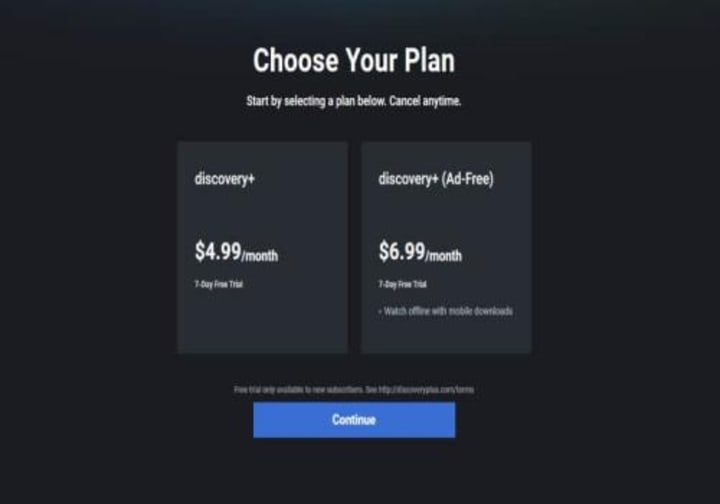
- Choose the plan you want to subscribe to, and then click "Continue"
- Sign up with your email address
- Choose "Agree and Continue"
- Finish the payment process as guided
>> Get free trial from Amazon Prime Video Channels
You can also get Discovery+ free trial by subscribing to Amazon Prime Video channels if you are a Prime Video user. There're hundreds of channels for you to choose from, and each of them offers a 7-day free trial. If you don't have an Amazon Prime Video account, you can sign up, and get your 30-day free trial.
- Go to PrimeVideo.com, Amazon.com, Amazon.co.uk, Amazon.de or Amazon.co.jp
- Find Discovery+ channel page
- Click on "More details"
- Tap the "Start your free trials" button
- Subscribe to the channel
- Start watching
How much is Discovery+ after the free trial?
You can select from 2 subscription plans. The ad-supported plan is $4.99/month, and the ad-free plan is $6.99/month. Both of them provide a free trial. Within 7 days, you'll enjoy all features of Discovery+. The subscription will renew every month automatically, and you can cancel it anytime before the free trial expires.
How to Keep Discovery Plus Video Forever for Free
As you can get a 7-day free trial, you can enjoy excellent content on this platform for one week without spending money. To download videos on this site and keep them after your free trial ends, you need to subscribe to the ad-free tier plan first, and cancel it before your free trial expires.
You can download all your favorite titles on Discovery+ by using SameMovie, a user-friendly tool for downloading Discovery+ videos.
SameMove Discovery+ Video Downloader
SameMovie DiscoveryPlus Video Downloader is a user-friendly video downloader for Discovery+ users from available service areas such as the US, Canada, Brazil, parts of Asia, and most of Europe. You can download movies and TV episodes in MP4/MKV format while getting 1080p resolution and Dolby Digital 5.1 surround sound. In the meanwhile, SameMovie offers a choice to download available subtitles and audio tracks in multiple languages.
Besides, SameMovie is not a video recorder, which means you can do other things while you’re downloading videos with this smart tool. The batch download feature is what you must experience when you’re downloading videos, especially seasons of TV series. Simply choose the seasons and episodes you want to download, and you can wait for the download process to finish. Additionally, a support team will help you solve all your problems within 24 hours for free. Simply click the “Free Trial” button, and start to experience the awesome downloading tool.
To learn more info, please click here.
About the Creator
Louise Walker
Trying to find useful video downloaders.
Keep reading
More stories from Louise Walker and writers in 01 and other communities.
Why Specialized Pediatric EMR Systems Are Becoming Essential
Digital health technology is transforming healthcare systems worldwide, but pediatric care presents a unique set of challenges. From growth tracking and vaccination schedules to age-specific medication dosing, pediatricians need tools that are designed specifically for children rather than adapted from adult healthcare systems. As healthcare providers increasingly adopt digital solutions, specialized systems are becoming essential for efficient pediatric care.
By Steve Waugh3 days ago in 01
The Growing Impact of Simple AI Tools in Everyday Digital Tasks
Introduction Artificial Intelligence (AI) is becoming an important part of modern technology. Many digital platforms now use AI to help people complete tasks faster and more efficiently. From writing support to idea generation, AI tools are helping individuals improve productivity without requiring advanced technical knowledge.
By Arslan Khan6 days ago in 01
From ad men to mad men
It's after 2am in the morning when a local police patrol vehicle in Northern New Jersey spots a figure costumed as Quasimodo, The Hunchback of Notre Dame, proceeding southbound on the sidewalk along Lydecker Street. Though the hunchback’s costume stuffing offers added insulation, it's January, and friggin’ freezing. Carefully, the officers slow down, gently question the subject, and offer him a ride home.
By David W. Maury6 days ago in Humor



Comments
There are no comments for this story
Be the first to respond and start the conversation.